
Android 开发笔记___存储方式__共享参数__sharedprefences
Android 的数据存储方式有四种,这次是【共享参数__sharedprefences】
听起来挺别扭的,平时看到的app里面,当用户删除了一些软件以后下次安装,发现原来的设置还在,这种情况就是把一些用户的设置保存在手机里面的一个存储区域,
- 格式是XML
- key__Value
- 不方便保存关系比较复杂的数据
write
 package com.example.alimjan.hello_world;

 /**

  * Created by alimjan on 7/4/2017.

  */

         import android.content.Context;

         import android.content.Intent;

         import android.content.SharedPreferences;

         import android.os.Bundle;

         import android.support.v7.app.AppCompatActivity;

         import android.view.View;

         import android.view.View.OnClickListener;

         import android.widget.AdapterView;

         import android.widget.ArrayAdapter;

         import android.widget.EditText;

         import android.widget.Spinner;

         import android.widget.Toast;

         import android.widget.AdapterView.OnItemSelectedListener;

         import com.example.alimjan.hello_world.Utils.DateUtil;

 public class class_4_1_1 extends AppCompatActivity implements OnClickListener {

     private SharedPreferences mShared;

     private EditText et_name;

     private EditText et_age;

     private EditText et_height;

     private EditText et_weight;

     private boolean bMarried = false;

     @Override

     protected void onCreate(Bundle savedInstanceState) {

         super.onCreate(savedInstanceState);

         setContentView(R.layout.code_4_1_1);

         et_name = (EditText) findViewById(R.id.et_name);

         et_age = (EditText) findViewById(R.id.et_age);

         et_height = (EditText) findViewById(R.id.et_height);

         et_weight = (EditText) findViewById(R.id.et_weight);

         findViewById(R.id.btn_save).setOnClickListener(this);

         ArrayAdapter<String> typeAdapter = new ArrayAdapter<String>(this,

                 R.layout.item_select, typeArray);

         typeAdapter.setDropDownViewResource(R.layout.item_dropdown);

         Spinner sp_married = (Spinner) findViewById(R.id.sp_married);

         sp_married.setPrompt("请选择婚姻状况");

         sp_married.setAdapter(typeAdapter);

         sp_married.setSelection(0);

         sp_married.setOnItemSelectedListener(new TypeSelectedListener());

         mShared = getSharedPreferences("share", MODE_PRIVATE);

     }

     private String[] typeArray = {"未婚", "已婚"};

     class TypeSelectedListener implements OnItemSelectedListener {

         public void onItemSelected(AdapterView<?> arg0, View arg1, int arg2, long arg3) {

             bMarried = (arg2==0)?false:true;

         }

         public void onNothingSelected(AdapterView<?> arg0) {

         }

     }

     @Override

     public void onClick(View v) {

         if (v.getId() == R.id.btn_save) {

             String name = et_name.getText().toString();

             String age = et_age.getText().toString();

             String height = et_height.getText().toString();

             String weight = et_weight.getText().toString();

             if (name==null || name.length()<=0) {

                 showToast("请先填写姓名");

                 return;

             }

             if (age==null || age.length()<=0) {

                 showToast("请先填写年龄");

                 return;

             }

             if (height==null || height.length()<=0) {

                 showToast("请先填写身高");

                 return;

             }

             if (weight==null || weight.length()<=0) {

                 showToast("请先填写体重");

                 return;

             }

             SharedPreferences.Editor editor = mShared.edit();

             editor.putString("name", name);

             editor.putInt("age", Integer.parseInt(age));

             editor.putLong("height", Long.parseLong(height));

             editor.putFloat("weight", Float.parseFloat(weight));

             editor.putBoolean("married", bMarried);

             editor.putString("update_time", DateUtil.getCurDateStr("yyyy-MM-dd HH:mm:ss"));

             editor.commit();

             showToast("数据已写入共享参数");

         }

     }

     private void showToast(String desc) {

         Toast.makeText(this, desc, Toast.LENGTH_SHORT).show();

     }

     public static void startHome(Context mContext) {

         Intent intent = new Intent(mContext, class_4_1_1.class);

         mContext.startActivity(intent);

     }

 }
 <LinearLayout xmlns:android="http://schemas.android.com/apk/res/android"

     android:layout_width="match_parent"

     android:layout_height="match_parent"

     android:focusable="true"

     android:focusableInTouchMode="true"

     android:orientation="vertical"

     android:padding="10dp" >

     <RelativeLayout

         android:layout_width="match_parent"

         android:layout_height="50dp" >

         <TextView

             android:id="@+id/tv_name"

             android:layout_width="wrap_content"

             android:layout_height="match_parent"

             android:layout_alignParentLeft="true"

             android:gravity="center"

             android:text="姓名:"

             android:textColor="@color/black"

             android:textSize="17sp" />

         <EditText

             android:id="@+id/et_name"

             android:layout_width="match_parent"

             android:layout_height="match_parent"

             android:layout_marginBottom="5dp"

             android:layout_marginTop="5dp"

             android:layout_toRightOf="@+id/tv_name"

             android:background="@drawable/editext_selector"

             android:gravity="left|center"

             android:hint="请输入姓名"

             android:inputType="text"

             android:maxLength="12"

             android:textColor="@color/black"

             android:textColorHint="@color/grey"

             android:textCursorDrawable="@drawable/text_cursor"

             android:textSize="17sp" />

     </RelativeLayout>

     <RelativeLayout

         android:layout_width="match_parent"

         android:layout_height="50dp" >

         <TextView

             android:id="@+id/tv_age"

             android:layout_width="wrap_content"

             android:layout_height="match_parent"

             android:layout_alignParentLeft="true"

             android:gravity="center"

             android:text="年龄:"

             android:textColor="@color/black"

             android:textSize="17sp" />

         <EditText

             android:id="@+id/et_age"

             android:layout_width="match_parent"

             android:layout_height="match_parent"

             android:layout_marginBottom="5dp"

             android:layout_marginTop="5dp"

             android:layout_toRightOf="@+id/tv_age"

             android:background="@drawable/editext_selector"

             android:gravity="left|center"

             android:hint="请输入年龄"

             android:inputType="number"

             android:maxLength="2"

             android:textColor="@color/black"

             android:textColorHint="@color/grey"

             android:textCursorDrawable="@drawable/text_cursor"

             android:textSize="17sp" />

     </RelativeLayout>

     <RelativeLayout

         android:layout_width="match_parent"

         android:layout_height="50dp" >

         <TextView

             android:id="@+id/tv_height"

             android:layout_width="wrap_content"

             android:layout_height="match_parent"

             android:layout_alignParentLeft="true"

             android:gravity="center"

             android:text="身高:"

             android:textColor="@color/black"

             android:textSize="17sp" />

         <EditText

             android:id="@+id/et_height"

             android:layout_width="match_parent"

             android:layout_height="match_parent"

             android:layout_marginBottom="5dp"

             android:layout_marginTop="5dp"

             android:layout_toRightOf="@+id/tv_height"

             android:background="@drawable/editext_selector"

             android:gravity="left|center"

             android:hint="请输入身高"

             android:inputType="number"

             android:maxLength="3"

             android:textColor="@color/black"

             android:textColorHint="@color/grey"

             android:textCursorDrawable="@drawable/text_cursor"

             android:textSize="17sp" />

     </RelativeLayout>

     <RelativeLayout

         android:layout_width="match_parent"

         android:layout_height="50dp" >

         <TextView

             android:id="@+id/tv_weight"

             android:layout_width="wrap_content"

             android:layout_height="match_parent"

             android:layout_alignParentLeft="true"

             android:gravity="center"

             android:text="体重:"

             android:textColor="@color/black"

             android:textSize="17sp" />

         <EditText

             android:id="@+id/et_weight"

             android:layout_width="match_parent"

             android:layout_height="match_parent"

             android:layout_marginBottom="5dp"

             android:layout_marginTop="5dp"

             android:layout_toRightOf="@+id/tv_weight"

             android:background="@drawable/editext_selector"

             android:gravity="left|center"

             android:hint="请输入体重"

             android:inputType="numberDecimal"

             android:maxLength="5"

             android:textColor="@color/black"

             android:textColorHint="@color/grey"

             android:textCursorDrawable="@drawable/text_cursor"

             android:textSize="17sp" />

     </RelativeLayout>

     <RelativeLayout

         android:layout_width="match_parent"

         android:layout_height="50dp" >

         <TextView

             android:id="@+id/tv_married"

             android:layout_width="wrap_content"

             android:layout_height="match_parent"

             android:layout_alignParentLeft="true"

             android:gravity="center"

             android:text="婚否:"

             android:textColor="@color/black"

             android:textSize="17sp" />

         <Spinner

             android:id="@+id/sp_married"

             android:layout_width="match_parent"

             android:layout_height="match_parent"

             android:layout_toRightOf="@+id/tv_married"

             android:gravity="left|center"

             android:spinnerMode="dialog" />

     </RelativeLayout>

     <Button

         android:id="@+id/btn_save"

         android:layout_width="match_parent"

         android:layout_height="wrap_content"

         android:text="保存到共享参数"

         android:textColor="@color/black"

         android:textSize="20sp" />

 </LinearLayout>
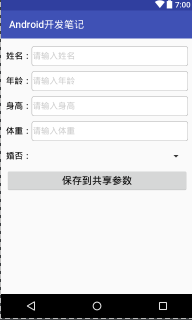
read
 package com.example.alimjan.hello_world;

 import java.util.Map;

 /**

  * Created by alimjan on 7/4/2017.

  */

 import android.content.Context;

 import android.content.Intent;

 import android.content.SharedPreferences;

         import android.os.Bundle;

         import android.support.v7.app.AppCompatActivity;

         import android.widget.TextView;

 public class class_4_1_1_1 extends AppCompatActivity {

     private SharedPreferences mShared;

     private TextView tv_share;

     @Override

     protected void onCreate(Bundle savedInstanceState) {

         super.onCreate(savedInstanceState);

         setContentView(R.layout.code_4_1_1_1);

         tv_share = (TextView) findViewById(R.id.tv_share);

         readSharedPreferences();

     }

     private void readSharedPreferences() {

         mShared = getSharedPreferences("share", MODE_PRIVATE);

         String desc = "共享参数中保存的信息如下:";

         Map<String, Object> mapParam = (Map<String, Object>) mShared.getAll();

         for (Map.Entry<String, Object> item_map : mapParam.entrySet()) {

             String key = item_map.getKey();

             Object value = item_map.getValue();

             if (value instanceof String) {

                 desc = String.format("%s\n %s的取值为%s", desc, key,

                         mShared.getString(key, ""));

             } else if (value instanceof Integer) {

                 desc = String.format("%s\n %s的取值为%d", desc, key,

                         mShared.getInt(key, 0));

             } else if (value instanceof Float) {

                 desc = String.format("%s\n %s的取值为%f", desc, key,

                         mShared.getFloat(key, 0.0f));

             } else if (value instanceof Boolean) {

                 desc = String.format("%s\n %s的取值为%b", desc, key,

                         mShared.getBoolean(key, false));

             } else if (value instanceof Long) {

                 desc = String.format("%s\n %s的取值为%d", desc, key,

                         mShared.getLong(key, 0l));

             } else {

                 desc = String.format("%s\n参数%s的取值为未知类型", desc, key);

             }

         }

         if (mapParam==null || mapParam.size()<=0) {

             desc = "共享参数中保存的信息为空";

         }

         tv_share.setText(desc);

     }

     public static void startHome(Context mContext) {

         Intent intent = new Intent(mContext, class_4_1_1_1.class);

         mContext.startActivity(intent);

     }

 }
 <LinearLayout xmlns:android="http://schemas.android.com/apk/res/android"

     android:layout_width="match_parent"

     android:layout_height="match_parent"

     android:focusable="true"

     android:focusableInTouchMode="true"

     android:orientation="vertical"

     android:padding="10dp" >

     <TextView

         android:id="@+id/tv_share"

         android:layout_width="match_parent"

         android:layout_height="wrap_content"

         android:textColor="@color/black"

         android:textSize="17sp" />

 </LinearLayout>
Android 开发笔记___存储方式__共享参数__sharedprefences的更多相关文章
- Android 开发笔记___图像视图__简单截屏
<?xml version="1.0" encoding="utf-8"?> <LinearLayout xmlns:android=&quo ...
- Android 开发笔记___实战项目:购物车
购物车的应用很广泛,电商app基本上都有它的身影.由于它用到了多种存储方式,通过项目对数据的存储有更高层次的了解. 1.设计思路 首先看看购物车的外观.第一次进入时里面是空的,去购物页面加入购物车以后 ...
- Android 开发笔记___初级控件之实战__计算器
功能简单,实现并不难,对于初学者可以总和了解初级控件的基本使用. 用到的知识点如下: 线性布局 LinearLayout:整体界面是从上往下的,因此需要垂直方向的linearlayout:下面每行四个 ...
- Android 开发笔记___基本适配器的使用__BaseAdapter
之前用到过ArryAdapter适用于纯文本的列表数据,SimpleAdapter适用于带图标的列表数据,但在实际应用中常常有更复杂的列表,比如同一项中存在多个控件,这时候用前面的两个会比较复杂,而且 ...
- Android 开发笔记___时间选择器---timePicker
像datepicker一样,也有timepicker. 同样有timepickerdialog 所用到的方法还是一样,监听时间选择器的变化. package com.example.alimjan.h ...
- Android 开发笔记___SD卡基本操作__图片读取写入
package com.example.alimjan.hello_world.Utils; import android.graphics.Bitmap; import android.graphi ...
- Android 开发笔记___登陆app
package com.example.alimjan.hello_world; /** * Created by alimjan on 7/4/2017. */ import android.con ...
- Android 开发笔记___复选框__checkbox
<LinearLayout xmlns:android="http://schemas.android.com/apk/res/android" android:layout ...
- Android 开发笔记___图像按钮__imageButton
IMAGEBUTTON 其实派生自image view,而不是派生自button.,image view拥有的属性和方法,image button 统统拥有,只是imagebutton有个默认的按钮外 ...
随机推荐
- Java客户端调用.NET的WebService
项目需要去调用.NET的WebSrevice,本身是Java,研究了半天,终于有些头绪,记下来. 1,新建.NET WebService.只在原方法上加上一个string类型的参数str [WebMe ...
- Knapsack I 竟然是贪心,证明啊。。。。
Knapsack I Time Limit: 2000/1000MS (Java/Others) Memory Limit: 128000/64000KB (Java/Others) SubmitSt ...
- The Moving Points hdu4717
The Moving Points Time Limit: 6000/3000 MS (Java/Others) Memory Limit: 32768/32768 K (Java/Others ...
- 1523. K-inversions URAL 求k逆序对,,,,DP加树状数组
1523. K-inversions Time limit: 1.0 secondMemory limit: 64 MB Consider a permutation a1, a2, …, an (a ...
- CentOS 搭建Graylog集群详解
1. Graylog2 简介 Graylog 是一个简单易用.功能较全面的日志管理工具,相比 ELK 组合, 优点: 部署维护简单,一体化解决方案,不像ELK三个独立系统集成. 查相比ES json语 ...
- slf4j+log4j在Java中实现日志记录
小Alan今天来跟大家聊聊开发中既简单又常用但必不可少的一样东西,那是什么呢?那就是日志记录,日志输出,日志保存. 后面就统一用日志记录四个字来形容啦. 日志记录是项目的开发中必不可少的一个环节,特别 ...
- iOS 简单socket连接
- (void)CreateSocket{ NSString *host = [self.realStreamDict objectForKey:@"StreamSeverIP"] ...
- 我的第一个python web开发框架(8)——项目结构与RESTful接口风格说明
PS:再次说明一下,原本不想写的太啰嗦的,可之前那个系列发布后发现,好多朋友都想马上拿到代码立即能上手开发自己的项目,对代码结构.基础常识.分类目录与文件功能结构.常用函数......等等什么都不懂, ...
- Laplace(拉普拉斯)先验与L1正则化
Laplace(拉普拉斯)先验与L1正则化 在之前的一篇博客中L1正则化及其推导推导证明了L1正则化是如何使参数稀疏化人,并且提到过L1正则化如果从贝叶斯的观点看来是Laplace先验,事实上如果从贝 ...
- 吾八哥学Python(三):了解Python基础语法(上)
学习一门开发语言首先当然是要熟悉它的语法了,Python的语法还算是比较简单的,这里从基础的开始了解一下. 标识符1.第一个字符必须是字母表中字母或下划线'_'.2.标识符的其他的部分有字母.数字和下 ...