
【代码笔记】iOS-手机验证码
一,效果图。

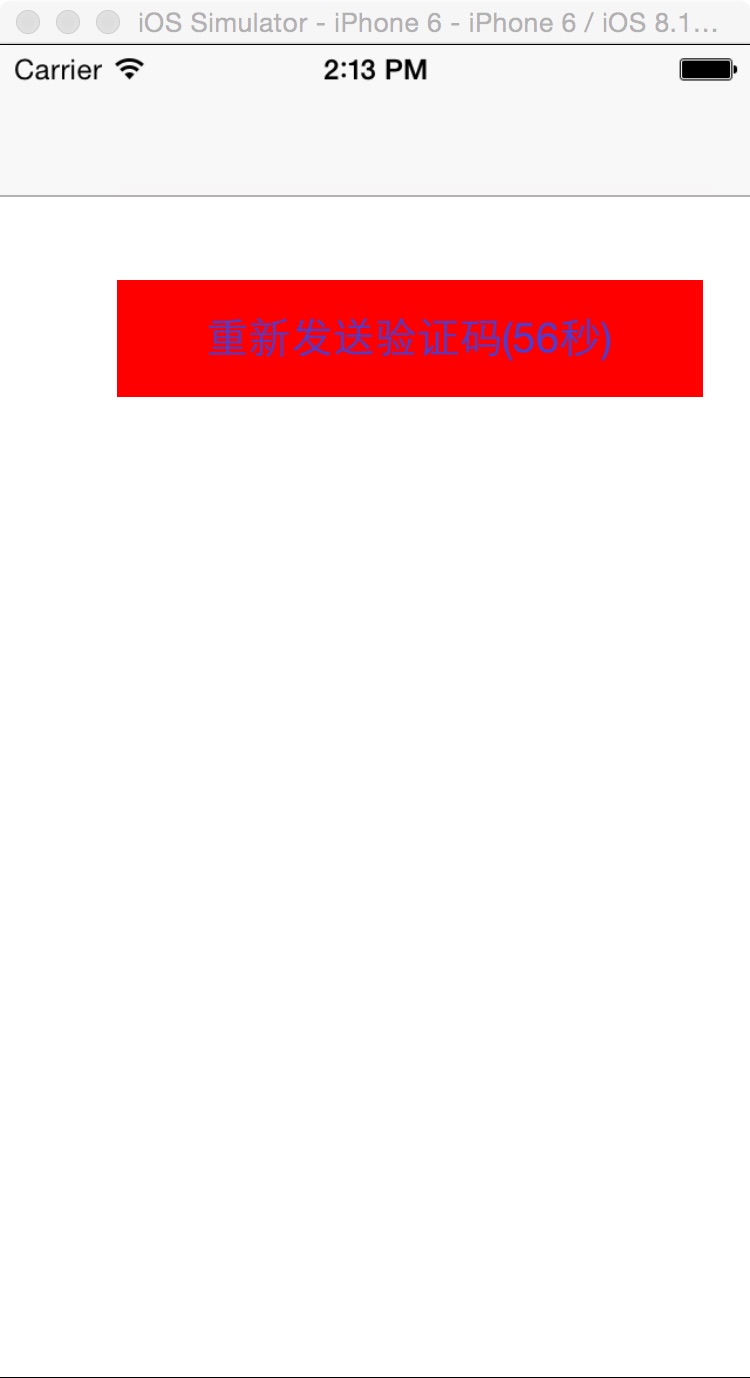
二,代码。
RootViewController.h
#import <UIKit/UIKit.h>

@interface RootViewController : UIViewController

@end
RootViewController.m

#import "RootViewController.h"

@interface RootViewController ()

@end

@implementation RootViewController

{

    NSTimer* sysTimer;

    BOOL timeStart;

}

- (id)initWithNibName:(NSString *)nibNameOrNil bundle:(NSBundle *)nibBundleOrNil

{

    self = [super initWithNibName:nibNameOrNil bundle:nibBundleOrNil];

    if (self) {

        // Custom initialization

    }

    return self;

}

- (void)viewDidLoad

{

    [super viewDidLoad];

    // Do any additional setup after loading the view.

    //BOOL值默认为NO。

    NSLog(@"---timeStart--%d-----",timeStart);

    //发送验证码到手机上-Button

    UIButton *sendYZM=[UIButton buttonWithType:UIButtonTypeCustom];

    [sendYZM setFrame:CGRectMake(50, 100, 250, 50)];

    [sendYZM setBackgroundColor:[UIColor redColor]];

    [sendYZM setTitle:@"发送注册验证码到手机上" forState:UIControlStateNormal];

    [sendYZM setTitleColor:[UIColor colorWithRed:66/255.0 green:66/255.0 blue:221/255.0 alpha:1.0] forState:UIControlStateNormal];

    [sendYZM addTarget:self action:@selector(doClickButton:) forControlEvents:UIControlEventTouchUpInside];

    [self.view addSubview:sendYZM];

}

-(void)doClickButton:(UIButton *)btn

{

    timeStart=YES;

    sysTimer = [NSTimer scheduledTimerWithTimeInterval:1 target:self selector:@selector(timerFireMethod:) userInfo:nil repeats:YES];

    // 可以通过fire这个方法去触发timer,即使timer的firing time没有到达

    [sysTimer fire];

    [self getAuthCode];

}

//随时更新验证码发送的时间

- (void)timerFireMethod:(NSTimer *)timer

{

    //定义一个NSCalendar对象

    NSCalendar *cal = [NSCalendar currentCalendar];

    //初始化目标时间...

    NSDateComponents *endTime = [[NSDateComponents alloc] init];

    //得到当前时间

    NSDate *today = [NSDate date];

    NSDate *date = [NSDate dateWithTimeInterval:60 sinceDate:today];

    NSDateFormatter *dateFormatter = [[NSDateFormatter alloc] init];

    [dateFormatter setDateFormat:@"yyyy-MM-dd HH:mm:ss"];

    NSString *dateString = [dateFormatter stringFromDate:date];

    static int year;

    static int month;

    static int day;

    static int hour;

    static int minute;

    static int second;

    if(timeStart) {

        //从NSDate中取出年月日,时分秒,但是只能取一次

        year = [[dateString substringWithRange:NSMakeRange(0, 4)] intValue];

        month = [[dateString substringWithRange:NSMakeRange(5, 2)] intValue];

        day = [[dateString substringWithRange:NSMakeRange(8, 2)] intValue];

        hour = [[dateString substringWithRange:NSMakeRange(11, 2)] intValue];

        minute = [[dateString substringWithRange:NSMakeRange(14, 2)] intValue];

        second = [[dateString substringWithRange:NSMakeRange(17, 2)] intValue];

        timeStart = NO;

    }

    [endTime setYear:year];

    [endTime setMonth:month];

    [endTime setDay:day];

    [endTime setHour:hour];

    [endTime setMinute:minute];

    [endTime setSecond:second];

    //把目标时间装载入date

    NSDate *todate = [cal dateFromComponents:endTime];

    //用来得到具体的时差,是为了统一成北京时间

    unsigned int unitFlags = NSYearCalendarUnit| NSMonthCalendarUnit| NSDayCalendarUnit| NSHourCalendarUnit| NSMinuteCalendarUnit| NSSecondCalendarUnit;

    NSDateComponents *d = [cal components:unitFlags fromDate:today toDate:todate options:0];

    NSLog(@"----%ld---",[d second]);

    if([d second] < 60 && [d second] > 0) {

        NSString *miao = [NSString stringWithFormat:@"%ld",[d second]];

        NSLog(@"---miao----%@",miao);

        UIButton *sendYZM=[UIButton buttonWithType:UIButtonTypeCustom];

        [sendYZM setFrame:CGRectMake(50, 100, 250, 50)];

        [sendYZM setBackgroundColor:[UIColor redColor]];

        [sendYZM setTitle:[NSString stringWithFormat:@"重新发送验证码(%@秒)",miao] forState:UIControlStateNormal];

        [sendYZM setTitleColor:[UIColor colorWithRed:66/255.0 green:66/255.0 blue:221/255.0 alpha:1.0] forState:UIControlStateNormal];

        [self.view addSubview:sendYZM];

    }else if([d second] == 0) {

        [sysTimer invalidate];

        UIButton *sendYZM=[UIButton buttonWithType:UIButtonTypeCustom];

        [sendYZM setFrame:CGRectMake(50, 100, 250, 50)];

        [sendYZM setBackgroundColor:[UIColor redColor]];

        [sendYZM setTitle:@"重新发送验证码" forState:UIControlStateNormal];

        [sendYZM setTitleColor:[UIColor colorWithRed:66/255.0 green:66/255.0 blue:221/255.0 alpha:1.0] forState:UIControlStateNormal];

        [sendYZM addTarget:self action:@selector(doClickButton:) forControlEvents:UIControlEventTouchUpInside];

        [self.view addSubview:sendYZM];

    }

}

- (void)getAuthCode{

    //将电话号码发送到服务器,服务器返回验证码。当验证码和注册用户输入一样的时候,则可以进行下一步操作。

}

- (void)didReceiveMemoryWarning

{

    [super didReceiveMemoryWarning];

    // Dispose of any resources that can be recreated.

}

/*

#pragma mark - Navigation

// In a storyboard-based application, you will often want to do a little preparation before navigation

- (void)prepareForSegue:(UIStoryboardSegue *)segue sender:(id)sender

{

    // Get the new view controller using [segue destinationViewController].

    // Pass the selected object to the new view controller.

}

*/

@end
【代码笔记】iOS-手机验证码的更多相关文章
- ios 手机验证码用户注册(倒计时15秒)
// // ViewController.m // register手机验证码注册 // // Created by zzqqrr on 17/8/28. // Copyright (c) 2017年 ...
- asp.net限时发送手机验证码
html代码 <p> <strong>手机验证码:</strong> <asp:TextBox ID="code" runat=" ...
- Web程序员开发App系列 - 调试Android和IOS手机代码(补图)
Web程序员开发App系列 Web程序员开发App系列 - 认识HBuilder Web程序员开发App系列 - 申请苹果开发者账号 Web程序员开发App系列 - 调试Android和iOS手机代码 ...
- 注册页面手机验证码无跳转接收[html+js+ajax+php]
[学习笔记] 来源:注册时需要使用短信验证码,但是注册的时候,点击接收验证码时,会产生跳转(尼玛,这不是我想要的啊!o(╥﹏╥)o) 查询资料和看书之后,知道使用js+ajax可以实现,就从网上找了一 ...
- 利用exif.js解决ios手机上传竖拍照片旋转90度问题
html5+canvas进行移动端手机照片上传时,发现ios手机上传竖拍照片会逆时针旋转90度,横拍照片无此问题:Android手机没这个问题. 因此解决这个问题的思路是:获取到照片拍摄的方向角,对非 ...
- C#发送手机验证码
C#发送手机验证码,平台有很多,我就说说其中的1个平台 测试环境:.net2.0 测试效果:速度还可以,10秒内接收短信 1.去http://www.yuntongxun.com注册,会送8元测试金额 ...
- IOS开发笔记 IOS如何访问通讯录
IOS开发笔记 IOS如何访问通讯录 其实我是反对这类的需求,你说你读我的隐私,我肯定不愿意的. 幸好ios6.0 以后给了个权限控制.当打开app的时候你可以选择拒绝. 实现方法: [plain] ...
- 解决ios手机上传竖拍照片旋转90度问题
html5+canvas进行移动端手机照片上传时,发现ios手机上传竖拍照片会逆时针旋转90度,横拍照片无此问题:Android手机没这个问题. 因此解决这个问题的思路是:获取到照片拍摄的方向角,对非 ...
- django 发送手机验证码
一.流程分析: 1.用户在项目前端,输入手机号,然后点击[获取验证码],将手机号发到post到后台. 2.后台验证手机号是否合法,是否已被占用,如果通过验证,则生成验证码,并通过运行脚本,让短信运营商 ...
- 微信小程序获取手机验证码
一种比较常见的功能获取手机验证码 先看效果图: 其实这个功能实现起来很简单,主要就是调取第三方接口,拿到返回值验证的问题 直接上代码吧: wxml页面: <view class='changeI ...
随机推荐
- 记录一个mysql连接慢的问题
问题现象是这样的: 我在一台机器上(61.183.23.23)启动了一个mysql,然后开通一个账号可以从127.0.0.1或者从61.183.23.23访问.但是遇到一个问题就是使用下面两个命令行访 ...
- C# 通过反射来动态创建泛型类型
C# 通过反射来动态创建泛型类型与创建普通类型的区别在于:泛型参数的处理 创建泛型类型存在三种情况: 第一种:知道泛型类型,但需要动态指定泛型参数: 第二种:知道泛型参数,但需要动态创建指定参数的泛型 ...
- 【原创】Kakfa message包源代码分析
笔者最近在研究Kafka的message包代码,有了一些心得,特此记录一下.其实研究的目的从来都不是只是看源代码,更多地是想借这个机会思考几个问题:为什么是这么实现的?你自己实现方式是什么?比起人家的 ...
- nodejs中exports与module.exports的实践
只要是在nodejs中写自己的文件模块就少不了会遇到module.exports和exports的使用,看别人的代码大多都会使用“module.exports=exports=<对象/函数等&g ...
- MFC 阶段学习总结
由于项目需求,需要用到C++开发软件,所以开始学习C++,重点是MFC,因为是窗体应用,感觉win32的比较麻烦,还是MFC方便点.至于为什么要用C++呢, 由于C++应用不需要客户额外安装环境和加密 ...
- 背水一战 Windows 10 (8) - 控件 UI: StateTrigger
[源码下载] 背水一战 Windows 10 (8) - 控件 UI: StateTrigger 作者:webabcd 介绍背水一战 Windows 10 之 控件 UI VisualState 之 ...
- 【Java每日一题】20161124
package Nov2016; public class Ques1124 { public static void main(String[] args) { Parent p = new Sub ...
- orcl的小技巧和分页
1Oracle中查看所有用户语句 select * from dba_users 1.修改用户的密码 alter user 用户名 identified by 密码; 2.如何查询stuInfo表中自 ...
- IO流(一)__File对象和字符流FileWriter FileReader
IO流:IO流用来处理设备之间的数据传输,Java对于流的操作对象都在IO包中将外设中的数据读取到内存中:输入将内存的数写入到外设中:输出 流分为字节流和字符流字符流的由来:其实就是字节流读取文字字节 ...
- el captain设置环境变量
这里说的不是设置变量给bash/shell来用, 而是给程序使用, 比如, chromium自36版以后, 就不再内置google api keys, 官方文档(http://www.chromium ...