
C++ 根据图片url 批量 下载图片
最近需要用到根据图片URL批量下载到本地的操作。查找了相关资料,记录在这儿。
1.首先在CSV文件中提取出url
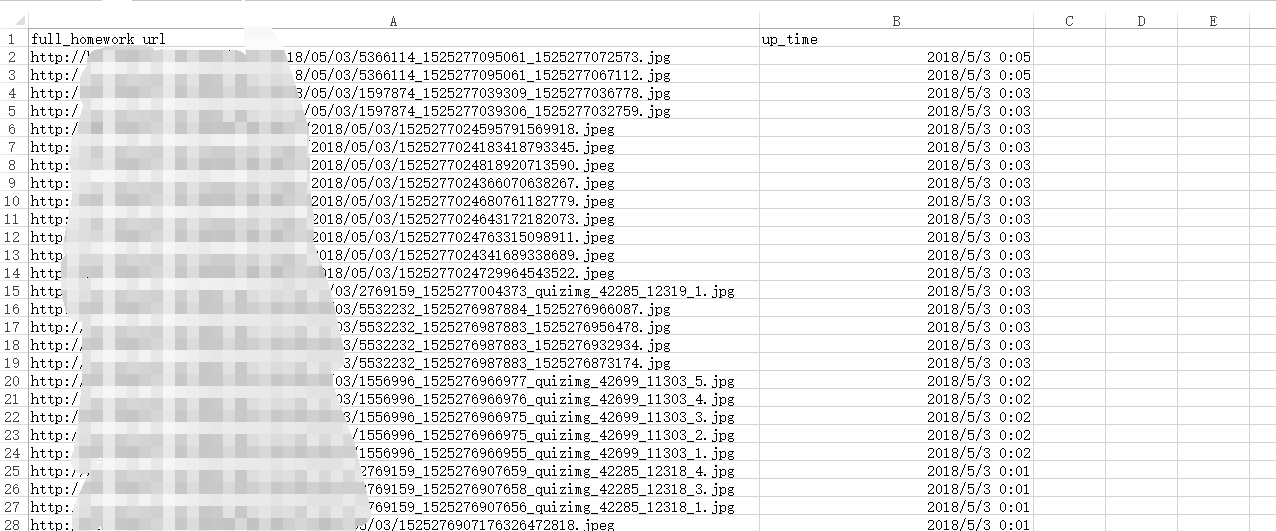
    ifstream fin("C:\\Users\\lenovo\\Desktop\\query_result0503.csv"); //打开文件流操作

    string line;

    int cnt = ;

    while (getline(fin, line) && cnt < )

    {

        istringstream sin(line); //将整行字符串line读入到字符串流istringstream中

        vector<string> urls;

        string url;

        while (getline(sin, url, ',')) //以逗号为分隔符

        {

            urls.push_back(url);

        }

        cnt++;

        size_t found =     urls[].find_last_of("/\\");

        if (found == string::npos) continue;

        string imgname = urls[].substr(found+);

        cout << "处理后:" << urls[] << "----" <<cnt<<"----" <<imgname << endl;
}
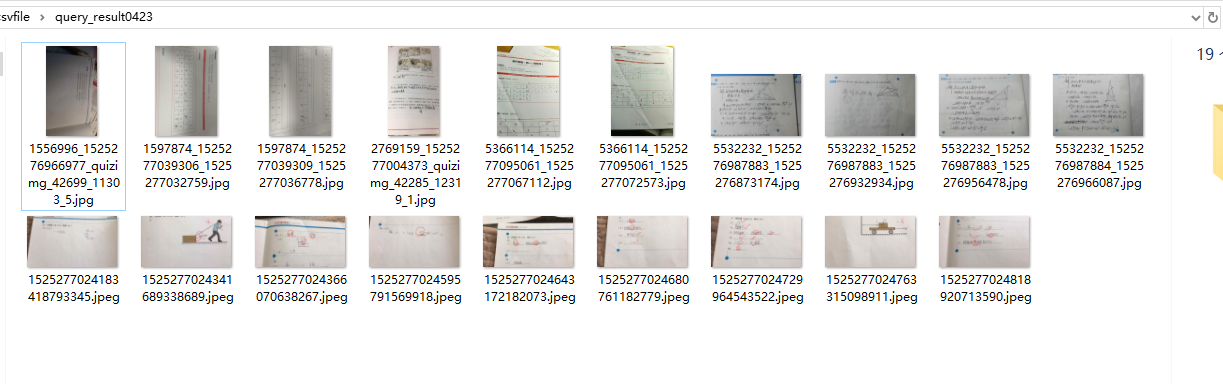
2.根据URL将图片保存到本地。
需要用到 URLDownloadToFile函数 。
踩的坑主要是 这个函数需要用到宽字符参数。。如果参数类型不正确。。那么你甭想下载得到正确文件。。。
需要用到 MultiByteToWideChar函数来转换一下。。。。
HRESULT URLDownloadToFile(

             LPUNKNOWN            pCaller,

             LPCTSTR              szURL,

             LPCTSTR              szFileName,

  _Reserved_ DWORD                dwReserved,

             LPBINDSTATUSCALLBACK lpfnCB

);
Parameters
pCaller
A pointer to the controlling IUnknown interface of the calling ActiveX component, if the caller is an ActiveX component. If the calling application is not an ActiveX component, this value can be set to NULL. Otherwise, the caller is a COM object that is contained in another component, such as an ActiveX control in the context of an HTML page. This parameter represents the outermost IUnknown of the calling component. The function attempts the download in the context of the ActiveX client framework, and allows the caller container to receive callbacks on the progress of the download.szURL
A pointer to a string value that contains the URL to download. Cannot be set to NULL. If the URL is invalid, INET_E_DOWNLOAD_FAILURE is returned.szFileName
A pointer to a string value containing the name or full path of the file to create for the download. If szFileNameincludes a path, the target directory must already exist.dwReserved
Reserved. Must be set to 0.lpfnCB
A pointer to the IBindStatusCallback interface of the caller. By using IBindStatusCallback::OnProgress, a caller can receive download status. URLDownloadToFile calls the IBindStatusCallback::OnProgress and IBindStatusCallback::OnDataAvailable methods as data is received. The download operation can be canceled by returning E_ABORT from any callback. This parameter can be set to NULL if status is not required.
Return value
This function can return one of these values.
| Return code | Description |
|---|---|
| S_OK |
The download started successfully. |
| E_OUTOFMEMORY |
The buffer length is invalid, or there is insufficient memory to complete the operation. |
| INET_E_DOWNLOAD_FAILURE |
The specified resource or callback interface was invalid. |
///

        size_t len = urls[].length();//获取字符串长度

        int nmlen = MultiByteToWideChar(CP_ACP, , urls[].c_str(), len + , NULL, );//如果函数运行成功,并且cchWideChar为零,

                                                                                  //返回值是接收到待转换字符串的缓冲区所需求的宽字符数大小。

        wchar_t* buffer = new wchar_t[nmlen];

        MultiByteToWideChar(CP_ACP, , urls[].c_str(), len + , buffer, nmlen);

        string savepath = "C:\\Users\\lenovo\\Desktop\\csvfile\\query_result0423\\"+imgname;

        size_t len1 = savepath.length();

        wchar_t* imgsavepath = new wchar_t[len1];

        int nmlen1 = MultiByteToWideChar(CP_ACP, , savepath.c_str(), len1 + , NULL, );

        MultiByteToWideChar(CP_ACP, , savepath.c_str(), len1 + , imgsavepath, nmlen1);

        HRESULT hr = URLDownloadToFile(NULL, buffer, imgsavepath, , NULL);

        if (hr == S_OK)

        {

            cout << "-------ok" << endl;

        }
参考:
http://www.cnblogs.com/codingmengmeng/p/6258020.html
C++ 根据图片url 批量 下载图片的更多相关文章
- 在C#中使用正则表达式筛选出图片URL并下载图片URL中的图片到本地
本功能主要用到的知识点如下: 1.正则表达式 2.C#中下载文件功能的实现 3.泛型集合的使用 4.进程的简单操作(用于结束当前程序) 下面就简单说一下是如何使用这些知识点的.先详细说下这个程序主要实 ...
- 根据url地址单个或批量下载图片
我们在java开发的时候会遇到通过url地址下载图片的情况.方便起见,我把通过url地址下载图片封装了tool工具类,方便以后使用 1.根据如:http://abc.com/hotels/a.jpg ...
- 【Python】nvshens按目录批量下载图片爬虫1.00(单线程版)
# nvshens按目录批量下载图片爬虫1.00(单线程版) from bs4 import BeautifulSoup import requests import datetime import ...
- python图片爬虫 - 批量下载unsplash图片
前言 unslpash绝对是找图的绝佳场所, 但是进网站等待图片加载真的令人捉急, 仿佛是一场拼RP的战争 然后就开始思考用爬虫帮我批量下载, 等下载完再挑选, 操作了一下不算很麻烦, 顺便也给大家提 ...
- URL地址下载图片到本地
package test.dao; import eh.base.dao.DoctorDAO; import eh.entity.base.Doctor; import junit.framework ...
- scrapy操作mysql/批量下载图片
1.操作mysql items.py meiju.py 3.piplines.py 4.settings.py -------------------------------------------- ...
- Java通过图片url地址获取图片base64位字符串的两种方式
工作中遇到通过图片的url获取图片base64位的需求.一开始是用网上的方法,通过工具类Toolkit,虽然实现的代码比较简短,不过偶尔会遇到图片转成base64位不正确的情况,至今不知道为啥. 之后 ...
- python——批量下载图片
前言 批量下载网页上的图片需要三个步骤: 获取网页的URL 获取网页上图片的URL 下载图片 例子 from html.parser import HTMLParser import urllib.r ...
- 用python批量下载图片
一 写爬虫注意事项 网络上有不少有用的资源, 如果需要合理的用爬虫去爬取资源是合法的,但是注意不要越界,前一阶段有个公司因为一个程序员写了个爬虫,导致公司200多个人被抓,所以先进入正题之前了解下什么 ...
随机推荐
- Oracle数据库对表基本的操作--增删查改
--向student表中加入入学时间属性,其数据类型为日期型alter table student add scome date; --删除student表中的入学时间属性alter table st ...
- angular2jsonp如何跨域请求百度API进行定位
前提,百度api的申请,不会的可以百度一下,下面是连接 http://lbsyun.baidu.com/index.php?title=webapi/ip-api 1.appMoudle里引入 imp ...
- Redis 持久化深入--机制、可靠性及比较
本文是对 antirez 博客中 Redis persistence demystified 的翻译和总结.主要从Redis的持久化机制,提供何种程度的可靠性以及与其他数据库的比较三个方面进行讨论. ...
- PHP中的递增/递减运算符
看这段代码 <?php $a=10; $b=++$a; //此语句等同于 ; $a=$a+1 ; $b=$a echo $a."<br>"; echo $b; ? ...
- python 装饰器和软件目录规范一
1.装饰器和迭代器的概念. 装饰器本质是一个函数,是为其他函数添加附加功能. 原则:不修改原函数源代码 不修改原函数的调用方式 2.装饰器的简单应用 # Author : xiajinqi impor ...
- abc sort
c: #include<stdio.h>//从大到小 int main(){ int a, b, c; int x = 0; printf("input message:\n&q ...
- leetcode记录-组合两个表
表1: Person +-------------+---------+ | 列名 | 类型 | +-------------+---------+ | PersonId | int | | Firs ...
- 20155211实验2 Windows口令破解
20155211实验2 Windows口令破解 实验目的 了解Windows口令破解原理 对信息安全有直观感性认识 能够运用工具实现口令破解 实验原理 口令破解方法 口令破解主要有两种方法:字典破解和 ...
- 20155236 2016-2017-2《Java程序设计》课程总结
20155236 2016-2017-2<Java程序设计>课程总结 作业链接汇总 预备作业1:对专业学习的展望,课程方面.师生关系的建议 预备作业2:在实践中学习,自己的相关经验以及C语 ...
- 20155316 实验三《敏捷开发与XP实践》实验报告
实验1 实验内容 在IDEA中使用工具(Code->Reformate Code)把下面代码重新格式化,再研究一下Code菜单,找出一项让自己感觉最好用的功能.提交截图,加上自己学号水印. pu ...