
(七十八)c#Winform自定义控件-倒影组件
官网
前提
入行已经7,8年了,一直想做一套漂亮点的自定义控件,于是就有了本系列文章。
GitHub:https://github.com/kwwwvagaa/NetWinformControl
码云:https://gitee.com/kwwwvagaa/net_winform_custom_control.git
如果觉得写的还行,请点个 star 支持一下吧
欢迎前来交流探讨: 企鹅群568015492 
来都来了,点个【推荐】再走吧,谢谢
NuGet
Install-Package HZH_Controls
目录
https://www.cnblogs.com/bfyx/p/11364884.html
用处及效果
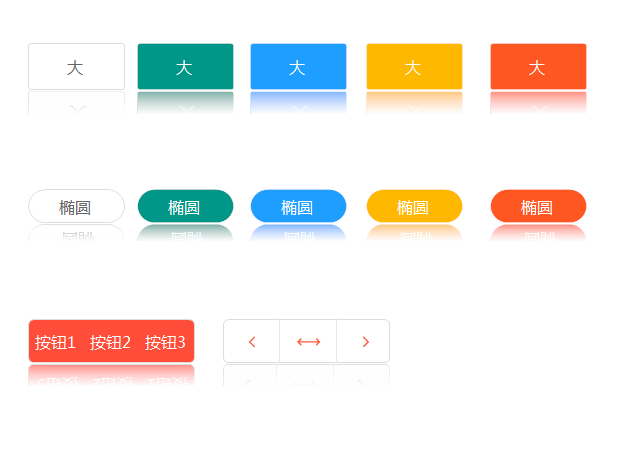
准备工作
GDI+画图,不了解先百度
开始
思路:
控件扩展属性,在组件中对需要显示倒影的控件的父控件添加Paint事件,在Paint事件中绘制控件,并旋转180,然后画到父控件上,然后再覆盖一层渐变色,完美。
添加一个类ShadowComponent 继承Component,实现 IExtenderProvider接口,扩展属性
代码比较少,直接放上来了
 /// <summary>

         /// The m control cache

         /// </summary>

         Dictionary<Control, bool> m_controlCache = new Dictionary<Control, bool>();

         #region 构造函数    English:Constructor

         /// <summary>

         /// Initializes a new instance of the <see cref="ShadowComponent" /> class.

         /// </summary>

         public ShadowComponent()

         {

         }

         /// <summary>

         /// Initializes a new instance of the <see cref="ShadowComponent" /> class.

         /// </summary>

         /// <param name="container">The container.</param>

         public ShadowComponent(IContainer container)

             : this()

         {

             container.Add(this);

         }

         #endregion

         /// <summary>

         /// 指定此对象是否可以将其扩展程序属性提供给指定的对象。

         /// </summary>

         /// <param name="extendee">要接收扩展程序属性的 <see cref="T:System.Object" />。</param>

         /// <returns>如果此对象可以扩展程序属性提供给指定对象,则为 true;否则为 false。</returns>

         public bool CanExtend(object extendee)

         {

             if (extendee is Control && !(extendee is Form))

                 return true;

             return false;

         }

         /// <summary>

         /// Gets the show shadow.

         /// </summary>

         /// <param name="control">The control.</param>

         /// <returns><c>true</c> if XXXX, <c>false</c> otherwise.</returns>

         [Browsable(true), Category("自定义属性"), Description("是否显示倒影"), DisplayName("ShowShadow"), Localizable(true)]

         public bool GetShowShadow(Control control)

         {

             if (m_controlCache.ContainsKey(control))

                 return m_controlCache[control];

             else

                 return false;

         }

         /// <summary>

         /// Sets the show shadow.

         /// </summary>

         /// <param name="control">The control.</param>

         /// <param name="isShowShadow">if set to <c>true</c> [is show shadow].</param>

         public void SetShowShadow(Control control, bool isShowShadow)

         {

             control.ParentChanged += control_ParentChanged;

             m_controlCache[control] = isShowShadow;

         }

         /// <summary>

         /// Handles the ParentChanged event of the control control.

         /// </summary>

         /// <param name="sender">The source of the event.</param>

         /// <param name="e">The <see cref="EventArgs"/> instance containing the event data.</param>

         void control_ParentChanged(object sender, EventArgs e)

         {

             Control control = sender as Control;

             if (control.Parent != null && m_controlCache[control])

             {

                 if (!lstPaintEventControl.Contains(control.Parent))

                 {

                     lstPaintEventControl.Add(control.Parent);

                     Type type = control.Parent.GetType();

                     System.Reflection.PropertyInfo pi = type.GetProperty("DoubleBuffered", System.Reflection.BindingFlags.Instance | System.Reflection.BindingFlags.NonPublic);

                     pi.SetValue(control.Parent, true, null);

                     control.Parent.Paint += Parent_Paint;

                 }

             }

         }

         /// <summary>

         /// The LST paint event control

         /// </summary>

         List<Control> lstPaintEventControl = new List<Control>();

         /// <summary>

         /// The shadow height

         /// </summary>

         private float shadowHeight = 0.3f;

         /// <summary>

         /// Gets or sets the height of the shadow.

         /// </summary>

         /// <value>The height of the shadow.</value>

         [Browsable(true), Category("自定义属性"), Description("倒影高度,0-1"), Localizable(true)]

         public float ShadowHeight

         {

             get { return shadowHeight; }

             set { shadowHeight = value; }

         }

         /// <summary>

         /// The BLN loading

         /// </summary>

         bool blnLoading = false;

         /// <summary>

         /// Handles the Paint event of the Parent control.

         /// </summary>

         /// <param name="sender">The source of the event.</param>

         /// <param name="e">The <see cref="PaintEventArgs"/> instance containing the event data.</param>

         void Parent_Paint(object sender, PaintEventArgs e)

         {

             if (blnLoading)

                 return;

             if (shadowHeight > )

             {

                 var control = sender as Control;

                 var lst = m_controlCache.Where(p => p.Key.Parent == control && p.Value);

                 if (lst != null && lst.Count() > )

                 {

                     blnLoading = true;

                     e.Graphics.SetGDIHigh();

                     foreach (var item in lst)

                     {

                         Control _control = item.Key;

                         using (Bitmap bit = new Bitmap(_control.Width, _control.Height))

                         {

                             _control.DrawToBitmap(bit, _control.ClientRectangle);

                             using (Bitmap bitNew = new Bitmap(bit.Width, (int)(bit.Height * shadowHeight)))

                             {

                                 using (var g = Graphics.FromImage(bitNew))

                                 {

                                     g.DrawImage(bit, new RectangleF(, , bitNew.Width, bitNew.Height), new RectangleF(, bit.Height - bit.Height * shadowHeight, bit.Width, bit.Height * shadowHeight), GraphicsUnit.Pixel);

                                 }

                                 bitNew.RotateFlip(RotateFlipType.Rotate180FlipNone);

                                 e.Graphics.DrawImage(bitNew, new Point(_control.Location.X, _control.Location.Y + _control.Height + ));

                                 Color bgColor = GetParentColor(_control);

                                 LinearGradientBrush lgb = new LinearGradientBrush(new Rectangle(_control.Location.X, _control.Location.Y + _control.Height + , bitNew.Width, bitNew.Height), Color.FromArgb(, bgColor), bgColor, 90f);   //75f 表示角度

                                 e.Graphics.FillRectangle(lgb, new Rectangle(new Point(_control.Location.X, _control.Location.Y + _control.Height + ), bitNew.Size));

                             }

                         }

                     }

                 }

             }

             blnLoading = false;

         }

         /// <summary>

         /// Gets the color of the parent.

         /// </summary>

         /// <param name="c">The c.</param>

         /// <returns>Color.</returns>

         private Color GetParentColor(Control c)

         {

             if (c.Parent.BackColor != Color.Transparent)

             {

                 return c.Parent.BackColor;

             }

             return GetParentColor(c.Parent);

         }
最后的话
如果你喜欢的话,请到 https://gitee.com/kwwwvagaa/net_winform_custom_control 点个星星吧
(七十八)c#Winform自定义控件-倒影组件的更多相关文章
- (七十)c#Winform自定义控件-饼状图
前提 入行已经7,8年了,一直想做一套漂亮点的自定义控件,于是就有了本系列文章. GitHub:https://github.com/kwwwvagaa/NetWinformControl 码云:ht ...
- (三十)c#Winform自定义控件-文本框(三)
前提 入行已经7,8年了,一直想做一套漂亮点的自定义控件,于是就有了本系列文章. 开源地址:https://gitee.com/kwwwvagaa/net_winform_custom_control ...
- (七十三)c#Winform自定义控件-资源加载窗体
前提 入行已经7,8年了,一直想做一套漂亮点的自定义控件,于是就有了本系列文章. GitHub:https://github.com/kwwwvagaa/NetWinformControl 码云:ht ...
- Unity3D研究院之Jenkins的使用(七十八)
长夜漫漫无心睡眠,来一篇嘿嘿.我相信如果已经用Shell脚本完成IOS和Android打包的朋友一定需要Jenkins 怎么才能让策划打包ipa和apk?怎么才能彻底省去程序的时间,只要在同一局域网内 ...
- (七十八)使用第三方框架INTULocationManager实现定位
前面(第七十五.七十六篇)讲述了如何通过CoreLocation获取位置,授权.获取等相当复杂,如果借助于第三方框架,可以简单的实现授权与定位. 首先在GitHub中搜索LocationManager ...
- (二十)c#Winform自定义控件-有后退的窗体
前提 入行已经7,8年了,一直想做一套漂亮点的自定义控件,于是就有了本系列文章. 开源地址:https://gitee.com/kwwwvagaa/net_winform_custom_control ...
- (五十)c#Winform自定义控件-滑块
前提 入行已经7,8年了,一直想做一套漂亮点的自定义控件,于是就有了本系列文章. GitHub:https://github.com/kwwwvagaa/NetWinformControl 码云:ht ...
- (八十)c#Winform自定义控件-分割线标签-HZHControls
官网 http://www.hzhcontrols.com 前提 入行已经7,8年了,一直想做一套漂亮点的自定义控件,于是就有了本系列文章. GitHub:https://github.com/kww ...
- (十)c#Winform自定义控件-横向列表
前提 入行已经7,8年了,一直想做一套漂亮点的自定义控件,于是就有了本系列文章. 开源地址:https://gitee.com/kwwwvagaa/net_winform_custom_control ...
随机推荐
- Qt最新版5.12.2在Win10环境静态编译安装和部署的完整过程(VS2017)
一.为什么要静态编译 用QtCreator编译程序时,使用的是动态编译.编译好的程序在运行时需要另外加上相应的Qt库文件,一大堆dll文件.如果想将生成的程序连同所需要的库一起完整地打包成一个可执行程 ...
- Docker资源管理
一台宿主机可以放多个容器,默认的情况下,Docker 没有对容器进行硬件资源的限制,当容器负载过高时会尽可能的占用宿主机资源,所以有时候我们需要对容器的资源使用设置一个上限,今天我们就来看看如何管理 ...
- C#开发BIMFACE系列8 服务端API之获取文件上传状态信息
系列目录 [已更新最新开发文章,点击查看详细] 在BIMFACE控制台上传文件,上传过程及结束后它会自动告诉你文件的上传状态,目前有三种状态:uploading,success,failure ...
- (五十八)c#Winform自定义控件-管道阀门(工业)
前提 入行已经7,8年了,一直想做一套漂亮点的自定义控件,于是就有了本系列文章. GitHub:https://github.com/kwwwvagaa/NetWinformControl 码云:ht ...
- 安装python的第三方库pillow
参考:http://jingyan.baidu.com/article/ff42efa929e6c8c19f220254.html 用Python做图像处理时,需要用到PIL(图像处理库).但是PIL ...
- 2019DX#8
Solved Pro.ID Title Ratio(Accepted / Submitted) 1001 Acesrc and Cube Hypernet 7.32%(3/41) 1002 A ...
- CodeForces 628 D Magic Numbers 数位DP
Magic Numbers 题意: 题意比较难读:首先对于一个串来说, 如果他是d-串, 那么他的第偶数个字符都是是d,第奇数个字符都不是d. 然后求[L, R]里面的多少个数是d-串,且是m的倍数. ...
- 天梯杯 L2-005. 集合相似度
L2-005. 集合相似度 时间限制 400 ms 内存限制 65536 kB 代码长度限制 8000 B 判题程序 Standard 作者 陈越 给定两个整数集合,它们的相似度定义为:Nc/Nt*1 ...
- hdu 4614 Vases and Flowers(线段树)
题目链接:http://acm.hdu.edu.cn/showproblem.php?pid=4614 题意: 给你N个花瓶,编号是0 到 N - 1 ,初始状态花瓶是空的,每个花瓶最多插一朵花. ...
- Period UVALive - 3026
For each prefix of a given string S with N characters (each character has an ASCII code between 97 a ...