
cocos2d-x游戏开发 跑酷(三) 人物跑动
原创。转载请注明出处:http://blog.csdn.net/dawn_moon/article/details/21245881
好吧。最终要跑起来了。
要实现跑酷须要用到帧动画,什么是帧动画,不解释行么。
介绍一个将小图打包的工具TexturePacker,这是一个非常强大的工具,另外另一个物理编辑器PhysicsEditor,也不错,地址:http://www.codeandweb.com。刚好上周收到工具作者给的free
licences,感谢一下。有兴趣的同学能够去申请一下。
载入精灵的一个比較高效的方式是用CCSpriteFrameCache和CCSpriteBatchNode配合使用。先讲一下这个使用方法。
以下几个步骤:
1.将打包好的大图和生成的plist文件载入到CCSpriteFrameCache,假设这两个文件名称除后缀不同其他全然一样的话。直接载入plist文件就能够了。
2.用大图生成一个CCSpriteBatchNode对象batch_node,并将其增加到当前场景addChild(batch_node)。
3.通过CCSprite::spriteWithSpriteFrame或CCSprite::spriteWithSpriteFrameName创建精灵。
4.将上一步生成的精灵通过addChild增加到bath_node就可以。
后面会有具体代码
创建Runner.cpp
- //
- // Runner.h
- // Parkour
- //
- // Created by lerry on 14-3-14.
- //
- //
- #ifndef __Parkour__Runner__
- #define __Parkour__Runner__
- #include "cocos2d.h"
- #include "Box2D.h"
- #include "resources.h"
- enum RunnerState{
- running,
- jumping,
- crouch
- };
- class Runner : public cocos2d::CCNode
- {
- cocos2d::CCSprite* mRunner;
- cocos2d::CCSize mRunningSize;
- cocos2d::CCAction* mRunningAction;
- cocos2d::CCSpriteBatchNode* mBatchNode;
- b2World* mWorld;
- RunnerState mState;
- private:
- void initAction();
- void initBody();
- void initShape();
- public:
- bool init(b2World* world, cocos2d::CCSpriteBatchNode* batchNode);
- virtual void update(float dt);
- static Runner* create(b2World* world, cocos2d::CCSpriteBatchNode* batchNode);
- };
- #endif /* defined(__Parkour__Runner__) */
继承CCnode,由于后面会有一个物理世界,所以重写了create函数和init函数。这两个函数还是保持与引擎一致,创建的对象也是自己主动释放对象。本节没有增加物理世界的实现,仅仅是实现一个跑动的人物。
- //
- // Runner.cpp
- // Parkour
- //
- // Created by lerry on 14-3-14.
- //
- //
- #include "Runner.h"
- USING_NS_CC;
- Runner* Runner::create(b2World *world, CCSpriteBatchNode* batchNode)
- {
- Runner* runner = new Runner();
- if (runner && runner->init(world, batchNode)) {
- runner->autorelease();
- return runner;
- }else
- {
- delete runner;
- runner = NULL;
- return NULL;
- }
- }
- bool Runner::init(b2World *world, CCSpriteBatchNode* batchNode)
- {
- if (!CCNode::init()) {
- return false;
- }
- // box2d的物理世界
- this->mWorld = world;
- this->mBatchNode = batchNode;
- initAction();
- initBody();
- initShape();
- mRunner = CCSprite::createWithSpriteFrameName(runner0);
- // 通过名字获取animation
- CCAnimation* animation = CCAnimationCache::sharedAnimationCache()->animationByName("running");
- mRunner->setPosition(ccp(85, 50));
- mRunner->runAction(CCRepeatForever::create(CCAnimate::create(animation)));
- mBatchNode->addChild(mRunner);
- return true;
- }
- void Runner::update(float dt)
- {
- }
- void Runner::initAction()
- {
- CCArray* animateFrames = CCArray::create();
- char str[50] = {0};
- for (int i = 0; i != 8; ++i) {
- sprintf(str, "runner%d.png", i);
- animateFrames->addObject(CCSpriteFrameCache::sharedSpriteFrameCache()->spriteFrameByName(str));
- }
- CCAnimation* animation = CCAnimation::createWithSpriteFrames(animateFrames, 0.1);
- animation->setRestoreOriginalFrame(true);
- // animation 命名
- CCAnimationCache::sharedAnimationCache()->addAnimation(animation, "running");
- }
- void Runner::initBody()
- {
- }
- void Runner::initShape()
- {
- }
mWorld和mBatchNode会由PlayScene传进来。
这里主要实现了initAction。动画的实现与JS版的稍稍有点差别。
由于命名问题。我将资源文件又又一次命名了一下
- //
- // resources.h
- // Parkour
- //
- // Created by lerry on 14-3-13.
- // Copyright (c) 2014年 Goonear Co.,Ltd. All rights reserved.
- //
- #ifndef Parkour_resources_h
- #define Parkour_resources_h
- static const char backmusic[] = "background.mp3";
- static const char jummpmusic[] = "jump.mp3";
- static const char crouchmusic[] = "crouch.mp3";
- static const char spritesheet[] = "parkour.plist";
- static const char spritePacker[] = "parkour.png";
- static const char runner0[] = "runner0.png";
- #endif
如今须要改动PlayerScene的init函数,增加人物,变成以下这样:
- bool PlayScene::init()
- {
- if(!CCLayer::init()){
- return false;
- }
- initPhysics();
- CCSpriteFrameCache::sharedSpriteFrameCache()->addSpriteFramesWithFile(spritesheet);
- CCSpriteBatchNode* spriteBatch = CCSpriteBatchNode::create(spritePacker);
- this->addChild(spriteBatch);
- mRunner = Runner::create(mWorld, spriteBatch);
- this->addChild(mRunner);
- // 调用update函数
- scheduleUpdate();
- return true;
- }
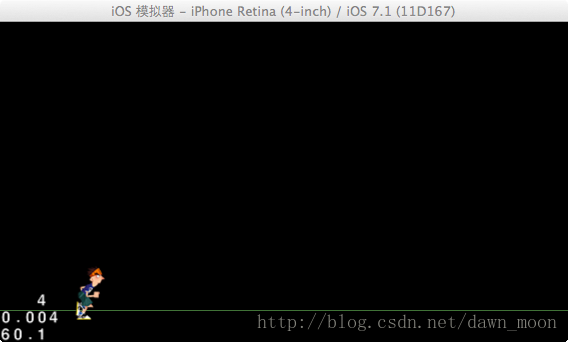
好了,跑起来了
cocos2d-x游戏开发 跑酷(三) 人物跑动的更多相关文章
- iOS cocos2d 2游戏开发实战(第3版)书评
2013是游戏爆发的一年,手游用户也是飞速暴增.虽然自己不做游戏,但也是时刻了解手机应用开发的新动向.看到CSDN的"写书评得技术图书赢下载分"活动,就申请了一本<iOS c ...
- cocos2d-x游戏开发 跑酷(两) 物理世界
原创.转载请注明出处:http://blog.csdn.net/dawn_moon/article/details/21240343 泰然的跑酷用的chipmunk物理引擎.我没有细致学过这个东西. ...
- HTML5 Canvas游戏开发(三)lufylegend开源库件(上)
lufylegend可以解决HTML5开发游戏中会遇到的一些问题: 1.各种浏览器对于JavaScript和HTML的解析是不一致的. 2.手机浏览器和PC浏览器的区别. 3.JavaScript并非 ...
- cocos2d-x游戏开发 跑酷(四) 关联与物理世界
原创.转载注明出处http://blog.csdn.net/dawn_moon/article/details/21451077 前面一节尽管实现了一个跑动的人物,可是他只不过一个精灵在运行一个跑动的 ...
- cocos2d-x游戏开发 跑酷(八) 对象管理 碰撞检測
对象管理类的原理是这种: ObjectManager类是一个单例类,全局仅仅有一个对象实例存在.初始化的时候创建两个数组CCArray来保存金币和岩石.为什么要保存,由于在地图重载的时候.要销毁看不见 ...
- cocos2d-x游戏开发 跑酷(九) 源代码下载及小结
这个东西零零碎碎写了一个礼拜吧. 事实上也没多少东西在里面.文章后附下载地址 博客地址:http://blog.csdn.net/dawn_moon 由于我没用过chipmunk,并且它是面向过程的东 ...
- three.js尝试(二)模拟游戏开发:3D人物在地图上行走
本次尝试,模拟了一个小人物在场景中行走,使用简单模型建立了森林,图片纹理模拟草地,加载3D模型呈现人物,使用按键asdw模拟人物的行走,行走和站立时人物的切换等. 主要用到点:3D模型的加载,模型的动 ...
- (转载)如何学好iphone游戏开发
转自:http://www.cnblogs.com/zilongshanren/archive/2011/09/19/2181558.html 自从发布<如何学习iphone游戏开发>到 ...
- 整理了一下浅墨大神的Visual C++/DirectX 9.0c的游戏开发手记
还是非常棒的博客,只是没有一个文件夹.所以自己做了一个山寨文件夹在这里.便于随时查找. 前面31期从略. [Visual C++]游戏开发笔记三十二 浅墨DirectX提高班之中的一个 DirectX ...
随机推荐
- 4.6 C++抽象基类和纯虚成员函数
参考:http://www.weixueyuan.net/view/6376.html 总结: 在C++中,可以通过抽象基类来实现公共接口 纯虚成员函数没有函数体,只有函数声明,在纯虚函数声明结尾加上 ...
- h5视频配置
<!DOCTYPE html PUBLIC "-//W3C//DTD XHTML 1.0 Transitional//EN" "http://www.w3.org/ ...
- bootstrap动态生成层级ul-li 新闻预览 常用方法
<div class="row" id="add-withinfosortId-row" style="display: none"& ...
- 什么是XP
极限编程(XP)是敏捷过程中最富盛名的一个.下述这些特点使得敏捷过程能够较好地适应商业竞争环境下对小型项目提出的有效资源和有限开发时间的约束. 极限编程的有效实践 极限编程的整体开发过程 极限编程的迭 ...
- VCL界面控件DevExpress VCL Controls发布v18.2.3|附下载
DevExpress VCL Controls是 Devexpress公司旗下最老牌的用户界面套包.所包含的控件有:数据录入,图表,数据分析,导航,布局,网格,日程管理,样式,打印和工作流等,让您快速 ...
- fk makefile文件的一些问题
除了要按具神说的makefile修改之外,还发现了另外一个问题: 不然就改成SACLIB=-L/usr/local/sac/lib
- SharePoint REST API - 文件夹和文件
博客地址:http://blog.csdn.net/FoxDave 本篇讲述如何通过REST操作文件夹和文件. 使用REST操作文件夹 在你知道某个文档库中的文件夹的URL时,可以使用如下的代码获 ...
- merge into用法小结
CREATE OR REPLACE PROCEDURE PRO_ZXC(O_NO OUT NUMBER,O_NOTE OUT NUMBER)ASBEGIN O_NO:=1; MERGE INTO QQ ...
- Unity项目中的资源管理
这是我在2017金山技术开放日分享的部分内容.从贴图资源格式配置的介绍开始,引申出资源配置工具,最后再谈谈一整套项目资源管理方案.在GitHub上可以获取到资源配置工具的代码,是基于下面理念的一份简单 ...
- pycharm运行pytest
pycharm运行三种方式 1.以xx.py脚本方式直接执行,当写的代码里面没用到unittest和pytest框架时,并且脚本名称不是以test_开头命名的,此时pycharm会以xx.py脚本方式 ...