
TinyFrame升级之十:WCF Rest Service注入IOC的心
由于在实际开发中,Silverlight需要调用WebService完成数据的获取,由于之前我们一直采用古老的ASMX方式,生成的代理类不仅难以维护,而且自身没有提供APM模式的调用方式,导致在Sinverlight中实现线程同步,非常的困难。所以这里我采用了WCF Restful Service来完成。
这里我们需要新建一个WCF Rest Service Application项目:

然后在项目中,我们删掉原有的示例文件,添加一个QDService.cs类,并设为Partial模式,以便于实现多用户的协同开发。然后我们在Global.asax中将注册的路由修改一下:
1: private void RegisterRoutes()
2: {
3: RouteTable.Routes.Add(new ServiceRoute("QDService", new WebServiceHostFactory(), typeof(QDService)));
4: }
这样,当项目运行的时候,就会以QDService为起始点运行。
路由注册完成后,我们就来将Autofac集成到项目中,这里需要集成的dll有两个:
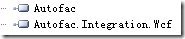
其中Autofac是主dll,Autofac.Integration.Wcf是专门针对Wcf注入而设计的扩展。安装Autofac.Integration.Wcf的时候,我们可以使用命令:
Install-Package Autofac.Wcf -version 3.0.0 -project TinyFrame.WebService
由于Autofac.Integration.Wcf 3.0.0需要Autofac 3.0.0及其以上版本的支持,而我们用到的Autofac版本为3.3.0的,所以我们这里使用Autofac.Integration.Wcf的3.0.0版本。
安装完毕后,Webconfig中会自动生成如下的配置:
1: <runtime>
2: <assemblyBinding xmlns="urn:schemas-microsoft-com:asm.v1">
3: <dependentAssembly>
4: <assemblyIdentity name="Autofac" publicKeyToken="17863af14b0044da" culture="neutral" />
5: <bindingRedirect oldVersion="0.0.0.0-3.3.0.0" newVersion="3.0.0.0" />
6: </dependentAssembly>
7: <dependentAssembly>
8: <assemblyIdentity name="WebGrease" publicKeyToken="31bf3856ad364e35" culture="neutral" />
9: <bindingRedirect oldVersion="0.0.0.0-1.5.2.14234" newVersion="1.5.2.14234" />
10: </dependentAssembly>
11: </assemblyBinding>
12: </runtime>
如果运行起来的时候,提示如下错误:
未能加载文件或程序集“Autofac, Version=3.3.0.0, Culture=neutral, PublicKeyToken=17863af14b0044da”或它的某一个依赖项。找到的程序集清单定义与程序集引用不匹配。 (异常来自 HRESULT:0x80131040)
我们需要将配置中的
1: <bindingRedirect oldVersion="0.0.0.0-3.3.0.0" newVersion="3.3.0.0" />
修改成
1: <bindingRedirect oldVersion="0.0.0.0-3.3.0.0" newVersion="3.0.0.0" />
才可以正常的运行,我不知道为啥,还望知道的朋友们说明一下原因。
上面的步骤进行完毕之后,我们添加添加一个有参数的构造函数,以便于实现Autofac的构造注入:
1: public partial class QDService
2: {
3: public QDService(
4: IApplicationService appService
5: , ILoggerService logger
6: , IUserService userService
7: , IRoleService roleService
8: , IModelService modelService
9: , IOperationService operationService
10: , IModelAndOperationService modelOperationService
11: , IModelAndRoleService modelRoleService
12: , IUserAndRoleService userRoleService
13: , ICookie cookieService
14: , IMonitorService<t_base_area> baseAreaService
15: , IMonitorService<t_base> baseService
16: , IMonitorService<t_monitor_equipment_type> equipmentTypeService
17: , IMonitorService<t_monitor_equipment> equipmentService
18: , IMonitorService<t_monitor_map> baseEquipmentMapService
19: , IMonitorService<t_monitor_param> paramService
20: , IMonitorDataQueryService dataService
21: )
22: {
23: this.appService = appService;
24: this.logger = logger;
25: this.userService = userService;
26: this.roleService = roleService;
27: this.modelService = modelService;
28: this.operationService = operationService;
29: this.modelOperationService = modelOperationService;
30: this.modelRoleService = modelRoleService;
31: this.userRoleService = userRoleService;
32: this.cookieService = cookieService;
33: this.baseAreaService = baseAreaService;
34: this.baseService = baseService;
35: this.equipmentService = equipmentService;
36: this.equipmentTypeService = equipmentTypeService;
37: this.baseEquipmentMapService = baseEquipmentMapService;
38: this.paramService = paramService;
39: this.dataService = dataService;
40: }
41:
42: private readonly IApplicationService appService;
43: private readonly ILoggerService logger;
44: private readonly IUserService userService;
45: private readonly IRoleService roleService;
46: private readonly IModelService modelService;
47: private readonly IOperationService operationService;
48: private readonly IModelAndOperationService modelOperationService;
49: private readonly IModelAndRoleService modelRoleService;
50: private readonly IUserAndRoleService userRoleService;
51: private readonly ICookie cookieService;
52: private readonly IMonitorService<t_base_area> baseAreaService;
53: private readonly IMonitorService<t_base> baseService;
54: private readonly IMonitorService<t_monitor_equipment_type> equipmentTypeService;
55: private readonly IMonitorService<t_monitor_equipment> equipmentService;
56: private readonly IMonitorService<t_monitor_map> baseEquipmentMapService;
57: private readonly IMonitorService<t_monitor_param> paramService;
58: private readonly IMonitorDataQueryService dataService;
59: }
运行起来以后,提示我们错误如下:
autofac the service type provided could not be loaded as a service because it does not have a default (parameter-less) constructor. To fix the problem, add a default constructor to the type, or pass an instance of the type to the host.
这里我需要说明一下,在WCF中,由于InstanceContextMode设置为InstanceContextMode.Single的时候,需要无参构造函数,所以在本项目中,我们的构造是带参数的,我们只能设置为PerCall或者是PerSession模式。这里我们就设置为PerSession模式。
设置完成后,我们根据dudu的这篇文章中提到的步骤,一步一步的进行即可:
首先实现IInstanceProvider接口:
1: using System;
2: using TinyFrame.Services;
3: using TinyFrame.Data.DataRepository;
4: using Autofac;
5: using TinyFrame.Unitofwork;
6: using TinyFrame.Framework.Caching;
7: using TinyFrame.Framework.Logger;
8: using TinyFrame.Framework.Query;
9: using TinyFrame.Framework.Cookie;
10: using TinyFrame.Data.DataContextFactory;
11: using Autofac.Integration.Wcf;
12: using System.ServiceModel;
13: using System.ServiceModel.Dispatcher;
14: using System.ServiceModel.Channels;
15:
16: namespace TinyFrame.WebService
17: {
18: public class IocInstanceProvider:IInstanceProvider
19: {
20: Type serviceType;
21: IContainer container;
22:
23: public IocInstanceProvider(Type serviceType)
24: {
25: this.serviceType = serviceType;
26: container = RegisterDependency();
27: }
28:
29: private IContainer RegisterDependency()
30: {
31: var builder = new ContainerBuilder();
32:
33: builder.RegisterGeneric(typeof(Repository<>)).As(typeof(IRepository<>));
34: builder.RegisterGeneric(typeof(MonitorService<>)).As(typeof(IMonitorService<>));
35:
36: builder.RegisterType<UnitOfWork>().As<IUnitOfWork>().WithParameter("dbContextFactory", new DbContextFactory());
37:
38: builder.RegisterType<UserService>().AsImplementedInterfaces().InstancePerLifetimeScope();
39: builder.RegisterType<ServiceNews>().AsImplementedInterfaces().InstancePerLifetimeScope();
40: builder.RegisterType<ServiceNewsType>().AsImplementedInterfaces().InstancePerLifetimeScope();
41: builder.RegisterType<ServiceProducts>().AsImplementedInterfaces().InstancePerLifetimeScope();
42: builder.RegisterType<ServiceProductType>().AsImplementedInterfaces().InstancePerLifetimeScope();
43: builder.RegisterType<ServicePublishType>().AsImplementedInterfaces().InstancePerLifetimeScope();
44: builder.RegisterType<BBSForum>().AsImplementedInterfaces().InstancePerLifetimeScope();
45: builder.RegisterType<BBSReply>().AsImplementedInterfaces().InstancePerLifetimeScope();
46: builder.RegisterType<BBSTopic>().AsImplementedInterfaces().InstancePerLifetimeScope();
47: builder.RegisterType<BBSUser>().AsImplementedInterfaces().InstancePerLifetimeScope();
48: builder.RegisterType<RoleService>().AsImplementedInterfaces().InstancePerLifetimeScope();
49: builder.RegisterType<ModelService>().AsImplementedInterfaces().InstancePerLifetimeScope();
50: builder.RegisterType<OperationService>().AsImplementedInterfaces().InstancePerLifetimeScope();
51: builder.RegisterType<ModelAndOperationService>().AsImplementedInterfaces().InstancePerLifetimeScope();
52: builder.RegisterType<DynamicQuery>().AsImplementedInterfaces().InstancePerLifetimeScope();
53: builder.RegisterType<ModelAndRoleService>().AsImplementedInterfaces().InstancePerLifetimeScope();
54: builder.RegisterType<UserAndRoleService>().AsImplementedInterfaces().InstancePerLifetimeScope();
55: builder.RegisterType<MonitorDataQueryService>().AsImplementedInterfaces().InstancePerLifetimeScope();
56: builder.RegisterType<CookieWrapper>().AsImplementedInterfaces().InstancePerLifetimeScope();
57: builder.RegisterType<LoggerService>().AsImplementedInterfaces().InstancePerLifetimeScope();
58:
59: builder.RegisterType<ApplicationService>().AsImplementedInterfaces().InstancePerLifetimeScope();
60: builder.RegisterType<QDService>().InstancePerLifetimeScope();
61:
62: builder.RegisterType<MemoryCacheManager>().As<ICacheManager>().Named<ICacheManager>("nop_cache_static").SingleInstance();
63:
64: return builder.Build();
65: }
66:
67: public object GetInstance(InstanceContext instanceContext, Message message)
68: {
69: return container.Resolve(serviceType);
70: }
71:
72: public object GetInstance(InstanceContext instanceContext)
73: {
74: return GetInstance(instanceContext,null);
75: }
76:
77: public void ReleaseInstance(InstanceContext instanceContext, object instance)
78: {
79: if (instance is IDisposable)
80: ((IDisposable)instance).Dispose();
81: }
82: }
83: }
然后实现IServiceBehavior接口:
1: using System;
2: using System.ServiceModel.Description;
3: using System.ServiceModel;
4: using System.Collections.ObjectModel;
5: using System.ServiceModel.Channels;
6: using System.ServiceModel.Dispatcher;
7:
8: namespace TinyFrame.WebService
9: {
10: public class IocServiceBehavior : Attribute, IServiceBehavior
11: {
12: public void AddBindingParameters( ServiceDescription serviceDescription
13: , ServiceHostBase serviceHostBase
14: , Collection<ServiceEndpoint> endpoints
15: , BindingParameterCollection bindingParameters)
16: {
17:
18: }
19:
20: public void ApplyDispatchBehavior(ServiceDescription serviceDescription, ServiceHostBase serviceHostBase)
21: {
22: foreach (ChannelDispatcher item in serviceHostBase.ChannelDispatchers)
23: {
24: foreach (var ed in item.Endpoints)
25: {
26: if(!ed.IsSystemEndpoint)
27: {
28: ed.DispatchRuntime.InstanceProvider = new IocInstanceProvider(serviceDescription.ServiceType);
29: }
30: }
31: }
32: }
33:
34: public void Validate(ServiceDescription serviceDescription,ServiceHostBase serviceHostBase)
35: {
36: }
37: }
38: }
最后在QDService.cs类头上,加上[IocServiceBehavior]标签即可实现:
1: [ServiceContract]
2: [AspNetCompatibilityRequirements(RequirementsMode = AspNetCompatibilityRequirementsMode.Allowed)]
3: [ServiceBehavior(InstanceContextMode = InstanceContextMode.PerSession)]
4: [IocServiceBehavior]
5: public partial class QDService
需要注意的是,RegisterDependency方法中需要将QDService自身的实例进行注入:
1: builder.RegisterType<QDService>().InstancePerLifetimeScope();
否则的话,会抛出如下的错误来:
The requested service 'TinyFrame.WebService.QDService' has not been registered. To avoid this exception, either register a component to provide the service, check for service registration using IsRegistered(), or use the ResolveOptional() method to resolve an optional dependency.
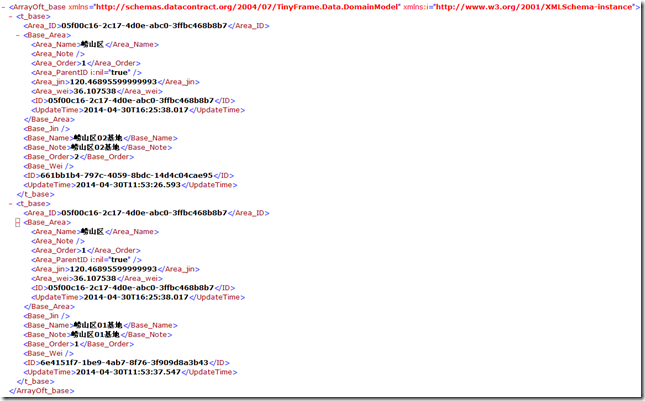
做完这一切之后,我们的所有前期准备工作都已经部署停当,下面是Consume Time!!!!!!
新建一个QDData.cs类并修改类头为:public partial class QDService,加入如下方法:
1: [WebInvoke(Method = "GET"
2: , ResponseFormat = WebMessageFormat.Xml
3: , BodyStyle = WebMessageBodyStyle.Bare
4: , UriTemplate = "/GetAllBases/")]
5: public List<t_base> GetAllBases()
6: {
7: var result = baseService.Get(x => x.ID != string.Empty);
8:
9: //重要
10: //这里都需要重新遍历赋值一下,虽然我不知道为什么,但是确实起作用了
11:
12: var list = new List<t_base>();
13: result.ToList().ForEach((item) =>
14: {
15: list.Add(new t_base()
16: {
17: Area_ID = item.Area_ID,
18: Base_Area = item.Base_Area,
19: Base_Jin = item.Base_Jin,
20: Base_Name = item.Base_Name,
21: Base_Note = item.Base_Note,
22: Base_Order = item.Base_Order,
23: Base_Wei = item.Base_Wei,
24: ID = item.ID,
25: UpdateTime = item.UpdateTime
26: });
27: });
28:
29: return list;
30: }
需要说明的是,虽然我们可以直接利用baseService.Get方法获取出IList<t_base>对象出来,但是我们不能够直接通过result.ToList()进行返回,否则的话将会得不到任何输出,只能将得到的数据遍历一遍,然后加入到新建的List对象中返回,才可奏效。这里非常奇怪,我不知道为什么。还望知道的朋友给解惑一下。
最后看看效果:
TinyFrame升级之十:WCF Rest Service注入IOC的心的更多相关文章
- WCF Restful Service的服务
构建基于WCF Restful Service的服务 前言 传统的Asmx服务,由于遵循SOAP协议,所以返回内容以xml方式组织.并且客户端需要添加服务端引用才能使用(虽然看到网络上已经提供了这方面 ...
- WCF服务属性注入基础设施
WCF服务属性注入基础设施 WCF的服务的创建行为:使用默认构造函数创建WCF服务对象.如果我们想要在WCF内使用外部对象,最简单的方式就是把外部对象做成全局对象.然而这样的话会增加全局对象的数量,让 ...
- WCF 的 Service Instance模式和并发处理
WCF 的 Service Instance(实例)有三种模式 PerCall:每一次调用都创建一个实例,每一次调用结束后回收实例.此模式完全无状态. PerSession:调用者打开Channel时 ...
- WCF Data Service
WCF Data Service:http://www.cnblogs.com/shanyou/category/240225.html
- 我的WCF Data Service 系列 (一、为什么要有WCF Data Service)
开篇先说两名题外话, 在博问上,经常看到有个问性能问题,比如Entity Framework的性能行不行啊之类的. 其实这个行不行,关键还是看对象,一夜家族的老七可能勉强吃点蓝片片,也就行了,可真要让 ...
- 构建基于WCF Restful Service的服务
前言 传统的Asmx服务,由于遵循SOAP协议,所以返回内容以xml方式组织.并且客户端需要添加服务端引用才能使用(虽然看到网络上已经提供了这方面的Dynamic Proxy,但是没有这种方式简便), ...
- WCF Data Service 使用小结(二) —— 使用WCF Data Service 创建OData服务
在 上一章 中,介绍了如何通过 OData 协议来访问 OData 服务提供的资源.下面来介绍如何创建一个 OData 服务.在这篇文章中,主要说明在.NET的环境下,如何使用 WCF Data Se ...
- WCF Data Service 使用小结 (一)—— 了解OData协议
最近做了一个小项目,其中用到了 WCF Data Service,之前是叫 ADO.NET Data Service 的.关于WCF Data Service,博客园里的介绍并不多,但它确实是个很好的 ...
- Wcf Restful Service服务搭建
目的 使用Wcf(C#)搭建一个Restful Service 背景 最近接到一个项目,客户要求使用Restful 方式接收到数据,并对数据提供对数据的统计显示功能,简单是简单,但必须要使用Restf ...
随机推荐
- 【转】OpenStack和Docker、ServerLess能不能决定云计算胜负吗?
还记得在十多年前,SaaS鼻祖SalesForce喊出的口号『No Software』吗?SalesForce在这个口号声中开创了SaaS行业,并成为当今市值460亿美元的SaaS之王.今天谈谈『No ...
- db2简单语句记录
db2start db2 connect reset 断开连接 db2 drop db xxx 删除数据库 db2 list tables 查看表 db2 create database xxx 建立 ...
- NuGet学习笔记1——初识NuGet及快速安装使用
关于NuGet园子里已经有不少介绍及使用经验,本文仅作为自己研究学习NuGet一个记录. 初次认识NuGet是在去年把项目升级为MVC3的时候,当时看到工具菜单多一项Library Package M ...
- php.ini配置解析
为了让PHP读取这个文件,它必须被命名为'php.ini'. PHP 查找配置文件次序:当前工作目录:环境变量PHPRC ; 指明的路径:编译时指定的路径. ; 在windows下,编译时的路径是 ...
- DGbroker主备切换
1.检查DG是否正常 DGMGRL> show configuration; Configuration - dgc Protection Mode: MaxProtection Databas ...
- html页面高亮关键词
function hightLightTheKeyWord(searchParam,$dom){ if(searchParam&&!/^\s*$/.test(searchParam)) ...
- 新手必学的java报表开发工具FineReport实用技巧
1.在制作模板时,如何将报表中的值传递到超链接网页呢? 在项目中以frame方法把F1.CPT放到项目的页面中,对F1.CPT做网络报表超链接F2.CPT,然后在F2.cpt页面中,做个超链接的网页, ...
- 使用Bootstrap v3.3.4注意细节box-sizing
一.bootstrap样式 在Bootstrap v3.3.4中有下面一条重置样式: * { -webkit-box-sizing: border-box; -moz-box-sizing: bord ...
- 2014 UESTC暑前集训图论专题解题报告
A.方老师和缘分 http://www.cnblogs.com/whatbeg/p/3765621.html B.方老师和农场 http://www.cnblogs.com/whatbeg/p/376 ...
- Qt5 发布的exe应用程序Windows下无法执行的问题解决方案
本解决方案着重解决报错为: This application has requested the Runtime to terminate it in an unusual way. 的错误. 即: ...