
Ocelot + IdentityServer4 构建 GateWay
上一篇已经构建好了例子,接下来将IdentityServer4添加到Ocelot中去实现
配置一个客户端配置,可以构建一个简单的客户端信息,这里我用的混合模式,配置比较多,对于客户端模式而言实际很多都不需要设置
只需要构如下即可
  ClientId="liyouming",

   ClientName="ChinaNetCore",

   ClientSecrets={new Secret("liyouming".Sha256()) },

   AllowedGrantTypes= GrantTypes.ClientCredentials,

  AccessTokenType= AccessTokenType.Jwt,

  AllowedScopes={

                       "openid",

                       "profile",

                       "UserServicesApi"

                    }
对于Ocelot而言你只需要在之前的配置中添加AuthenticationOptions节点参数配置
{

  "ReRoutes": [

    {

      "DownstreamPathTemplate": "/api/values/getuser",

      "DownstreamScheme": "http",

      "DownstreamHostAndPorts": [

        {

          "Host": "localhost",

          "Port":

        },

        {

          "Host": "localhost",

          "Port":

        }

      ],

      "UpstreamPathTemplate": "/test",

      "UpstreamHttpMethod": [ "Get" ],

      "LoadBalancer": "LeastConnection",

      "ServiceName": "userservices",

      "UseServiceDiscovery": true,

      "AuthenticationOptions": {

        "AuthenticationProviderKey": "usergateway",

        "AllowScopes": [ "UserServicesApi" ]

      }

    }

  ],

  "GlobalConfiguration": {

    "BaseUrl": "http://localhost:20000",

    "ServiceDiscoveryProvider": {

      "Host": "localhost",

      "Port":

    }

  }

}
Ocelot
 "AuthenticationOptions": {

        "AuthenticationProviderKey": "usergateway",

        "AllowScopes": [ "UserServicesApi" ]

      }
AuthenticationProviderKey 其实就是授权的authenticationscheme
allscopes 就是 apiresource中配置的授权访问范围,这里配置的即 ApiName
同时还需要在网关添加授权验证服务,配置好授权地址 ApiName(scope),以及对renefrence or jwt or both 和 secret 如果没有使用https 需要设置RequireHttpsMetadata =false
 services.AddAuthentication()

                .AddIdentityServerAuthentication("usergateway", options => {

                    options.Authority = "http://localhost:30000";

                    options.ApiName = "UserServicesApi";

                    options.SupportedTokens = IdentityServer4.AccessTokenValidation.SupportedTokens.Both;

                    options.ApiSecret = "liyouming";

                    options.RequireHttpsMetadata = false;

            });
使用PostMan 来测试下功能
不清楚获取Token地址可以访问配置文件查看
http://localhost:30000/.well-known/openid-configuration
{

    "issuer": "http://localhost:30000",

    "jwks_uri": "http://localhost:30000/.well-known/openid-configuration/jwks",

    "authorization_endpoint": "http://localhost:30000/connect/authorize",

    "token_endpoint": "http://localhost:30000/connect/token",

    "userinfo_endpoint": "http://localhost:30000/connect/userinfo",

    "end_session_endpoint": "http://localhost:30000/connect/endsession",

    "check_session_iframe": "http://localhost:30000/connect/checksession",

    "revocation_endpoint": "http://localhost:30000/connect/revocation",

    "introspection_endpoint": "http://localhost:30000/connect/introspect",

    "frontchannel_logout_supported": true,

    "frontchannel_logout_session_supported": true,

    "backchannel_logout_supported": true,

    "backchannel_logout_session_supported": true,

    "scopes_supported": ["openid", "profile", "UserServicesApi", "offline_access"],

    "claims_supported": [],

    "grant_types_supported": ["authorization_code", "client_credentials", "refresh_token", "implicit"],

    "response_types_supported": ["code", "token", "id_token", "id_token token", "code id_token", "code token", "code id_token token"],

    "response_modes_supported": ["form_post", "query", "fragment"],

    "token_endpoint_auth_methods_supported": ["client_secret_basic", "client_secret_post"],

    "subject_types_supported": ["public"],

    "id_token_signing_alg_values_supported": ["RS256"],

    "code_challenge_methods_supported": ["plain", "S256"]

}
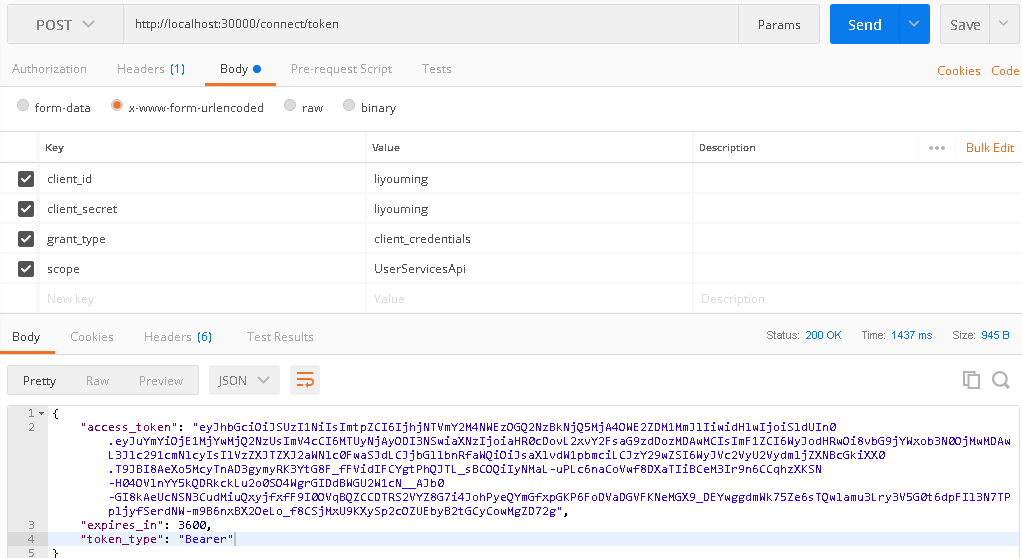
1、通过 http://localhost:30000/connect/token获取token

客户端模式需要四个参数
client_id
client_secret
grant_type
scope
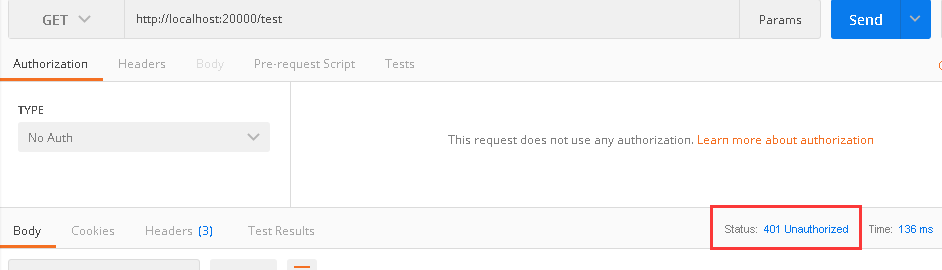
直接访问test提示401没授权
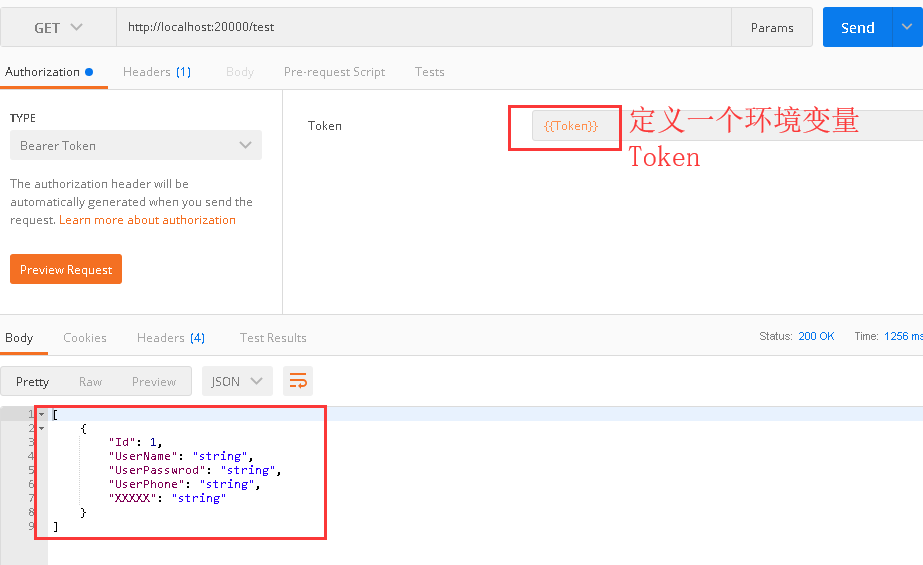
这里拿到了 access_token,接下来通过access_token访问GateWay中的test
Ocelot + IdentityServer4 构建 GateWay的更多相关文章
- NET Core + Ocelot + IdentityServer4 + Consul
.NET Core + Ocelot + IdentityServer4 + Consul 基础架构实现 先决条件 关于 Ocelot 针对使用 .NET 开发微服务架构或者面向服务架构提供一个统一访 ...
- 【转】.NET Core + Ocelot + IdentityServer4 + Consul 基础架构实现
作者:Zhang_Xiang 原文地址:.NET Core + Ocelot + IdentityServer4 + Consul 基础架构实现 先决条件 关于 Ocelot 针对使用 .NET 开发 ...
- 分享一个集成.NET Core+Swagger+Consul+Polly+Ocelot+IdentityServer4+Exceptionless+Apollo+SkyWalking的微服务开发框架
集成.NET Core+Swagger+Consul+Polly+Ocelot+IdentityServer4+Exceptionless+Apollo的微服务开发框架 Github源代码地址 htt ...
- 微服务项目整合Ocelot+IdentityServer4
项目搭建肯定少不了认证和授权,传统的单体应用基于cookie和session来完成的. 因为http请求是无状态的,每个请求都是完全独立的,服务端无法确认当前请求之前是否登陆过.所以第一次请求(登录) ...
- 使用Ocelot构建GateWay
添加Nuget包:Ocelot 添加配置文件Ocelot.json 具体配置可以看另一篇Ocelot配置 Json配置文件主要包含两个根节点: ReRoutes:路由重定向配置 都是数组结构 可以配置 ...
- .NET Core + Ocelot + IdentityServer4 + Consul 基础架构实现
先决条件 关于 Ocelot 针对使用 .NET 开发微服务架构或者面向服务架构提供一个统一访问系统的组件. 参考 本文将使用 Ocelot 构建统一入口的 Gateway. 关于 IdentityS ...
- .Net Core 商城微服务项目系列(一):使用IdentityServer4构建基础登录验证
这里第一次搭建,所以IdentityServer端比较简单,后期再进行完善. 1.新建API项目MI.Service.Identity,NuGet引用IdentityServer4,添加类InMemo ...
- .Net Core 商城微服务项目系列(二):使用Ocelot + Consul构建具备服务注册和发现功能的网关
1.服务注册 在上一篇的鉴权和登录服务中分别通过NuGet引用Consul这个包,同时新增AppBuilderExtensions类: public static class AppBuilderEx ...
- Ocelot + IdentityServer4 坑自己
现像是 connect/userinfo 可以访问 但是api都提示401 后面发现是在appsettings.json "Options": {"Authority&q ...
随机推荐
- c++ int转string类型
std::string int2string(int input){ std::ostringstream ss; //clear string //ss.str(""); //s ...
- error::尝试加载 Oracle 客户端库时引发 BadImageFormatException。如果在安装 32 位 Oracle 客户端组件的情况下以 64 位模式运行,将出现此问题。
1.VS出现此问题 问题分析:本地电脑安装的oracle客户端为64位客户端,vs启动网站默认启动自带的32位IIS Express,所以出错. 解决方案: 方案1.本地电脑安装oracle32位客户 ...
- 使用alien命令让deb包和rpm包互相转换
OS version: CentOS7 / Debian9 发现alien这个命令时很惊喜,之前在debian上安装etcd找不到安装包感觉很不科学,有了alien命令事情一下就变简单了. 这里以et ...
- spark性能调优(四) spark shuffle中JVM内存使用及配置内幕详情
转载:http://www.cnblogs.com/jcchoiling/p/6494652.html 引言 Spark 从1.6.x 开始对 JVM 的内存使用作出了一种全新的改变,Spark 1. ...
- CODE FESTIVAL 2017 qual A 题解
补一发A的题解. A - Snuke's favorite YAKINIKU 题意: 输入字符串S,如果以YAKI开头输出Yes,否则输出No. #include<bits/stdc++.h&g ...
- C++并发编程之std::future
简单地说,std::future 可以用来获取异步任务的结果,因此可以把它当成一种简单的线程间同步的手段.std::future 通常由某个 Provider 创建,你可以把 Provider 想象成 ...
- Linux掉电处理
在嵌入式设备中,掉电处理一直是一项比较麻烦的工作,在具有Linux系统的设备中,系统的种种数据的处理更是增加掉电处理的难度.现在做以下几点总结,再遇到类似问题可以做个参考. 1,系统启动的处理 在系统 ...
- Qt ------ 自定义QVector<T>中的T
#ifndef FREQUENCYSPECTRUM_H #define FREQUENCYSPECTRUM_H #include <QtCore/QVector> /** * Repres ...
- Go_21: Golang 中 time 包的使用二
常量声明: const TimeLayout = "2006-01-02 15:04:05" 这是个奇葩,必须是这个时间点,据说是 go 诞生之日, 记忆方法:6-1-2-3-4- ...
- [六字真言]5.咪.功力不足,学习前端JavaScript异常
A Guide to Proper Error Handling in JavaScript 这是关于JavaScript中异常处理的故事.如果你相信 墨菲定律 ,那么任何事情都可能出错,不,一定会出 ...