
msf自动连接postgresql配置
今天做了一下msf连接数据库的配置,中间碰到了一些坑点这里就不详细叙述了,开始正确的操作方式。
首先对postgresql进行配置以方便连接。

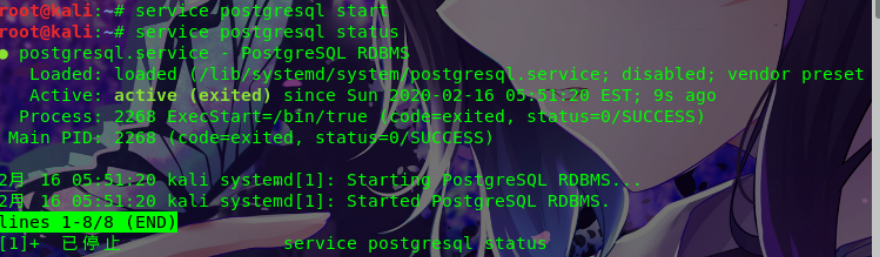
root@kali:~# service postgresql start #启动数据库
root@kali:~# service postgresql status
root@kali:~# sudo -u postgres psql
psql (10.1)
输入 "help" 来获取帮助信息.
postgres=# alter user postgres password 'admin';
ALTER ROLE
postgres=# \q

root@kali:~# msfconsole                                           #测试数据库连接状态

### ###

msf > db_connect msf:admin@localhost/msf

[*] Rebuilding the module cache in the background...

msf > db_status

[*] postgresql connected to msf

msf > search 2015-0531

[!] Module database cache not built yet, using slow search #这里要稍等一下才会正常,可以考虑关闭应用重启一下

msf > exit

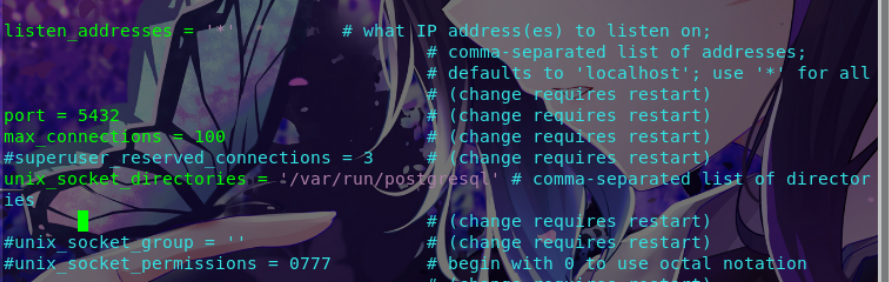
文件第二处 (88行)

第二个文件最会添加。
在文档最后添加
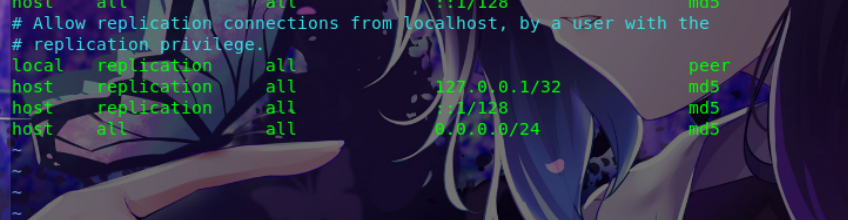
连接数据库
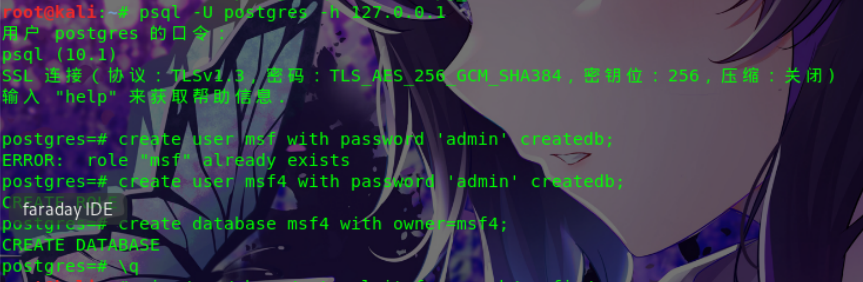
这里因为之前有msf了所以从新创一个msf4(正常的可略过)

这里如果没有database.yml文件可以先cp database.yml.example database.yml 然后进行修改。

root@kali:/usr/share/metasploit-framework/config# cp database.yml.example database.yml

root@kali:/usr/share/metasploit-framework/config# vi database.yml

root@kali:/usr/share/metasploit-framework/config# cat database.yml

# Please only use postgresql bound to a TCP port.

# Only postgresql is supportable for metasploit-framework

# these days. (No SQLite, no MySQL).

#

# To set up a metasploit database, follow the directions hosted at:

# http://r-7.co/MSF-DEV#set-up-postgresql

development: &pgsql

adapter: postgresql

database: msf #修改这里

username: msf #这里

password: admin  #还有这里

host: localhost

port: 5432

pool: 5  #这里看心情

timeout: 5

# You will often want to seperate your databases between dev

# mode and prod mode. Absent a production db, though, defaulting

# to dev is pretty sensible for many developer-users.

production: &production

<<: *pgsql

# Warning: The database defined as "test" will be erased and

# re-generated from your development database when you run "rake".

# Do not set this db to the same as development or production.

#

# Note also, sqlite3 is totally unsupported by Metasploit now.

test:

<<: *pgsql

database: metasploit_framework_test

username: metasploit_framework_test

password: ___________________________
最后如重新启动msf就可以了,当然还可以在配置下数据库自动开启

root@kali:~# systemctl start postgresql
root@kali:~# systemctl enable postgresql
root@kali:~# msfconsole #进入msf看效果
### ### msf > db_status [*] postgresql connected to msf msf > search CVE-2015-0311 Matching Modules ================ Name Disclosure Date Rank Description ---- --------------- ---- ----------- exploit/multi/browser/adobe_flash_uncompress_zlib_uaf 2014-04-28 great Adobe Flash Player ByteArray UncompressViaZlibVariant Use After Free msf >

msf自动连接postgresql配置的更多相关文章
- kali linux 系列教程之metasploit 连接postgresql可能遇见的问题
kali linux 系列教程之metasploit 连接postgresql可能遇见的问题 文/玄魂 目录 kali linux 下metasploit 连接postgresql可能遇见的问题. ...
- 最新发布树莓派2代Wi-Fi自动连接实战(适合初学者)
话说天地会珠海分舵在上几天才刚给大家分享了个海外资讯说树莓派2已经发布且Windows10加盟之类的资讯,具体请查看<海外优秀资讯抢先看8 - Windows 10 for Raspberry ...
- msf连接PostgreSQL数据库
一.启动PostgreSQL服务######################################################################?root@root:~# ...
- linux环境下搭建osm_web服务器一(Postgresql配置及osm2pgsql原始数据导入):
Postgresql配置及osm2pgsql原始数据导入 2012年,Ubuntu 12.04LTS发布,又一个长效支持版,我们又该更新OpenStreetMap服务器了,这次,将详细在博客中记录配置 ...
- prometheus使用postgresql-adapter连接postgresql
概述 Prometheus使用postgresql需要使用postgresql-adapter进行数据转换.在安装postgresql-adapter之前需要安装2个扩展:pg_prometheus和 ...
- powerdesigner连接postgresql数据库生成pdm及word文档
1.准备软件: powerdesigner165与postgresql的驱动:psqlodbc_11_01_0000 2.安装并破解完成powerdesigner165 参看链接:https://ww ...
- ASP.NET MVC 使用 Petapoco 微型ORM框架+NpgSql驱动连接 PostgreSQL数据库
前段时间在园子里看到了小蝶惊鸿 发布的有关绿色版的Linux.NET——“Jws.Mono”.由于我对.Net程序跑在Linux上非常感兴趣,自己也看了一些有关mono的资料,但是一直没有时间抽出时间 ...
- hibernate+mysql的连接池配置
1:连接池的必知概念 首先,我们还是老套的讲讲连接池的基本概念,概念理解清楚了,我们也知道后面是怎么回事了. 以前我们程序连接数据库的时候,每一次连接数据库都要一个连接,用完后再释放.如果频繁的 ...
- DBCP连接池配置参数说明
<!-- 数据源1 --> <bean id="dataSource" class="org.apache.commons.dbcp.BasicData ...
随机推荐
- jquery 单选框 radio是否选择问题
业务需求是当用户勾选中的时候删除数据,取消勾选的时候数据取消 //单选事件,获取到每行数据ID $('.checkItem').change(function(){ // checkItem是给rad ...
- Systemverilog for design 笔记(七)
转载请标明出处 第一章 接口(interface) 1.1. 接口的概念 接口允许许多信号合成一组由一个端口表示. 1.2. 接口声明 //接口定义 Interface main_bus ...
- 「CH6202」黑暗城堡
「CH6202」黑暗城堡 传送门 这道题是要让我们求以点 \(1\) 为源点的最短路树的方案数. 我们先跑一遍最短路,然后考虑类似 \(\text{Prim}\) 的过程. 当我们把点 \(x\) 加 ...
- 135、Java中的静态块,构造方法和构造块
01.代码如下: package TIANPAN; class Book { static String msg; // static属性,暂不封装 public Book() { // 构造方法 S ...
- 129、Java面向对象之static关键字一(修改static变量)
01.代码如下: package TIANPAN; class Book { // 描述的是同一个出版社的信息 private String title; // 普通属性 private double ...
- 等级保护2.0-oracle
- Maven项目-控制台乱码
乱码显示: 解决方法:
- php 实现店铺装修2
<?php namespace Webapp\Model; use Common\Model\DataModel\FlagShopCategoryModel; use Common\Model\ ...
- Python 动态从文件中导入类或函数的方法
假设模块文件名是data_used_to_test.py,放在tests文件夹下 文件夹结构如下: project |-tests |-data_used_to_test.py 文件内包含一个test ...
- angularJs-服务调用与后台数据获取
可以用factory做一些后台数据的获取,例如 happyFarm.factory('seedList',['$http',function($http){ return { ge ...