
出现Please make sure you have the correct access rights and the repository exists.问题解决
问题:
有一段时间没有用码云了,当输入 git push -u origin master命令出现Please make sure you have the correct access rights and the repository exists.错误,
原因:
是git服务器没有发现存储本地的ssh密钥。(git服务器已经存在我电脑的ssh秘钥)
解决方案:
总思路:重新生成新的 ssh秘钥,再把新的秘钥添加到git服务器的ssh公钥上。
解决问题步骤:
1. 删除 .ssh 文件夹【C:\Users\(本地用户名)\.ssh】 中的 known_hosts(手动删除即可),
2. 在下载好的Git中的bin目录下(一般是 C:\Program Files\Git\bin)打开bash.exe输入命令ssh-keygen -t rsa -C "username" (注:username为你git上的用户名),
3. 出现 Enter file in which to save the key (/Users/username/.ssh/id_rsa): //按回车
4. 返回/Users/your username/.ssh/id_rsa already exists.Overwrite (y/n)? //如果以前有存储地址输入y回车
5. Enter passphrase(empty for no passphrase): //如果以前没有储存地址就会出现这个,直接回车就好
6. 运行完成时 :username/.ssh/id_rsa.pub.(注:username为你git上的用户名)中发现,已经新生成了id_rsa和id_rsa.pub两个文件
7. 打开id_rsa.pub将全部的内容复制,到 git服务器的 “设置” > “安全设置” > “ssh公钥”
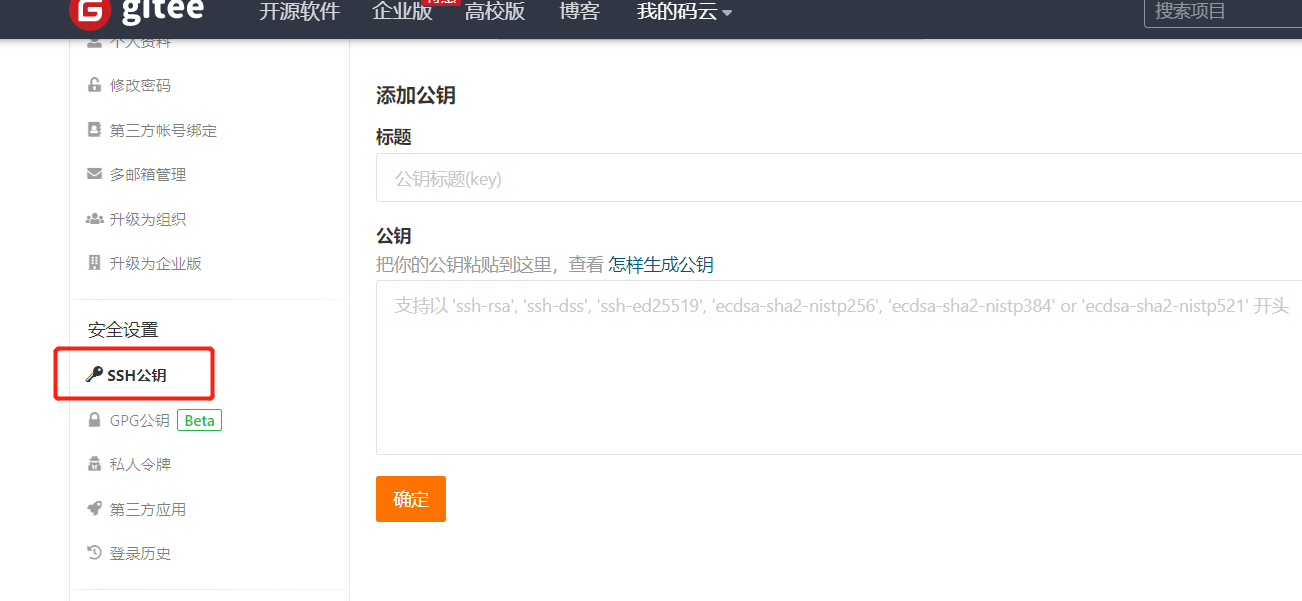
8. 重新运行命令行就可以正常了。
祝:你们也和我一样顺利解决
出现Please make sure you have the correct access rights and the repository exists.问题解决的更多相关文章
- windows 部署 git 服务器报 Please make sure you have the correct access rights and the repository exists.错误
这两天在阿里云上弄windows 服务器,顺便部署了一个git服务.根据网上教程一步步操作下来,最后在 remote远程仓库的时候提示 fatal: 'yourpath/test.git' does ...
- git pull 出错 fatal: Could not read from remote repository.Please make sure you have the correct access rights.and the repository exists.
Warning: Permanently added the RSA host key for IP address '192.30.252.131' to the list of known hos ...
- Git push提交时报错Permission denied(publickey)...Please make sure you have the correct access rights and the repository exists.
一.git push origin master 时出错 错误信息为: Permission denied(publickey). fatal: Could not read from remote ...
- git遇到的问题之“Please make sure you have the correct access rights and the repository exists.”
对于git的提交一直很小心翼翼,感觉一不小心就会踩到莫名的坑. 这不, 某天commit 就遇到了On branch master nothing to commit (working directo ...
- 【Devops】【docker】【CI/CD】Jenkins源码管理,设置gitlab上项目的clone地址 + jenkins构建报错:Please make sure you have the correct access rights and the repository exists.
注意,如果 jenkins构建报错:Please make sure you have the correct access rights and the repository exists. 而此时 ...
- 【Devops】【docker】【CI/CD】jenkins源码管理,添加SSH地址后报错+Jenkins构建报错:Please make sure you have the correct access rights and the repository exists.
jenkins源码管理,添加SSH地址后报错: Could not read from remote repository. Please make sure you have the correct ...
- 使用git时出现Please make sure you have the correct access rights and the repository exists.问题已解决。
使用git时,出现Please make sure you have the correct access rights and the repository exists.问题已解决. 今天我在使用 ...
- Please make sure you have the correct access rights and the repository exists.
参考:https://blog.csdn.net/jingtingfengguo/article/details/51892864,感谢老哥. 从码云克隆项目到新的服务器上,报错: Please ma ...
- [Git]Please make sure you have the correct access rights and the repository exists
这个问题是这样,需要在已有github账号的A机器上,再创建一个github账号,新账号创建完毕,将代码通过机器A push上之后,再另一台机器B,clone 这个项目时报出了如下错误: Permis ...
随机推荐
- HashMap主要方法源码分析(JDK1.8)
本篇从HashMap的put.get.remove方法入手,分析源码流程 (不涉及红黑树的具体算法) jkd1.8中HashMap的结构为数组.链表.红黑树的形式 (未转化红黑树时) (转 ...
- L4文本预处理
文本预处理 timemachine.txt数据下载地址 链接:https://pan.baidu.com/s/1RO2OLyTRQZ90HJUW7V7BCQ 提取码:bjox NLTK数据集下载 链接 ...
- OpenAL试水
参考了https://wysaid.org/976.html. 这个博客给了一个EGE+OpenAL的demo和源代码.一开始没注意,博主也没有给EGE相关信息.会找不到EGE相关头文件,建议如果要二 ...
- ado.net 面向对象
面向对象:就是一个大的转换器,建立起一条通道通往数据库然后通过通道将所需(方法)数据从转换器往返于外部界面端 1 首先在项目里创建文件夹: 右击项目———添加个文件夹App_Cod 2 ...
- 泛微ecology OA系统在数据库配置信息泄露
漏洞描述 攻击者可通过该漏洞页面直接获取到数据库配置信息,攻击者可通过访问存在漏洞的页面并解密从而获取数据库配置信息,如攻击者可直接访问数据库,则可直接获取用户数据,由于泛微e-cology默认数据库 ...
- this 关键字的用法
用法一 this代表当前类的实例对象 class Program { static void Main(string[] args) { tr ...
- TensorFlow的图像NCHW与NHWC
import tensorflow as tf x = [1, 2, 3, 4, 5, 6, 7, 8, 9, 10, 11, 12] with tf.Session() as sess: a = t ...
- 【MyBatis深入剖析】应用分析与最佳实践(下)
MyBatis编程式开发 MyBatis编程式开发步骤 MyBatis和MySQL Jar包依赖 全局配置文件mybatis-config.xml 映射器Mapper.xml Mapper接口 编程式 ...
- 一种特殊的生成器函数-Generator函数
本节的内容,是建立在iterator遍历器知识的基础上.所以希望还没有看上一节的内容的话,最好还是看一看,当然你如果熟悉iterator就没有那个必要了. 既然你都看到这里来了,就咱们就接着往下讲.. ...
- PHP(ThinkPHP5.0) + PHPMailer 进行邮箱发送验证码
GitHub下载最新版第三方类库PHPMailer: 第一步: 打开网址https://github.com/PHPMailer/PHPMailer/ 下载PHPMailer,PHPMailer 需要 ...