
Please make sure you have the correct access rights and the repository exists.
参考:https://blog.csdn.net/jingtingfengguo/article/details/51892864,感谢老哥。
从码云克隆项目到新的服务器上,报错:
Please make sure you have the correct access rights and the repository exists.
解决:
1、首先我得重新在git设置一下身份的名字和邮箱(因为当初都忘了设置啥了,因为遇到坑了)进入到需要提交的文件夹底下(因为直接打开git Bash,在没有路径的情况下,根本没!法!改!刚使用git时遇到的坑。。。)
git config --global user.name "yourname"
git config --global user.email“your@email.com"
注:yourname是你要设置的名字,your@email是你要设置的邮箱。
2、删除.ssh文件夹(直接搜索该文件夹)下的known_hosts(手动删除即可,不需要git)
3、git输入命令
$ ssh-keygen -t rsa -C "your@email.com"(请填你设置的邮箱地址)
接着出现:
Generating public/private rsa key pair.
Enter file in which to save the key (/Users/your_user_directory/.ssh/id_rsa):
请直接按下回车
然后系统会自动在.ssh文件夹下生成两个文件,id_rsa和id_rsa.pub,用记事本打开id_rsa.pub
将全部的内容复制
在码云添加SSH KEY
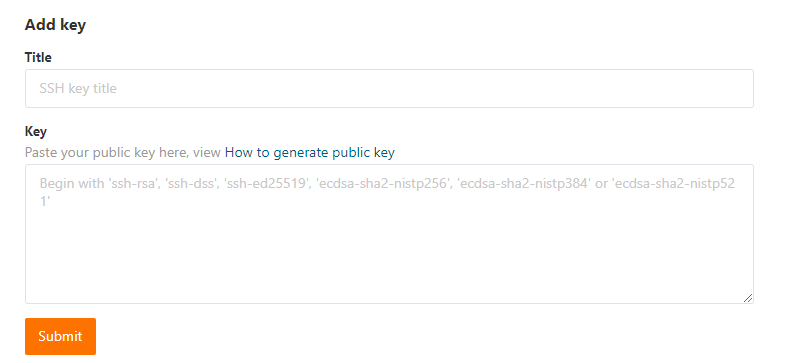
GitHub同理
Please make sure you have the correct access rights and the repository exists.的更多相关文章
- windows 部署 git 服务器报 Please make sure you have the correct access rights and the repository exists.错误
这两天在阿里云上弄windows 服务器,顺便部署了一个git服务.根据网上教程一步步操作下来,最后在 remote远程仓库的时候提示 fatal: 'yourpath/test.git' does ...
- git pull 出错 fatal: Could not read from remote repository.Please make sure you have the correct access rights.and the repository exists.
Warning: Permanently added the RSA host key for IP address '192.30.252.131' to the list of known hos ...
- Git push提交时报错Permission denied(publickey)...Please make sure you have the correct access rights and the repository exists.
一.git push origin master 时出错 错误信息为: Permission denied(publickey). fatal: Could not read from remote ...
- git遇到的问题之“Please make sure you have the correct access rights and the repository exists.”
对于git的提交一直很小心翼翼,感觉一不小心就会踩到莫名的坑. 这不, 某天commit 就遇到了On branch master nothing to commit (working directo ...
- 【Devops】【docker】【CI/CD】Jenkins源码管理,设置gitlab上项目的clone地址 + jenkins构建报错:Please make sure you have the correct access rights and the repository exists.
注意,如果 jenkins构建报错:Please make sure you have the correct access rights and the repository exists. 而此时 ...
- 【Devops】【docker】【CI/CD】jenkins源码管理,添加SSH地址后报错+Jenkins构建报错:Please make sure you have the correct access rights and the repository exists.
jenkins源码管理,添加SSH地址后报错: Could not read from remote repository. Please make sure you have the correct ...
- 使用git时出现Please make sure you have the correct access rights and the repository exists.问题已解决。
使用git时,出现Please make sure you have the correct access rights and the repository exists.问题已解决. 今天我在使用 ...
- 出现Please make sure you have the correct access rights and the repository exists.问题解决
问题: 有一段时间没有用码云了,当输入 git push -u origin master命令出现Please make sure you have the correct access rights ...
- Git提交时提示“Please make sure you have the correct access rights and the repository exists.”的解决方法
1.首先打开Git Bash设置名字和邮箱: git config --global user.name "你的名字" git config --global user.email ...
随机推荐
- Hibernate 框架入门
接着上一篇的 Hibernate 框架的了解,我们就继续学习 Hibernate 框架.这次就进入 Hibernate 框架的入门学习. 首先在学习 Hibernate 框架之前,我们要准备好我们需要 ...
- 第03讲 fragment
Fragment 官网文档:https://developer.android.google.cn/guide/components/fragments 什么是Fragment 在手机上,Activi ...
- MySQL数据库~~~~~索引
1. 索引 索引在MySQL中也叫"键"或者"key",是存储引擎于快速找到记录的一种数据结构. 索引的数据结构: B+树 B+树性质: 索引字段要尽量小; 索 ...
- vue element-ui父列表和子列表同时出现时的bug
在项目中遇到这样的问题 当第一个父列表下的子列表选择了1,切换到第二个父列表的时候,也会默认选择1 我最开始是计划通过修改子列表的default-active为-1,结果不行 后来发现出现这个问题的原 ...
- 数组中重复的数字(剑指offer_3)
在一个长度为n的数组里的所有数字都在0到n-1的范围内. 数组中某些数字是重复的,但不知道有几个数字是重复的,也不知道每个数字重复几次.请找出数组中任意一个重复的数字. Input: {2,3,1,0 ...
- Tyvj 1953 Normal:多项式,点分治
Decription: 某天WJMZBMR学习了一个神奇的算法:树的点分治! 这个算法的核心是这样的: 消耗时间=0 Solve(树 a) 消耗时间 += a 的 大小 如果 a 中 只有 1 个点, ...
- .net core 在 Docker 上的部署
Docker可以说是现在微服务,DevOps的基础,咱们.Net Core自然也得上Docker..Net Core发布到Docker容器的教程网上也有不少,但是今天还是想来写一写.你搜.Net co ...
- Leetcode题解 - 树部分简单题目代码+思路(105、106、109、112、897、257、872、226、235、129)
树的题目中递归用的比较多(但是递归是真难弄 我
- css流星 效果
style: .loding { width: 100%; height: 100%; } .bg{ width: 100%; height: 100%; ...
- sublime插件开发教程4
写几个简单的例子详解下 import sublime import sublime_plugin class ExampleCommand(sublime_plugin.TextCommand): d ...