
出现Please make sure you have the correct access rights and the repository exists.问题解决
问题:
有一段时间没有用码云了,当输入 git push -u origin master命令出现Please make sure you have the correct access rights and the repository exists.错误,
原因:
是git服务器没有发现存储本地的ssh密钥。(git服务器已经存在我电脑的ssh秘钥)
解决方案:
总思路:重新生成新的 ssh秘钥,再把新的秘钥添加到git服务器的ssh公钥上。
解决问题步骤:
1. 删除 .ssh 文件夹【C:\Users\(本地用户名)\.ssh】 中的 known_hosts(手动删除即可),
2. 在下载好的Git中的bin目录下(一般是 C:\Program Files\Git\bin)打开bash.exe输入命令ssh-keygen -t rsa -C "username" (注:username为你git上的用户名),
3. 出现 Enter file in which to save the key (/Users/username/.ssh/id_rsa): //按回车
4. 返回/Users/your username/.ssh/id_rsa already exists.Overwrite (y/n)? //如果以前有存储地址输入y回车
5. Enter passphrase(empty for no passphrase): //如果以前没有储存地址就会出现这个,直接回车就好
6. 运行完成时 :username/.ssh/id_rsa.pub.(注:username为你git上的用户名)中发现,已经新生成了id_rsa和id_rsa.pub两个文件
7. 打开id_rsa.pub将全部的内容复制,到 git服务器的 “设置” > “安全设置” > “ssh公钥”
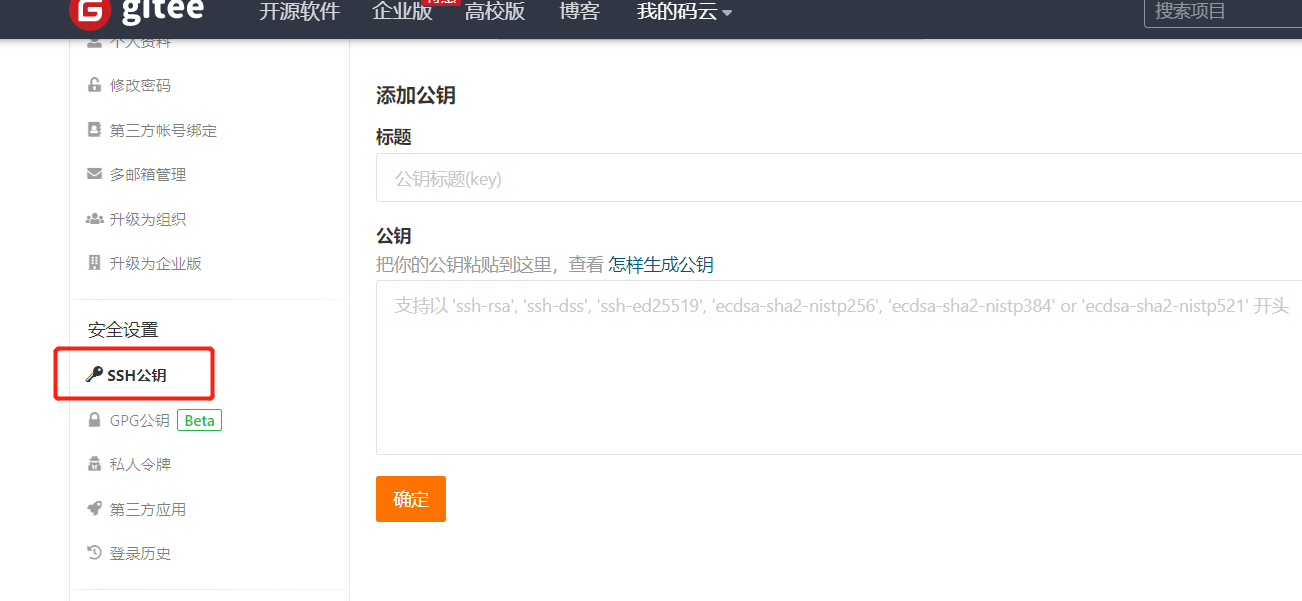
8. 重新运行命令行就可以正常了。
祝:你们也和我一样顺利解决
出现Please make sure you have the correct access rights and the repository exists.问题解决的更多相关文章
- windows 部署 git 服务器报 Please make sure you have the correct access rights and the repository exists.错误
这两天在阿里云上弄windows 服务器,顺便部署了一个git服务.根据网上教程一步步操作下来,最后在 remote远程仓库的时候提示 fatal: 'yourpath/test.git' does ...
- git pull 出错 fatal: Could not read from remote repository.Please make sure you have the correct access rights.and the repository exists.
Warning: Permanently added the RSA host key for IP address '192.30.252.131' to the list of known hos ...
- Git push提交时报错Permission denied(publickey)...Please make sure you have the correct access rights and the repository exists.
一.git push origin master 时出错 错误信息为: Permission denied(publickey). fatal: Could not read from remote ...
- git遇到的问题之“Please make sure you have the correct access rights and the repository exists.”
对于git的提交一直很小心翼翼,感觉一不小心就会踩到莫名的坑. 这不, 某天commit 就遇到了On branch master nothing to commit (working directo ...
- 【Devops】【docker】【CI/CD】Jenkins源码管理,设置gitlab上项目的clone地址 + jenkins构建报错:Please make sure you have the correct access rights and the repository exists.
注意,如果 jenkins构建报错:Please make sure you have the correct access rights and the repository exists. 而此时 ...
- 【Devops】【docker】【CI/CD】jenkins源码管理,添加SSH地址后报错+Jenkins构建报错:Please make sure you have the correct access rights and the repository exists.
jenkins源码管理,添加SSH地址后报错: Could not read from remote repository. Please make sure you have the correct ...
- 使用git时出现Please make sure you have the correct access rights and the repository exists.问题已解决。
使用git时,出现Please make sure you have the correct access rights and the repository exists.问题已解决. 今天我在使用 ...
- Please make sure you have the correct access rights and the repository exists.
参考:https://blog.csdn.net/jingtingfengguo/article/details/51892864,感谢老哥. 从码云克隆项目到新的服务器上,报错: Please ma ...
- [Git]Please make sure you have the correct access rights and the repository exists
这个问题是这样,需要在已有github账号的A机器上,再创建一个github账号,新账号创建完毕,将代码通过机器A push上之后,再另一台机器B,clone 这个项目时报出了如下错误: Permis ...
随机推荐
- L22 Data Augmentation数据增强
数据 img2083 链接:https://pan.baidu.com/s/1LIrSH51bUgS-TcgGuCcniw 提取码:m4vq 数据cifar102021 链接:https://pan. ...
- L8梯度消失、梯度爆炸
houseprices数据下载: 链接:https://pan.baidu.com/s/1-szkkAALzzJJmCLlJ1aXGQ 提取码:9n9k 梯度消失.梯度爆炸以及Kaggle房价预测 代 ...
- L1线性回归
线性回归 主要内容包括: 线性回归的基本要素 线性回归模型从零开始的实现 线性回归模型使用pytorch的简洁实现 代码下载地址 https://download.csdn.net/download/ ...
- 详解 ServerSocket与Socket类
(请观看本人博文 -- <详解 网络编程>) 目录 ServerSocket与Socket ServerSocket 类: Socket类: ServerSocket与Socket 首先, ...
- java集合List
需求:List集合存储字符串并遍历.List集合的特点: 有序(存储和取出的元素一致),可重复的.package javatest; import java.util.ArrayList;import ...
- C#客户端打印条形码
第一种方法: 引用第三方插件文件zxing.dll // 1.设置条形码规格 EncodingOptions encodeOption = new EncodingOptions(); encodeO ...
- 随笔之——浮动(float)的影响及其清除、、clear与overflow-hidden清除float的不同!!!
一.浮动(float)对内联元素的影响. 1.我们都知道,内联元素(例如:span/img/input...)在正常情况下不可以对其设置宽高的,它的大小之只和它内部内容的多少有关. 我们怎样才可以对其 ...
- 米特运输——(dfs)
米特是D星球上一种非常神秘的物质,蕴含着巨大的能量.在以米特为主要能源的D星上,这种米特能源的运输和储 存一直是一个大问题.D星上有N个城市,我们将其顺序编号为1到N,1号城市为首都.这N个城市由N- ...
- 大数据hbase分布式安装及其部署。
大数据hbase分布式安装及其部署. 首先要启动Hadoop以及zookeeper,可以参考前面发布的文章. 将hbase的包上传至master节点 这里我使用的是1.3.6的版本,具体的根据自己的版 ...
- git .gitignore不生效
原因是.gitignore只能忽略那些原来没有被track的文件,如果某些文件已经被纳入了版本管理中,则修改.gitignore是无效的. 解决方法: 1.先把规则写好,然后把规则对应的文件删了,然后 ...