
Spring boot Sample 004之spring-boot-configuration-yaml
一、环境
1.1、Idea 2020.1
1.2、JDK 1.8
二、目的
三、步骤
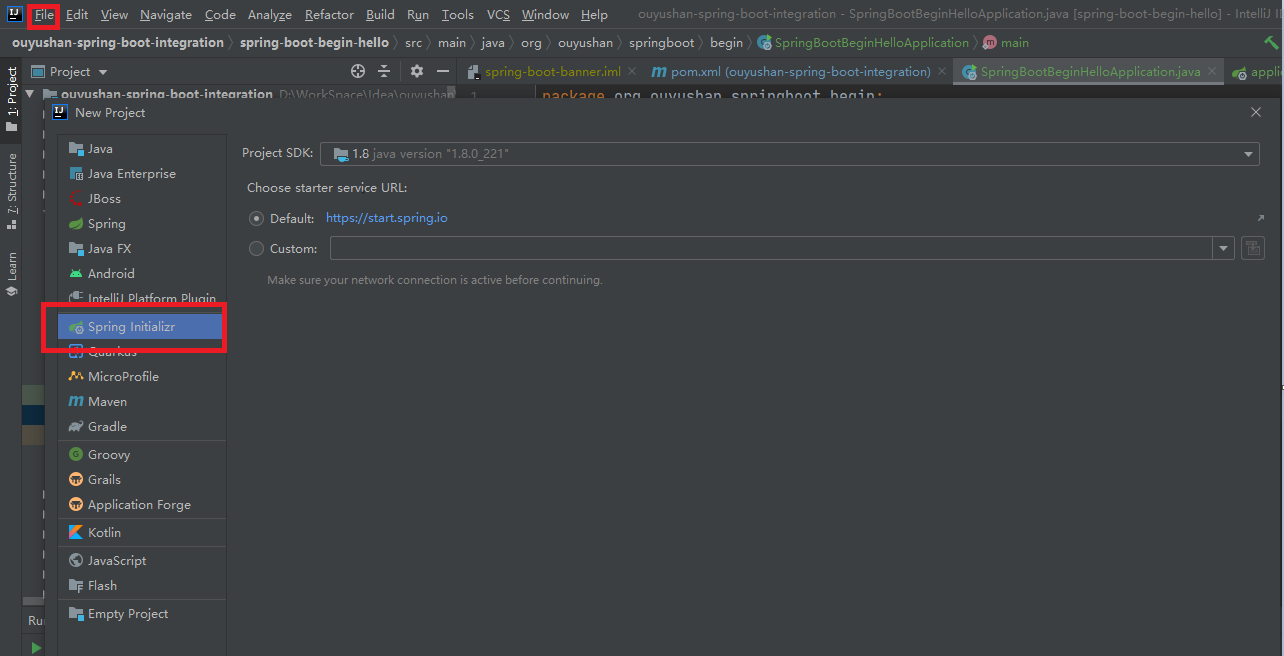
3.1、点击File -> New Project -> Spring Initializer,点击next
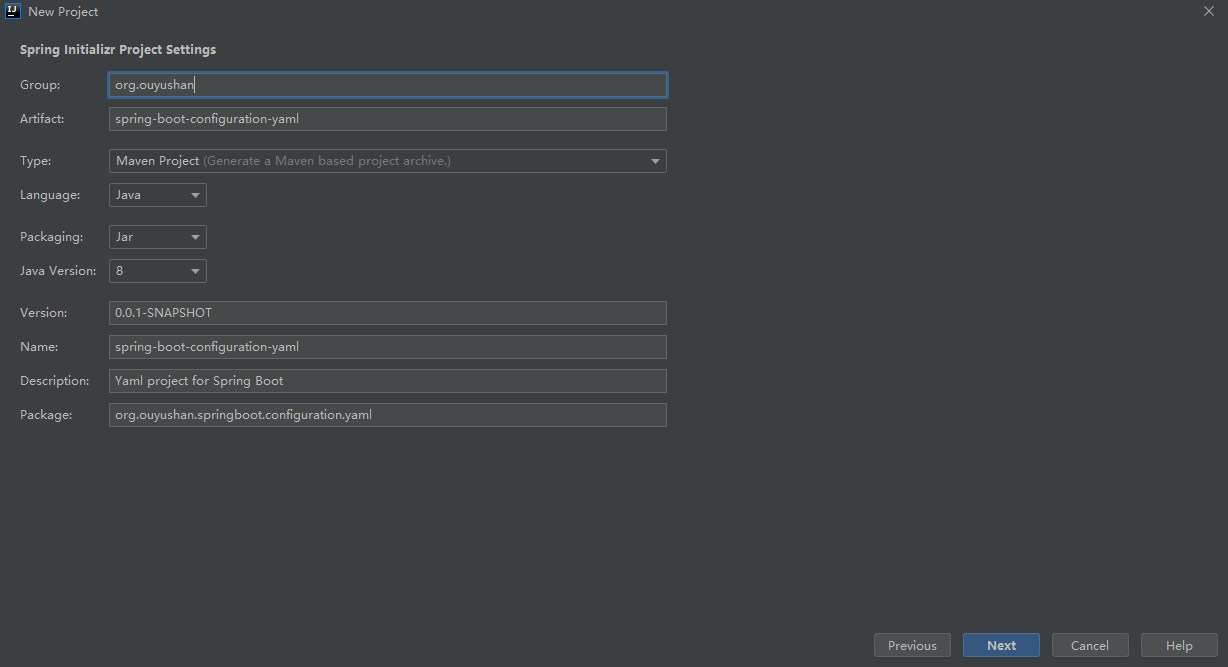
3.2、在对应地方修改自己的项目信息
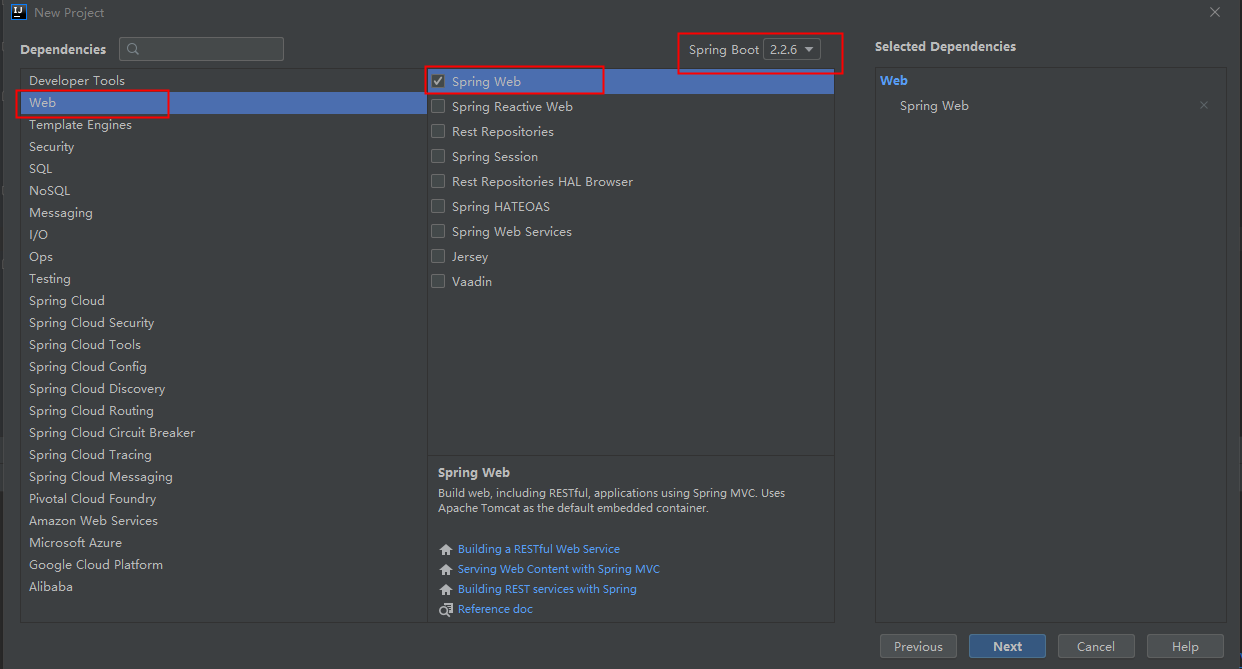
3.3、选择Web依赖,选中Spring Web。可以选择Spring Boot版本,本次默认为2.2.6,点击Next
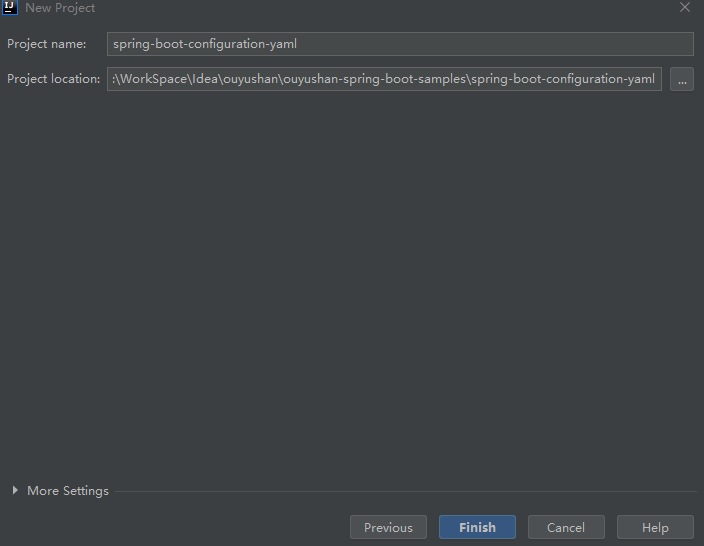
3.4、编辑工程名和项目路径,确定后点击Finish完成
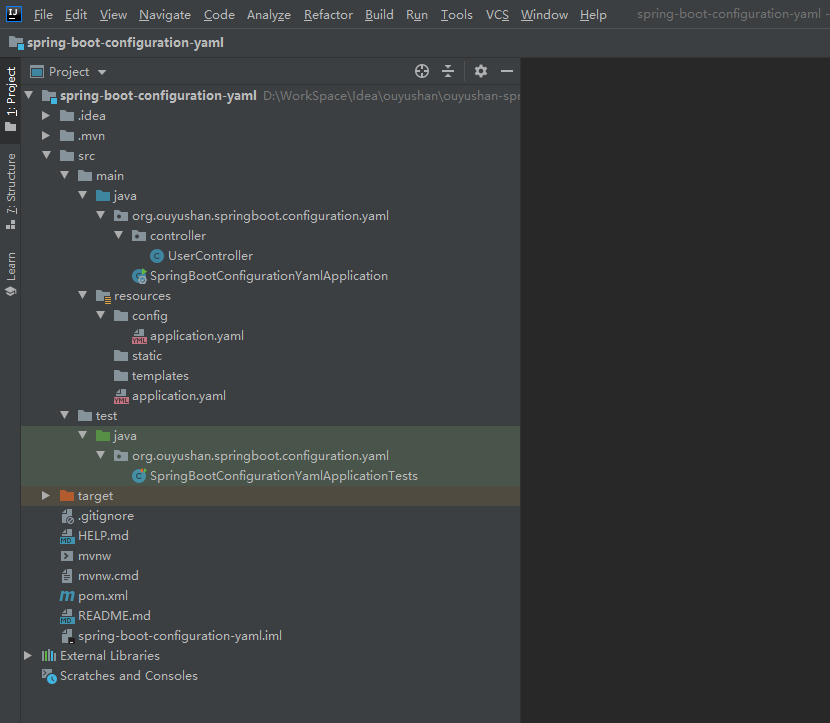
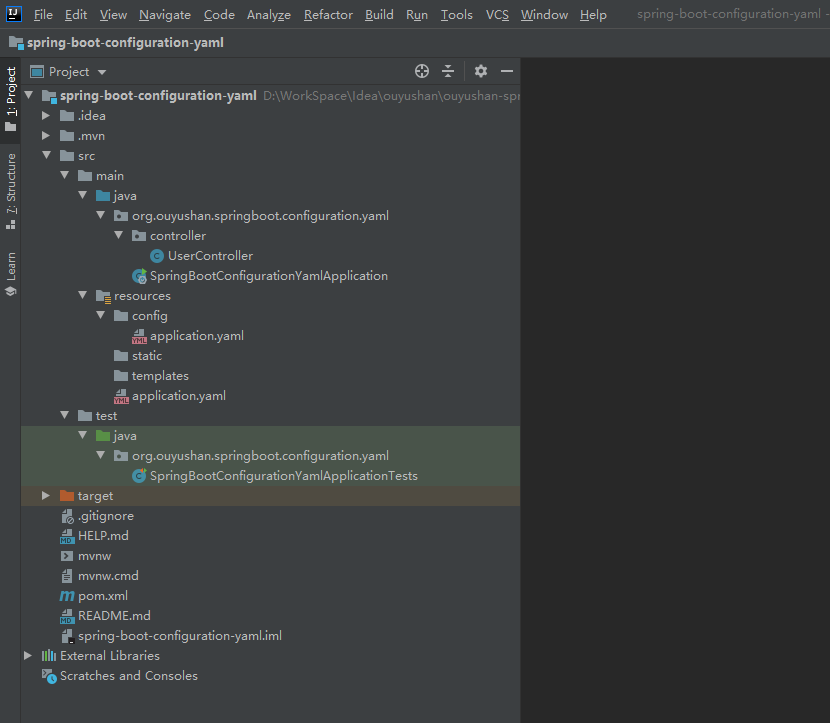
3.5、项目结构
四、添加测试方法
4.1、新建UserController实体类
package org.ouyushan.springboot.configuration.properties.controller;

import org.springframework.beans.factory.annotation.Value;

import org.springframework.web.bind.annotation.*;

import java.util.HashMap;

/**

 * @Description:

 * @Author: ouyushan

 * @Email: ouyushan@hotmail.com

 * @Date: 2020/4/27 13:34

 */

@RestController

@RequestMapping("/api/user")

public class UserController {

    @Value(value = "${ouyushan.secret}")

    private String secret;

    @Value(value = "${ouyushan.number}")

    private int number;

    @Value(value = "${ouyushan.desc}")

    private String desc;

    @GetMapping("/")

    public String hello() {

        return "Hello World Based On Spring-Boot";

    }

    // @RequestParam 简单类型的绑定

    @GetMapping("/getUser")

    public HashMap<String, Object> getUser(@RequestParam String username) {

        HashMap<String, Object> map = new HashMap<>();

        map.put("title", "hello world");

        map.put("username", username);

        map.put("secret",secret);

        map.put("number",number);

        map.put("desc",desc);

        return map;

    }

}
4.2、配置默认application.yaml
ouyushan:

  secret: ${random.value}

  number: ${random.int}

  name: ouyushan.org

  desc: ${ouyushan.name} is a domain name

server:

  port: 7070

spring:

  jackson:

    date-format: yyyy-MM-dd HH:mm:ss

    time-zone: Asia/Chongqing
{

    "number":1410493656,

    "secret":"f99e177aeb5370bec930ec7159bb5df7",

    "title":"hello world",

    "username":"spring",

    "desc":"ouyushan.org is a domain name"

}
4.3、配置resources/config/application.yaml
ouyushan:

  secret: ${random.value}

  number: ${random.int}

  name: ouyushan.org

  desc: config ${ouyushan.name} is a domain name

server:

  port: 9090

spring:

  jackson:

  date-format: yyyy-MM-dd HH:mm:ss

  time-zone: Asia/Chongqing
启动项目,访问
{

    "number":-1333749861,

    "secret":"9e0107e2d0d1b91591a18e8165532201",

    "title":"hello world",

    "username":"spring",

    "desc":"config ouyushan.org is a domain name"

}
通过对比请求地址和返回结果,发现resources/config/application.yaml中的配置内容已覆盖resources/application.yaml
五、知识点
yaml文件优先级

1. 当前目录下的一个/config子目录

2. 当前目录

3. 一个classpath下的/config包

4. classpath根路径(root)

 yaml中: 后面有空格

可通过@Value取值

    @Value(value = "${ouyushan.secret}")

    private String secret;

**@ConfigurationProperties(prefix = "sample")**

读取外部配置文件中sample 开始的属性,自动映射到类中的字段,并覆盖代码中的值。
Spring boot Sample 004之spring-boot-configuration-yaml的更多相关文章
- Spring boot Sample 009之spring-boot-web-thymeleaf
一.环境 1.1.Idea 2020.1 1.2.JDK 1.8 二.目的 spring boot 整合thymeleaf模板开发web项目 三.步骤 3.1.点击File -> New Pro ...
- Spring boot Sample 012之spring-boot-web-upload
一.环境 1.1.Idea 2020.1 1.2.JDK 1.8 二.目的 spring boot 整合web实现文件上传下载 三.步骤 3.1.点击File -> New Project -& ...
- Spring boot Sample 0010之spring-boot-web-freemarker
一.环境 1.1.Idea 2020.1 1.2.JDK 1.8 二.目的 spring boot 整合freemarker模板开发web项目 三.步骤 3.1.点击File -> New Pr ...
- Spring boot Sample 006之spring-boot-custom-servlet
一.环境 1.1.Idea 2020.1 1.2.JDK 1.8 二.步骤 2.1.点击File -> New Project -> Spring Initializer,点击next 2 ...
- Spring boot Sample 005之spring-boot-profile
一.环境 1.1.Idea 2020.1 1.2.JDK 1.8 二.目的 通过yaml文件配置spring boot 属性文件 三.步骤 3.1.点击File -> New Project - ...
- spring cloud教程之使用spring boot创建一个应用
<7天学会spring cloud>第一天,熟悉spring boot,并使用spring boot创建一个应用. Spring Boot是Spring团队推出的新框架,它所使用的核心技术 ...
- Spring Boot——2分钟构建spring web mvc REST风格HelloWorld
之前有一篇<5分钟构建spring web mvc REST风格HelloWorld>介绍了普通方式开发spring web mvc web service.接下来看看使用spring b ...
- 【Spring】关于Boot应用中集成Spring Security你必须了解的那些事
Spring Security Spring Security是Spring社区的一个顶级项目,也是Spring Boot官方推荐使用的Security框架.除了常规的Authentication和A ...
- [转]Spring Boot——2分钟构建spring web mvc REST风格HelloWorld
Spring Boot——2分钟构建spring web mvc REST风格HelloWorld http://projects.spring.io/spring-boot/ http://spri ...
随机推荐
- [Linux] Hexo 搭建个人博客
不做笔记出了bug就得重新再看一遍视频 视频来源: https://www.bilibili.com/video/BV1Yb411a7ty?t=75 安装 先安装 nodejs,npm, git 安装 ...
- CC2530串口通信
任何USART双向通信至少需要两个脚:接收数据输入(RX)和发送数据输出(TX). RX:接收数据串行输入.通过采样技术来区别数据和噪音,从而恢复数据. TX :发送数据输出.当发送器被禁止时,输出引 ...
- window下用notepad++编辑了脚本文件然后放在linux报错显示无法运行
首先vi :set ff 查看文件类型 接着 下载dos2unix root用户下yum -y install dos2unix 然后 dos2unix 文件.sh 转换格式 接着在正常启动即可
- Coursera课程笔记----计算导论与C语言基础----Week 12
期末编程测试(Week 12) Quiz1 判断闰年 #include <iostream> using namespace std; int main() { int year; cin ...
- rsync服务端一键安装rsync脚本(非源码)
export RSYNC_PASSWORD=123 USER=rsync AUTHUSERS=bck MK=backupmk local_dir=/backup yum remove rsync &a ...
- 【Kafka】实时看板案例
目录 项目需求 项目模型 实现步骤 项目需求 快速计算双十一当天的订单量和销售金额 项目模型 实现步骤 一.创建topic bin/kafka-topics.sh --create --topic i ...
- JAVA知识总结(四):单例模式和多态
好吧,今天一定要把面向对象的最后一个特性:多态,给说完.不过我们先来聊一聊设计模式,因为它很重要. 设计模式 官方的解释是,设计模式是:一套被反复使用,多数人知晓的,经过分类编目,代码设计经验的总结. ...
- 《C程序设计语言》 练习2-8
问题描述 练习 2-8 编写一个函数rightrot(x, n),该函数返回将x循环右移(即从最右端移出的位将从最左端移入)n(二进制)位后所得到的值. Write a function rightr ...
- C# Sign In With Apple苹果登陆后端验证
苹果App授权登录 苹果官方的授权文档: 生成Token:https://developer.apple.com/documentation/sign_in_with_apple/generate_a ...
- centOS 开启服务器后无法访问(大坑啊)
在开启了nodejs后,发现虽然ssh访问到主机,但是公网不能访问. 一番调试发现程序是正常的,也确实在监听着端口.折腾良久无果,在Vultr上发帖求助.几分钟后Vultr团队的工程师Joshua B ...