
【angular5项目积累总结】panel组件
view
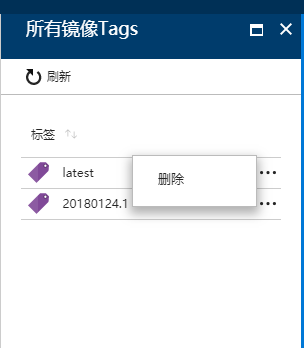
code
panel.component.css
:host {

    display:flex;

    min-width:300px

}
panel.component.html
<header class="fxs-blade-header fxs-header fxs-blade-border fxs-trim-border fxs-trim fxs-blade-loaded">

    <div class="fxs-blade-title-content">

        <div class="fxs-blade-title">

            <h2 class="fxs-blade-title-titleText msportalfx-tooltip-overflow" tabindex="-1">

                {{headerTitle}}

            </h2>

        </div>

        <div class="fxs-blade-actions" role="menubar" *ngIf="!disableAction">

            <button type="button" role="menuitem" class="fxs-blade-collapser fxs-trim-svg fxs-trim-hover" title="Restore" (click)="minmize()" *ngIf="width=='100%'">

                <svg height="100%" width="100%" aria-hidden="true" role="presentation" focusable="false">

                    <g xmlns="http://www.w3.org/2000/svg">

                        <path d="M 11 5 H 2 v 9 h 9 V 5 Z m -7 7 V 7 h 5 v 5 H 4 Z" />

                        <path d="M 8 6 V 3 h 5 v 5 h -3 v 2 h 5 V 1 H 6 v 5 h 2 Z" />

                    </g>

                </svg>

            </button>

            <button type="button" role="menuitem" class="fxs-blade-pin fxs-trim-svg fxs-trim-hover" title="Maximize" (click)="maximize()" *ngIf="width!='100%'">

                <svg height="100%" width="100%" role="presentation">

                    <g xmlns="http://www.w3.org/2000/svg">

                        <path d="M 1 2 v 12 h 14 V 2 H 1 Z m 2 10 V 6 h 10 v 6 H 3 Z" />

                    </g>

                </svg>

            </button>

            <button type="button" role="menuitem" class="fxs-blade-close fxs-trim-svg" title="关闭" (click)="close()">

                <svg height="100%" width="100%" role="presentation">

                    <g xmlns="http://www.w3.org/2000/svg">

                        <path d="M 14 3.3 L 12.7 2 L 8 6.7 L 3.3 2 L 2 3.3 L 6.7 8 L 2 12.7 L 3.3 14 L 8 9.3 l 4.7 4.7 l 1.3 -1.3 L 9.3 8 Z" />

                    </g>

                </svg>

            </button>

        </div>

    </div>

</header>

<div class="fxs-blade-content-container fxs-portal-text" [ngStyle]="{'height.px':height}">

    <div class="fxs-blade-content-container-default fxs-blade-border fxs-portal-border fxs-bladecontent fxs-mode-locked fxs-blade-locked fx-rightClick fxs-bladestyle-default fxs-bladesize-small">

        <div class="fxs-blade-commandBarContainer" *ngIf="menuItems.length>0">

            <div class="fxs-commandBar-target fxs-portal-border fxs-portal-background fxs-portal-svg fxs-commandBar">

                <ul class="fxs-commandBar-itemList" role="menubar" style="position: relative;">

                    <li class="fxs-commandBar-item fxs-portal-border fxs-portal-hover" *ngFor="let item of menuItems" (click)="item.event()" [title]="item.title">

                        <div class="fxs-commandBar-item-buttoncontainer">

                            <div class="fxs-commandBar-item-icon">

                                <svg height="100%" width="100%" role="presentation">

                                    <use xmlns:xlink="http://www.w3.org/1999/xlink" [attr.xlink:href]="item.icon"></use>

                                </svg>

                            </div>

                            <div class="fxs-commandBar-item-text msportalfx-tooltip-overflow" preserveFragment="false">

                                {{item.title}}

                            </div>

                        </div>

                    </li>

                </ul>

            </div>

        </div>

        <ng-content></ng-content>

    </div>

</div>
panel.component.ts
import { Component, Input, Output, EventEmitter } from '@angular/core';

@Component({

    selector: 'panel-component',

    templateUrl: './panel.component.html',

    styleUrls: ['./panel.component.css'],

    host: {

        'class': 'fxs-blade fxs-stacklayout-child fxs-blade-maximized fxs-blade-firstblade',

        '[class.whatever]': "{'fxs-blade-maximized': width=='100%'}",

        '[style.width]': 'width'

    }

})

export class PanelComponent {

    width: string;

    height: string;

    @Input()

    initWidth: string;

    @Input()

    headerTitle: string;

    @Input()

    menuItems: Array<{

        title: string,

        icon: string,

        event: string;

    }> = [];

    @Output()

    closeEvent: EventEmitter<any> = new EventEmitter();

    @Input()

    disableAction: boolean = false;

    constructor() {

    }

    ngOnInit() {

        var self = this;

        this.width = this.initWidth;

        this.height = (document.body.clientHeight - 85) + "";

        window.addEventListener("resize", function () {

            self.height = (document.body.clientHeight - 85) + "";

        });

    }

    maximize() {

        this.width = "100%";

    }

    minmize() {

        this.width = this.initWidth;

    }

    close() {

        this.closeEvent.emit();

    }

}
panel.component.module.ts
import { NgModule } from '@angular/core';

import { CommonModule } from '@angular/common';

import { PanelComponent } from './panel.component';

@NgModule({

    declarations: [

        PanelComponent,

    ],

    imports: [

        CommonModule,

    ],

    exports: [

        PanelComponent

    ]

})

export class PanelComponentModuleModule {

}
示例:
<div class="fxs-journey-target fxs-journey">

    <div class="fxs-journey-layout fxs-stacklayout-horizontal fxs-stacklayout fxs-journey-withspacer">

        <panel-component [menuItems]="menuItems" headerTitle="开发者中心" initWidth="600px" (closeEvent)="close()">

        </panel-component>

    </div>

</div>
import { Component } from '@angular/core';

import { Router } from '@angular/router';

@Component({

    selector: 'devCenter-page',

    templateUrl: './devCenter.html'

})

export class DevCenterPage {

  constructor(private router: Router) { }

    menuItems: any = [

        { title: "添加", icon: "#FxSymbol0-010", event: null },

    ]

    close() {

        this.router.navigate([''], {});

    }

}
【angular5项目积累总结】panel组件的更多相关文章
- 【angular5 项目积累总结】项目公共样式
main.css @font-face { font-family: 'wf_segoe-ui_normal'; src: local('Segoe UI'),url('../fonts/segoe- ...
- 【angular5项目积累总结】优秀组件以及应用实例
1.手机端 图片预览组件 组件:sideshow 效果图:(预览图全屏 且可以左右移动) code: <div class="row ui-app-s ...
- 【angular5项目积累总结】avatar组件
View Code import { Component, HostListener, ElementRef } from '@angular/core'; import { Adal4Service ...
- 【angular5项目积累总结】breadcrumb面包屑组件
view code <div class="fxs-breadcrumb-wrapper" aria-label="Navigation history" ...
- 【angular5项目积累总结】遇到的一些问题以及解决办法
1.项目中字符串特别是\r\n,替换成br之后,在页面换行无法生效? 答:绑定元素 innerHTML. <div class="panel-body" [innerHTML ...
- 【angular5项目积累总结】消息订阅服务
code import { Injectable } from '@angular/core'; import { Subject } from 'rxjs/Subject'; @Injectable ...
- 【angular5项目积累总结】文件上传
<div class="form-group row"> <label class="col-sm-2 col-form-label"> ...
- 【angular5项目积累总结】侧栏菜单 navmenu
View Code import { Component, OnInit } from '@angular/core'; import { HttpClient } from '@angular/co ...
- 【angular5项目积累总结】结合adal4实现http拦截器(token)
import { Injectable } from '@angular/core'; import { HttpEvent, HttpInterceptor, HttpHandler, HttpRe ...
随机推荐
- django drf unique_together和UniqueTogetherValidator
联合唯一可以使用django中的unique_together,和DRF中的UniqueTogetherValidator->https://www.django-rest-framework. ...
- 用MVC5+EF6+WebApi 做一个小功能(三) 项目搭建
一般一个项目开始之前都会有启动会,需求交底等等,其中会有一个环节,大讲特讲项目的意义,然后取一个高大上的项目名字,咱这是一个小功能谈不上项目,但是名字不能太小气了.好吧,就叫Trump吧.没有任何含义 ...
- Java50道经典习题-程序14 求日期
题目:输入某年某月某日,判断这一天是这一年的第几天?分析:(1)以3月5日为例,应该先把前两个月的加起来,然后再加上5天即本年的第几天 (2)特殊情况,闰年2月份的天数是29天,否则是28天 impo ...
- CTF web题型解题技巧
工具集 基础工具:Burpsuite,python,firefox(hackbar,foxyproxy,user-agent,swither等) 扫描工具:nmap,nessus,openvas sq ...
- elasticsearch 5.6.4自动创建索引与mapping映射关系 +Java语言
由于业务上的需求 ,最近在研究elasticsearch的相关知识 ,在网上查略了大部分资料 ,基本上对elasticsearch的数据增删改都没有太大问题 ,这里就不做总结了 .但是,在网上始终没 ...
- iOS中文本属性Attributes
NSFontAttributeName //设置字体大小 NSParagraphStyleAttributeName //设置段落格式 NSForegroundColorAttributeName / ...
- mxonline实战8,机构列表分页功能,以及按条件筛选功能
对应github地址:列表分页和按条件筛选 一. 列表分页 1. pip install django-pure-pagination 2. settings.py中 install ...
- Google 推出新搜索引擎以查找数据集
简评:谷歌推出了一个用于寻找数据集的新搜索引擎,有点厉害! 该工具可以更轻松地访问 Web 上数千个数据存储库中的数百万个数据集,当前还处于测试版: 什么是 Dataset Search? 数 ...
- Protobuf底层存储原理
参考官网, 序列化原理 底层二进制存储 message Test1 { optional int32 a = 1; } 并设置为a=150,序列化到一个文件中,查看文件,得到下面的二进制: 08 96 ...
- Scala代码开发 metaTable(元表)
使用Scala语言开发时,自动生成get和set方法 不用写return进行返回, 因为它的最后一行就是返回值 先建立四个层(层层递进) domain 表结构的建立 repository(DAO) 实 ...