
【angular5项目积累总结】avatar组件
View
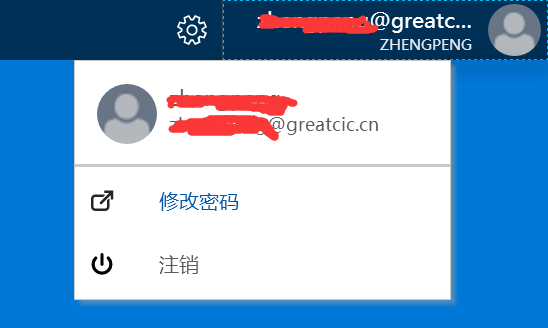
Code
import { Component, HostListener, ElementRef } from '@angular/core';

import { Adal4Service } from '../../adal/adal4.service';

export class UserProfile {

    name: string;

    roleName: string

}

@Component({

    selector: 'avatar',

    templateUrl: './avatar.component.html',

    styleUrls: ['./avatar.component.css'],

    host: {

        'class': 'fxs-topbar-avatarmenu fxs-avatarmenu'

    }

})

export class AvatarComponent {

    currentUser: any;

    dropmenuIsOpen: boolean = false;

    ngOnInit(): void {

        this.currentUser = this.service.userInfo;

    }

    constructor(

        private service: Adal4Service,

        private eRef: ElementRef) {

    }

    dropmenuOpen() {

        if (this.dropmenuIsOpen)

            this.dropmenuIsOpen = false;

        else {

            this.dropmenuIsOpen = true;

        }

    }

    signOut() {

        this.service.logOut();

    }

    @HostListener('document:click', ['$event'])

    clickout(event: Event) {

        if (this.eRef.nativeElement.contains(event.target)) {

            if (event.srcElement.id != 'avatarmenu') {

                this.dropmenuOpen();

            }

        } else {

            this.dropmenuIsOpen = false;

        }

    }

}
<div class="fxs-dropmenu" role="presentation" id="avatarmenu">

    <button title="" class="fxs-dropmenu-button fxs-menu-account fxs-popup-button" (click)="dropmenuOpen()" id="avatarmenu">

        <div title="" class="fxs-avatarmenu-header fxs-trim-hover" id="avatarmenu">

            <div class="fxs-avatarmenu-tenant-container" id="avatarmenu">

                <div class="fxs-avatarmenu-username" id="avatarmenu">

                    {{currentUser.profile.unique_name}}

                </div>

                <div class="fxs-avatarmenu-tenant" id="avatarmenu">{{currentUser.profile.name}}</div>

            </div>

            <!--https://portal.azure.com/Content/static/MsPortalImpl/AvatarMenu/AvatarMenu_defaultAvatarSmall.png-->

            <img class="fxs-avatarmenu-tenant-image" alt="" src="/images/AvatarMenu_defaultAvatarSmall.png" id="avatarmenu">

        </div>

    </button>

    <div class="fxs-dropmenu-content fxs-text-link fxs-popup fxs-portal-bg-txt-br fxs-dropmenu-defaultWidth fxs-dropmenu-left" [class.fxs-dropmenu-hidden]="!dropmenuIsOpen" [class.fxs-dropmenu-is-open]="dropmenuIsOpen" id="0d73b1cf-e692-477e-b434-edecaa1f3004" role="menu" aria-hidden="false">

        <div class="fxs-avatarmenu-dropdown">

            <div class="fxs-avatarmenu-scrollviewer">

                <ul class="menu sub-menu">

                    <li id="mi_246_profileInfo" class="menu-item profile-info-item" style="padding:15px">

                        <span class="html">

                            <img src="/images/AvatarMenu_defaultAvatarSmall.png" class="profile-image" alt="">

                            <div class="profile-menu-name" title="{{currentUser.profile.name}}">{{currentUser.profile.name}}</div>

                            <div class="profile-menu-unique-name" title="{{currentUser.profile.unique_name}}">{{currentUser.profile.unique_name}}</div>

                        </span>

                    </li>

                    <li id="mi_258" class="menu-item menu-item-separator" role="separator" title="">

                        <div class="separator"></div>

                    </li>

                    <li id="mi_260" class="menu-item cta" style="padding:10px" >

                        <span class="menu-item-icon bowtie-icon bowtie-contact-card" aria-hidden="true">

                            <svg viewBox="0 0 15 15" class="fxs-portal-svg" role="presentation" focusable="false" xmlns:svg="http://www.w3.org/2000/svg" xmlns:xlink="http://www.w3.org/1999/xlink" id="FxSymbol0-006" width="100%" height="100%"><g><title></title><path d="M8.883.942v1.586h3.118L6.314 8.214a.792.792 0 1 0 1.121 1.122l5.545-5.545v2.833h1.586V.942H8.883z"></path><path d="M12.01 6.064a.316.316 0 0 0-.344.068l-.946.946a.316.316 0 0 0-.092.223v3.746c0 .601-.489 1.09-1.09 1.09H3.272c-.601 0-1.09-.489-1.09-1.09V6.07c0-.601.489-1.09 1.09-1.09h4.762a.315.315 0 0 0 .223-.092l.946-.946a.316.316 0 0 0-.223-.539H3.272A2.67 2.67 0 0 0 .605 6.07v4.977a2.67 2.67 0 0 0 2.667 2.667h6.266a2.67 2.67 0 0 0 2.667-2.667V6.355a.319.319 0 0 0-.195-.291z"></path></g></svg>

                        </span>

                        <span class="text" role="button"><a href="https://sts.china-inv.cn/adfs/portal/updatepassword" target="_blank">修改密码</a></span>

                        <span class="html"></span>

                    </li>

                    <li id="mi_260" class="menu-item cta" style="padding:10px;" (click)="signOut()">

                        <span class="menu-item-icon bowtie-icon bowtie-contact-card" aria-hidden="true">

                            <svg xmlns="http://www.w3.org/2000/svg" class="" role="presentation" aria-hidden="true" viewBox="0 0 15 15" focusable="false" xmlns:xlink="http://www.w3.org/1999/xlink" xmlns:svg="http://www.w3.org/2000/svg">

                                <g>

                                    <path d="M 12.133 3.033 a 0.995 0.995 0 1 0 -1.408 1.408 a 4.543 4.543 0 0 1 1.336 3.225 a 4.544 4.544 0 0 1 -1.336 3.225 A 4.547 4.547 0 0 1 7.5 12.227 a 4.54 4.54 0 0 1 -3.224 -1.336 A 4.544 4.544 0 0 1 2.94 7.666 a 4.543 4.543 0 0 1 1.336 -3.225 a 0.995 0.995 0 1 0 -1.408 -1.408 a 6.537 6.537 0 0 0 -1.92 4.633 a 6.535 6.535 0 0 0 1.92 4.633 A 6.537 6.537 0 0 0 7.5 14.218 h 0.004 a 6.53 6.53 0 0 0 4.628 -1.919 a 6.534 6.534 0 0 0 1.919 -4.633 a 6.534 6.534 0 0 0 -1.918 -4.633 Z M 7.5 8.662 c 0.55 0 0.996 -0.446 0.996 -0.996 V 1.655 a 0.996 0.996 0 0 0 -1.992 0 v 6.011 c 0 0.55 0.446 0.996 0.996 0.996 Z" />

                                </g>

                            </svg>

                        </span>

                        <span class="text" role="button" style="margin-left:20px">注销</span>

                        <span class="html"></span>

                    </li>

                </ul>

            </div>

        </div>

    </div>

</div>
.sub-menu {

    font-size: 13px;

    z-index:;

    background: #fff;

    color: #5b5b5b;

    white-space: nowrap;

    z-index:;

    -webkit-box-shadow: 0 3px 3px rgba(160,160,160,.5);

    -moz-box-shadow: 0 3px 3px rgba(160,160,160,.5);

    box-shadow: 0 3px 3px rgba(160,160,160,.5);

    border-top:;

    border-left:;

    text-align: left;

    font-family: "Segoe UI VSS (Regular)","-apple-system",BlinkMacSystemFont,"Segoe UI",Roboto,"Helvetica Neue",Helvetica,Ubuntu,Arial,sans-serif,"Apple Color Emoji","Segoe UI Emoji","Segoe UI Symbol";

    position: fixed;

    right: 65px;

}

.menu {

    border: 1px solid #c8c8c8;

    background-color: #fff;

    min-width: 250px;

    max-width: 400px;

    -moz-box-shadow: 3px 3px 3px rgba(160,160,160,.5);

    -webkit-box-shadow: 3px 3px 3px rgba(160,160,160,.5);

    box-shadow: 3px 3px 3px rgba(160,160,160,.5);

}

.menu-item .profile-info-item {

    width: 250px;

    margin-bottom: 8px;

    text-decoration: none !important;

}

.html {

    font-size: 14px;

}

.profile-image {

    width: 40px;

    height: 40px;

    border-radius: 50%;

    margin-right: 8px;

    float: left;

}

.profile-menu-name {

    width: calc(100% - 50px);

    white-space: nowrap;

    overflow: hidden;

    text-overflow: ellipsis;

}

.profile-menu-unique-name {

    font-size: 12px;

    width: calc(100% - 50px);

    white-space: nowrap;

    overflow: hidden;

    text-overflow: ellipsis;

}

.bowtie-icon {

    margin: 0 6px 0 0;

    height: 16px;

    width: 16px;

    vertical-align: bottom;

}

.menu-item-separator {

    min-height:;

    border: none;

    padding: 4px 0;

}

.separator {

    height: 1px;

    background-color: #c8c8c8;

    border-top: 1px solid transparent;

    cursor: default;

}

.menu-item .bowtie-icon {

    margin: 1px 10px 0 0;

    float: left;

}

.text {

    display: inline-block;

    text-overflow: ellipsis;

    overflow: hidden;

    white-space: nowrap;

    width: 100%;

}
【angular5项目积累总结】avatar组件的更多相关文章
- 【angular5项目积累总结】优秀组件以及应用实例
1.手机端 图片预览组件 组件:sideshow 效果图:(预览图全屏 且可以左右移动) code: <div class="row ui-app-s ...
- 【angular5项目积累总结】breadcrumb面包屑组件
view code <div class="fxs-breadcrumb-wrapper" aria-label="Navigation history" ...
- 【angular5项目积累总结】panel组件
view code panel.component.css :host { display:flex; min-width:300px } panel.component.html <heade ...
- 【angular5项目积累总结】遇到的一些问题以及解决办法
1.项目中字符串特别是\r\n,替换成br之后,在页面换行无法生效? 答:绑定元素 innerHTML. <div class="panel-body" [innerHTML ...
- 【angular5项目积累总结】消息订阅服务
code import { Injectable } from '@angular/core'; import { Subject } from 'rxjs/Subject'; @Injectable ...
- 【angular5项目积累总结】文件上传
<div class="form-group row"> <label class="col-sm-2 col-form-label"> ...
- 【angular5 项目积累总结】项目公共样式
main.css @font-face { font-family: 'wf_segoe-ui_normal'; src: local('Segoe UI'),url('../fonts/segoe- ...
- 【angular5项目积累总结】侧栏菜单 navmenu
View Code import { Component, OnInit } from '@angular/core'; import { HttpClient } from '@angular/co ...
- 【angular5项目积累总结】结合adal4实现http拦截器(token)
import { Injectable } from '@angular/core'; import { HttpEvent, HttpInterceptor, HttpHandler, HttpRe ...
随机推荐
- iOS开发 关于iBeacon的一些记录
最近时间一直在研究ibeacon所以把自己遇到的一些问题写下来做个笔记. 参考资料:https://github.com/nixzhu/dev-blog/blob/master/2014-04-23- ...
- Python:windows下scikit-learn 安装和更新
scikit-learn 报错: from sklearn.model_selection import train_test_split ImportError: No module named m ...
- 托管博客到coding或者github
1. 部署网站到github的pages服务 参考: <在Github上面搭建Hexo博客(一):部署到Github> <Hexo搭建独立博客,托管到Github和Coding上教程 ...
- 【VB.NET】通过 IPIP.NET 数据库来查询IP地址
上一次介绍了利用纯真数据库查询IP地址详细信息的方法.然而纯真数据库是由网友反馈所提供的,很多数据描述并不准确,所以我上网找了一些其他的IP数据库,最后就找到了 ipip.net 这个网站所提供的IP ...
- sharepoint support ashx file
Hello, I did the steps from the tutorial you are using. I have received the same error when I did no ...
- jQuery中FormData的使用
web中数据提交事件是常常发生的,但是大多数情况下我们不希望使用html中的form表单提交,因为form表单提交会中断当前浏览器的操作并且会调到另一个地址(即使这个地址是当前页面),并且会重复加载一 ...
- Python 爬虫(二十五) Cookie的处理--cookielib库的使用
Python中cookielib库(python3中为http.cookiejar)为存储和管理cookie提供客户端支持. 该模块主要功能是提供可存储cookie的对象.使用此模块捕获cookie并 ...
- LOJ#3048. 「十二省联考 2019」异或粽子(trie树+堆)
题面 传送门 题解 我们先把它给前缀异或和一下,然后就是要求前\(k\)大的\(a_i\oplus a_j\).把\(k\)乘上个\(2\),变成前\(2k\)大的\(a_i\oplus a_j\), ...
- Android逆向——smali复杂类解析
i春秋作家:HAI_ 之前在Android逆向——初识smali与java类中讲解了基本的HelloWorld和简单类.这节课就要进一步深入.如果能够耐下心来分析一定会有所收获.——写给自己和后来人. ...
- [Leetcode]123.买卖股票的最佳时机3
[原题链接][https://leetcode-cn.com/problems/best-time-to-buy-and-sell-stock-iii/] 分析:动态规划+二分法.以第i天为分界线,计 ...