
【angular5项目积累总结】优秀组件以及应用实例
1.手机端 图片预览组件
组件:sideshow
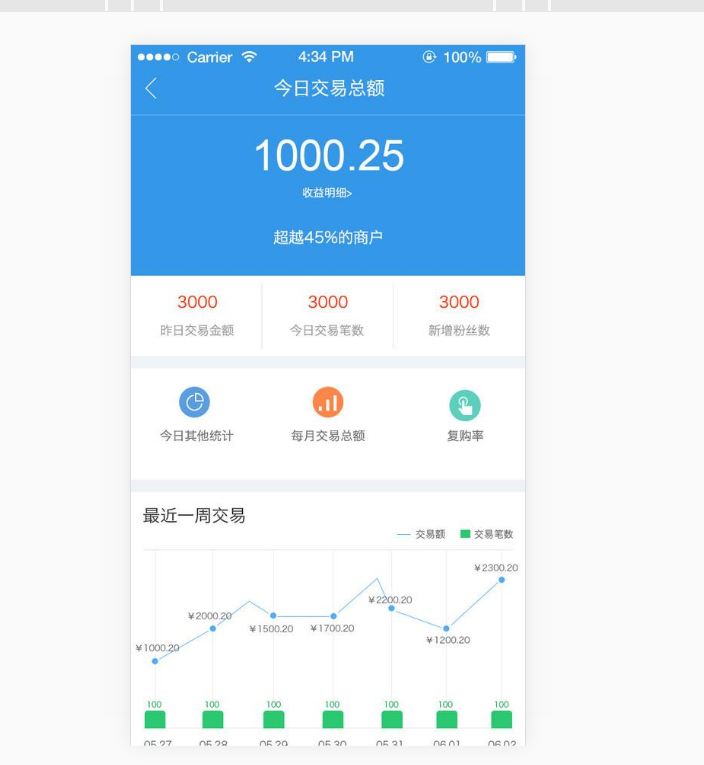
效果图:(预览图全屏 且可以左右移动)

code:
<div class="row ui-app-screenshot">

            <img src="{{proUrl(pic.Url)}}" *ngFor="let pic of currApp.Pictures;let i = index;" (click)="onViewPicture(i)">

        </div>
<slideshow [imageUrls]="slideUrls" [showArrows]="false" #slideRef (click)="onCloseViewPicture()"></slideshow>
import { ViewChild, Component, ElementRef, Renderer2 } from '@angular/core';

import { Router, ActivatedRoute, Params } from '@angular/router';

import { AppStoreService } from '../../service/appService';

import { ConfigureOptions } from '../../configure/configure.options';

import { BrowserService } from '../../service/browser.service';

import { Adal4Service } from '../../adal/adal4.service';

@Component({

    selector: 'mobile-app-info',

    templateUrl: './mobileAppInfo.html',

    styleUrls: ['./mobileAppInfo.css']

})

export class MobileAppInfo {

    @ViewChild('slideRef') slideRef: ElementRef;

    constructor(

        private router: Router,

        private actRouter: ActivatedRoute,

        private appService: AppStoreService,

        private browserService: BrowserService,

        private appOptions: ConfigureOptions,

        private renderer: Renderer2,

        private adalService: Adal4Service) {

    }

    id: string;

    platSource: any;

    showRateBox: boolean = false;

    rateVal: number = 0;

    screenHeight: any;

    currApp: any = [];

    currPackage: any = [];

    userRateStars: any = [{}, {}, {}, {}, {}];

    slideUrls: any = [{}];

    eleSlidershow: any;

    username: string;

    ngOnInit(): void {

        this.initWinHeight();

        this.eleSlidershow = this.slideRef && this.slideRef['container'].nativeElement;

        if (this.eleSlidershow) {

            this.renderer.setStyle(this.eleSlidershow, 'position', 'fixed');

            this.renderer.setStyle(this.eleSlidershow, 'top', '0');

            this.renderer.setStyle(this.eleSlidershow, 'z-index', '1041');

            this.renderer.setStyle(this.eleSlidershow, 'display', 'none');

        }

        this.actRouter.params.subscribe((params: Params) => {

            this.id = params["id"];

            this.platSource = this.browserService.getBrowserInfo();

            if (!this.platSource.isMobile && !this.platSource.isWechat) {

                this.router.navigate(["/appInfo/" + this.id], {});

            }

            this.appService.GetAppInfo(this.id, (rtv) => {

                this.initAppData(rtv);

            });

        });

        this.username = this.adalService.userInfo.username || "未登录";

    }

    initAppData(rtv: any) {

        this.currApp.IconUrl = this.proUrl(rtv.IconUrl);

        this.currApp.Name = rtv.Name || '';

        this.currApp.DownloadCount = rtv.DownloadCount || 0;

        this.currApp.AvgScore = rtv.AvgScore || 0;

        this.currApp.ScoreCount = rtv.ScoreCount || 0;

        this.currApp.Pictures = rtv.Pictures || [];

        this.currApp.CreatedOn = rtv.CreatedOn || '';

        this.currApp.Category = rtv.Category || '';

        this.currApp.Version = rtv.Version || '';

        this.currApp.IsScored = rtv.IsScored || false;

        this.currApp.Description = this.proTxt(rtv.Description);

        this.currApp.scoreTxt = rtv.IsScored ? '已评分' : '评  分';

        this.slideUrls = rtv.Pictures.map(p => this.proUrl(p.Url));

        if (this.slideUrls.length == 0) {

            this.slideUrls.push({});

        }

        this.slideRef['slideIndex'] = this.slideUrls.length - 1;

        let _pkgArray = this.platSource.platform.Android ? rtv.AndoridPackages[0] : rtv.iOSPackages[0];

        this.currPackage.Version = _pkgArray && _pkgArray.Version || '';

        this.currPackage.ReleaseNotes = this.proTxt(_pkgArray && _pkgArray.ReleaseNotes);

        this.currPackage.FileSize = this.proSize(_pkgArray && _pkgArray.FileSize || 0);

    }

    initWinHeight() {

        this.screenHeight = (window.screen.height || window.innerHeight) - 52;

        let self = this;

        window.addEventListener("resize", function () {

            self.screenHeight = (window.screen.height || window.innerHeight) - 52;

        });

    }

    proUrl(url) {

        return this.appOptions.BlobUrl + url;

    }

    proDevice() {

        let devStr = '';

        if (this.platSource.platform.Android) {

            this.currPackage ? devStr = 'Android' : devStr = '不支持Android';

        } else if (this.platSource.platform.iPad || this.platSource.platform.iPhone) {

            this.currPackage ? devStr = 'IOS' : devStr = '不支持IOS';

        }

        return devStr;

    }

    proTxt(txt: string) {

        return txt ? txt.replace(/\r?\n/g, "<br />").replace('undefined', '<font color="#a1a1a1">暂无信息</font>') : '<font color="#a1a1a1">暂无信息</font>';

    }

    proSize(limit: any) {

        var size = "";

        if (!limit) return size;

        if (limit < 0.1 * 1024) { //如果小于0.1KB转化成B

            size = limit.toFixed(2) + "B";

        } else if (limit < 0.1 * 1024 * 1024) {//如果小于0.1MB转化成KB

            size = (limit / 1024).toFixed(2) + "KB";

        } else if (limit < 0.1 * 1024 * 1024 * 1024) { //如果小于0.1GB转化成MB

            size = (limit / (1024 * 1024)).toFixed(2) + "MB";

        } else { //其他转化成GB

            size = (limit / (1024 * 1024 * 1024)).toFixed(2) + "GB";

        }

        var sizestr = size + "";

        var len = sizestr.indexOf("\.");

        var dec = sizestr.substr(len + 1, 2);

        if (dec == "00") {//当小数点后为00时 去掉小数部分

            return sizestr.substring(0, len) + sizestr.substr(len + 3, 2);

        }

        return sizestr;

    }

    getStarClass(val: number): number {

        return Math.floor(val * 2) || 0;

    }

    onOpenRate() {

        if (this.checkAuth()) {

            this.showRateBox = true;

            this.rateVal = 0;

        }

    }

    onCloseRate() {

        this.showRateBox = false;

    }

    onSetScore() {

        this.appService.SetScore(this.id, this.rateVal, (rtv) => {

            this.currApp.IsScored = true;

            this.onCloseRate()

        });

    }

    onRate(value): void {

        this.rateVal = value;

    }

    getDownloadUrl(): void {

        if (!this.checkAuth()) {

            return;

        }

        this.appService.GetDownloadUrl(this.id, this.platSource.platform.Android ? "Android" : "iOS", (ret) => {

            if (!!ret) {

                window.location.href = ret;

            } else {

                alert("获取下载地址失败,请稍后再试");

            }

        });

    }

    private checkAuth(): boolean {

        var user = this.adalService.userInfo;

        if (user.authenticated) {

            return true;

        }

        localStorage.setItem("app-store-redirect-uri", window.location.pathname);

        this.router.navigate(["/login"], {});

        return false;

    }

    onViewPicture(index: any): void {

        this.renderer.setStyle(this.eleSlidershow, 'display', 'block');

        this.slideRef && this.slideRef['onButtonClick'].call(this.slideRef, index || 0);

    }

    onCloseViewPicture(): void {

        this.renderer.setStyle(this.eleSlidershow, 'display', 'none');

    }

}
2.树形组件或者树形下拉框组件
ng2tree ngx-treeview
地址:https://github.com/leovo2708/ngx-treeview
angular2-tree
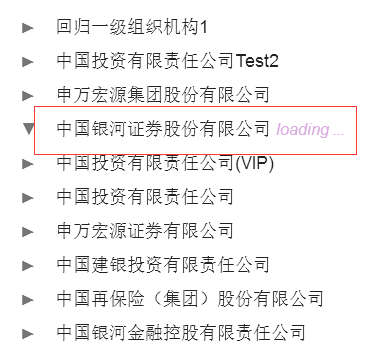
2.1 难点:ng2tree 异步加载
预览:
code:
<tree [tree] ="orgTree" [settings]="{rootIsVisible: false}" (nodeSelected)="logEvent($event)" (nodeMoved)="onNodeMoved($event)"></tree>
import { Component } from '@angular/core';

import { Router, ActivatedRoute, Params } from '@angular/router';

import { TreeModel, NodeEvent, TreeModelSettings } from 'ng2-tree';

import { UserService } from '../common/userService';

import { CommonService } from '../../providers/commonService';

@Component({

    selector: 'orgTree',

    templateUrl: './orgTree.html',

    styleUrls: ['./orgTree.css']

})

export class orgTree {

    menuItems: any = [

        { title: "添加", icon: "#FxSymbol0-0bd", event: this.onAdd.bind(this) },

        { title: "编辑", icon: "#FxSymbol0-0bf", event: this.onEdit.bind(this) }

    ]

    public orgTree: TreeModel;

    public nodeTree: Array<TreeModel> = [];

    constructor(

        private router: Router,

        private actRouter: ActivatedRoute,

        private comService: CommonService,

        private userService: UserService) {

        this.onRefresh(comService);

    }

    loadNodes(id: string,callback:any):void {

        let rtv: Array<TreeModel> = [];

        this.userService.LoadSyncTree(id, (result) => {

            let length: number = result.children.length;

            if (length > 0) {

                for (let i = 0; i < length; i++) {

                    let node: TreeModel =

                        {

                            id: result.children[i].id,

                            value: result.children[i].value,

                            loadChildren: (cb) => {this.loadNodes(result.children[i].id,cb)

                            }

                        }

                    rtv.push(node);

                }

            }
            callback(rtv);

        });

    }

    currGroup: string = '';

    groupId: string = '';

    ngOnInit(): void {

        this.actRouter.params.subscribe((params: Params) => {

            this.groupId = params["id"];

            if (!this.groupId) {

                this.groupId = "org";

            }

            this.currGroup = params["id"];

            this.onLoadTree(this.groupId);

        });

    }

    public logEvent(e: NodeEvent): void {

        if (e.node.id.toString() == '') {

            alert('根机构不可编辑!')

        } else {

            this.currGroup = e.node.id.toString();

            if (this.currGroup != "") {

                this.router.navigate(['/ou/org/' + this.currGroup + '/member'], {});

            }

        }

    }

    onLoadTree(id: string) {

        this.userService.LoadSyncTree(null, (result) => {

            const treeSettings: TreeModelSettings = {

                static: false,

                rightMenu: false,

                leftMenu: false,

                isCollapsedOnInit: false

            }

            let length: number = result.children.length;

            for (let i = 0; i < length; i++) {

                result.children[i].loadChildren = (callback) => {this.loadNodes(result.children[i].id,callback)

                }

            };

            this.orgTree = result;

            this.orgTree.settings = treeSettings;

        });

    }

    onEdit() {

        if (this.currGroup == '' || this.currGroup == null) {

            alert('请先选择一个机构再进行编辑操作。');

        }

        else

            this.router.navigate(['/ou/' + this.groupId + '/' + this.currGroup + '/edit'], {});

    }

    onAdd() {

        if (this.currGroup == '' || this.currGroup == null) {

            alert('请先选择一个机构再进行添加操作。');

        } else

            this.router.navigate(['/ou/' + this.groupId + '/' + this.currGroup + '/create'], {});

    }

    onOUFresh() {

        this.userService.RefreshTree(this.groupId, (result) => {

            const treeSettings: TreeModelSettings = {

                static: false,

                rightMenu: false,

                leftMenu: false,

                isCollapsedOnInit: false

            }

            this.orgTree = result;

            this.orgTree.settings = treeSettings;

        });

    }

    onClose() {

        this.router.navigate(['/ou']);

    }

    onRefresh(comService: CommonService) {

        this.comService.notifyObservable$.subscribe(data => {

            if (data == 'refreshOrgTree') {

                this.currGroup = '';

                this.onLoadTree(this.groupId);

            }

        }, error => {

            console.log(`subscribe error:${error}`)

        })

    }

    onNodeMoved(e: NodeEvent): void {

        console.log("curr:" + e.node.parent.value);

        console.log(e.node.value);

    }

}
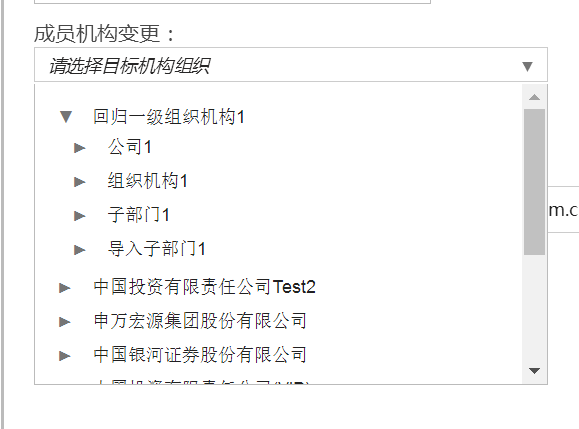
2.2 改造:下拉框 tree
预览:
3. 上传组件
组件:ng2-file-upload
code:
<input type="file" ng2FileSelect [uploader]="uploader" [(ngModel)]="fileInfo"/>
import { Component } from '@angular/core';

import { Router, ActivatedRoute, Params } from '@angular/router';

import { FileUploader, FileItem, ParsedResponseHeaders } from 'ng2-file-upload';

import { Adal4Service } from '../../adal/adal4.service';

import { ConfigureService } from '../../configure/configure.service';

import { UserService } from '../common/userService';

@Component({

    selector: 'usersimport',

    templateUrl: './importUsers.html',

    styleUrls: ['./importUsers.css']

})

export class importUsers {

    errorMsg: string;

    lstHistory: any;

    template: string;

    token: string;

    uploader: FileUploader = null;

    parentUrl: string;

    fileInfo: string;

    groupId: string;

    orgPath: string;

    menuItems: any = [

        { title: "刷新", icon: "#FxSymbol0-0bf", event: this.onRefresh.bind(this) }

    ]

    constructor(

        private router: Router,

        private actRouter: ActivatedRoute,

        public configService: ConfigureService,

        private adal4Service: Adal4Service,

        private userService: UserService

    ) {

        this.template = "/api/import/template?type=user";

        this.token = this.adal4Service.userInfo.token;

        this.uploader = new FileUploader({

            url: "/api/Import/User",

            method: "POST",

            itemAlias: "dataFile",

            autoUpload: false,

            headers: [{ name: 'Authorization', value: `Bearer ${this.token}` }]

        });

        this.menuItems = [

            { title: "上传", icon: "#FxSymbol0-001", event: this.uploadExcel.bind(this) },

            { title: "刷新", icon: "#FxSymbol0-0bf", event: this.onRefresh.bind(this) }

        ];

        this.onRefresh();

    }

    onRefresh(): void {

        this.userService.RefreshHistory("ImportUser", (rtv) => {

            this.lstHistory = rtv;

        });

    }

    ngOnInit(): void {

        this.parentUrl = this.router.url;

        this.actRouter.params.subscribe((params: Params) => {

            this.groupId = params["groupId"] || this.groupId;

            this.groupId && this.initOrgPath();

        });

    }

    onClose() {

        this.router.navigate(['/ou/org/' + this.groupId + '/member/'], {});

    }

    uploadExcel() {

        if (this.uploader != null && this.uploader.queue[0] != null) {

            this.uploader.queue[0].onSuccess = (response, status, headers) => {

                if (status == 200) {

                    this.errorMsg = "";

                    let rtv = JSON.parse(response);

                    if (rtv.RetCode == 0) {

                        this.errorMsg = "文件上传成功,结果查看结果列表。";

                    } else {

                        this.errorMsg = "文件上传失败." + rtv.RetMessage;

                    }

                } else {

                    this.errorMsg = response;

                }

                this.fileInfo = "";

            };

            this.uploader.onBeforeUploadItem = (item) => {

                item.withCredentials = false;

            }

            this.uploader.onSuccessItem = this.onSuccessItem.bind(this);

            this.uploader.onErrorItem = this.onErrorItem.bind(this);

            this.uploader.uploadAll();

        }

        else {

            alert('请选择上传文件!');

        }

    }

    onErrorItem(item: FileItem, response: string, status: number, headers: ParsedResponseHeaders): any {

        if (status != 200) {

            alert('导入人员失败!');

        } else {

            alert(response);

        }

        this.fileInfo = "";

        this.onClose();

    }

    onSuccessItem(item: FileItem, response: string, status: number, headers: ParsedResponseHeaders): any {

        if (status == 200) {

            this.errorMsg = "";

            let rtv = JSON.parse(response);

            if (rtv.status == 1) {

                alert('文件上传成功!');

            } else {

                alert('文件上传失败,错误信息:' + rtv.message);

            }

            this.fileInfo = "";

            this.uploader.removeFromQueue(item);

            this.uploader.clearQueue();

            this.uploader.destroy();

            this.onRefresh();

        } else {

            alert(response);

        }

        this.onClose();

    }

    initOrgPath() {

        let _array = decodeURIComponent(this.groupId).split(',');

        if (_array && _array.length > 0) {

            this.orgPath = _array.map(o => o.replace('OU=', '')).reverse().join('#');

            if(this.orgPath) this.orgPath = decodeURIComponent(this.orgPath);

        }

    }

}
2.头像上传 编辑图片组件
angular2-img-cropper
3.日期选择
https://github.com/CuppaLabs/angular2-datetimepicker
4.列表分页组件
npm install ngx-pagination
5.html 编辑器
npm install angular-froala-wysiwyg --save
https://summernote.org/
https://github.com/lula/ngx-summernote/
推荐组件库:
FreeNG
https://freengs.github.io/#/main/introduction
http://www.wheelsfactory.cn
https://www.jqwidgets.com/angular/#demos/angular2/angular-fileupload-defaultfunctionality.htm
https://www.telerik.com/kendo-angular-ui/components/
https://www.infragistics.com/angularsite/components/grids_and_lists.html
https://docs.nativescript.org/angular/ui/ng-ui-widgets/date-picker
https://material.angular.io/components/datepicker/examples
https://js.devexpress.com/Demos/WidgetsGallery/Demo/DataGrid/RecordPaging/jQuery/Light/
https://akveo.github.io/ngx-admin/?utm_source=github&utm_medium=ngx_admin_readme&utm_campaign=themes
未完待续,本文章待补充....
【angular5项目积累总结】优秀组件以及应用实例的更多相关文章
- 【angular5项目积累总结】avatar组件
View Code import { Component, HostListener, ElementRef } from '@angular/core'; import { Adal4Service ...
- 【angular5项目积累总结】breadcrumb面包屑组件
view code <div class="fxs-breadcrumb-wrapper" aria-label="Navigation history" ...
- 【angular5项目积累总结】panel组件
view code panel.component.css :host { display:flex; min-width:300px } panel.component.html <heade ...
- 【angular5项目积累总结】遇到的一些问题以及解决办法
1.项目中字符串特别是\r\n,替换成br之后,在页面换行无法生效? 答:绑定元素 innerHTML. <div class="panel-body" [innerHTML ...
- 【angular5项目积累总结】消息订阅服务
code import { Injectable } from '@angular/core'; import { Subject } from 'rxjs/Subject'; @Injectable ...
- 【angular5项目积累总结】文件上传
<div class="form-group row"> <label class="col-sm-2 col-form-label"> ...
- 【angular5 项目积累总结】项目公共样式
main.css @font-face { font-family: 'wf_segoe-ui_normal'; src: local('Segoe UI'),url('../fonts/segoe- ...
- 【angular5项目积累总结】侧栏菜单 navmenu
View Code import { Component, OnInit } from '@angular/core'; import { HttpClient } from '@angular/co ...
- 【angular5项目积累总结】结合adal4实现http拦截器(token)
import { Injectable } from '@angular/core'; import { HttpEvent, HttpInterceptor, HttpHandler, HttpRe ...
随机推荐
- .Net core 2.0的数据初始化
在StartUp.cs里面,添加Seed方法 public static void Seed(IApplicationBuilder applicationBuilder) { using (var ...
- Mysql 优化与测试
由于经常被抓取文章内容,在此附上博客文章网址:,偶尔会更新某些出错的数据或文字,建议到我博客地址 : --> 点击这里 以下的测试数据根据环境的不同所耗费的时间有所不同,例如我在腾讯云上的测试 ...
- Vue 框架 笔记
1.兼容 2.性能优化 vuejs ******作者:尤雨溪 *** *******MVVM框架: M:model层 数据层 数据的增删改查 V:view视图层 类似于html的模板 vm:vie ...
- Java多线程学习(一)
在Java多线程应用中,队列的使用率很高,多数生产消费模型的首选数据结构就是队列.Java提供的线程安全的Queue可以分为阻塞队列和非阻塞队列,其中阻塞队列的典型例子是BlockingQueue,非 ...
- iOS --UIScrollView的学习(二)
1.接着上一次的说:http://www.cnblogs.com/fengzhihao/p/5287734.html,这次讲一下UISCrollView的缩放功能. 2.当用户在UIScrollVie ...
- CUDA安装
1.CUDA是什么? CUDA(Compute Unified Device Architecture),显卡厂商NVidia推出的运算平台. 随着显卡的发展,GPU越来越强大,而且GPU为显示图像做 ...
- HQL的使用和limit的替代
1.HQL不同于SQL,from必须是项目中table反转后对应的class的名字. 2.如何使用参数生成HQL语句: String hql = "from User where userI ...
- 禅道与bugfree区别
bugfree更偏重bug管理, 禅道是以项目管理为目标, 所以出发点不一样. 我们bug追踪管理使用bugfree,项目管理计划使用禅道,配置管理使用svn bugfree很low,安装需要环境特别 ...
- OpenCV识别技术
OpenCV识别技术# 老师:james 20181019 # 识别技术# Pycharm + Python3 + OpenCV """ 一.识别技术: 什么是OpenC ...
- ThreadLocal系列(三)-TransmittableThreadLocal的使用及原理解析
ThreadLocal系列(三)-TransmittableThreadLocal的使用及原理解析 上一篇:ThreadLocal系列(二)-InheritableThreadLocal的使用及原理解 ...