
HCNA配置浮动静态路由
1、拓扑图
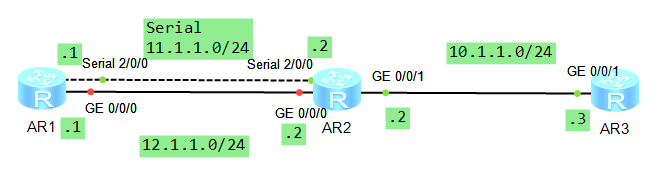
2、配置IP
R1
 Please press enter to start cmd line!

 ############

 <Huawei>

 Dec   ::-: Huawei %%01IFPDT//IF_STATE(l)[]:Interface GigabitEt

 hernet0// has turned into UP state.

 <Huawei>

 Dec   ::-: Huawei %%01IFPDT//IF_STATE(l)[]:Interface Serial2/

 / has turned into UP state.

 <Huawei>

 Dec   ::-: Huawei %%01IFNET//LINK_STATE(l)[]:The line protocol

  PPP on the interface Serial2// has entered the UP state.

 <Huawei>sys

 Enter system view, return user view with Ctrl+Z.

 [Huawei]sysname R1

 [R1]int g0//

 [R1-GigabitEthernet0//]ip add 12.1.1.1

 Dec   ::-: R1 %%01IFNET//LINK_STATE(l)[]:The line protocol IP

 on the interface GigabitEthernet0// has entered the UP state.

 [R1-GigabitEthernet0//]q

 [R1]int s

 [R1]int Serial

 [R1]int Serial

                ^

 Error: Wrong parameter found at '^' position.

 [R1]int Serial

 [R1]int Serial ?

   <->  Serial interface slot number

 [R1]int Serial

                ^

 Error: Wrong parameter found at '^' position.

 [R1]int Serial //

 [R1-Serial2//]ip add 11.1.1.1

 [R1-Serial2//]q

 [R1]

 Dec   ::-: R1 %%01IFNET//LINK_STATE(l)[]:The line protocol PPP

  IPCP on the interface Serial2// has entered the UP state.

 [R1]dis ip int

 [R1]dis ip interface bri

 *down: administratively down

 ^down: standby

 (l): loopback

 (s): spoofing

 The number of interface that is UP in Physical is

 The number of interface that is DOWN in Physical is

 The number of interface that is UP in Protocol is

 The number of interface that is DOWN in Protocol is

 Interface                         IP Address/Mask      Physical   Protocol

 GigabitEthernet0//              12.1.1.1/          up         up

 GigabitEthernet0//              unassigned           down       down

 NULL0                             unassigned           up         up(s)

 Serial2//                       11.1.1.1/          up         up

 Serial2//                       unassigned           down       down

 [R1]
R2
 Please press enter to start cmd line!

 ####

 <Huawei>

 Dec   ::-: Huawei %%01IFNET//BOARD_ENABLE(l)[]:Board  has bee

 n available.

 <Huawei>

 Dec   ::-: Huawei %%01IFNET//IF_ENABLE(l)[]:Interface GigabitE

 thernet1// has been available.

 <Huawei>

 Dec   ::-: Huawei %%01DEV//ENTUP(l)[]:2SA board[] register su

 ccess.

 <Huawei>

 Dec   ::-: Huawei %%01IFNET//BOARD_ENABLE(l)[]:Board  has bee

 n available.

 <Huawei>

 Dec   ::-: Huawei %%01IFNET//IF_ENABLE(l)[]:Interface Serial2/

 / has been available.

 <Huawei>

 Dec   ::-: Huawei %%01IFNET//IF_ENABLE(l)[]:Interface Serial2/

 / has been available.

 <Huawei>

 Dec   ::-: Huawei %%01IFPDT//IF_STATE(l)[]:Interface GigabitEt

 hernet0// has turned into UP state.

 <Huawei>

 Dec   ::-: Huawei %%01IFPDT//IF_STATE(l)[]:Interface GigabitEt

 hernet0// has turned into UP state.

 <Huawei>

 Dec   ::-: Huawei %%01IFPDT//IF_STATE(l)[]:Interface Serial2/

 / has turned into UP state.

 <Huawei>

 Dec   ::-: Huawei %%01IFNET//LINK_STATE(l)[]:The line protocol

  PPP on the interface Serial2// has entered the UP state.

 <Huawei>sys

 Enter system view, return user view with Ctrl+Z.

 [Huawei]sysname R2

 [R2]int

 [R2]interface g0//

 [R2-GigabitEthernet0//]ip add 12.1.1.2

 Dec   ::-: R2 %%01IFNET//LINK_STATE(l)[]:The line protocol IP

  on the interface GigabitEthernet0// has entered the UP state.

 [R2-GigabitEthernet0//]q

 [R2]int s2///

         ^

 Error: Wrong parameter found at '^' position.

 [R2]int s

 [R2]int Serial //

 [R2-Serial2//]ip add 11.1.1.2

 [R2-Serial2//]

 Dec   ::-: R2 %%01IFNET//LINK_STATE(l)[]:The line protocol PP

 P IPCP on the interface Serial2// has entered the UP state.

 [R2-Serial2//]q

 [R2]int

 [R2]interface g0//

 [R2-GigabitEthernet0//]ip add 10.1.1.1

 Dec   ::-: R2 %%01IFNET//LINK_STATE(l)[]:The line protocol IP

  on the interface GigabitEthernet0// has entered the UP state.

 [R2-GigabitEthernet0//]q

 [R2]interface g0//

 [R2-GigabitEthernet0//]ip add 10.1.1.2

 [R2-GigabitEthernet0//]q

 [R2]dis ip int

 [R2]dis ip interface br

 [R2]dis ip interface brief

 *down: administratively down

 ^down: standby

 (l): loopback

 (s): spoofing

 The number of interface that is UP in Physical is

 The number of interface that is DOWN in Physical is

 The number of interface that is UP in Protocol is

 The number of interface that is DOWN in Protocol is

 Interface                         IP Address/Mask      Physical   Protocol

 GigabitEthernet0//              12.1.1.2/          up         up

 GigabitEthernet0//              10.1.1.2/          up         up

 GigabitEthernet1//              unassigned           down       down

 NULL0                             unassigned           up         up(s)

 Serial2//                       11.1.1.2/          up         up

 Serial2//                       unassigned           down       down

 [R2]
R3
 The device is running!

 <Huawei>

 Dec   ::-: Huawei %%01IFPDT//IF_STATE(l)[]:Interface GigabitEt

 hernet0// has turned into UP state.

 <Huawei>sys

 Enter system view, return user view with Ctrl+Z.

 [Huawei]sysname R3

 [R3]int g0//

 [R3-GigabitEthernet0//]ip add 10.1.1.3

 [R3-GigabitEthernet0//]

 Dec   ::-: R3 %%01IFNET//LINK_STATE(l)[]:The line protocol IP

 on the interface GigabitEthernet0// has entered the UP state.

 [R3-GigabitEthernet0//]q

 [R3]dis ip int bri

 *down: administratively down

 ^down: standby

 (l): loopback

 (s): spoofing

 The number of interface that is UP in Physical is

 The number of interface that is DOWN in Physical is

 The number of interface that is UP in Protocol is

 The number of interface that is DOWN in Protocol is

 Interface                         IP Address/Mask      Physical   Protocol

 GigabitEthernet0//              unassigned           down       down

 GigabitEthernet0//              10.1.1.3/          up         up

 GigabitEthernet0//              unassigned           down       down

 GigabitEthernet2//              unassigned           down       down

 GigabitEthernet2//              unassigned           down       down

 GigabitEthernet2//              unassigned           down       down

 GigabitEthernet2//              unassigned           down       down

 NULL0                             unassigned           up         up(s)

 [R3]
3、R1配置浮动静态路由
[R1]ip rou

[R1]ip route-s

[R1]ip route-static 10.1.1.0  g0// 12.1.1.2

[R1]ip rou

[R1]ip route-st

[R1]ip route-static 10.1.1.0  se

[R1]ip route-static 10.1.1.0  Serial // 11.1.1.2

[R1]dis ip rou

[R1]dis ip routing-table

Route Flags: R - relay, D - download to fib

------------------------------------------------------------------------------

Routing Tables: Public

         Destinations :        Routes :

Destination/Mask    Proto   Pre  Cost      Flags NextHop         Interface

       10.1.1.0/  Static                D   12.1.1.2        GigabitEthernet

//

                    Static                D   11.1.1.2        Serial2//

       11.1.1.0/  Direct                 D   11.1.1.1        Serial2//

       11.1.1.1/  Direct                 D   127.0.0.1       Serial2//

       11.1.1.2/  Direct                 D   11.1.1.2        Serial2//

     11.1.1.255/  Direct                 D   127.0.0.1       Serial2//

       12.1.1.0/  Direct                 D   12.1.1.1        GigabitEthernet

//

       12.1.1.1/  Direct                 D   127.0.0.1       GigabitEthernet

//

     12.1.1.255/  Direct                 D   127.0.0.1       GigabitEthernet

//

      127.0.0.0/   Direct                 D   127.0.0.1       InLoopBack0

      127.0.0.1/  Direct                 D   127.0.0.1       InLoopBack0

127.255.255.255/  Direct                 D   127.0.0.1       InLoopBack0

255.255.255.255/  Direct                 D   127.0.0.1       InLoopBack0

[R1]ip route-static 10.1.1.0  Serial // 11.1.1.2 pri

[R1]ip route-static 10.1.1.0  Serial // 11.1.1.2 pr

[R1]ip route-static 10.1.1.0  Serial // 11.1.1.2 preference ?

  INTEGER<->  Preference value range

[R1]ip route-static 10.1.1.0  Serial // 11.1.1.2 preference

Info: Succeeded in modifying route.

[R1]dis ip ro

[R1]dis ip routing-table

Route Flags: R - relay, D - download to fib

------------------------------------------------------------------------------

Routing Tables: Public

         Destinations :        Routes :

Destination/Mask    Proto   Pre  Cost      Flags NextHop         Interface

       10.1.1.0/  Static                D   12.1.1.2        GigabitEthernet

//

       11.1.1.0/  Direct                 D   11.1.1.1        Serial2//

       11.1.1.1/  Direct                 D   127.0.0.1       Serial2//

       11.1.1.2/  Direct                 D   11.1.1.2        Serial2//

     11.1.1.255/  Direct                 D   127.0.0.1       Serial2//

       12.1.1.0/  Direct                 D   12.1.1.1        GigabitEthernet

//

       12.1.1.1/  Direct                 D   127.0.0.1       GigabitEthernet

//

     12.1.1.255/  Direct                 D   127.0.0.1       GigabitEthernet

//

      127.0.0.0/   Direct                 D   127.0.0.1       InLoopBack0

      127.0.0.1/  Direct                 D   127.0.0.1       InLoopBack0

127.255.255.255/  Direct                 D   127.0.0.1       InLoopBack0

255.255.255.255/  Direct                 D   127.0.0.1       InLoopBack0

[R1]int

[R1]interface g

[R1]interface GigabitEthernet //

[R1-GigabitEthernet0//]shut

[R1-GigabitEthernet0//]shutdown

Dec   ::-: R1 %%01IFPDT//IF_STATE(l)[]:Interface GigabitEthern

et0// has turned into DOWN state.

[R1-GigabitEthernet0//]

[R1-GigabitEthernet0//]

Dec   ::-: R1 %%01IFNET//LINK_STATE(l)[]:The line protocol IP

on the interface GigabitEthernet0// has entered the DOWN state.

[R1-GigabitEthernet0//]dis ip ro

[R1-GigabitEthernet0//]dis ip rou

[R1-GigabitEthernet0//]dis ip rout

[R1-GigabitEthernet0//]q

[R1]dis ip rou

[R1]dis ip routing-table

Route Flags: R - relay, D - download to fib

------------------------------------------------------------------------------

Routing Tables: Public

         Destinations :         Routes :

Destination/Mask    Proto   Pre  Cost      Flags NextHop         Interface

       10.1.1.0/  Static                D   11.1.1.2        Serial2//

       11.1.1.0/  Direct                 D   11.1.1.1        Serial2//

       11.1.1.1/  Direct                 D   127.0.0.1       Serial2//

       11.1.1.2/  Direct                 D   11.1.1.2        Serial2//

     11.1.1.255/  Direct                 D   127.0.0.1       Serial2//

      127.0.0.0/   Direct                 D   127.0.0.1       InLoopBack0

      127.0.0.1/  Direct                 D   127.0.0.1       InLoopBack0

127.255.255.255/  Direct                 D   127.0.0.1       InLoopBack0

255.255.255.255/  Direct                 D   127.0.0.1       InLoopBack0

[R1]
HCNA配置浮动静态路由的更多相关文章
- 路由与交换,cisco路由器配置,浮动静态路由
设置浮动静态路由的目的就是为了防止因为一条线路故障而引起网络故障.言外之意就是说浮动静态路由实际上是主干路由的备份.例如下图: 假如我们设路由器之间的串口(seria)为浮动静态路由(管理距离为100 ...
- 路由与交换,cisco路由器配置,静态路由
网络是一个大型的拓扑结构,在路由表中,最重要的是管理距离和度量值 管理距离 管理距离用来确定路由的优先级.管理距离的范围是0-255之间的整数值.值越低代表优先级越高.0代表最高优先级.并且只有直连路 ...
- 两台CISCO2691测试静态路由汇总,浮动静态路由和负载分担静态路由配置
Dynagen的配置文件内容: #Lab - autostart = False [localhost] [[]] ram = image = C:\Program Files (x86)\Dynam ...
- Network基础(五):配置静态路由、配置浮动路由、配置多路由的静态路由、配置默认路由
一.配置静态路由 目标: 配置路由接口IP地址并通过静态路由的配置实现全网的互通. 方案: 按如下网络拓扑配置接口IP地址并通过静态路由的配置实现全网的互通如下图所示: 步骤: 步骤一:配置静态路由 ...
- 华为eNSP路由交换-静态路由
静态路由 一. 静态路由及默认路由基本配置 1.1实验内容 在由三台路由器所组成的简单网络中,R1和R3各连着一台PC,现在要求能够实现PC-1和PC-2之间的通信.本实验将通过配置基本的静态路由和默 ...
- ubuntu 配置静态路由
原文:http://blog.sina.com.cn/s/blog_6fd8d5d90101f1xy.html -------------------------------------------- ...
- 路由器静态IP的配置及其备份静态路由缺省路由
静态路由时管理员手动配置并维护的路由.静态路由配置简单,被广泛应用于网络中.静态路由还可以实现负载均衡和路由备份.学习掌握好静态路由的配置是很重要的. 如下图, 首先进入路由器的命令视图,(sys) ...
- CCNP之静态路由实验报告
静态路由实验报告 一.实验要求: 1.内网IP基于172.16.0.0/16自行子网划分 2.除了R2--R4路由器各有两个环回接口 3.R1下的PC自动获取IP地址 4 ...
- 总结:BGP和静态路由并存,达到故障自动倒换的目的。
总体结论: 在上云的场景中,客户需要本地数据中心到云上VPC,出现网络故障时做到自动倒换,保证业务不中断. 一.客户需求 1.客户有总厂.分厂.总厂是通过专线和VPN连接上云,分厂是通过专线先连接到总 ...
随机推荐
- Visible Ops
Link:http://www.wikisummaries.org/Visible_Ops Contents [hide] 1 What is ITIL? 2 Introduction 3 Phas ...
- Margarite and the best present
Little girl Margarita is a big fan of competitive programming. She especially loves problems about a ...
- 如何查看mysql执行的所有SQL
在程序调试中,有时需要看到最终在DB执行的SQL文,而默认mysql此功能是关闭的,开启的方法如下: set global general_log='ON'; 然后用如下命令查看log文件所在路径即可 ...
- 一般小的maven pom
<?xml version="1.0" encoding="UTF-8"?> <project xmlns="http://mave ...
- case when null then 'xx' else 'yy' end 无效
Sql Server 中使用case when then 判断某字段是否为null,和判断是否为字符或数字时的写法不一样,而且语法能正常执行, 如果不注意数据内容,很容易搞错. 错误方法: CASE ...
- 信息领域热词分析系统--python切词
利用python将标题切割成词语 import jieba #读取文件 f=open(r"F:\大数据\大作业\爬取到的数据\data1_xinxi.txt",'r') s=f.r ...
- VMware Workstation 12.5.9 Pro虚拟机软件中文版
更新为 VMware Workstation 12.5.9 pro版.VMware虚拟机软件无疑是windows系统下最强大好用的虚拟机软件.最新的VMware Workstation 12 Pro ...
- vue 的watch用法
参考转自https://www.imooc.com/article/details/id/28187 类型:{ [key: string]: string | Function | Object | ...
- 当前activity透明度的获取与修改
WindowManager.LayoutParams lp = getWindow().getAttributes();//layoutparams是静态类不能通过new来完成. lp.alpha = ...
- 小萝卜控机大师录制脚本(手机app自动化)
手机自动化测试 之前发布过小萝贝控机大师与按键精灵结合实现手机自动化测试的功能,小萝贝控机大师升级了实现了更多手机自动化测试的功能,如下: l 手机功能自动化测试:录制脚本,检查点时点击小萝贝控机大师 ...