
MYSQL InnoDB Cluster
https://dev.mysql.com/doc/refman/5.7/en/group-replication.html
GroupReplication的原理
https://dev.mysql.com/doc/refman/5.7/en/mysql-innodb-cluster-introduction.html
介绍mysql基于innodb引擎的集群
https://dev.mysql.com/doc/refman/5.7/en/mysql-innodb-cluster-userguide.html
mysql基于innodb引擎的集群的用户手册
https://dev.mysql.com/doc/refman/5.7/en/mysql-innodb-cluster-sandbox-deployment.html
mysql基于innodb引擎的集群的沙箱部署方案
账号、密码:root root
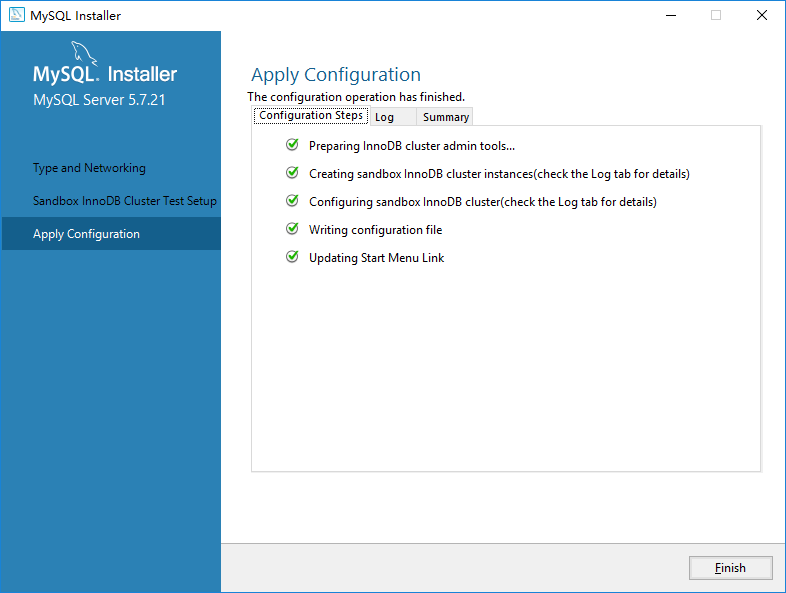
Beginning configuration step: Preparing InnoDB cluster admin tools...

Preparing InnoDB cluster admin tools...

Creating InnoDB cluster admin tools temp folder...

Extracting InnoDB cluster admin tools...

InnoDB cluster admin tools were extracted successfully.

InnoDB cluster admin tools prepared successfully.

Ended configuration step: Preparing InnoDB cluster admin tools...

Beginning configuration step: Creating sandbox InnoDB cluster instances(check the Log tab for details)

Creating sandbox InnoDB cluster instances...

MySQL InnoDB Cluster Sandbox Setup

==================================

Setting up a MySQL InnoDB cluster with  MySQL Server sandbox instances.

The instances will be installed in:

  Unix-like systems: ~/mysql-sandboxes.

  Windows: %userprofile%\MySQL\mysql-sandboxes

The instances will be running on ports , , , , , , , , .

Deploy sandbox instance at port ...

Deploy sandbox instance at port ...

Deploy sandbox instance at port ...

Deploy sandbox instance at port ...

Deploy sandbox instance at port ...

Deploy sandbox instance at port ...

Deploy sandbox instance at port ...

Deploy sandbox instance at port ...

Deploy sandbox instance at port ...

INFO: Sandbox instances deployed successfully.

Sandbox InnoDB cluster instances created successfully.

Ended configuration step: Creating sandbox InnoDB cluster instances(check the Log tab for details)

Beginning configuration step: Configuring sandbox InnoDB cluster(check the Log tab for details)

Configuring sandbox InnoDB cluster...

Setting up InnoDB cluster...

Waiting till seed instance reaches ONLINE status.

Seed instance reached ONLINE status.

Adding instances to the cluster...

Instances successfully added to the cluster.

Waiting till all instances reach ONLINE status...........

Some instances have not reached ONLINE status yet. Please allow more time for them to catch up to the seed instance.

SUCCESS: InnoDB cluster deployed successfully. Call ic.status() to get status information about the cluster.

Sandbox InnoDB cluster configured successfully.

Deleting InnoDB cluster admin tools temporary directory...

Deleted the InnoDB cluster admin tools temporary directory successfully...

Ended configuration step: Configuring sandbox InnoDB cluster(check the Log tab for details)

Beginning configuration step: Writing configuration file

Ended configuration step: Writing configuration file

Beginning configuration step: Updating Start Menu Link

Attempting to verify command-line client shortcut.

Verified command-line client shortcut.

Verified command-line client shortcut.

Ended configuration step: Updating Start Menu Link
The InnoDB cluster 'sandboxCluster' is available on the following ports:

     localhost: through localhost:

To connect with the MySQL Shell execute the following command:

     mysqlsh root@localhost:

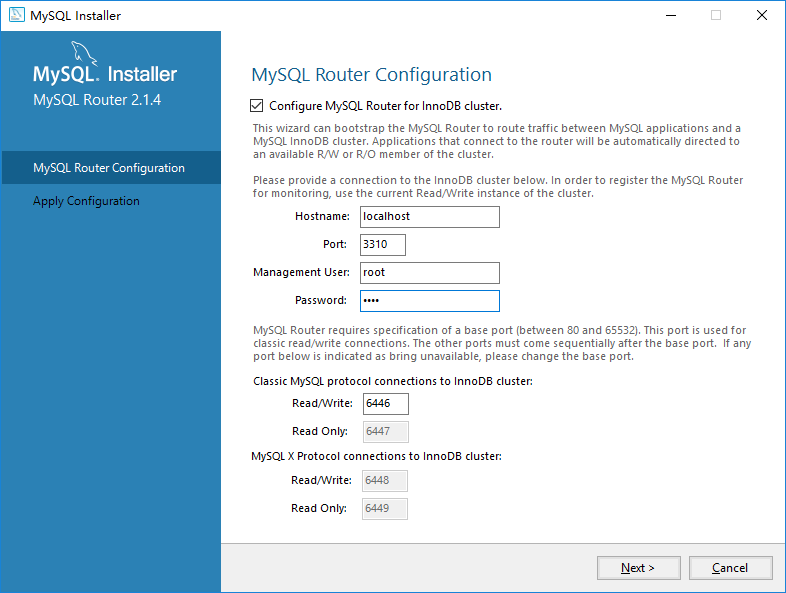
To bootstrap the MySQL Router execute the following command:

     mysqlrouter --bootstrap root@localhost: --directory router-sandbox
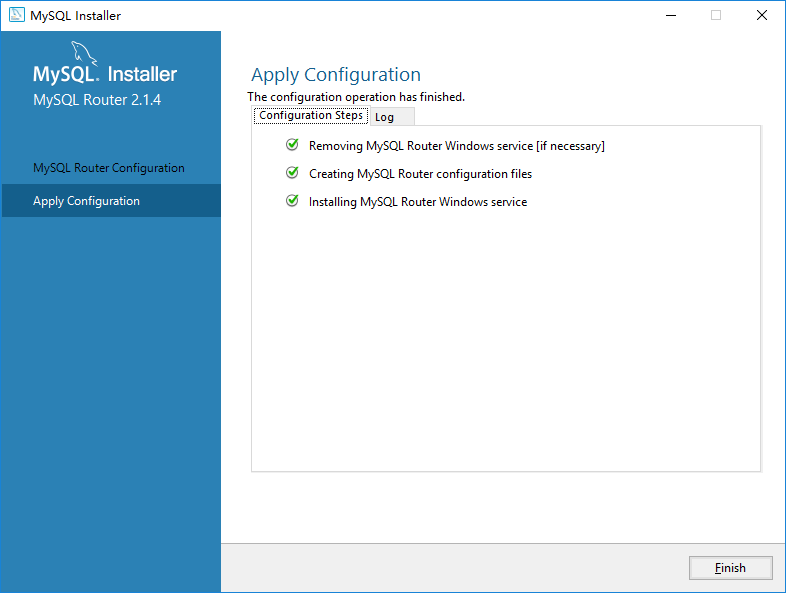
Beginning configuration step: Removing MySQL Router Windows service [if necessary]

Service successfully removed.

Ended configuration step: Removing MySQL Router Windows service [if necessary]

Beginning configuration step: Creating MySQL Router configuration files

Please enter MySQL password for root:

Bootstrapping MySQL Router instance at C:/ProgramData/MySQL/MySQL Router...

MySQL Router  has now been configured for the InnoDB cluster 'sandboxCluster'.

The following connection information can be used to connect to the cluster.

Classic MySQL protocol connections to cluster 'sandboxCluster':

- Read/Write Connections: localhost:6446

- Read/Only Connections: localhost:6447

X protocol connections to cluster 'sandboxCluster':

- Read/Write Connections: localhost:6448

- Read/Only Connections: localhost:6449

Existing configurations backed up to C:/ProgramData/MySQL/MySQL Router/mysqlrouter.conf.bak

Ended configuration step: Creating MySQL Router configuration files

Beginning configuration step: Installing MySQL Router Windows service

Service successfully installed.

Starting MySQL Router Windows service...

Ended configuration step: Installing MySQL Router Windows service
Mysql shell在JavaScript模式下,管理维护集群的命令。
mysql-js> \?

===== Global Commands =====

\help       (\?,\h)    Print this help.

\sql                   Switch to SQL processing mode.

\js                    Switch to JavaScript processing mode.

\py                    Switch to Python processing mode.

\source     (\.)       Execute a script file. Takes a file name as an argument.

\                      Start multi-line input when in SQL mode.

\quit       (\q,\exit) Quit MySQL Shell.

\connect    (\c)       Connect to a server.

\warnings   (\W)       Show warnings after every statement.

\nowarnings (\w)       Don't show warnings after every statement.

\status     (\s)       Print information about the current global connection.

\use        (\u)       Set the current schema for the active session.

For help on a specific command use the command as \? <command>

===== Global Objects =====

dba        Enables you to administer InnoDB clusters using the AdminAPI.

mysql      Used to work with classic MySQL sessions using SQL.

mysqlx     Used to work with X Protocol sessions using the MySQL X DevAPI.

session    Represents the currently open MySQL session.

shell      Gives access to general purpose functions and properties.

sys        Gives access to system specific parameters.

Please note that MySQL Document Store APIs are subject to change in future

releases.

For more help on a global variable use <var>.help(), e.g. dba.help()

mysql-js> \c root@localhost:3310

Creating a Session to 'root@localhost:3310'

Enter password: ****

Your MySQL connection id is 156

Server version: 5.7.21-log MySQL Community Server (GPL)

No default schema selected; type \use <schema> to set one.

mysql-js> var cluster = dba.getCluster()

mysql-js> cluster.status()

{

    "clusterName": "sandboxCluster",

    "defaultReplicaSet": {

        "name": "default",

        "primary": "localhost:3310",

        "status": "OK",

        "statusText": "Cluster is ONLINE and can tolerate up to 4 failures.",

        "topology": {

            "localhost:3310": {

                "address": "localhost:3310",

                "mode": "R/W",

                "readReplicas": {},

                "role": "HA",

                "status": "ONLINE"

            },

            "localhost:3320": {

                "address": "localhost:3320",

                "mode": "R/O",

                "readReplicas": {},

                "role": "HA",

                "status": "ONLINE"

            },

            "localhost:3330": {

                "address": "localhost:3330",

                "mode": "R/O",

                "readReplicas": {},

                "role": "HA",

                "status": "ONLINE"

            },

            "localhost:3340": {

                "address": "localhost:3340",

                "mode": "R/O",

                "readReplicas": {},

                "role": "HA",

                "status": "ONLINE"

            },

            "localhost:3350": {

                "address": "localhost:3350",

                "mode": "R/O",

                "readReplicas": {},

                "role": "HA",

                "status": "ONLINE"

            },

            "localhost:3360": {

                "address": "localhost:3360",

                "mode": "R/O",

                "readReplicas": {},

                "role": "HA",

                "status": "ONLINE"

            },

            "localhost:3370": {

                "address": "localhost:3370",

                "mode": "R/O",

                "readReplicas": {},

                "role": "HA",

                "status": "ONLINE"

            },

            "localhost:3380": {

                "address": "localhost:3380",

                "mode": "R/O",

                "readReplicas": {},

                "role": "HA",

                "status": "ONLINE"

            },

            "localhost:3390": {

                "address": "localhost:3390",

                "mode": "R/O",

                "readReplicas": {},

                "role": "HA",

                "status": "ONLINE"

            }

        }

    }

}

mysql-js>
mysql启用了mysql X Protocol和classic两种协议,支持Client与Server建立会话。
- The mysqlx module contains a complete development API to interact with MySQL Servers using a session through the X Protocol.
- The mysql module contains a lightweight development API to interact with MySQL Servers using a classic session.

上述组复制方案,采用的标准的一主多从复制方案的集群配置。
多主复制以及循环复制的配置方案,可参考:https://dev.mysql.com/doc/refman/5.7/en/mysql-cluster-replication-multi-master.html
一篇更全面的参考文章:https://mysqlserverteam.com/mysql-innodb-cluster-setting-up-innodb-cluster-on-windows/
MYSQL InnoDB Cluster的更多相关文章
- MySQL InnoDB Cluster介绍
目录 一.MySQL InnoDB Cluster介绍 二.环境准备 三.将MGR节点加入MySQL Cluster 四.问题汇总 五.性能测试 六.个人总结 一.MySQL InnoDB Clust ...
- Mysql Innodb cluster集群搭建
之前搭建过一个Mysql Ndb cluster集群,但是mysql版本是5.7的,看到官网上mysql8的还是开发者版本,所以尝试搭建下mysql Innodb cluster集群. MySQL的高 ...
- MySQL高可用方案-MySQL InnoDB Cluster
MySQL InnoDB Cluster简介 MySQL InnoDB Cluster 是最新GA的MySQL高可用方案,利用MySQL Group Replication和MySQL Shell.M ...
- mysql innodb cluster 无感知集群
MySQL 8.0.12 innodb cluster 高可用集群部署运维管理手册 Innodb cluster 原理介绍 Innodb cluster 利用组复制的 pxos 协议,保障数据一致性 ...
- 什么是mysql innodb cluster?
目录 一.简介 二.特性 一.简介 MySQL InnoDB集群提供了一个集成的,本地的,HA解决方案.MySQL InnoDB集群由以下几部分组成: MySQL Servers with Group ...
- MySQL 8.0.18 InnoDB Cluster 主从(MGR)完整安装配置
提示: MySQL InnoDB Cluster底层依赖Group Replication模式,至少3台机器 1. 准备3台 CentOS Linux 7 (Core), 修改各主机名:db-hos ...
- Centos7.5基于MySQL5.7的 InnoDB Cluster 多节点高可用集群环境部署记录
一. MySQL InnoDB Cluster 介绍MySQL的高可用架构无论是社区还是官方,一直在技术上进行探索,这么多年提出了多种解决方案,比如MMM, MHA, NDB Cluster, G ...
- Innodb Cluster集群部署配置
目录 一.简介 二.环境声明 三.部署 安装(均操作) 配置(均操作) 开启group_replication(均操作) 启动group_replication 创建集群(在mysql-1执行) 创建 ...
- 巧用MySQL InnoDB引擎锁机制解决死锁问题(转)
该文会通过一个实际例子中的死锁问题的解决过程,进一步解释innodb的行锁机制 最近,在项目开发过程中,碰到了数据库死锁问题,在解决问题的过程中,笔者对MySQL InnoDB引擎锁机制的理解逐步加深 ...
随机推荐
- 合并多个Excel文件
这条分享来自百度经验https://jingyan.baidu.com/article/e6c8503cb6ed7ee54e1a1811.html
- 泰泽智能电视(Tizen smart TV)问世
6月2日至4日,泰泽开发人员大会(TDC)在美国洛杉矶举行,会上韓国三星公司展出了一台泰泽智能电视(原型机). 智能电视(Smart TV not to be confused ...
- 【html5】如何让Canvas标签自适应设备
javascript方法: var oC=document.querySelectorAll('canvas')[0];oC.width=document.documentElement.client ...
- ORB-SLAM2(4) 离线双目数据测试
官网 https://github.com/raulmur/ORB_SLAM2 1从http://www.cvlibs.net/datasets/kitti/eval_odometry.php下载数据 ...
- 如何在自己设计的页面中调用metamask-2
参考: 1)https://www.colabug.com/3204345.html 2)https://www.toptal.com/ethereum/one-click-login-flows-a ...
- metamask源码学习-inpage.js
The most confusing part about porting MetaMask to a new platform is the way we provide the Web3 API ...
- firewalld
1.查看firewalld防火墙自带的区域名 [root@web ~]# firewall-cmd --get-zones block dmz drop external home internal ...
- [转]QDir类及其用法总结
直接给出原文链接:QDir类及其用法总结
- [转]Qt 之 QFileSystemWatcher
简述 QFileSystemWatcher类用于提供监视文件和目录修改的接口. QFileSystemWatcher通过监控指定路径的列表,监视文件系统中文件和目录的变更. 调用addPath()函数 ...
- 安装win10操作系统的设备将要突破10亿台
导读 该公司最初的目标是在发布后的三年内在 10 亿台设备上运行 Windows 10. 据微软高管梅赫迪 (Yusuf Mehdi) 周四在 Twitter 上透露,目前已经有 8 亿多台设备安装了 ...