
[elk]elasticsearch实现冷热数据分离
本文以最新的elasticsearch-6.3.0.tar.gz为例,为了节约资源,本文将副本调为0, 无client角色
https://www.elastic.co/blog/hot-warm-architecture-in-elasticsearch-5-x
以前es2.x版本配置elasticsearch.yml 里的node.tag: hot这个配置不生效了

被改成了这个

node.attr.box_type: hot
es架构
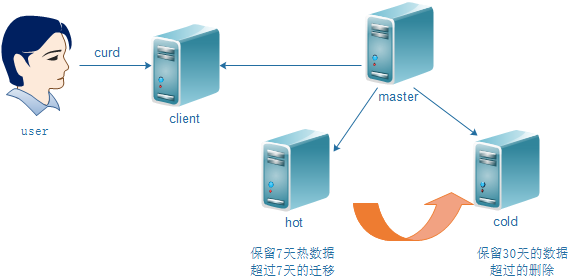
各节点的es配置
master节点:

[root@n1 ~]# cat /usr/local/elasticsearch/config/elasticsearch.yml

cluster.name: elk

node.master: true

node.data: false

node.name: 192.168.2.11

#node.attr.box_type: hot

#node.tag: hot

path.data: /data/es

path.logs: /data/log

network.host: 192.168.2.11

http.port: 9200

transport.tcp.port: 9300

transport.tcp.compress: true

discovery.zen.ping.unicast.hosts: ["192.168.2.11"]

cluster.routing.allocation.disk.watermark.low: 85%

cluster.routing.allocation.disk.watermark.high: 90%

indices.fielddata.cache.size: 10%

indices.breaker.fielddata.limit: 30%

http.cors.enabled: true

http.cors.allow-origin: "*"
- client节点(这里就不配置了)

node.master: false

node.data: false
- hot节点

[root@n2 ~]# cat /usr/local/elasticsearch/config/elasticsearch.yml

cluster.name: elk

node.master: false

node.data: true

node.name: 192.168.2.12

node.attr.box_type: hot

path.data: /data/es

network.host: 192.168.2.12

http.port: 9200

transport.tcp.port: 9300

transport.tcp.compress: true

discovery.zen.ping.unicast.hosts: ["192.168.2.11"]

cluster.routing.allocation.disk.watermark.low: 85%

cluster.routing.allocation.disk.watermark.high: 90%

indices.fielddata.cache.size: 10%

indices.breaker.fielddata.limit: 30%

http.cors.enabled: true

http.cors.allow-origin: "*"
- cold节点

[root@n3 ~]# cat /usr/local/elasticsearch/config/elasticsearch.yml

cluster.name: elk

node.master: false

node.data: true

node.name: 192.168.2.13

node.attr.box_type: cold

path.data: /data/es

network.host: 192.168.2.13

http.port: 9200

transport.tcp.port: 9300

transport.tcp.compress: true

discovery.zen.ping.unicast.hosts: ["192.168.2.11"]

cluster.routing.allocation.disk.watermark.low: 85%

cluster.routing.allocation.disk.watermark.high: 90%

indices.fielddata.cache.size: 10%

indices.breaker.fielddata.limit: 30%

http.cors.enabled: true

http.cors.allow-origin: "*"
如何实现某索引数据写到指定的node?(根据节点tag即可)
我hot节点打了tag
node.attr.box_type: cold
创建一个template(这里我用kibana来操作es的api)

PUT _template/test

{

    "index_patterns": "test-*",

    "settings": {

        "index.number_of_replicas": "0",

        "index.routing.allocation.require.box_type": "hot"

     }

}
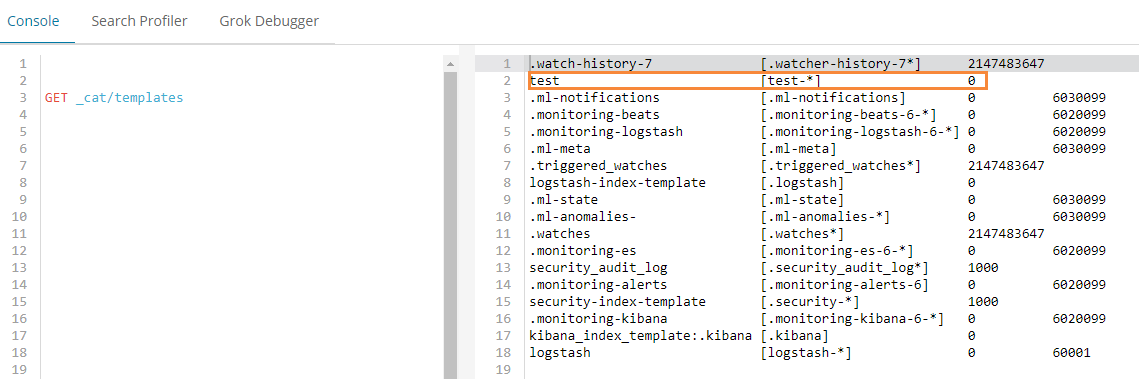
意思是test-*索引命名的,都将其数据放到hot节点上.
如何实现数据从hot节点迁移到老的cold节点?
以test-2018.07.05索引为例,将它从hot节点迁移到cold节点
kibana里操作:

PUT /test-2018.07.05/_settings

{

  "settings": {

    "index.routing.allocation.require.box_type": "cold"

  }

}
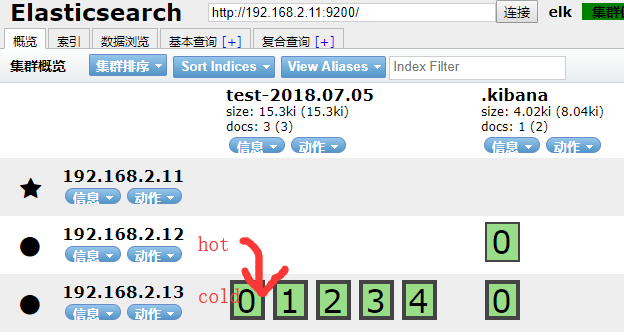
生产中可能每天,或每h,生成一个index.
test-2018.07.01

test-2018.07.02

test-2018.07.03

test-2018.07.04

test-2018.07.05

...
我可以写一个sh定时任务,每天晚上定时迁移数据.
如我在hot节点只保留7天的数据,7天以前的索引我匹配到, 每天晚上执行以下迁移命令即可.
cold节点数据保留1个月?
https://www.cnblogs.com/iiiiher/p/8029062.html
优化点:
1.为了提高吞吐量
path.data:/data1,/data2,/data3,/data4,/data5 可以每个目录挂一块盘
2.如果有10台hot节点,可以设置10个shards
logstash测试
input { stdin { } }

output {

    elasticsearch {

        index => "test-%{+YYYY.MM.dd}"

        hosts => ["192.168.2.11:9200"]

    }

    stdout {codec => rubydebug}

}

/usr/local/logstash/bin/logstash -f logstash.yaml --config.reload.automatic
关于es的index template
关于es的template
es数据入库时候都会匹配一个index template,默认匹配的是logstash这个template
template大致分成setting和mappings两部分
- settings主要作用于index的一些相关配置信息,如分片数、副本数,tranlog同步条件、refresh等。
- mappings主要是一些说明信息,大致又分为_all、_source、prpperties这三部分: https://elasticsearch.cn/article/335
根据index name来匹配使用哪个index template. index template属于节点范围,而非全局. 需要给某个节点单独设置index_template(如给设置一些特有的tag).
[elk]elasticsearch实现冷热数据分离的更多相关文章
- ELK冷热数据分离
通常情况下,我们使用ELK日志分析平台最常用的数据时间为1周或一个月(因业务场景不同,可能存在差别),时间比较长的数据没有特殊情况可能我们就没有必要再进行查询了,但是因业务需求或者作为凭证,这些日 ...
- EFK教程(3) - ElasticSearch冷热数据分离
基于ElasticSearch多实例架构,实现资源合理分配.冷热数据分离 作者:"发颠的小狼",欢迎转载与投稿 目录 ▪ 用途 ▪ 架构 ▪ 192.168.1.51 elasti ...
- 分布式mysql 和 zk ( zookeeper )的分布式的区别 含冷热数据讨论
zk ( zookeeper )的分布式仅仅指的是备份模式. 分布式 mysql 不仅仅要关注备份(从以往的半主,主主,到 paxos). (mysql 比 hbase 的region成熟, hdfs ...
- 使用ELK(Elasticsearch + Logstash + Kibana) 搭建日志集中分析平台实践--转载
原文地址:https://wsgzao.github.io/post/elk/ 另外可以参考:https://www.digitalocean.com/community/tutorials/how- ...
- ELk(Elasticsearch, Logstash, Kibana)的安装配置
目录 ELk(Elasticsearch, Logstash, Kibana)的安装配置 1. Elasticsearch的安装-官网 2. Kibana的安装配置-官网 3. Logstash的安装 ...
- ELK(elasticsearch+kibana+logstash)搜索引擎(二): elasticsearch基础教程
1.elasticsearch的结构 首先elasticsearch目前的结构为 /index/type/id id对应的就是存储的文档ID,elasticsearch一般将数据以JSON格式存储. ...
- ElasticSearch5.X的冷热数据架构
转载:https://my.oschina.net/xiaomaijiang/blog/826701 当使用ElasticSearch做大规模的时序数据分析的时候,我们建议使用基于时序的索引并且采用3 ...
- CentOS 6.x ELK(Elasticsearch+Logstash+Kibana)
CentOS 6.x ELK(Elasticsearch+Logstash+Kibana) 前言 Elasticsearch + Logstash + Kibana(ELK)是一套开源的日志管理方案, ...
- ELK(elasticsearch+logstash+kibana)入门到熟练-从0开始搭建日志分析系统教程
#此文篇幅较长,涵盖了elk从搭建到运行的知识,看此文档,你需要会点linux,还要看得懂点正则表达式,还有一个聪明的大脑,如果你没有漏掉步骤的话,还搭建不起来elk,你来打我. ELK使用elast ...
随机推荐
- 利用shell脚本实现nginx 的logs日志分割
Nginx 是一个非常轻量的 Web 服务器,体积小.性能高.速度快等诸多优点.但不足的是也存在缺点,比如其产生的访问日志文件一直就是一个,不会自动地进行切割,如果访问量很大的话,将 导致日志文件容量 ...
- C#导出Excel时间格式问题
Range range = worksheet.get_Range(worksheet.Cells[2, 1], worksheet.Cells[RowCount + 1, ColCount]);ra ...
- Xamarin Essentials教程地理定位Geolocation
Xamarin Essentials教程地理定位Geolocation 通过地理定位功能,应用程序可以获取用户的当前地理位置,如经纬度值.利用地理位置,可以在地图上定位,也可以转化物理位置,划分用 ...
- AGC 010D.Decrementing(博弈)
题目链接 \(Description\) 给定\(n\)个数\(A_i\),且这\(n\)个数的\(GCD\)为\(1\).两个人轮流进行如下操作: 选择一个\(>1\)的数使它\(-1\). ...
- java获取一年的周数和间隔天数
java获取一年的周数和间隔天数 import java.text.ParseException; import java.text.SimpleDateFormat; import java.uti ...
- 【开源GPS追踪】 之 为何费力不讨好
GPS追踪,在X宝上一搜一大堆,价格几十到几百层次不齐,为何还要自己开发? 1 对我来说,就是手头有这些硬件资源(GPRS GPS MCU)以及软件资源(VPS),算闲的蛋疼,其实不然,本人工作也很忙 ...
- GPIO知识点整理
//GPIO的作业,抄两次,注意:本文件是知识点的整理不是可以直接运行的程序. //STM32必须包含的头文件 #include "stm32f10x.h" //GPIO相关头文件 ...
- [CC-COUPLES]Couples sit next to each other
[CC-COUPLES]Couples sit next to each other 题目大意: 有\(n(n\le5\times10^5)\)对小伙伴共\(2n\)个人坐成一圈.刚开始编号为\(i\ ...
- js 函数与类的区别
<!DOCTYPE html> <html lang="en"> <head> <meta charset="UTF-8&quo ...
- JS简单实现滚动自动加载新内容(懒加载)
加载源 // 这里存后台发来的数据 var galleryList = [ { src: "./images/1.jpeg", desc: "11111" }, ...