
使用python解析nginx日志
性能测试时,需使用生产环境各接口请求比例分配接口请求比,nginx统计脚本如下:
import re

import pandas as pd

import xlwt

obj = re.compile(

    r'(?P<ip>.*?)- - \[(?P<time>.*?)\] "(?P<request>.*?)" (?P<request_time>.*?) (?P<status>.*?) (?P<bytes>.*?) "(?P<referer>.*?)" "(?P<ua>.*?)"')

def load_log(path):

    lst = []

    error_lst = []

    i = 0

    with open(path, mode="r", encoding="utf-8") as f:

        for line in f:

            line = line.strip()

            dic = parse(line)

            if dic:

                lst.append(dic)

            else:

                error_lst.append(line)

            i += 1

    return lst, error_lst

def NumIn(s):

    for char in s:

        if char.isdigit():

            return True

    return False

def parse(line):

    dic = {}

    try:

        result = obj.match(line)

        time = result.group("time")

        time = time.replace(" +0800", "")

        time_min = time[:17]

        time_10min = time[:16]

        time_hour = time[:14]

        dic['time'] = time

        dic['time_min'] = time_min

        dic['time_10min'] = time_10min

        dic['time_hour'] = time_hour

        request = result.group("request")

        a = request.split()[1].split("?")[0]

        c = '/'.join(a.split('/')[:5])

        b = request.split()[0]

        for item in c.split('/')[4]:

            if NumIn(item):

                c='/'.join(a.split('/')[:4])

        dic['request'] = b + " " + c

        return dic

    except:

        return False

def analyse(lst,project):

    df = pd.DataFrame(lst)

    df = df[df['request'].str.contains(project)]

    request_time_count = pd.value_counts(df['time']).reset_index().rename(columns={"index": "time", "time": "count"}).iloc[:100, :]

    request_time_min_count = pd.value_counts(df['time_min']).reset_index().rename(columns={"index": "time_min", "time_min": "count"}).iloc[:100, :]

    request_time_10min_count = pd.value_counts(df['time_10min']).reset_index().rename(columns={"index": "time_10min", "time_10min": "count"}).iloc[:100, :]

    request_time_hour_count = pd.value_counts(df['time_hour']).reset_index().rename(columns={"index": "time_hour", "time_hour": "count"}).iloc[:24, :]

    request_count = pd.value_counts(df['request']).reset_index().rename(columns={"index": "request", "request": "count"}).iloc[:, :]

    request_time_count_values = request_time_count.values

    request_time_min_count_values = request_time_min_count.values

    request_time_10min_count_values = request_time_10min_count.values

    request_time_hour_count_values = request_time_hour_count.values

    request_count_values = request_count.values

    wb = xlwt.Workbook()

    sheet = wb.add_sheet("url请求次数及占比")

    row = 0

    sheet.write(row, 0, "request_url")

    sheet.write(row, 1, "request_type")

    sheet.write(row, 2, "count")

    sheet.write(row, 3, "百分比")

    sheet.write(row, 4, "请求总数")

    row += 1

    sheet.write(row, 4, df.shape[0])

    for item in request_count_values:

        sheet.write(row, 0, item[0].split(" ")[1])

        sheet.write(row, 1, item[0].split(" ")[0])

        sheet.write(row, 2, item[1])

        sheet.write(row, 3, "%.2f%%" % (round(float(item[1]/df.shape[0]) * 100, 2)))

        row += 1

    sheet = wb.add_sheet("秒级请求数top100")

    row = 0

    sheet.write(row, 0, "time")

    sheet.write(row, 1, "count")

    row += 1

    for item in request_time_count_values:

        sheet.write(row, 0, item[0])

        sheet.write(row, 1, item[1])

        row += 1

    sheet = wb.add_sheet("分钟请求数top100")

    row = 0

    sheet.write(row, 0, "time_min")

    sheet.write(row, 1, "count")

    row += 1

    for item in request_time_min_count_values:

        sheet.write(row, 0, item[0]+':00'+"-"+item[0]+':59')

        sheet.write(row, 1, item[1])

        row += 1

    sheet = wb.add_sheet("10分钟请求数top100")

    row = 0

    sheet.write(row, 0, "time10")

    sheet.write(row, 1, "count")

    row += 1

    for item in request_time_10min_count_values:

        sheet.write(row, 0, item[0]+'0:00'+"-"+item[0]+'9:59')

        sheet.write(row, 1, item[1])

        row += 1

    sheet = wb.add_sheet("小时级请求数")

    row = 0

    sheet.write(row, 0, "timehour")

    sheet.write(row, 1, "count")

    row += 1

    for item in request_time_hour_count_values:

        sheet.write(row, 0, item[0]+':00:00'+"-"+item[0]+':59:59')

        sheet.write(row, 1, item[1])

        row += 1

    wb.save("nginx_log.xls")

if __name__ == '__main__':

    lst, error_lst = load_log(path="D:\Desktop\\****imc.log")

    analyse(lst,project='/SVC***/')
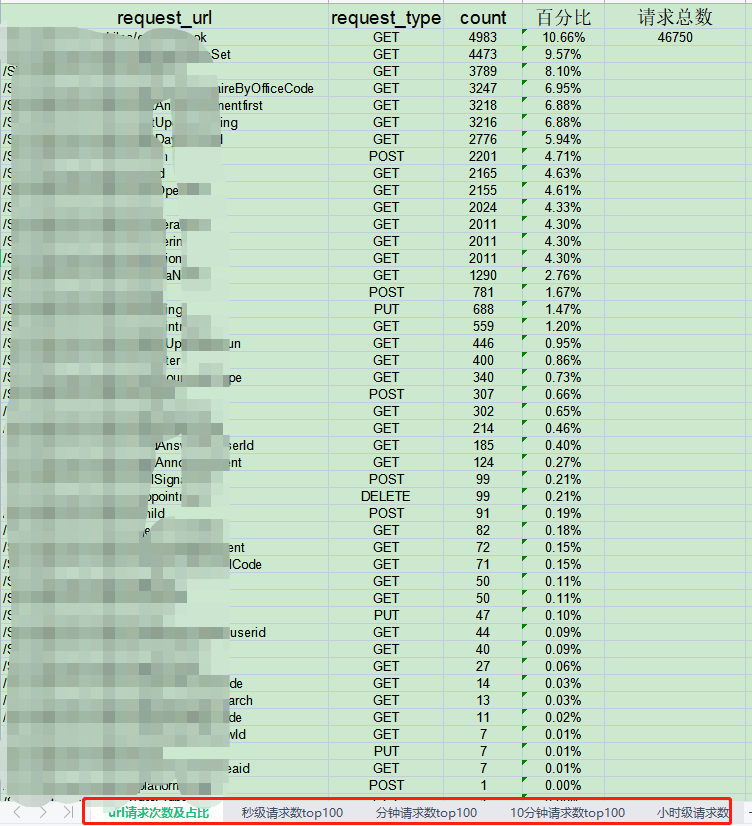
统计结果如下:
使用python解析nginx日志的更多相关文章
- python 解析nginx 日志 url
>>> import os>>> os.chdir('e:/')>>> log=open('access.log')//这两行是获取日志流> ...
- Python切割nginx日志_小组_ThinkSAAS
Python切割nginx日志_小组_ThinkSAAS Python切割nginx日志
- python解析Nginx访问日志
环境说明 python3+ pip install geoip2==2.9.0 nginx日志配置成json格式,配置如下: log_format json_log '{ "time&quo ...
- 利用python分析nginx日志
最近在学习python,写了个脚本分析nginx日志,练练手.写得比较粗糙,但基本功能可以实现. 脚本功能:查找出当天访问次数前十位的IP,并获取该IP来源,并将分析结果发送邮件到指定邮箱. 实现前两 ...
- 通过python统计nginx日志定位php网站响应慢的问题
# 公司网站反映很慢,可能是一些页面的访问方法或者页面引起,通过程序统计nginx访问日志的页面和具体的action方法访问次数以及平均响应时间可以为程序开发的同事提供参考定位具体的代码 # 默认的n ...
- Logstash使用grok插件解析Nginx日志
grok表达式的打印复制格式的完整语法是下面这样的: %{PATTERN_NAME:capture_name:data_type}data_type 目前只支持两个值:int 和 float. 在线g ...
- ELK+Redis 解析Nginx日志
一.ELK简介 Elk是指logstash,elasticsearch,kibana三件套,我们一般使用它们做日志分析. ELK工作原理图: 简单来讲ELK具体的工作流程就是客户端的logstash ...
- [日志分析]Graylog2进阶 通过正则解析Nginx日志
之前分享的 [日志分析]Graylog2采集Nginx日志 主动方式 这篇文章介绍了Graylog如何通过Graylog Collector Sidecar来采集nginx日志. 由于日志是未经处理的 ...
- Goaccess解析nginx日志备忘
参考 http://nginx.org/en/docs/http/ngx_http_log_module.html?&_ga=1.92028562.949762386.1481787781#l ...
- 使用Python 统计nginx日志前十ip访问量并以柱状图显示
脚本内容: import matplotlib.pyplot as plt # nginx_file = '10.6.11.91_access.log-2018-12-27' ip = {} #筛选n ...
随机推荐
- 全球首款乘云而来的存储产品CDS诞生!
9月22日,阿里云发布全球首款"云定义存储"(Cloud Defined Storage,CDS)产品.作为一款本地部署的分布式存储产品,阿里云CDS拥有与公共云存储相同的技术架 ...
- 《HelloGitHub》第 97 期
兴趣是最好的老师,HelloGitHub 让你对编程感兴趣! 简介 HelloGitHub 分享 GitHub 上有趣.入门级的开源项目. https://github.com/521xueweiha ...
- go-admin 视频教程
https://cloud.189.cn/t/6JJ3uqreqyai (访问码:2xn5) 感谢 熊猫 同学 整理 失效了可以去B站看 https://www.bilibili.com/video/ ...
- ansible(5)--ansible的script模块
1. script模块 作用:在远程主机运行本地的脚本: 调用格式: -m script -a "/PATH/TO/SCRIPT_FILE": 参数: creates:如果其后跟的 ...
- postgresql 去重&查最新一组记录 关键词partition by
- C语言中四舍五入问题总结
C语言中四舍五入问题的总结 在C语言中大部分情况下都是不需要四舍五入的. 除了一种情况:在使用输出函数 printf()限制浮点型输出的小数位个数 eg: printf("%0.2f&quo ...
- SQL Server实战七:自定义数据类型、标量值、内嵌表值、多语句表值函数的操作
本文介绍基于Microsoft SQL Server软件,实现数据库用户自定义数据类型的创建.使用与删除,以及标量值.内嵌表值.多语句表值函数等用户定义函数的创建.使用.删除方法. 目录 1 用S ...
- GitHub SSH 快速配置
每次更换系统或者电脑时,都需要重新配置一番 Github SSH 的验证,记性不太好,写了一个快速部署的辅助脚本,直接安装脚本提示使用即可,经测试,Linux 和 Windows 下均能使用. 脚本功 ...
- 记录一次配置iis与Sqlserver的集成windows账户登录
1.连接字符串,要写 "Data Source=[主机名称];Initial Catalog=[数据库名称];Integrated Security=True" 2.iis下配 ...
- Android 13 - Media框架(22)- ACodec(四)
关注公众号免费阅读全文,进入音视频开发技术分享群! 前面两节我们了解了 ACodec 的创建及配置流程,配置完成后 ACodec 进入了 LoadedState,这一节开始将会了解 ACodec 的启 ...