
springcloud11----turbine
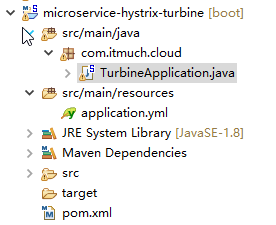
package com.itmuch.cloud;

import org.springframework.boot.SpringApplication;

import org.springframework.boot.autoconfigure.SpringBootApplication;

import org.springframework.cloud.netflix.turbine.EnableTurbine;

//一个turbine server就写完了

//turbine是监控整个集群的,

@EnableTurbine

@SpringBootApplication

public class TurbineApplication {

  public static void main(String[] args) {

    SpringApplication.run(TurbineApplication.class, args);

  }

}
server:

  port: 8031

  #http://localhost:8031/turbine.stream

spring:

  application:

    name: microservice-hystrix-turbine

#turbine加入eureka

eureka:

  client:

    serviceUrl:

      defaultZone: http://user:password123@localhost:8761/eureka

  instance:

    prefer-ip-address: true

  #turbine加入eureka

turbine:

  aggregator:

    clusterConfig: default

  #监控ribbon-with-hystrix集群(多个端口)和feign-with-hystrix集群(多个状态)

  appConfig: microservice-consumer-movie-ribbon-with-hystrix2,microservice-consumer-movie-feign-with-hystrix

  clusterNameExpression: "'default'"
<project xmlns="http://maven.apache.org/POM/4.0.0" xmlns:xsi="http://www.w3.org/2001/XMLSchema-instance"

    xsi:schemaLocation="http://maven.apache.org/POM/4.0.0 http://maven.apache.org/xsd/maven-4.0.0.xsd">

    <modelVersion>4.0.0</modelVersion>

    <parent>

        <groupId>com.itmuch.cloud</groupId>

        <artifactId>microservice-spring-cloud</artifactId>

        <version>0.0.1-SNAPSHOT</version>

    </parent>

    <artifactId>microservice-hystrix-turbine</artifactId>

    <packaging>jar</packaging>

    <properties>

        <project.build.sourceEncoding>UTF-8</project.build.sourceEncoding>

    </properties>

    <!-- turbine的依赖 -->

    <dependencies>

        <dependency>

            <groupId>org.springframework.cloud</groupId>

            <artifactId>spring-cloud-starter-turbine</artifactId>

        </dependency>

    </dependencies>

</project>
turbine2的yml文件
server:

  port: 8031

spring:

  application:

    name: microservice-hystrix-turbine

eureka:

  client:

    serviceUrl:

      defaultZone: http://user:password123@localhost:8761/eureka

  instance:

    prefer-ip-address: true

turbine:

  aggregator:

    clusterConfig: MICROSERVICE-CONSUMER-MOVIE-RIBBON-WITH-HYSTRIX2

  appConfig: microservice-consumer-movie-ribbon-with-hystrix2

turbine.instanceUrlSuffix.MICROSERVICE-CONSUMER-MOVIE-RIBBON-WITH-HYSTRIX2: /ribbon/hystrix.stream

logging:

  level:

    root: INFO

    com.netflix.turbine.monitor: DEBUG
turbine3的yml文件
server:

  port: 8031

spring:

  application:

    name: microservice-hystrix-turbine

eureka:

  client:

    serviceUrl:

      defaultZone: http://user:password123@localhost:8761/eureka

  instance:

    prefer-ip-address: true

turbine:

  aggregator:

    clusterConfig: MICROSERVICE-CONSUMER-MOVIE-RIBBON-WITH-HYSTRIX3

  appConfig: microservice-consumer-movie-ribbon-with-hystrix3

logging:

  level:

    root: INFO

    com.netflix.turbine.monitor: DEBUG
microservice-consumer-movie-ribbon-with-hystrix2的yml文件
spring:

  application:

    name: microservice-consumer-movie-ribbon-with-hystrix2

server:

  port: 8010

  context-path: /ribbon   #url的前缀

eureka:

  client:

    healthcheck:

      enabled: true

    serviceUrl:

      defaultZone: http://user:password123@localhost:8761/eureka

  instance:

    prefer-ip-address: true

    home-page-url-path: /ribbon

hystrix.command.default.execution.isolation.thread.timeoutInMilliseconds: 5000

#http://localhost:8761/eureka/apps/microservice-consumer-movie-ribbon-with-hystrix2
microservice-consumer-movie-ribbon-with-hystrix3的yml文件
#一个应用有2个端口,一个管理端口一个访问端口

management: # spring-boot-starter-acturator管理端口

  port: 8081

spring:

  application:

    name: microservice-consumer-movie-ribbon-with-hystrix3

server:

  port: 8010 #访问端口

  context-path: /ribbon

eureka:

  client:

    healthcheck:

      enabled: true

    serviceUrl:

      defaultZone: http://user:password123@localhost:8761/eureka

  instance:

    prefer-ip-address: true

    metadata-map:

      management.port: 8081

hystrix.command.default.execution.isolation.thread.timeoutInMilliseconds: 5000
springcloud11----turbine的更多相关文章
- 第二十六章 hystrix-dashboard + turbine
一.使用turbine的意义 引入多个hystrix stream: 1.使用hystrix-dashboard的可以添加多个stream的功能 图中添加的两个stream会在真正monitor的时候 ...
- 附7 turbine
一.作用 聚集同一个微服务的相同的commandKey.Threadpool.commandGroupKey数据进行聚合 二.配置 1.集群(cluster)(turbine聚集数据的粒度) turb ...
- apache开源项目-- Turbine
1.缘起 Jetspeed是Apache Jakarta小组的开放源码门户系统.它使得最终用户可以通过WAP手机.浏览器.PDA等各种设备来使用各种各样的网络资源(比如应用程序.数据以及这之外的任何网 ...
- springcloud(五):熔断监控Hystrix Dashboard和Turbine
Hystrix-dashboard是一款针对Hystrix进行实时监控的工具,通过Hystrix Dashboard我们可以在直观地看到各Hystrix Command的请求响应时间, 请求成功率等数 ...
- spring cloud熔断监控Hystrix Dashboard和Turbine
参考: http://blog.csdn.net/ityouknow/article/details/72625646 完整pom <?xml version="1.0" e ...
- 改造断路器集群监控Hystrix Turbine实现自动注册消费者、实时监控多个服务
在上一篇文章中,我们搭建了Hystrix Dashoard,对指定接口进行监控.但是只能对一个接口进行监听,功能比较局限: Turbine:汇总系统内多个服务的数据并显示到 Hystrix Dashb ...
- spring cloud(五)熔断监控Hystrix Dashboard和Turbine
Hystrix-dashboard是一款针对Hystrix进行实时监控的工具,通过Hystrix Dashboard我们可以在直观地看到各Hystrix Command的请求响应时间, 请求成功率等数 ...
- Spring Cloud Turbine微服务集群实时监控
本文代码下载地址: https://gitlab.com/mySpringCloud/turbine SpringBoot版本:1.5.9.RELEASE (稳定版) SpringCloud版本:Ed ...
- SpringCloud系列七:Hystrix 熔断机制(Hystrix基本配置、服务降级、HystrixDashboard服务监控、Turbine聚合监控)
1.概念:Hystrix 熔断机制 2.具体内容 所谓的熔断机制和日常生活中见到电路保险丝是非常相似的,当出现了问题之后,保险丝会自动烧断,以保护我们的电器, 那么如果换到了程序之中呢? 当现在服务的 ...
- Spring Cloud 入门教程(八): 断路器指标数据监控Hystrix Dashboard 和 Turbine
1. Hystrix Dashboard (断路器:hystrix 仪表盘) Hystrix一个很重要的功能是,可以通过HystrixCommand收集相关数据指标. Hystrix Dashboa ...
随机推荐
- iOS - UIImageView - how to handle UIImage image orientation
本文转载至 http://stackoverflow.com/questions/8915630/ios-uiimageview-how-to-handle-uiimage-image-orienta ...
- LLDB调试器
你是否曾经苦恼于理解你的代码,而去尝试打印一个变量的值? NSLog(@"%@", whatIsInsideThisThing); 或者跳过一个函数调用来简化程序的行为? NSNu ...
- 17,UC(06)
/* 达内学习 UC day06 2013-10-10 */ 回忆过去: 系统调用 - UNIX操作系统提供的一些列函数皆苦,用于访问内核空间,遵循posix规范 文件操作:open()\rea ...
- web基础----->模板引擎Velocity的使用(二)
这里面是关于velocity的一些用法,比较基础的使用.愿你生命中有够多的云翳,来造成一个美丽的黄昏. velocity生成javaBean 一.定义一个简单的bean类 public class C ...
- CentOS下安装cvechecker并进行主机基线安全检查
一.cvechecker的安装 1.首先下载cvechecker并解压该文件: cd /home/username mkdir cve wget https://raw.githubuserconte ...
- 微信小游戏 Egret开发数据域官方Demo下载地址
随着引擎的升级,伴随而来就是各种问题,使用官方调试过的Demo,少走弯路. Mark下 官方Demo
- 系统事件管理(Events) ---- HTML5+
模块:events Events模块管理客户端事件,包括系统事件,如扩展API加载完毕.程序前后台切换等. 比如说:网络的链接的和断开这种事件,系统从前台走到后台这种事件: 不包括:点击和滑动页面事件 ...
- 次小生成树(poj1679)
The Unique MST Time Limit: 1000MS Memory Limit: 10000K Total Submissions: 20737 Accepted: 7281 D ...
- Centos6.8 防火墙设置
1.指令 vi /etc/sysconfig/iptables 添加以下内容和要开放的端口 # Firewall configuration written by system-config-fire ...
- DetailView内匿名函数不可用
DetailView yii\widgets\DetailView 小部件显示的是单一 yii\widgets\DetailView::$model 数据的详情. 它非常适合用常规格式显示一个模型(例 ...