
Spring Cloud 入门教程(九): 路由网关zuul
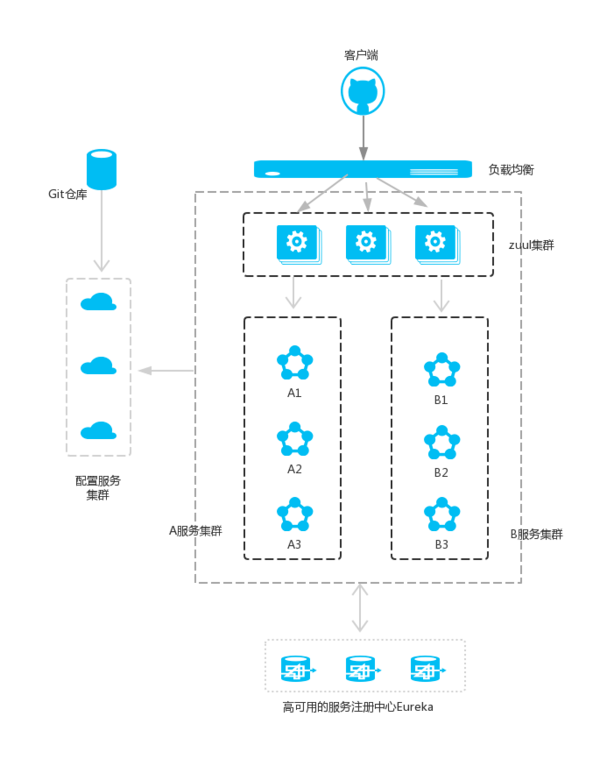
在微服务架构中,需要几个关键的组件,服务注册与发现、服务消费、负载均衡、断路器、智能路由、配置管理等,由这几个组件可以组建一个简单的微服务架构。客户端的请求首先经过负载均衡(zuul、Ngnix),再到达服务网关(zuul集群),然后再到具体的服务,服务统一注册到高可用的服务注册中心集群,服务的所有的配置文件由配置服务管理(下一篇文章讲述),配置服务的配置文件放在Git仓库,方便开发人员随时改配置。
1. Zuul介绍
Zuul的主要功能是路由和过滤器。路由功能是微服务的一部分,比如/api/user映射到user服务,/api/shop映射到shop服务。zuul实现了负载均衡。以下是微服务结构中,Zuul的基本流程。在接下来的步骤中,我们来创建一个zuul服务, 将/api-feign/**映射到我们之前创建feign-service, 将/api-ribbon/**映射到之前的ribbon-service服务。
2. 创建Zuul的Maven工程,其中关于zuul的依赖是
<dependency>

     <groupId>org.springframework.cloud</groupId>

    <artifactId>spring-cloud-starter-zuul</artifactId>

</dependency>
完整pom.xml如下:
 <?xml version="1.0" encoding="UTF-8"?>

 <project xmlns="http://maven.apache.org/POM/4.0.0"

          xmlns:xsi="http://www.w3.org/2001/XMLSchema-instance"

          xsi:schemaLocation="http://maven.apache.org/POM/4.0.0 http://maven.apache.org/xsd/maven-4.0.0.xsd">

     <modelVersion>4.0.</modelVersion>

     <groupId>cm.chry</groupId>

     <artifactId>spring.helloworld.zuul.service</artifactId>

     <version>0.0.-SNAPSHOT</version>

     <name>spring.helloworld.zuul.service</name>

     <description>zuul service demo</description>

     <parent>

         <groupId>org.springframework.boot</groupId>

         <artifactId>spring-boot-starter-parent</artifactId>

         <version>1.5..RELEASE</version>

         <relativePath/> <!-- lookup parent from repository -->

     </parent>

     <properties>

         <project.build.sourceEncoding>UTF-</project.build.sourceEncoding>

         <project.reporting.outputEncoding>UTF-</project.reporting.outputEncoding>

         <java.version>1.8</java.version>

     </properties>

     <dependencies>

         <dependency>

             <groupId>org.springframework.cloud</groupId>

             <artifactId>spring-cloud-starter-eureka</artifactId>

         </dependency>

         <dependency>

             <groupId>org.springframework.boot</groupId>

             <artifactId>spring-boot-starter-web</artifactId>

         </dependency>

         <dependency>

             <groupId>org.springframework.cloud</groupId>

             <artifactId>spring-cloud-starter-zuul</artifactId>

         </dependency>

         <dependency>

             <groupId>org.springframework.boot</groupId>

             <artifactId>spring-boot-starter-test</artifactId>

             <scope>test</scope>

         </dependency>

     </dependencies>

     <dependencyManagement>

         <dependencies>

             <dependency>

                 <groupId>org.springframework.cloud</groupId>

                 <artifactId>spring-cloud-dependencies</artifactId>

                 <version>Dalston.RC1</version>

                 <type>pom</type>

                 <scope>import</scope>

             </dependency>

         </dependencies>

     </dependencyManagement>

     <build>

         <plugins>

             <plugin>

                 <groupId>org.springframework.boot</groupId>

                 <artifactId>spring-boot-maven-plugin</artifactId>

             </plugin>

         </plugins>

     </build>

     <repositories>

         <repository>

             <id>spring-milestones</id>

             <name>Spring Milestones</name>

             <url>https://repo.spring.io/milestone</url>

             <snapshots>

                 <enabled>false</enabled>

             </snapshots>

         </repository>

     </repositories>

 </project>
pom.xml
3. 创建启动类: 使用@EnableZuulProxy注解
 package spring.helloworld.zuul.service;

 import org.springframework.boot.SpringApplication;

 import org.springframework.boot.autoconfigure.SpringBootApplication;

 import org.springframework.cloud.netflix.eureka.EnableEurekaClient;

 import org.springframework.cloud.netflix.zuul.EnableZuulProxy;

 @EnableZuulProxy

 @EnableEurekaClient

 @SpringBootApplication

 public class ServiceZuulApplication {

     public static void main(String[] args) {

         SpringApplication.run(ServiceZuulApplication.class, args);

     }

 }
4. 编写zuul服务配置:
简单配置两个路由, 一个路由到ribbon,一个路由到feign; 由于都注册到eureka服务中心,所以都用通过serviceId来发现服务具体地址, path是路由的地址映射关系
 eureka:

     client:

         serviceUrl:

             defaultZone: http://localhost:8761/eureka/

 server:

     port: 8904

 spring:

     application:

         name: service-zuul

 zuul:

   routes:

     ribbo:

       path: /api-ribbon/**

       serviceId: service-ribbon

     feign:

       path: /api-feign/**

       serviceId: service-feign
这时启动zuul服务, 然后访问http://localhost:8904/api-ribbon可直接路由到http://localhost:8901/.
http://localhost:8904/api-feign/hello可路由到http://localhost:8902/hello
5. Zuul过滤器
zuul还提供了过滤功能, 只要实现接口ZuulFilter即可对请求先进行筛选和过滤之后再路由到具体服务。
 package spring.helloworld.zuul.service;

 import javax.servlet.http.HttpServletRequest;

 import org.slf4j.Logger;

 import org.slf4j.LoggerFactory;

 import org.springframework.stereotype.Component;

 import com.netflix.zuul.ZuulFilter;

 import com.netflix.zuul.context.RequestContext;

 @Component

 public class DemoFilter extends ZuulFilter {

     private static Logger log = LoggerFactory.getLogger(DemoFilter.class);

     @Override

     public String filterType() {

         return "pre";

     }

     @Override

     public int filterOrder() {

         return 0;

     }

     @Override

     public boolean shouldFilter() {

         return true;

     }

     @Override

     public Object run() {

         RequestContext ctx = RequestContext.getCurrentContext();

         HttpServletRequest request = ctx.getRequest();

         String s = String.format("%s >>> %s", request.getMethod(), request.getRequestURL().toString());

         log.info(s);

         return null;

     }

 }
filterType:返回一个字符串代表过滤器的类型,在zuul中定义了四种不同生命周期的过滤器类型,具体如下:
- pre:路由之前
- routing:路由之时
- post: 路由之后
- error:发送错误调用
filterOrder:过滤的顺序
- pre:路由之前
- routing:路由之时
- post: 路由之后
- error:发送错误调用
shouldFilter:这里可以写逻辑判断,是否要过滤,本文true,永远过滤。
run:过滤器的具体逻辑,这里只是将请求的URL简单些到日志中
上一篇:Spring Cloud 入门教程(八): 断路器指标数据监控Hystrix Dashboard 和 Turbine
下一篇:Spring Cloud 入门教程(十):和RabbitMQ的整合 -- 消息总线Spring Cloud Netflix Bus
Spring Cloud 入门教程(九): 路由网关zuul的更多相关文章
- Spring Cloud 入门教程(八): 断路器指标数据监控Hystrix Dashboard 和 Turbine
1. Hystrix Dashboard (断路器:hystrix 仪表盘) Hystrix一个很重要的功能是,可以通过HystrixCommand收集相关数据指标. Hystrix Dashboa ...
- Spring Cloud 入门教程 - 搭建配置中心服务
简介 Spring Cloud 提供了一个部署微服务的平台,包括了微服务中常见的组件:配置中心服务, API网关,断路器,服务注册与发现,分布式追溯,OAuth2,消费者驱动合约等.我们不必先知道每个 ...
- Spring Cloud 入门教程(一): 服务注册
1. 什么是Spring Cloud? Spring提供了一系列工具,可以帮助开发人员迅速搭建分布式系统中的公共组件(比如:配置管理,服务发现,断路器,智能路由,微代理,控制总线,一次性令牌,全局锁 ...
- Spring Cloud 入门教程(七): 熔断机制 -- 断路器
对断路器模式不太清楚的话,可以参看另一篇博文:断路器(Curcuit Breaker)模式,下面直接介绍Spring Cloud的断路器如何使用. SpringCloud Netflix实现了断路器库 ...
- Spring Cloud 入门教程(六): 用声明式REST客户端Feign调用远端HTTP服务
首先简单解释一下什么是声明式实现? 要做一件事, 需要知道三个要素,where, what, how.即在哪里( where)用什么办法(how)做什么(what).什么时候做(when)我们纳入ho ...
- Spring Cloud 入门教程(十):和RabbitMQ的整合 -- 消息总线Spring Cloud Netflix Bus
在本教程第三讲Spring Cloud 入门教程(三): 配置自动刷新中,通过POST方式向客户端发送/refresh请求, 可以让客户端获取到配置的最新变化.但试想一下, 在分布式系统中,如果存在很 ...
- Spring Cloud 入门教程(五): Ribbon实现客户端的负载均衡
接上节,假如我们的Hello world服务的访问量剧增,用一个服务已经无法承载, 我们可以把Hello World服务做成一个集群. 很简单,我们只需要复制Hello world服务,同时将原来的端 ...
- Spring Cloud 入门教程(二): 配置管理
使用Config Server,您可以在所有环境中管理应用程序的外部属性.客户端和服务器上的概念映射与Spring Environment和PropertySource抽象相同,因此它们与Spring ...
- Spring Cloud 入门教程(三): 配置自动刷新
之前讲的配置管理, 只有在应用启动时会读取到GIT的内容, 之后只要应用不重启,GIT中文件的修改,应用无法感知, 即使重启Config Server也不行. 比如上一单元(Spring Cloud ...
随机推荐
- VirtualBox下安装CentOS7系统
本文假定你已经知道如何安装VirtualBox虚拟机软件,并且已经安装好了. 首先我们需要准备好centos的iso镜像文件,可以从centos的官网下载. 以下操作使用的VirtualBox版本号是 ...
- Python机器学习入门
# NumPy Python科学计算基础包 import numpy as np # 导入numpy库并起别名为npnumpy_array = np.array([[1,3,5],[2,4,6]])p ...
- sql server全文索引使用中的小坑 (转载)
一.业务场景 我们在实际生产环境中遇到了这样一种需求,即需要检索一个父子关系的子树数据 估计大家也遇到过类似的场景,最典型的就是省市数据,其中path字段是按层级关系生成的行政区路径: 如果我们已知某 ...
- python3 下列表与字典转换
在写爬虫的时候,经常需要处理cookie,requests库里的cookie是dict,但是headers['cookie']却是一个key=value的字符串. 下面是几个用推导式实现的转换函数,供 ...
- Pandas:让你像写SQL一样做数据分析
1. 引言 Pandas是一个开源的Python数据分析库.Pandas把结构化数据分为了三类: Series,1维序列,可视作为没有column名的.只有一个column的DataFrame: Da ...
- Hibernate 中的 idclass mapping 问题
关于出现 idclass mapping 运行错误 @IdClass 注释通常用于定义包含复合键id的Class.即多个属性的关键复合. @IdClass(CountrylanguageEntityP ...
- 常用DOS命令之通俗易懂篇
目录 常用DOS命令之通俗易懂篇 Arp 命令 Assoc 关联 At 计划服务 Attrib 属性 Cd=chdir 目录 Cipher Cls 清屏 Color 颜色 Comp 比较 Compac ...
- Docker容器学习与分享01
1.什么是容器? 容器技术是一种虚拟化的方案,与传统的虚拟机不同,传统的虚拟机是通过中间层将一台或多台独立的机器虚拟运行于物理硬件之上,而容器是直接运行在操作系统内核之上的用户空间. 所以容器虚拟化又 ...
- 洛谷P1223
#include <iostream>#include <algorithm>#include <cstdio>using namespace std;int b[ ...
- Java:传值还是传引用?
这是一个Java的经典问题,大部分人从C,C++语言入门,C语言有三种传递方式:值传递,地址传递和引用传递.详细的对C语言指针,引用的我个人的理解,见链接. Java所有操作都是传值操作!都是传值操作 ...