
利用WPF建立自己的3d gis软件(非axhost方式)(一)
原文:利用WPF建立自己的3d gis软件(非axhost方式)(一)
先下载SDK:https://pan.baidu.com/s/1M9kBS6ouUwLfrt0zV0bPew 密码:1te1
地图数据包(sqlserver2008R2版本,也可以不下载): https://pan.baidu.com/s/1PjcNamad7OVpCrsVJ7dwFQ 密码:uw9r
完整的视频演示:http://v.youku.com/v_show/id_XMTU4MTI5NTE4NA==.html
下载完成以后,解压出来,将30-1.exe 拖动到 把授权拖到我上面install.bat上完成授权安装。。。
设置system.ini 如下内容
Server=122.112.229.220
user=GisTest
Password=chinamtouch.com
该数据库中只提供 成都市火车南站附近的数据请注意,104.0648,30.61658
而且该公用服务器带宽不大,所以会有些卡顿,建议下载数据库后本地使用,下载后的数据库有些许变化,请联系博主修改一下
你下载了sql包。则设置为自己的设置。
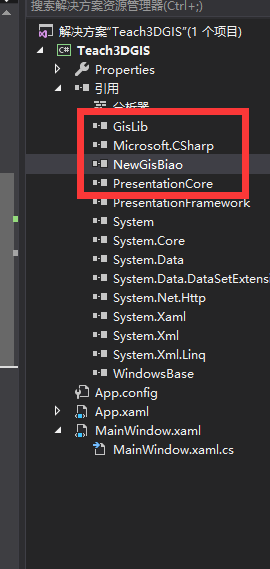
下一步新建一个wpf工程。然后引用SDK中的gislib.dll,NewGisBiao.dll如下图:
下面上代码
<Window x:Class="Teach3DGIS.MainWindow"

        xmlns="http://schemas.microsoft.com/winfx/2006/xaml/presentation"

        xmlns:x="http://schemas.microsoft.com/winfx/2006/xaml"

        xmlns:d="http://schemas.microsoft.com/expression/blend/2008"

        xmlns:mc="http://schemas.openxmlformats.org/markup-compatibility/2006"

        xmlns:local="clr-namespace:Teach3DGIS"

        mc:Ignorable="d"

        Title="MainWindow" Height="768" Width="1024">

    <Canvas x:Name="Root" Height="768" Width="1024">

    </Canvas>

</Window>
MainWindow.cs
using GisLib;

using System;

using System.Collections.Generic;

using System.Linq;

using System.Text;

using System.Threading.Tasks;

using System.Windows;

using System.Windows.Controls;

using System.Windows.Data;

using System.Windows.Documents;

using System.Windows.Input;

using System.Windows.Media;

using System.Windows.Media.Imaging;

using System.Windows.Navigation;

using System.Windows.Shapes;

namespace Teach3DGIS

{

    /// <summary>

    /// MainWindow.xaml 的交互逻辑

    /// </summary>

    public partial class MainWindow : Window

    {

        public MainWindow()

        {

            InitializeComponent();

            Init3D();

        }

        GisLib.MTGIS3D gis3d;

        GisLib.MTGIS2 gis2d;

        private void Init3D()

        {

            if (gis3d == null)

            {

                IniRead.IniReadWrite.BiaoManage = new NewGisBiao.Base.BiaoManage(Root);

                gis3d = new MTGIS3D();

                gis3d.TManage = IniRead.IniReadWrite.BiaoManage;

                Root.Children.Add(gis3d);

                Canvas.SetLeft(gis3d, 0);

                Canvas.SetTop(gis3d, 0);

                gis3d.Width = this.Width - 100;

                gis3d.Height = this.Height - 100;

                //高程数据目录及对象初始

                // gis3d.WireLineSelect += Gis3d_WireLineSelect;

                gis3d._HiMain = new GisLib.HiData.HiMang(AppDomain.CurrentDomain.BaseDirectory + "hidatatemp", "hi");

                 IniRead.IniReadWrite.MPareant = gis3d;

            }

        }

    }

}
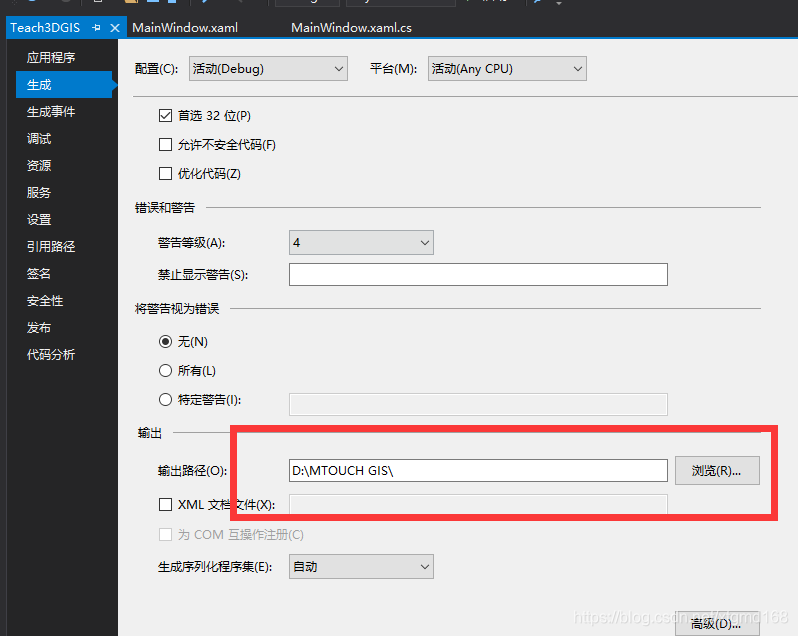
设置工程 输出目录为SDK所在目录如下图
然后运后就可以得到一个wpf版本的3dgis了:
由于是非axhost方式加入的,所以是完全支持WPF的特性的。我们可以将地图控件旋转一定角度:代码如下:
  RotateTransform u1 = new RotateTransform();

                u1.Angle = 45;

                gis3d.RenderTransformOrigin = new Point(0.5, 0.5);

                gis3d.RenderTransform = u1;
效果如下:
利用WPF建立自己的3d gis软件(非axhost方式)(一)的更多相关文章
- 利用WPF建立自己的3d gis软件(非axhost方式)(十二)SDK中的导航系统
原文:利用WPF建立自己的3d gis软件(非axhost方式)(十二)SDK中的导航系统 先下载SDK:https://pan.baidu.com/s/1M9kBS6ouUwLfrt0zV0bPew ...
- 利用WPF建立自己的3d gis软件(非axhost方式)(十三)万能的用户层接口,(强大的WPF)
原文:利用WPF建立自己的3d gis软件(非axhost方式)(十三)万能的用户层接口,(强大的WPF) 先下载SDK:https://pan.baidu.com/s/1M9kBS6ouUwLfrt ...
- 利用WPF建立自己的3d gis软件(非axhost方式)(十一)SDK中的动画系统
原文:利用WPF建立自己的3d gis软件(非axhost方式)(十一)SDK中的动画系统 先下载SDK:https://pan.baidu.com/s/1M9kBS6ouUwLfrt0zV0bPew ...
- 利用WPF建立自己的3d gis软件(非axhost方式)(十)SDK中一些自带的展示面板应用
原文:利用WPF建立自己的3d gis软件(非axhost方式)(十)SDK中一些自带的展示面板应用 先下载SDK:https://pan.baidu.com/s/1M9kBS6ouUwLfrt0zV ...
- 利用WPF建立自己的3d gis软件(非axhost方式)(七)实现简单的粒子效果
原文:利用WPF建立自己的3d gis软件(非axhost方式)(七)实现简单的粒子效果 先下载SDK:https://pan.baidu.com/s/1M9kBS6ouUwLfrt0zV0bPew密 ...
- 利用WPF建立自己的3d gis软件(非axhost方式)(八)拖动一个UI到地球上
原文:利用WPF建立自己的3d gis软件(非axhost方式)(八)拖动一个UI到地球上 先下载SDK:https://pan.baidu.com/s/1M9kBS6ouUwLfrt0zV0bPew ...
- 利用WPF建立自己的3d gis软件(非axhost方式)(九)SDK自带部分面板的调用
原文:利用WPF建立自己的3d gis软件(非axhost方式)(九)SDK自带部分面板的调用 先下载SDK:https://pan.baidu.com/s/1M9kBS6ouUwLfrt0zV0bP ...
- 利用WPF建立自己的3d gis软件(非axhost方式)(六)跳转,增加外部三维模型
原文:利用WPF建立自己的3d gis软件(非axhost方式)(六)跳转,增加外部三维模型 先下载SDK:https://pan.baidu.com/s/1M9kBS6ouUwLfrt0zV0bPe ...
- 利用WPF建立自己的3d gis软件(非axhost方式)(五)在鼠标点击的位置增加UI
原文:利用WPF建立自己的3d gis软件(非axhost方式)(五)在鼠标点击的位置增加UI 先下载SDK:https://pan.baidu.com/s/1M9kBS6ouUwLfrt0zV0bP ...
- 利用WPF建立自己的3d gis软件(非axhost方式)(四)在地图上添加FrameworkElement
原文:利用WPF建立自己的3d gis软件(非axhost方式)(四)在地图上添加FrameworkElement 先下载SDK:https://pan.baidu.com/s/1M9kBS6ouUw ...
随机推荐
- AMBA标准
AMBA标准定义了三种不同的总线 高级高性能总线(AHB): 高级系统总线(ASB):-----用的比较少 高级外设总线(APB). 基于AMBA的典型微控制器: 典型的AMBA AHB系统设计包含以 ...
- [D3] Create Chart Axes with D3 v4
Most charts aren’t complete without axes to provide context and labeling for the graphical elements ...
- C#数据池
//ThreadPool(线程池)是一个静态类,它没有定义任何的构造方法(),我们只能够使用它的静态方法,这是因为,这是因为ThreadPool是托管线程池(托管线程池http://msdn.micr ...
- ZOJ 2850和ZOJ 1414
下午上数据结构,结果竟然没有新题.T T果断上OJ来水一发 ZOJ 2850 Beautiful Meadow 传送门http://acm.zju.edu.cn/onlinejudge/showP ...
- Mac 环境下svn服务器的配置
Mac 环境下svn服务器的配置 本文目录 • 一.创建代码仓库,用来存储客户端所上传的代码 • 二.配置svn的用户权限 • 三.使用svn客户端功能 在Windows环境中,我们一般使用Torto ...
- P2P系统哪家强,功能其实都一样
现在的P2P平台有好几千家了,了解了其中的几十家,发现用户端的P2P界面功能都差不多.下面来做个简要的总结: 1.通用功能 注册.登录 2.投资理财 针对理财人的投标.债权转让 3.借款申请 ...
- Textillate.js有什么用及使用实例
Textillate.js有什么用及使用实例 一.总结 一句话总结:Textillate.js – 实现动感的 CSS3 文本动画的简单插件 二.textillate.js 文字动画 textilla ...
- Fragment为载体可自己主动布局的CardView(GitHub上写开源项目初体验)
转载请注明本文出自大苞米的博客(http://blog.csdn.net/a396901990),谢谢支持! 开篇废话: 前些天一直在看Android5.0 的Material Desgin,里面新增 ...
- [AngularJS NG-redux] Handle Asynchronous Operations with Middleware
Invariably the question that comes up when talking about Redux is how does one handle asynchronous o ...
- layer iframe 之间传值和关闭iframe弹窗
1.访问父页面元素值 var parentId=parent.$("#id").val();//访问父页面元素值 2.访问父页面方法 var parentMethodValue=p ...