
使用scrapy 爬取酷狗音乐歌手及歌曲名并存入mongodb中
备注还没来得及写,共爬取八千多的歌手,每名歌手平均三十首歌曲算,大概二十多万首歌曲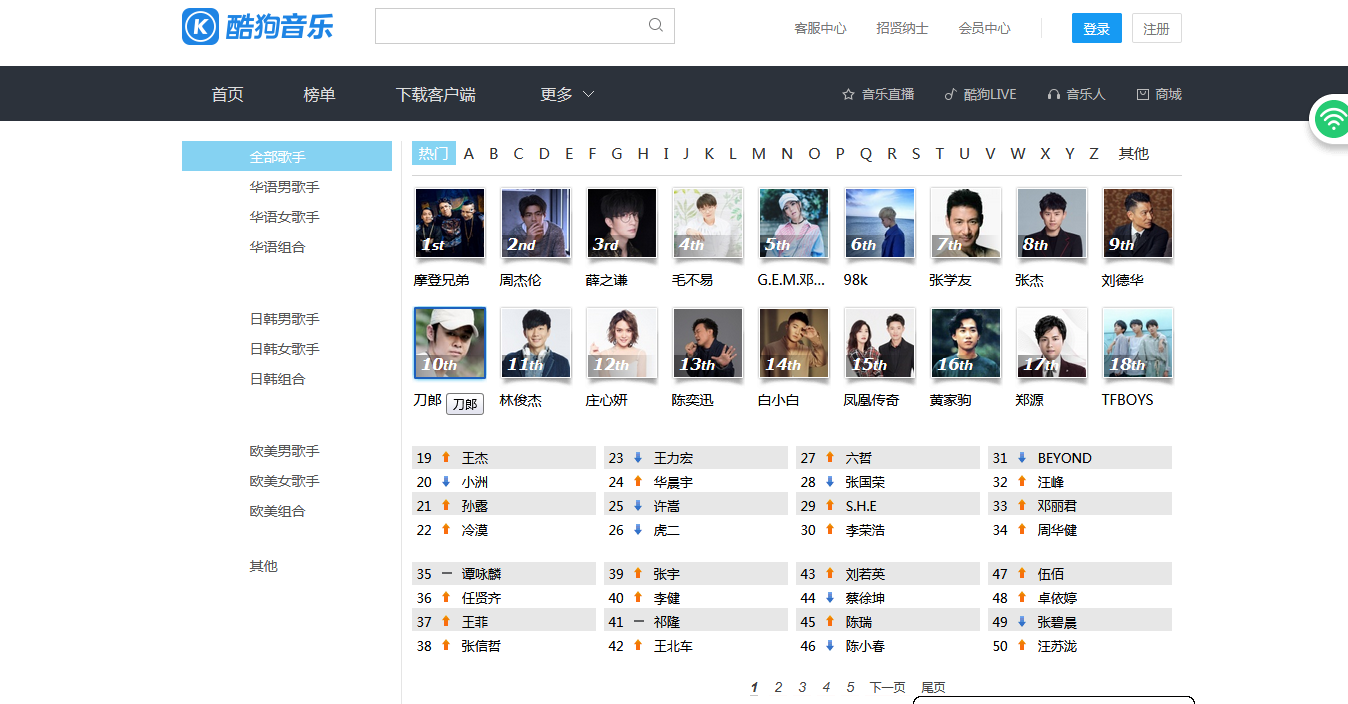
run.py
 #!/usr/bin/env python

 # -*- coding: utf-8 -*-

 __author__ = 'Zqf'

 from dingdian_simple.spiders.dingdian_spider import DingdianSimpleSpider

 from scrapy.crawler import CrawlerProcess

 from scrapy.utils.project import get_project_settings

 # 获取settings.py模块的设置

 settings = get_project_settings()

 process = CrawlerProcess(settings=settings)

 # 可以添加多个spider

 process.crawl(DingdianSimpleSpider)

 # 启动爬虫,会阻塞,直到爬取完成

 process.start()
kugou.py
 #!/usr/bin/env python

 # -*- coding: utf-8 -*-

 import re

 __author__ = 'Zqf'

 import scrapy

 from kugoumusic.items import KugoumusicItem

 from scrapy.linkextractors import LinkExtractor

 from scrapy.spiders import Rule

 class KugouSpiders(scrapy.spiders.CrawlSpider):

     name = 'kugou'

     start_urls = ['http://www.kugou.com/']

     rules = (

         Rule(LinkExtractor(allow=['http://www.kugou.com/yy/html/singer.html',

                                   'http://www.kugou.com/yy/singer/index/\d-([a-z]|null)-1.html'])),

         Rule(LinkExtractor(allow=['http://www.kugou.com/yy/singer/home/\d+.html']), callback='parse_item')

     )

     def parse_item(self, response):

         singer = response.xpath('//div/div[@class="clear_fix"]/strong/text()').extract_first()

         print(singer)

         songs = response.xpath('//ul[@id="song_container"]/li//span[@class="text"]/i/text()').extract()

         print(songs)

         item = KugoumusicItem()

         item['singer'] = singer

         item['songs'] = songs

         yield item
items.py
 # -*- coding: utf-8 -*-

 # Define here the models for your scraped items

 #

 # See documentation in:

 # https://doc.scrapy.org/en/latest/topics/items.html

 import scrapy

 class KugoumusicItem(scrapy.Item):

     # define the fields for your item here like:

     # name = scrapy.Field()

     singer = scrapy.Field()

     songs = scrapy.Field()
pipelines.py
 # -*- coding: utf-8 -*-

 # Define your item pipelines here

 #

 # Don't forget to add your pipeline to the ITEM_PIPELINES setting

 # See: https://doc.scrapy.org/en/latest/topics/item-pipeline.html

 from pymongo import MongoClient

 class KugoumusicPipeline(object):

     def open_spider(self, spider):

         # mongo_config = spider.settings['MONGO_CONFIG']

         # host = '127.0.0.1', port = 27017

         self.client = MongoClient(host='127.0.0.1', port=27017)

         self.coll = self.client['student_db']['kugou']

         self.li = []

     def close_spider(self, spider):

         self.insert()

         self.client.close()

     def insert(self):

         self.coll.insert_many(self.li)

     def process_item(self, item, spider):

         if len(self.li) >= 100:

             self.insert()

             self.li = []

             print("成功插入100条数据-------------------------------------")

         else:

             self.li.append(dict(item))

         return item
settings.py
 # -*- coding: utf-8 -*-

 # Scrapy settings for kugoumusic project

 #

 # For simplicity, this file contains only settings considered important or

 # commonly used. You can find more settings consulting the documentation:

 #

 #     https://doc.scrapy.org/en/latest/topics/settings.html

 #     https://doc.scrapy.org/en/latest/topics/downloader-middleware.html

 #     https://doc.scrapy.org/en/latest/topics/spider-middleware.html

 BOT_NAME = 'kugoumusic'

 SPIDER_MODULES = ['kugoumusic.spiders']

 NEWSPIDER_MODULE = 'kugoumusic.spiders'

 # MONGO_CONFIG = ['192.168.62.35:1806, '

 #               '192.168.62.240:1806, '

 #               '192.168.62.23:1806, '

 #               '192.168.62.32:1806, '

 #               '192.168.62.25:1806, '

 #               '192.168.62.28:1806, '

 #               '192.168.62.241:1806']

 # MONGO_CONFIG = {

 #     'host': '127.0.0.1',

 #     'port': 27017

     # 'user': 'root',

     # 'password': '123456',

     # 'db': 's1806',

     # 'charset': 'utf8'

 # }

 # Crawl responsibly by identifying yourself (and your website) on the user-agent

 #USER_AGENT = 'kugoumusic (+http://www.yourdomain.com)'

 # Obey robots.txt rules

 ROBOTSTXT_OBEY = False

 # Configure maximum concurrent requests performed by Scrapy (default: 16)

 #CONCURRENT_REQUESTS = 32

 # Configure a delay for requests for the same website (default: 0)

 # See https://doc.scrapy.org/en/latest/topics/settings.html#download-delay

 # See also autothrottle settings and docs

 #DOWNLOAD_DELAY = 3

 # The download delay setting will honor only one of:

 #CONCURRENT_REQUESTS_PER_DOMAIN = 16

 #CONCURRENT_REQUESTS_PER_IP = 16

 # Disable cookies (enabled by default)

 #COOKIES_ENABLED = False

 # Disable Telnet Console (enabled by default)

 #TELNETCONSOLE_ENABLED = False

 # Override the default request headers:

 DEFAULT_REQUEST_HEADERS = {

     'Connection': 'keep-alive',

     'User-Agent': 'Mozilla/5.0 (Windows NT 10.0; Win64; x64) AppleWebKit/537.36 (KHTML, like Gecko) Chrome/64.0.3282.186 Safari/537.36',

     'Accept': 'text/html,application/xhtml+xml,application/xml;q=0.9,image/webp,image/apng,*/*;q=0.8',

     'Accept-Encoding': 'gzip, deflate, br',

     'Accept-Language': 'zh-CN,zh;q=0.9',

 }

 # Enable or disable spider middlewares

 # See https://doc.scrapy.org/en/latest/topics/spider-middleware.html

 #SPIDER_MIDDLEWARES = {

 #    'kugoumusic.middlewares.KugoumusicSpiderMiddleware': 543,

 #}

 # Enable or disable downloader middlewares

 # See https://doc.scrapy.org/en/latest/topics/downloader-middleware.html

 #DOWNLOADER_MIDDLEWARES = {

 #    'kugoumusic.middlewares.KugoumusicDownloaderMiddleware': 543,

 #}

 # Enable or disable extensions

 # See https://doc.scrapy.org/en/latest/topics/extensions.html

 #EXTENSIONS = {

 #    'scrapy.extensions.telnet.TelnetConsole': None,

 #}

 # Configure item pipelines

 # See https://doc.scrapy.org/en/latest/topics/item-pipeline.html

 ITEM_PIPELINES = {

    'kugoumusic.pipelines.KugoumusicPipeline': 300,

 }

 # Enable and configure the AutoThrottle extension (disabled by default)

 # See https://doc.scrapy.org/en/latest/topics/autothrottle.html

 #AUTOTHROTTLE_ENABLED = True

 # The initial download delay

 #AUTOTHROTTLE_START_DELAY = 5

 # The maximum download delay to be set in case of high latencies

 #AUTOTHROTTLE_MAX_DELAY = 60

 # The average number of requests Scrapy should be sending in parallel to

 # each remote server

 #AUTOTHROTTLE_TARGET_CONCURRENCY = 1.0

 # Enable showing throttling stats for every response received:

 #AUTOTHROTTLE_DEBUG = False

 # Enable and configure HTTP caching (disabled by default)

 # See https://doc.scrapy.org/en/latest/topics/downloader-middleware.html#httpcache-middleware-settings

 #HTTPCACHE_ENABLED = True

 #HTTPCACHE_EXPIRATION_SECS = 0

 #HTTPCACHE_DIR = 'httpcache'

 #HTTPCACHE_IGNORE_HTTP_CODES = []

 #HTTPCACHE_STORAGE = 'scrapy.extensions.httpcache.FilesystemCacheStorage'
使用scrapy 爬取酷狗音乐歌手及歌曲名并存入mongodb中的更多相关文章
- Java爬虫系列之实战:爬取酷狗音乐网 TOP500 的歌曲(附源码)
在前面分享的两篇随笔中分别介绍了HttpClient和Jsoup以及简单的代码案例: Java爬虫系列二:使用HttpClient抓取页面HTML Java爬虫系列三:使用Jsoup解析HTML 今天 ...
- python爬取酷狗音乐排行榜
本文为大家分享了python爬取酷狗音乐排行榜的具体代码,供大家参考,具体内容如下
- python使用beautifulsoup4爬取酷狗音乐
声明:本文仅为技术交流,请勿用于它处. 小编经常在网上听一些音乐但是有一些网站好多音乐都是付费下载的正好我会点爬虫技术,空闲时间写了一份,截止4月底没有问题的,会下载到当前目录,只要按照bs4库就好, ...
- python爬取酷狗音乐
url:https://www.kugou.com/yy/html/rank.html 我们随便访问一个歌曲可以看到url有个hash https://www.kugou.com/song/#hash ...
- 【Python】【爬虫】爬取酷狗音乐网络红歌榜
原理:我的上篇博客 import requests import time from bs4 import BeautifulSoup def get_html(url): ''' 获得 HTML ' ...
- Python爬取酷狗飙升榜前十首(100)首,写入CSV文件
酷狗飙升榜,写入CSV文件 爬取酷狗音乐飙升榜的前十首歌名.歌手.时间,是一个很好的爬取网页内容的例子,对爬虫不熟悉的读者可以根据这个例子熟悉爬虫是如何爬取网页内容的. 需要用到的库:requests ...
- 【Python】【爬虫】爬取酷狗TOP500
好啦好啦,那我们来拉开我们的爬虫之旅吧~~~ 这一只小爬虫是爬取酷狗TOP500的,使用的爬取手法简单粗暴,目的是帮大家初步窥探爬虫长啥样,后期会慢慢变得健壮起来的. 环境配置 在此之前需要下载一个谷 ...
- htmlunit+fastjson抓取酷狗音乐 qq音乐链接及下载
上次学了jsoup之后,发现一些动态生成的网页内容是无法抓取的,于是又学习了htmlunit,下面是抓取酷狗音乐与qq音乐链接的例子: 酷狗音乐: import java.io.BufferedInp ...
- 使用Xpath爬取酷狗TOP500的歌曲信息
使用xpath爬取酷狗TOP500的歌曲信息, 将排名.歌手名.歌曲名.歌曲时长,提取的结果以文件形式保存下来.参考网址:http://www.kugou.com/yy/rank/home/1-888 ...
随机推荐
- 雅礼集训 2017 Day1
T1:loj 6029 市场 题目大意: 维护一个数据结构支持区间加 区间除法 区间求最小值 区间求和 思路: 用线段树维护区间加 区间求最小值 区间和 对于区间除法 注意到除数d很大而加法的w很小 ...
- 微信公众平台appid和appsecret在哪
1.appid和appsecret是微信公众平台服务号才有的,如果自己家的公众平台不是服务号,需要升级为服务号. 2.登录服务号,登录“服务”条目,“服务中心”如图. 3.点击“自定义菜单”-“开发模 ...
- Python 返回多个值+Lambda的使用
def MaxMin(a,b): if(a>b): return a,b else: return b,a max,min=MaxMin(8,95) print "最大值为:" ...
- Spark 分布式环境--连接独立集群管理器
Spark 分布式环境:master,worker 节点都配置好的情况下 : 却无法通过spark-shell连接到 独立集群管理器 spark-shell --master spark://soyo ...
- FastDFS的实现
FastDFS的实现 环境 centos7.1节点提供tracker和storage服务 centos7.2,centos7.3只提供storage服务 FastDFS的实现 fastdfs-5.0. ...
- bzoj 1731: [Usaco2005 dec]Layout 排队布局【差分约束】
差分约束裸题,用了比较蠢的方法,先dfs_spfa判负环,再bfs_spfa跑最短路 注意到"奶牛排在队伍中的顺序和它们的编号是相同的",所以\( d_i-d_{i-1}>= ...
- CSS实现居中的方式
在介绍居中方式之前,简单介绍一下行内元素和块级元素. 行内元素 和其他元素都在同一行 高,行高及外边距和内边距部分可以改变 宽度只与内容有关 行内元素只能容纳文本或者其他行内元素 常用内联元素:a,i ...
- PHP 小tip .(@)符号和 php if 赋值
tip 1: 下面介绍一下它的用法. 例如: 复制代码代码如下: function db_connect()//连接数据库 { @$db =mysql_connect('localhost','roo ...
- Objective-C设计模式——中介者Mediator(对象去耦)
中介者模式 中介者模式很好的诠释了迪米特法则,任意两个不相关的对象之间如果需要关联,那么需要通过第三个类来进行.中介者就是把一组对象进行封装,屏蔽了类之间的交互细节,使不同的类直接不需要持有对方引用也 ...
- Laravel5.1学习笔记22 Eloquent 调整修改
Eloquent: Mutators Introduction Accessors & Mutators Date Mutators Attribute Casting Introductio ...