
iOS学习之UINavigationController详解与使用(三)ToolBar
1、显示Toolbar
在RootViewController.m的- (void)viewDidLoad方法中添加代码,这样Toobar就显示出来了。
- [self.navigationController setToolbarHidden:NO animated:YES];

2、在ToolBar上添加UIBarButtonItem
新建几个UIBarButtonItem,然后以数组的形式添加到Toolbar中
- UIBarButtonItem *one = [[UIBarButtonItem alloc] initWithBarButtonSystemItem:UIBarButtonSystemItemAdd target:nil action:nil];
- UIBarButtonItem *two = [[UIBarButtonItem alloc] initWithBarButtonSystemItem:UIBarButtonSystemItemBookmarks target:nil action:nil];
- UIBarButtonItem *three = [[UIBarButtonItem alloc] initWithBarButtonSystemItem:UIBarButtonSystemItemAction target:nil action:nil];
- UIBarButtonItem *four = [[UIBarButtonItem alloc] initWithBarButtonSystemItem:UIBarButtonSystemItemEdit target:nil action:nil];
- UIBarButtonItem *flexItem = [[UIBarButtonItem alloc] initWithBarButtonSystemItem:UIBarButtonSystemItemFlexibleSpace target:nil action:nil];
- [self setToolbarItems:[NSArray arrayWithObjects:flexItem, one, flexItem, two, flexItem, three, flexItem, four, flexItem, nil]];
效果:
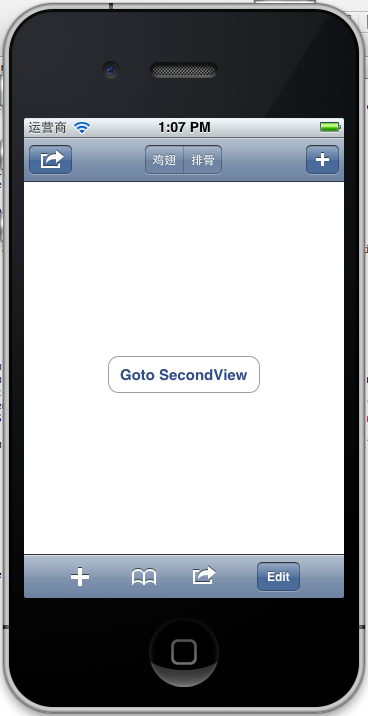
注意:用 [self.navigationController.toolbar setItems:(NSArray *) animated:<#(BOOL)#>]这个方法添加item是不起效果的。下面我动态自己添加Toolbar时,这个才起效果。
3、动态添加Toolbar
我们在SecondView添加动态的Toolbar。
在SecondViewController.h添加
- #import <UIKit/UIKit.h>
- @interface SecondViewController : UIViewController
- {
- UIToolbar *toolBar;
- }
- @end
在SecondViewController.m添加
- - (void)viewDidLoad
- {
- [super viewDidLoad];
- [self.navigationController setToolbarHidden:YES animated:YES];
- UIBarButtonItem *addButton = [[UIBarButtonItem alloc] initWithBarButtonSystemItem:UIBarButtonSystemItemSearch target:self action:@selector(gotoThridView:)];
- toolBar = [[UIToolbar alloc] initWithFrame:CGRectMake(0.0, self.view.frame.size.height - toolBar.frame.size.height - 44.0, self.view.frame.size.width, 44.0)];
- [toolBar setBarStyle:UIBarStyleDefault];
- toolBar.autoresizingMask = UIViewAutoresizingFlexibleTopMargin;
- [toolBar setItems:[NSArray arrayWithObject:addButton]];
- [self.view addSubview:toolBar];
- // Do any additional setup after loading the view from its nib.
- }
先把RootView时显示的Toobar隐藏
[self.navigationController setToolbarHidden:YESanimated:YES];然后把新建的Toolbar添加的SecondView中,并为Toobar设置了一个Item.
[toolBarsetItems:[NSArrayarrayWithObject:addButton]];
BarButtonItem用 的是UIBarButtonSystemItemSearch, 效果如下:
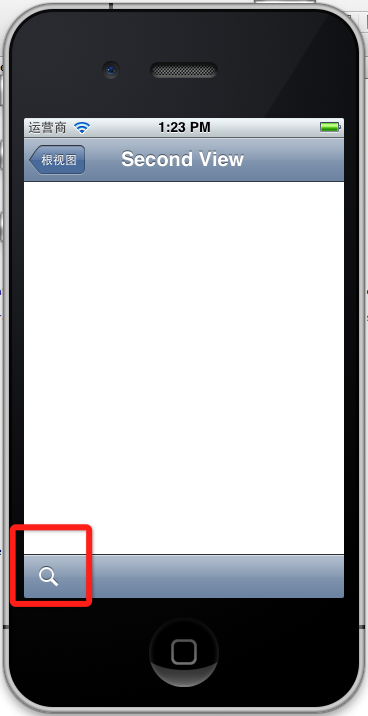
4、新建ThridView,从SecondView跳转到
Commad+N新建一个ThridViewController,
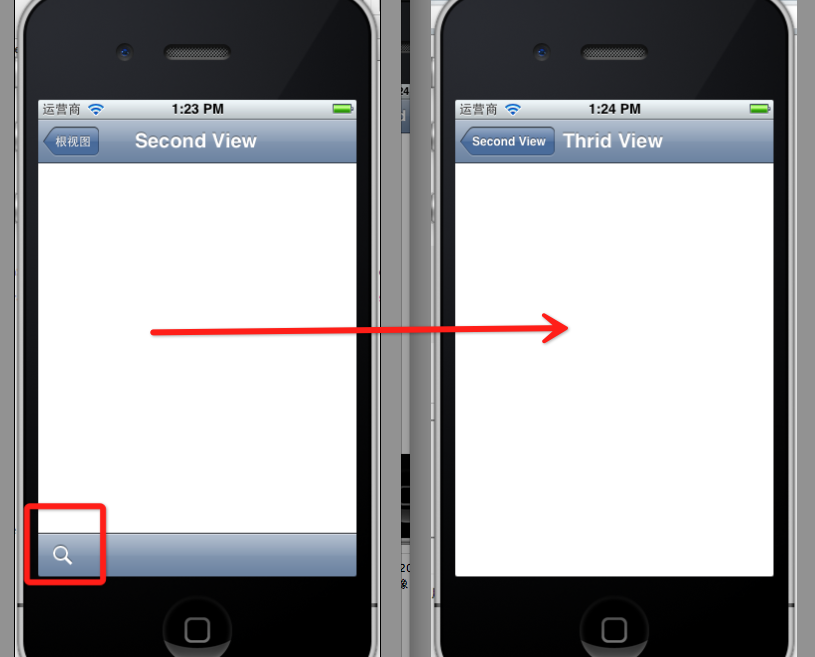
这个addButton跳转到ThridView
- -(void)gotoThridView:(id)sender
- {
- ThridViewController *thridView = [[ThridViewController alloc] init];
- [self.navigationController pushViewController:thridView animated:YES];
- thridView.title = @"Thrid View";
- }
跳转Second到Third效果:
到此UINavigationController练习的差不多了。
前面两篇:
iOS学习之UINavigationController详解与使用(一)添加UIBarButtonItem
iOS学习之UINavigationController详解与使用(二)页面切换和segmentedController
例子代码:https://github.com/schelling/YcDemo
iOS学习之UINavigationController详解与使用(三)ToolBar的更多相关文章
- [转]iOS学习之UINavigationController详解与使用(三)ToolBar
转载地址:http://blog.csdn.net/totogo2010/article/details/7682641 iOS学习之UINavigationController详解与使用(二)页面切 ...
- iOS学习之UINavigationController详解与使用(二)页面切换和segmentedController
iOS学习之UINavigationController详解与使用(一)添加UIBarButtonItem是上篇,我们接着讲UINavigationController的重要作用,页面的管理和切换. ...
- iOS学习之UINavigationController详解与使用(一)添加UIBarButtonItem
http://blog.csdn.net/totogo2010/article/details/7681879 1.UINavigationController导航控制器如何使用 UINavigati ...
- [转]iOS学习之UINavigationController详解与使用(二)页面切换和segmentedController
转载地址:http://blog.csdn.net/totogo2010/article/details/7682433 iOS学习之UINavigationController详解与使用(一)添加U ...
- [转]iOS学习之UINavigationController详解与使用(一)添加UIBarButtonItem
转载地址:http://blog.csdn.net/totogo2010/article/details/7681879 1.UINavigationController导航控制器如何使用 UINav ...
- IOS开发之UINavigationController详解
UINavigationController是IOS编程中比较常用的一种容器view controller,很多系统的控件(如UIImagePickerViewController)以及很多有名的AP ...
- UINavigationController详解一(转)UIBarButtonItem
本文出自:http://www.cnblogs.com/smileEvday/archive/2012/05/14/2495153.html 特别感谢. 1.UINavigationControlle ...
- IOS 友盟使用详解
IOS 友盟使用详解 这篇博客将会详细介绍友盟的使用,希望对博友们有所帮助. 首先我们在浏览器上搜索友盟. 在这里我们选择官网这个,进去友盟官网后我们按照下图进行选择. 接下来选择如下图 Next 这 ...
- iOS中—触摸事件详解及使用
iOS中--触摸事件详解及使用 (一)初识 要想学好触摸事件,这第一部分的基础理论是必须要学会的,希望大家可以耐心看完. 1.基本概念: 触摸事件 是iOS事件中的一种事件类型,在iOS中按照事件划分 ...
随机推荐
- python笔记-20 django进阶 (model与form、modelform对比,三种ajax方式的对比,随机验证码,kindeditor)
一.model深入 1.model的功能 1.1 创建数据库表 1.2 操作数据库表 1.3 数据库的增删改查操作 2.创建数据库表的单表操作 2.1 定义表对象 class xxx(models.M ...
- {Reship}{Sparse Representation}稀疏表示入门
声明:本人属于绝对的新手,刚刚接触“稀疏表示”这个领域.之所以写下以下的若干个连载,是鼓励自己不要急功近利,而要步步为赢!所以下文肯定有所纰漏,敬请指出,我们共同进步! 踏入“稀疏表达”(Sparse ...
- elixir 使用mix umbrella 模块化项目
备注: 项目比较大, 模块比较多,一般使用mix 的方式是大家进行文件夹的划分,但是使用mix 的umbrella 可能会更方便 1. 安装 默认安装elixir 的时候已经包含了这个功能 2. 基本 ...
- 最短路径问题的Dijkstra算法
问题 最短路径问题的Dijkstra算法 是由荷兰计算机科学家艾兹赫尔·戴克斯特拉提出.迪科斯彻算法使用了广度优先搜索解决非负权有向图的单源最短路径问题,算法终于得到一个最短路径树> ...
- RK3288 修改设备默认的蓝牙名称
path:device/rockchip/rk3288/bluetooth/bdroid_buildcfg.h /* * Copyright (C) 2012 The Android Open Sou ...
- 框架(yii和thinkphp)中实例化php内置或者扩展中的对象问题
将php原生语句实例化SphinxClient对象移植到yii2框架中报错 原生语句中这样写: $s = new SphinxClient(); 框架中应该加入反斜杠,这样写: $s = new \S ...
- 安装配置solr
1.由于用户是普通用户,没有root一些权限,所以修改hadoop用户权限 用root权限,修改sudoers文件 nano /etc/sudoers 打开文件,修改hadoop用户权限,如 ...
- i2c驱动程序全面分析,从adapter驱动程序到设备驱动程序
开发板 :mini2440 内核版本:linux2.6.32.2 驱动程序参考:韦东山老师毕业班i2c 内容概括: 1.adapter client 简介 2.adapter 驱动框架 ...
- Spark-1.5.2安装--Standalone和Yarn
Spark Standalone 1.下载scala-2.10.6包解压到指定目录,添加环境变量 #SCALA VARIABLES START export SCALA_HOME=/usr/local ...
- 关于v9缓存的那点事
当做好以后模块后,由于是模块原型性能不佳,故而可以用缓存方式来提升效率.缓存生成可以是模块的一个方法或者一个函数,phpcms的缓存也可以分为不同的类型,比如file,memcache.如果是file ...