
[转]iOS学习之UINavigationController详解与使用(二)页面切换和segmentedController
转载地址:http://blog.csdn.net/totogo2010/article/details/7682433
iOS学习之UINavigationController详解与使用(一)添加UIBarButtonItem是上篇,我们接着讲UINavigationController的重要作用,页面的管理和切换。
1、RootView 跳到SecondView
首先我们需要新一个View。新建SecondView,按住Command键然后按N,弹出新建页面,我们新建SecondView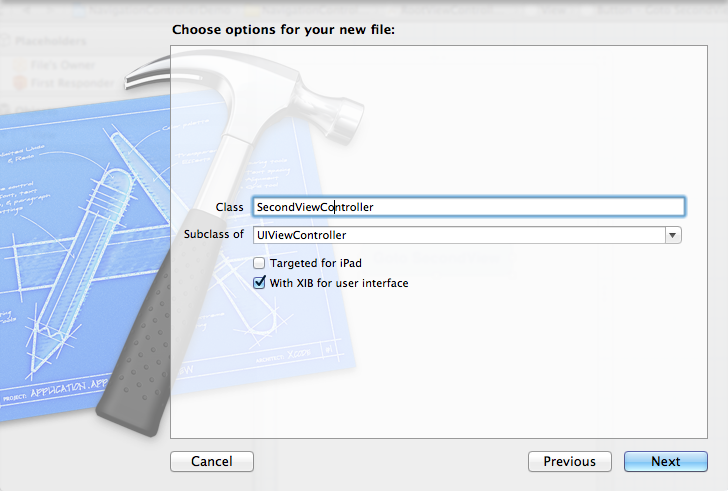
2、为Button 添加点击事件,实现跳转
在RootViewController.xib中和RootViewController.h文件建立连接

在RootViewController.m中实现代码,alloc一个SecondViewController,用pushViewController到navigationController中去,并为
SecondViewController这是title为 secondView.title =@"Second View"; 默认情况下,titie为下个页面返回按钮的名字。
- - (IBAction)gotoSecondView:(id)sender {
- SecondViewController *secondView = [[SecondViewController alloc] init];
- [self.navigationController pushViewController:secondView animated:YES];
- secondView.title = @"Second View";
- }
这是点击GotoSecondView 按钮,出现
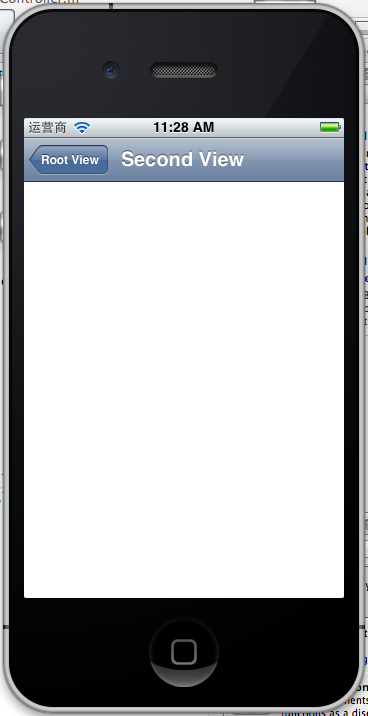
这就是SecondView了。
3、添加segmentedController
在nav bar这样的效果是如何实现的呢?
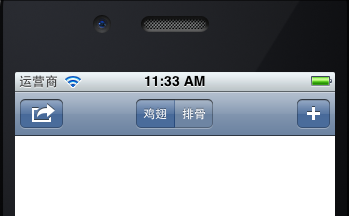
这就是segmentedController。
3.1在RootViewController.m的viewDidLoad添加如下代码:
- NSArray *array = [NSArray arrayWithObjects:@"鸡翅",@"排骨", nil];
- UISegmentedControl *segmentedController = [[UISegmentedControl alloc] initWithItems:array];
- segmentedController.segmentedControlStyle = UISegmentedControlSegmentCenter;
- [segmentedController addTarget:self action:@selector(segmentAction:) forControlEvents:UIControlEventValueChanged];
- self.navigationItem.titleView = segmentedController;
3.2[segmentedController addTarget:selfaction:的实现
- -(void)segmentAction:(id)sender
- {
- switch ([sender selectedSegmentIndex]) {
- case 0:
- {
- UIAlertView *alter = [[UIAlertView alloc] initWithTitle:@"提示" message:@"你点击了鸡翅" delegate:self cancelButtonTitle:@"确定" otherButtonTitles:nil, nil];
- [alter show];
- }
- break;
- case 1:
- {
- UIAlertView *alter = [[UIAlertView alloc] initWithTitle:@"提示" message:@"你点击了排骨" delegate:self cancelButtonTitle:@"确定" otherButtonTitles:nil, nil];
- [alter show];
- }
- break;
- default:
- break;
- }
- }
这样就能响应鸡翅和排骨按钮了
4、自定义backBarButtonItem
左上角的返回上级View的barButtonitem的名字是上级目录的Title,如果title或者适合做button的名字,怎么办呢?我们可以自己定义
代码如下:
- UIBarButtonItem *backButton = [[UIBarButtonItem alloc] initWithTitle:@"根视图" style:UIBarButtonItemStyleDone target:nil action:nil];
- self.navigationItem.backBarBu
效果:

6、自定义title
UINavigationController的title可以用别view替代,比如用UIButton UILable等,下面我用UIButton.
在SecondViewController.m中添加下面如下。
- - (void)viewDidLoad
- {
- [super viewDidLoad];
- UIButton *button = [UIButton buttonWithType: UIButtonTypeRoundedRect];
- [button setTitle: @"自定义title" forState: UIControlStateNormal];
- [button sizeToFit];
- self.navigationItem.titleView = button;}
运行程序,goto secondView,运行效果
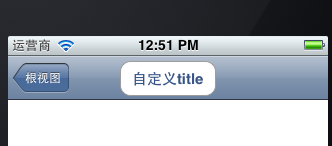
下篇文件讲下Navigation 的Toobar如何显示和如何自己定义。
[转]iOS学习之UINavigationController详解与使用(二)页面切换和segmentedController的更多相关文章
- iOS学习之UINavigationController详解与使用(二)页面切换和segmentedController
iOS学习之UINavigationController详解与使用(一)添加UIBarButtonItem是上篇,我们接着讲UINavigationController的重要作用,页面的管理和切换. ...
- [转]iOS学习之UINavigationController详解与使用(三)ToolBar
转载地址:http://blog.csdn.net/totogo2010/article/details/7682641 iOS学习之UINavigationController详解与使用(二)页面切 ...
- iOS学习之UINavigationController详解与使用(一)添加UIBarButtonItem
http://blog.csdn.net/totogo2010/article/details/7681879 1.UINavigationController导航控制器如何使用 UINavigati ...
- iOS学习之UINavigationController详解与使用(三)ToolBar
1.显示Toolbar 在RootViewController.m的- (void)viewDidLoad方法中添加代码,这样Toobar就显示出来了. [cpp] view plaincopy [ ...
- [转]iOS学习之UINavigationController详解与使用(一)添加UIBarButtonItem
转载地址:http://blog.csdn.net/totogo2010/article/details/7681879 1.UINavigationController导航控制器如何使用 UINav ...
- JavaScript学习笔记-实例详解-类(二)
实例详解-类(二) //===给Object.prototype添加只读\不可枚举\不可配置的属性objectId(function(){ Object.defineProperty(Object ...
- IOS开发之UINavigationController详解
UINavigationController是IOS编程中比较常用的一种容器view controller,很多系统的控件(如UIImagePickerViewController)以及很多有名的AP ...
- [转]iOS学习笔记(2)--Xcode6.1创建仅xib文件无storyboard的hello world应用
转载地址:http://www.mamicode.com/info-detail-514151.html 由于Xcode6之后,默认创建storyboard而非xib文件,而作为初学,了解xib的加载 ...
- UINavigationController详解一(转)UIBarButtonItem
本文出自:http://www.cnblogs.com/smileEvday/archive/2012/05/14/2495153.html 特别感谢. 1.UINavigationControlle ...
随机推荐
- status 状态栏
http://www.pchou.info/ios/2015/08/22/oc-statusbar.html IOS的项目多数会遇到控制状态栏和导航栏的问题,比如隐藏状态栏.控制状态栏的文字颜色等,导 ...
- 在Android平台下的基于Linux-C 的测试程序
iTOP-4412 开发板可以运行的文件系统很多,在具体的文件系统上实现特定功能前,可以 使用Linux-C 程序来测试硬件以及驱动.而且这些程序很容易移植到Android.Qt/E 以及最小文件系统 ...
- mac gcc 编译错误 基础问题
mac gcc Undefined symbols for architecture x86_64 "std::__1: // Undefined symbols for architec ...
- replication_slot and PostgreSQL Replication
主库IP:192.168.230.128 备库IP:192.168.230.129 PostgreSQL版本: 主备机PostgreSQL源码包均位于/opt/soft_bak OS:CentOS5 ...
- 通过JavaScript设置样式和jQuey设置样式,还有随机数抛出水果的习题
一:通过JavaScript的方式设置样式(:拿习题为例): var shuiguo = document.getElementById('fruit'); shuiguo.style.bac ...
- HDU 4816 Bathysphere(数学)(2013 Asia Regional Changchun)
题目链接:http://acm.hdu.edu.cn/showproblem.php?pid=4816 Problem Description The Bathysphere is a spheric ...
- LED流水灯(二)
记住看汇编的时候是红在上面 黑色在下面 startup.s 程序 ; MDK跑马灯实验; PRESERVE8 // 字节对齐关键词 ,汇编有8位对齐的要求,要添加 AREA ...
- js高级程序设计笔记之-addEventListener()与removeEventListener(),事件解除与绑定
js高级程序设计笔记之-addEventListener()与removeEventListener(),事件解除与绑定 addEventListener()与removeEventListener( ...
- opengl& 颜色
颜色 简介 颜色的显示模式分为两种: RGBA显示模式 颜色索引显示模式(使用颜色映射表,映射表提供了索引,可以混合基本的红,绿,蓝色值). RGBA模式可以选择的颜色数量多于颜色索引模式.一般而言, ...
- [php] How to debug PHP in the terminal
Here I use Netbeans, xdebug to debug the PHP in the terminal of Ubuntu. 1. you have to install the x ...