
DotNetOpenAuth实践之Webform资源服务器配置
系列目录:
DotNetOpenAuth实践系列(源码在这里)
上篇我们讲到WebApi资源服务器配置,这篇我们说一下Webform下的ashx,aspx做的接口如何使用OAuth2认证
一、环境搭建
1、新建Webform项目
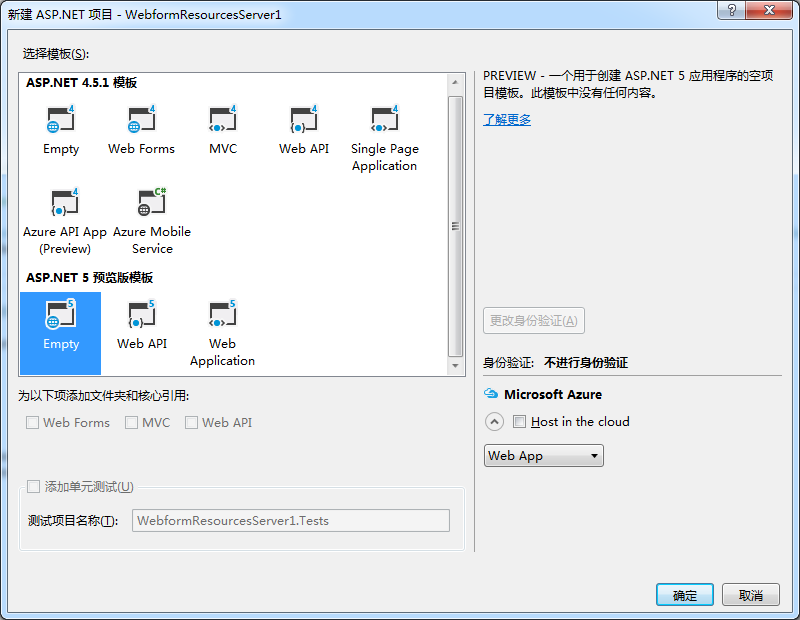
2、使用Nuget添加DotNetOpenAuth 5.0.0 alpha3
3、把上次制作的证书文件拷贝的项目中
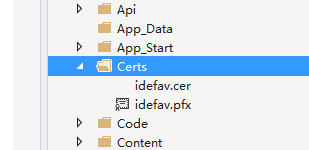
二、编写关键代码
1、公共代码
ResourceServerConfiguration
 using System.Security.Cryptography.X509Certificates;

 namespace WebformResourcesServer.Code

 {

     public class ResourceServerConfiguration

     {

         public X509Certificate2 EncryptionCertificate { get; set; }

         public X509Certificate2 SigningCertificate { get; set; }

     }

 }
Common.cs
 namespace WebformResourcesServer.Code

 {

     public class Common

     {

         public static ResourceServerConfiguration Configuration = new ResourceServerConfiguration();

     }

 }
Global
 using System;

 using System.Collections.Generic;

 using System.Linq;

 using System.Security.Cryptography.X509Certificates;

 using System.Web;

 using System.Web.Optimization;

 using System.Web.Routing;

 using System.Web.Security;

 using System.Web.SessionState;

 using WebformResourcesServer.Code;

 namespace WebformResourcesServer

 {

     public class Global : HttpApplication

     {

         void Application_Start(object sender, EventArgs e)

         {

             Common.Configuration = new ResourceServerConfiguration

             {

                 EncryptionCertificate = new X509Certificate2(Server.MapPath("~/Certs/idefav.pfx"), "a"),

                 SigningCertificate = new X509Certificate2(Server.MapPath("~/Certs/idefav.cer"))

             };

             // 在应用程序启动时运行的代码

             RouteConfig.RegisterRoutes(RouteTable.Routes);

             BundleConfig.RegisterBundles(BundleTable.Bundles);

         }

     }

 }
2、关键代码
ashxhandler
 using System;

 using System.Collections.Generic;

 using System.Linq;

 using System.Net.Http;

 using System.Security.Cryptography;

 using System.Security.Principal;

 using System.Threading;

 using System.Threading.Tasks;

 using System.Web;

 using System.Web.UI;

 using DotNetOpenAuth.Messaging;

 using DotNetOpenAuth.OAuth2;

 namespace WebformResourcesServer.Code

 {

     public class AshxHandler

     {

         public AshxHandler(HttpContext context)

         {

             Context = context;

         }

         public HttpContext Context { get; set; }

         private async Task<IPrincipal> VerifyOAuth2(HttpRequestBase httpDetails, params string[] requiredScopes)

         {

             var resourceServer = new ResourceServer(new StandardAccessTokenAnalyzer((RSACryptoServiceProvider)Common.Configuration.SigningCertificate.PublicKey.Key, (RSACryptoServiceProvider)Common.Configuration.EncryptionCertificate.PrivateKey));

             return await resourceServer.GetPrincipalAsync(httpDetails, requiredScopes: requiredScopes);

         }

         public async Task Proc(Action<HttpContext> action)

         {

             try

             {

                 var principal = await VerifyOAuth2(new HttpRequestWrapper(Context.Request));

                 if (principal != null)

                 {

                     Context.User = principal;

                     Thread.CurrentPrincipal = principal;

                     action.Invoke(Context);

                 }

             }

             catch (ProtocolFaultResponseException exception)

             {

                 var outgoingResponse = await exception.CreateErrorResponseAsync(CancellationToken.None);

                 Context.Response.StatusCode = (int)outgoingResponse.StatusCode;

                 //Context.Response.SuppressContent = true;

                 foreach (var header in outgoingResponse.Headers)

                 {

                     //Context.Response.Headers[header.Key] = header.Value.First();

                     Context.Response.AddHeader(header.Key, header.Value.First());

                 }

                 Context.Response.Write(exception.Message);

             }

         }

     }

 }
3、添加一个ashx文件
目录:
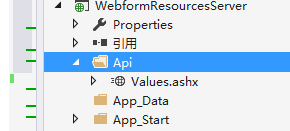
代码:
 using System;

 using System.Threading;

 using System.Threading.Tasks;

 using System.Web;

 using WebformResourcesServer.Code;

 namespace WebformResourcesServer.Api

 {

     /// <summary>

     /// Values 的摘要说明

     /// </summary>

     public class Values : IHttpAsyncHandler

     {

         public void ProcessRequest(HttpContext context)

         {

             context.Response.ContentType = "text/plain";

         }

         public bool IsReusable

         {

             get

             {

                 return false;

             }

         }

         public IAsyncResult BeginProcessRequest(HttpContext context, AsyncCallback cb, object extraData)

         {

             return new AsyncResult(cb, extraData, new AshxHandler(context).Proc(c =>

             {

                 c.Response.Write("The Data you get!");

             }));

         }

         public void EndProcessRequest(IAsyncResult result)

         {

             var r = (AsyncResult)result;

             r.Task.Wait();

         }

     }

     internal class AsyncResult : IAsyncResult

     {

         private object _state;

         private Task _task;

         private bool _completedSynchronously;

         public AsyncResult(AsyncCallback callback, object state, Task task)

         {

             _state = state;

             _task = task;

             _completedSynchronously = _task.IsCompleted;

             _task.ContinueWith(t => callback(this), TaskContinuationOptions.ExecuteSynchronously);

         }

         public Task Task

         {

             get { return _task; }

         }

         public object AsyncState

         {

             get { return _state; }

         }

         public WaitHandle AsyncWaitHandle

         {

             get { return ((IAsyncResult)_task).AsyncWaitHandle; }

         }

         public bool CompletedSynchronously

         {

             get { return _completedSynchronously; }

         }

         public bool IsCompleted

         {

             get { return _task.IsCompleted; }

         }

     }

 }
4、测试
获取access_token
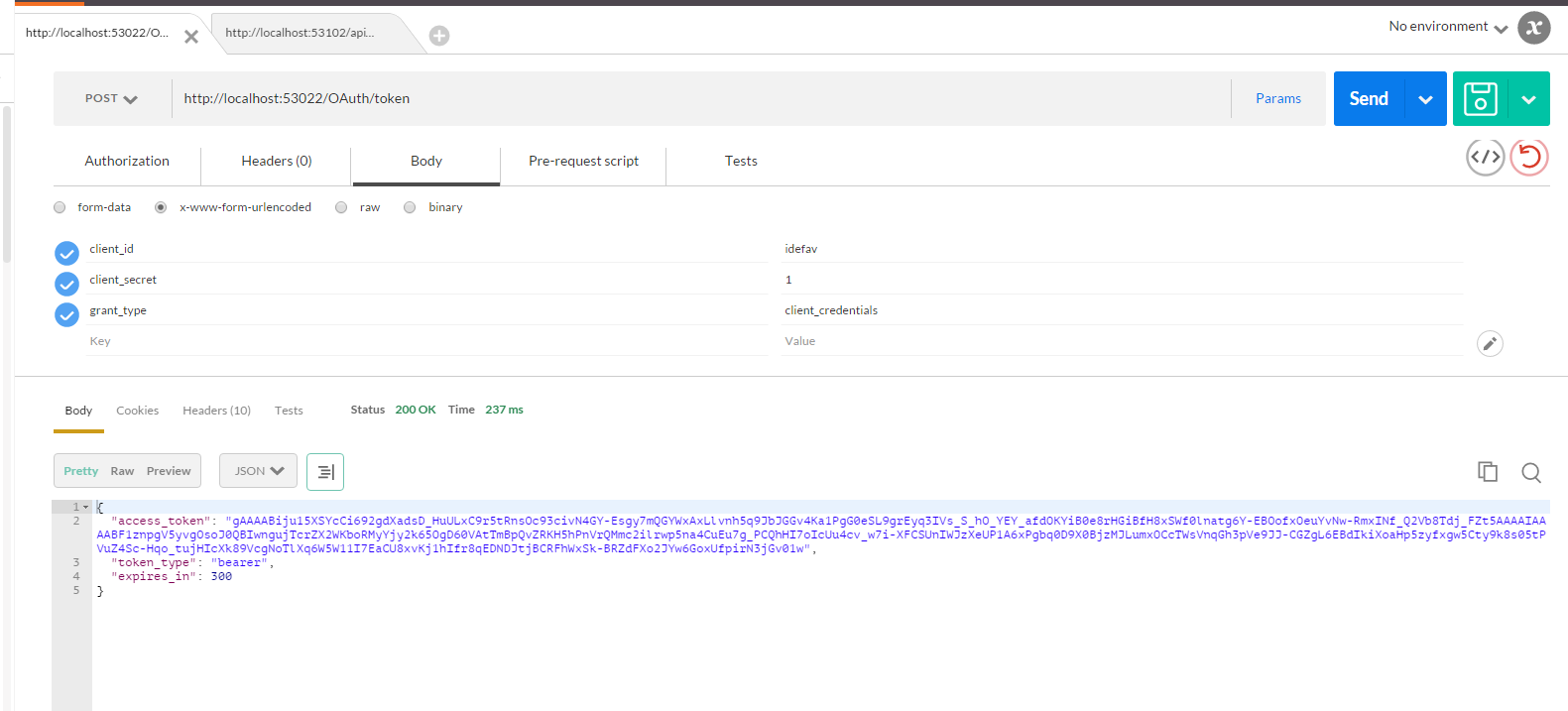
访问api

如果token不正确
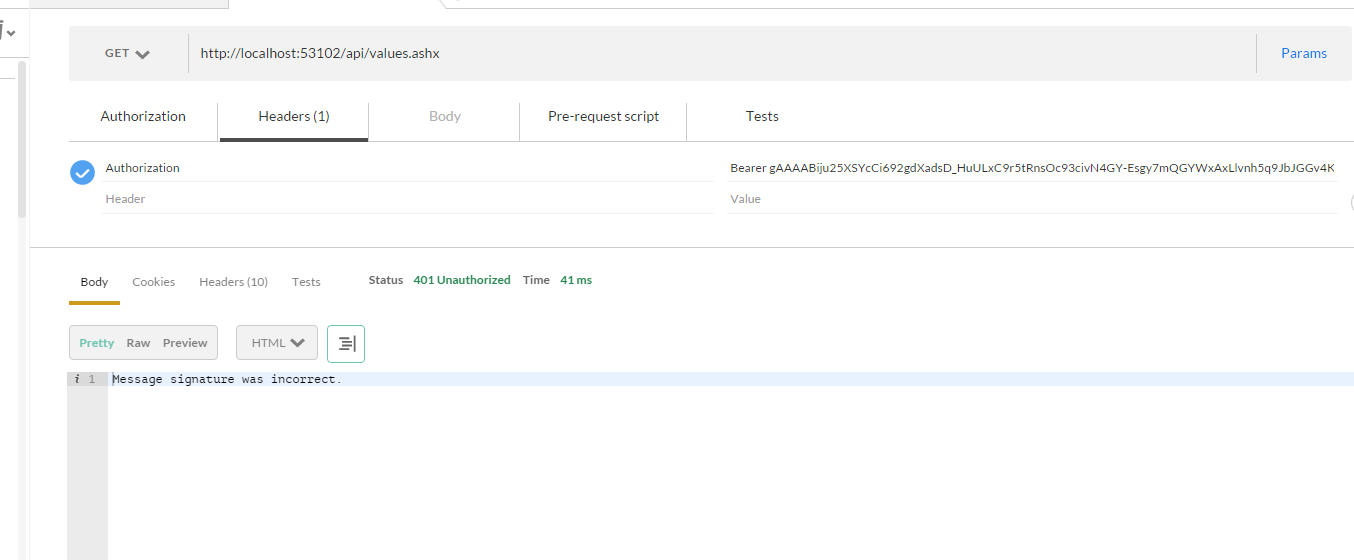
到这篇为止,本系列基本结束,如果有不明白的地方可以评论留言,感谢大家的关注
DotNetOpenAuth实践之Webform资源服务器配置的更多相关文章
- DotNetOpenAuth实践之WCF资源服务器配置
系列目录: DotNetOpenAuth实践系列(源码在这里) 上一篇我们写了一个OAuth2的认证服务器,我们也获取到access_token,那么这个token怎么使用呢,我们现在就来揭开 一般获 ...
- DotNetOpenAuth实践之WebApi资源服务器
系列目录: DotNetOpenAuth实践系列(源码在这里) 上篇我们讲到WCF服务作为资源服务器接口提供数据服务,那么这篇我们介绍WebApi作为资源服务器,下面开始: 一.环境搭建 1.新建We ...
- DotNetOpenAuth实践系列
写在前面 本人在研究DotNetOpenAuth的过程中,遇到很多问题,很多坑,花费了很多时间才调通这玩意,现在毫无保留的分享出来,希望博友们可以轻松的上手DotNetOpenAuth,减少爬坑时间. ...
- DotNetOpenAuth实践
DotNetOpenAuth实践之搭建验证服务器 DotNetOpenAuth是OAuth2的.net版本,利用DotNetOpenAuth我们可以轻松的搭建OAuth2验证服务器,不废话,下面我们来 ...
- DotNetOpenAuth实践之搭建验证服务器
系列目录: DotNetOpenAuth实践系列(源码在这里) DotNetOpenAuth是OAuth2的.net版本,利用DotNetOpenAuth我们可以轻松的搭建OAuth2验证服务器,不废 ...
- DotNetOpenAuth实践之Windows签名制作
系列目录: DotNetOpenAuth实践系列(源码在这里) 在上篇中我们搭建了一个简单的认证服务器,里面使用到了Windows签名证书,这一篇则是教大家如何制作Windows签名证书,下面进入正题 ...
- 学习nginx从入门到实践(五) 场景实践之静态资源web服务
一.静态资源web服务 1.1 静态资源 静态资源定义:非服务器动态生成的文件. 1.2 静态资源服务场景-CDN 1.3 文件读取配置 1.3.1 sendfile 配置语法: syntax: se ...
- Kubernetes实践技巧:资源预留
ubernetes 的节点可以按照节点的资源容量进行调度,默认情况下 Pod 能够使用节点全部可用容量.这样就会造成一个问题,因为节点自己通常运行了不少驱动 OS 和 Kubernetes 的系统守护 ...
- nginx静态资源服务器配置
编辑 nginx.conf server { listen 80; server_name file.youxiu326.xin; location /image/ { #访问 file.youxiu ...
随机推荐
- 洛谷P3414 SAC#1 - 组合数
P3414 SAC#1 - 组合数 218通过 681提交 题目提供者ProjectWTA 标签 难度普及/提高- 时空限制1s / 128MB 提交 讨论 题解 最新讨论更多讨论 讨论区出bug ...
- VLFeat在matlab和vs中安装
转:http://blog.csdn.net/u011718701/article/details/51452011 博主最近用vlfeat库做课题,网上搜索使用方法,一大片都会告诉你说:run(/v ...
- bzoj 1879 状压dp
879: [Sdoi2009]Bill的挑战 Time Limit: 4 Sec Memory Limit: 64 MBSubmit: 852 Solved: 435[Submit][Status ...
- (转) 使用vivado创建工程 3
Create a Hello World application In this experiment we will use Xilinx SDK to create a simple Hello ...
- 前端PHP入门-015-递归函数-飘过
提要: 如果感觉吃力,web前端的各位同学,可以弃之. 递归函数,递归只是一个名字,而递归函数的规定: 函数体内调用函数自己 . 我们来计算 10!=10*9*8*7*6*5*4*3*2*1 web前 ...
- KeyDown,KeyPress和KeyUp详解(转)
1.按键的类型 Windows窗体将键盘输入标识为由按位Keys枚举表示的虚拟键代码.使用Keys枚举,可以综合一系列按键以生成单个值,这些值与WM_KEYDOWN和WM_SYSKEYDOWNWind ...
- JS笔记加强版3
JS 面向对象及组件开发 JS的面向对象: 1.什么是面向对象编程 用对象的思想去写代码,就是面向对象编程 过程式写法 面向对象写法 我们一直都在使用对象 数组 Array 时间 Date ...
- CSS基础复习
重新撸一遍CSS的基础,因为以前面试的时候被问到,突然发现某些概念搞不清楚,瞬间懵逼了,其实我都知道的,就是因为不会炒概念,导致面试官觉得我很low,你特么连这个都不知道还敢来面试,回家种田去好嘛! ...
- (4.1)LingPipe在Eclipse中的运行
酒店评论情感分析系统(四)——LingPipe在Eclipse中的运行 本来打算在做这个项目的时候,使用基于语义的文本倾向性分析方法,即先通过对评论文本进行中文分析,去停用词,然后在倾向性语义模式库的 ...
- 【BZOJ】1951[Sdoi2010]古代猪文
[题意]给定G,N,求: $$ans=G^{\sum_{i|n}\binom{n}{i}}\ \mod\ \ p$$ 1<=N,G<=10^9,p=999911659. [算法]欧拉定理+ ...