
DotNetOpenAuth实践之搭建验证服务器
系列目录:
DotNetOpenAuth实践系列(源码在这里)
DotNetOpenAuth是OAuth2的.net版本,利用DotNetOpenAuth我们可以轻松的搭建OAuth2验证服务器,不废话,下面我们来一步步搭建验证服务器
本次搭建环境:
.net4.5.1 ,DotNetOpenAuth v5.0.0-alpha3,MVC5
一、环境搭建
1、新建一个空的VS解决方案

2、添加验证服务器项目,项目选择MVC,不要自带的身份验证
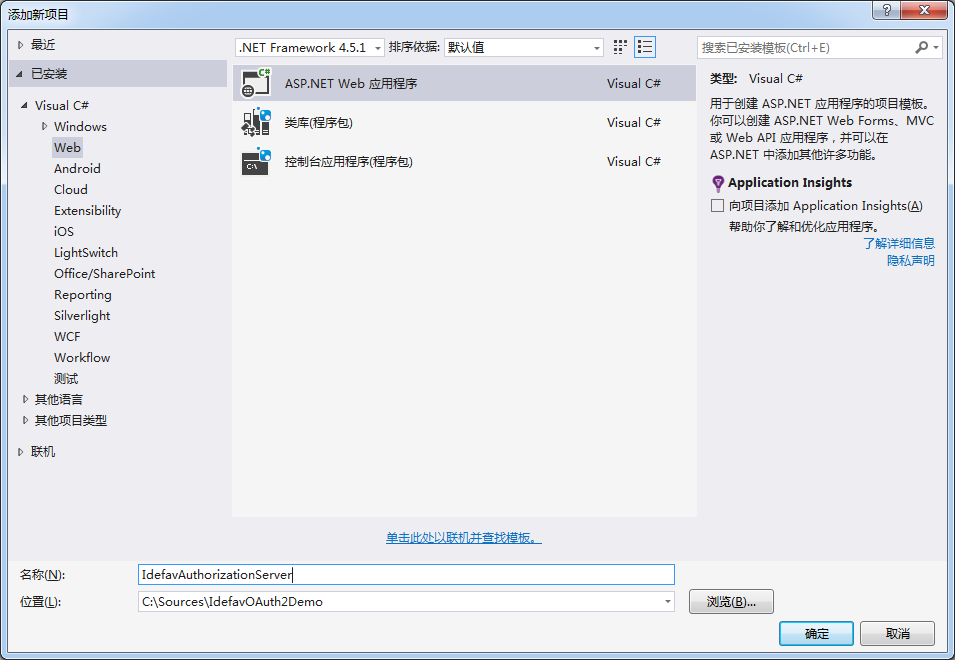

3、使用Nuget添加DotNetOpenAuth v5.0.0-alpha3
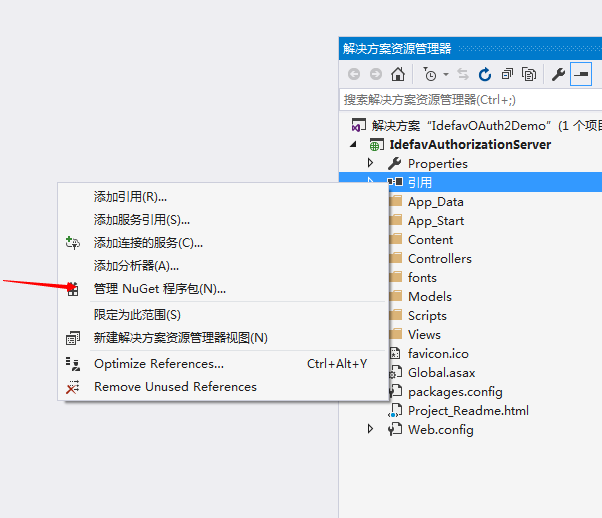
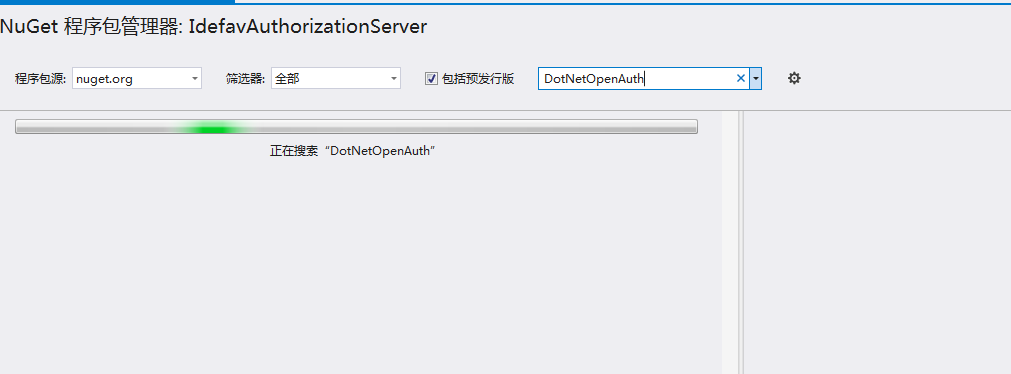
输入DotNetOpenAuth 安装DotNetOpenAuth v5.0.0-alpha3
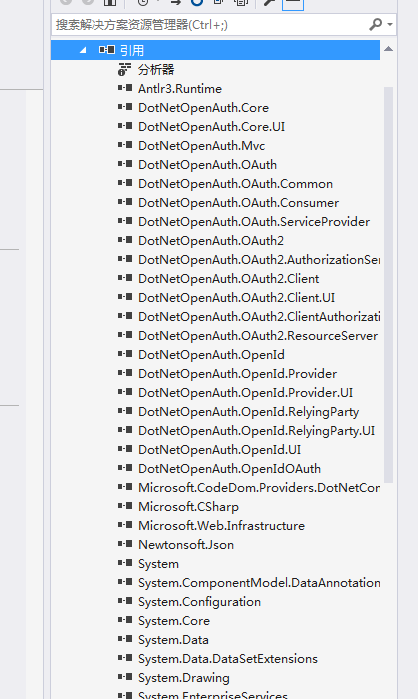
添加完成后
二、编写DotNetOpenAuth 验证服务器关键代码,实现功能
1、添加AuthorizationServerConfiguration.cs
这里的配置是为了添加方便管理,其实可以不用这个类
 using System;

 using System.Collections.Generic;

 using System.Linq;

 using System.Security.Cryptography.X509Certificates;

 using System.Web;

 namespace IdefavAuthorizationServer.Code

 {

     /// <summary>

     /// 验证服务器配置

     /// </summary>

     public class AuthorizationServerConfiguration

     {

         /// <summary>

         /// 构造函数

         /// </summary>

         public AuthorizationServerConfiguration()

         {

             TokenLifetime = TimeSpan.FromMinutes();

         }

         /// <summary>

         /// 签名证书

         /// </summary>

         public X509Certificate2 SigningCertificate { get; set; }

         /// <summary>

         /// 加密证书

         /// </summary>

         public X509Certificate2 EncryptionCertificate { get; set; }

         /// <summary>

         /// Token有效时间

         /// </summary>

         public TimeSpan TokenLifetime { get; set; }

     }

 }
2、实现IClientDescription接口
 using System;

 using System.Collections.Generic;

 using System.Linq;

 using System.Web;

 using DotNetOpenAuth.Messaging;

 using DotNetOpenAuth.OAuth2;

 namespace IdefavAuthorizationServer.Code

 {

     public class Client : IClientDescription

     {

         /// <summary>

         /// 客户端名称client_id

         /// </summary>

         public string Name { get; set; }

         /// <summary>

         /// 客户端类型

         /// </summary>

         public int ClientType { get; set; }

         /// <summary>

         /// 回调URL

         /// </summary>

         public string Callback { get; set; }

         public string ClientSecret { get; set; }

         Uri IClientDescription.DefaultCallback

         {

             get { return string.IsNullOrEmpty(this.Callback) ? null : new Uri(this.Callback); }

         }

         ClientType IClientDescription.ClientType

         {

             get { return (ClientType)this.ClientType; }

         }

         bool IClientDescription.HasNonEmptySecret

         {

             get { return !string.IsNullOrEmpty(this.ClientSecret); }

         }

         bool IClientDescription.IsCallbackAllowed(Uri callback)

         {

             if (string.IsNullOrEmpty(this.Callback))

             {

                 // No callback rules have been set up for this client.

                 return true;

             }

             // In this sample, it's enough of a callback URL match if the scheme and host match.

             // In a production app, it is advisable to require a match on the path as well.

             Uri acceptableCallbackPattern = new Uri(this.Callback);

             if (string.Equals(acceptableCallbackPattern.GetLeftPart(UriPartial.Authority), callback.GetLeftPart(UriPartial.Authority), StringComparison.Ordinal))

             {

                 return true;

             }

             return false;

         }

         bool IClientDescription.IsValidClientSecret(string secret)

         {

             return MessagingUtilities.EqualsConstantTime(secret, this.ClientSecret);

         }

     }

 }
3、实现IAuthorizationServerHost接口
 using System;

 using System.Collections.Generic;

 using System.Linq;

 using System.Security.Cryptography;

 using System.Web;

 using DotNetOpenAuth.Messaging.Bindings;

 using DotNetOpenAuth.OAuth2;

 using DotNetOpenAuth.OAuth2.ChannelElements;

 using DotNetOpenAuth.OAuth2.Messages;

 namespace IdefavAuthorizationServer.Code

 {

     public class IdefavAuthorizationServerHost : IAuthorizationServerHost

     {

         /// <summary>

         /// 配置

         /// </summary>

         private readonly AuthorizationServerConfiguration _configuration;

         /// <summary>

         /// 构造函数

         /// </summary>

         /// <param name="config"></param>

         public IdefavAuthorizationServerHost(AuthorizationServerConfiguration config)

         {

             if (config != null)

                 _configuration = config;

         }

         /// <summary>

         /// Token创建

         /// </summary>

         /// <param name="accessTokenRequestMessage"></param>

         /// <returns></returns>

         public AccessTokenResult CreateAccessToken(IAccessTokenRequest accessTokenRequestMessage)

         {

             var accessToken = new AuthorizationServerAccessToken();

             accessToken.Lifetime = _configuration.TokenLifetime;//设置Token的有效时间

             // 设置加密公钥

             accessToken.ResourceServerEncryptionKey =

                 (RSACryptoServiceProvider)_configuration.EncryptionCertificate.PublicKey.Key;

             // 设置签名私钥

             accessToken.AccessTokenSigningKey = (RSACryptoServiceProvider)_configuration.SigningCertificate.PrivateKey;

             var result = new AccessTokenResult(accessToken);

             return result;

         }

         public IClientDescription GetClient(string clientIdentifier)

         {

             // 这里需要去验证客户端发送过来的client_id

             if (string.Equals(clientIdentifier, "idefav", StringComparison.CurrentCulture))// 这里为了简明起见没有使用数据库

             {

                 var client=new Client

                 {

                     Name = "idefav",

                     ClientSecret = "",

                     ClientType =

                 };

                 return client;

             }

             throw new ArgumentOutOfRangeException("clientIdentifier");

         }

         public bool IsAuthorizationValid(IAuthorizationDescription authorization)

         {

             return true;

         }

         public AutomatedUserAuthorizationCheckResponse CheckAuthorizeResourceOwnerCredentialGrant(string userName, string password,

             IAccessTokenRequest accessRequest)

         {

             throw new NotImplementedException();

         }

         public AutomatedAuthorizationCheckResponse CheckAuthorizeClientCredentialsGrant(IAccessTokenRequest accessRequest)

         {

             AutomatedUserAuthorizationCheckResponse response = new AutomatedUserAuthorizationCheckResponse(accessRequest, true, "test");

             return response;

         }

         public ICryptoKeyStore CryptoKeyStore { get; }

         public INonceStore NonceStore { get; }

     }

 }
4、实现OAuthController
 using System;

 using System.Collections.Generic;

 using System.Linq;

 using System.Threading.Tasks;

 using System.Web;

 using System.Web.Mvc;

 using DotNetOpenAuth.Messaging;

 using DotNetOpenAuth.OAuth2;

 using IdefavAuthorizationServer.Code;

 namespace IdefavAuthorizationServer.Controllers

 {

     public class OAuthController : Controller

     {

         private readonly AuthorizationServer authorizationServer =

            new AuthorizationServer(new IdefavAuthorizationServerHost(Common.Configuration));

         public async Task<ActionResult> Token()

         {

             var response = await authorizationServer.HandleTokenRequestAsync(Request);

             return response.AsActionResult();

         }

     }

 }
5、初始化AuthorizationServerConfiguration
这里采用Windows签名证书
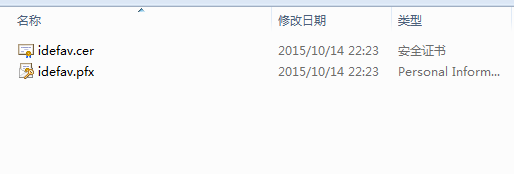
放到项目中
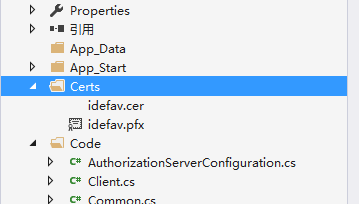
制作证书事注意:要加上-a sha1 -sky exchange
到此,基本代码就写完了,现在说说要注意的地方,OAuth2默认设置的请求是要求SSL的也就是必须是https//localhost:1111/OAuth/Token,然后我们现在不需要使用SSL加密请求,更改一下WebConfig文件
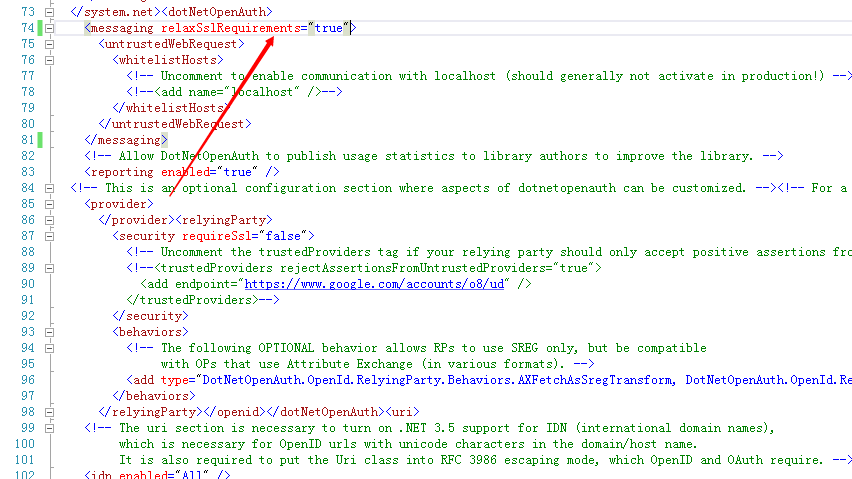
在WebConfig里面设置成如图中那样,就可以不用https访问了
6、我们F5运行项目
使用Post工具发送Post请求访问 http://localhost:53022/OAuth/token
Body参数:
 client_id:idefav

 client_secret:

 grant_type:client_credentials
请求结果:
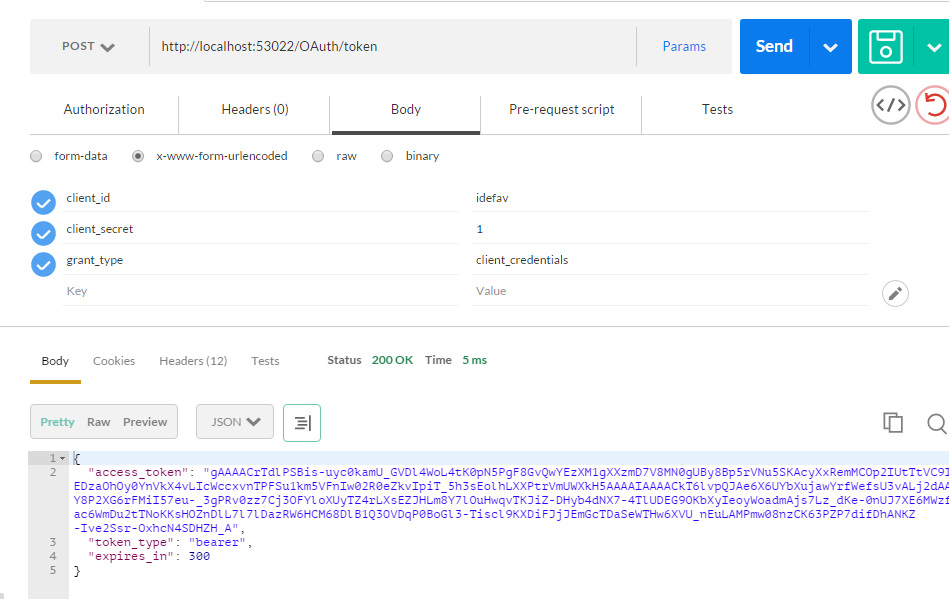
这样我们就拿到了access_token,通过这个access_token我们就可以访问资源服务器了
更新:
OAuthController代码添加内容类型
 using System.Collections.Generic;

 using System.Linq;

 using System.Threading.Tasks;

 using System.Web;

 using System.Web.Mvc;

 using System.Web.Script.Services;

 using DotNetOpenAuth.Messaging;

 using DotNetOpenAuth.OAuth2;

 using IdefavAuthorizationServer.Code;

 namespace IdefavAuthorizationServer.Controllers

 {

     public class OAuthController : Controller

     {

         private readonly AuthorizationServer authorizationServer =

            new AuthorizationServer(new IdefavAuthorizationServerHost(Common.Configuration));

         public async Task<ActionResult> Token()

         {

             var response = await authorizationServer.HandleTokenRequestAsync(Request);

             Response.ContentType = response.Content.Headers.ContentType.ToString();

             return response.AsActionResult();

         }

     }

 }
鉴于有人不知道Windows签名制作,下篇我们一起来看看如何制作一个认证服务器可以使用的签名证书
DotNetOpenAuth实践之搭建验证服务器的更多相关文章
- DotNetOpenAuth实践之WebApi资源服务器
系列目录: DotNetOpenAuth实践系列(源码在这里) 上篇我们讲到WCF服务作为资源服务器接口提供数据服务,那么这篇我们介绍WebApi作为资源服务器,下面开始: 一.环境搭建 1.新建We ...
- DotNetOpenAuth实践
DotNetOpenAuth实践之搭建验证服务器 DotNetOpenAuth是OAuth2的.net版本,利用DotNetOpenAuth我们可以轻松的搭建OAuth2验证服务器,不废话,下面我们来 ...
- DotNetOpenAuth Part 1 : Authorization 验证服务实现及关键源码解析
DotNetOpenAuth 是 .Net 环境下OAuth 开源实现框架.基于此,可以方便的实现 OAuth 验证(Authorization)服务.资源(Resource)服务.针对 DotNet ...
- DotNetOpenAuth实践系列
写在前面 本人在研究DotNetOpenAuth的过程中,遇到很多问题,很多坑,花费了很多时间才调通这玩意,现在毫无保留的分享出来,希望博友们可以轻松的上手DotNetOpenAuth,减少爬坑时间. ...
- 用 Apache James 搭建邮件服务器来收发邮件实践(一)(转)
Apache James 简称 James, 是 Java Apache Mail Enterprise Server的缩写.James 是100%基于Java的电子邮件服务器.它是一种独立的邮件服务 ...
- 信安实践——自建CA证书搭建https服务器
1.理论知识 https简介 HTTPS(全称:Hyper Text Transfer Protocol over Secure Socket Layer),是以安全为目标的HTTP通道,简单讲是HT ...
- .net core 3.0 搭建 IdentityServer4 验证服务器
叙述 最近在搞 IdentityServer4 API接口认证部分,由于之前没有接触过 IdentityServer4 于是在网上一顿搜搜搜,由于自己技术水平也有限,看了好几篇文章才搞懂,想通过博客 ...
- DotNetOpenAuth实践之WCF资源服务器配置
系列目录: DotNetOpenAuth实践系列(源码在这里) 上一篇我们写了一个OAuth2的认证服务器,我们也获取到access_token,那么这个token怎么使用呢,我们现在就来揭开 一般获 ...
- DotNetOpenAuth实践之Windows签名制作
系列目录: DotNetOpenAuth实践系列(源码在这里) 在上篇中我们搭建了一个简单的认证服务器,里面使用到了Windows签名证书,这一篇则是教大家如何制作Windows签名证书,下面进入正题 ...
随机推荐
- openGL笔记-画基本图形
#include "iostream" #include <GL/glut.h> #include<cmath> #include<vector> ...
- 【精选】Ubuntu 14.04 安装Nginx、php5-fpm、ThinkPHP5.0(已经测试上线)
sudo apt-get update 安裝Nginx https://www.vultr.com/docs/setup-nginx-rtmp-on-ubuntu-14-04 安裝完成後,Nginx的 ...
- IEnumerable 与 IQueryable
无论是在ado.net EF或者是在其他的Linq使用中,我们经常会碰到两个重要的静态类Enumerable.Queryable,他们在System.Linq命名空间下.那么这两个类是如何定义的,又是 ...
- [译]Quartz.NET 框架 教程(中文版)2.2.x 之第四课 更多关于Triggers
第四课 更多关于Triggers 跟作业任务类似,触发器也非常容易使用,但是在你能够充分掌握Quartz之前,你需要知道并理解许多触发器的客户化的参数.前面已经提到过,有许多不同类型的触发器供你选择, ...
- id=%d是什么意思呢?
$branch=M('Branchs')->where("id=%d",session('branchid'))->find(); %d代表,逗号后面那个user[]的 ...
- zookeeper日常报错总结
1:创建子节点的时候 没有根节点 org.apache.zookeeper.KeeperException$NoNodeException: KeeperErrorCode = NoNode for ...
- Python中的and和or
引子: 出现以上情况的原因是什么呢? print(bool('')) # False print(bool(0)) # False 所有变量的位操作都是通过强制转换成bool实现的,并且表达式的值是从 ...
- 如何开启一个Django项目
一:新建的Django工程 新建了一个Django工程后,工程会自动创建有两个templates文件夹和unitled文件夹,再加上一个manage.py文件. 二:Django开发的一般流程 在工程 ...
- SQL Server 2000事务复制问题
2000现在用的估计不多了,把之前收集的一些复制问题整理发布出来.可能都是些很白很二的问题,但人总是由最初的无知不断成长●-● SQL Server 2000事务复制问题服务器A(发布) 服务器B(分 ...
- 写给“有钱大爷”、”美工殿下”、“前端文艺青年”的微信HTML5页面设计建议
============================== 2018更新 iphone X 的设计内容 ============================== 我保证你一分钟就 ...