
DotNetOpenAuth实践之WCF资源服务器配置
系列目录:
DotNetOpenAuth实践系列(源码在这里)
上一篇我们写了一个OAuth2的认证服务器,我们也获取到access_token,那么这个token怎么使用呢,我们现在就来揭开
一般获取access_token用处就是访问接口资源,不然也用不到怎么大费周章的还要获取个token再去访问资源
而接口有几类:
WCF服务接口,WebApi,还有自己用如ashx,aspx写的接口提供给前端调用的接口
其中WCF接口DotNetOpenAuth.Sample例子中已经做了
这些接口公开对外就需要一个认证的过程才能访问(当然内部或者内网使用的也不用这么麻烦,毕竟认证也是影响性能的)
废话不多说,我们下面开始搭建资源服务器
首先,搭建WCF服务接口的资源认证
一、创建WCF资源服务器项目
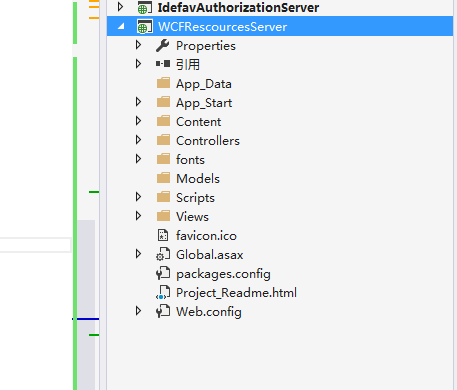
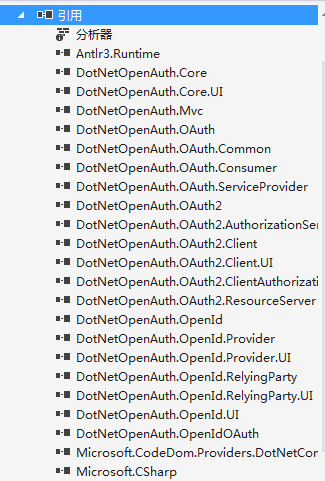
2、添加DotNetOpenAuth到项目中
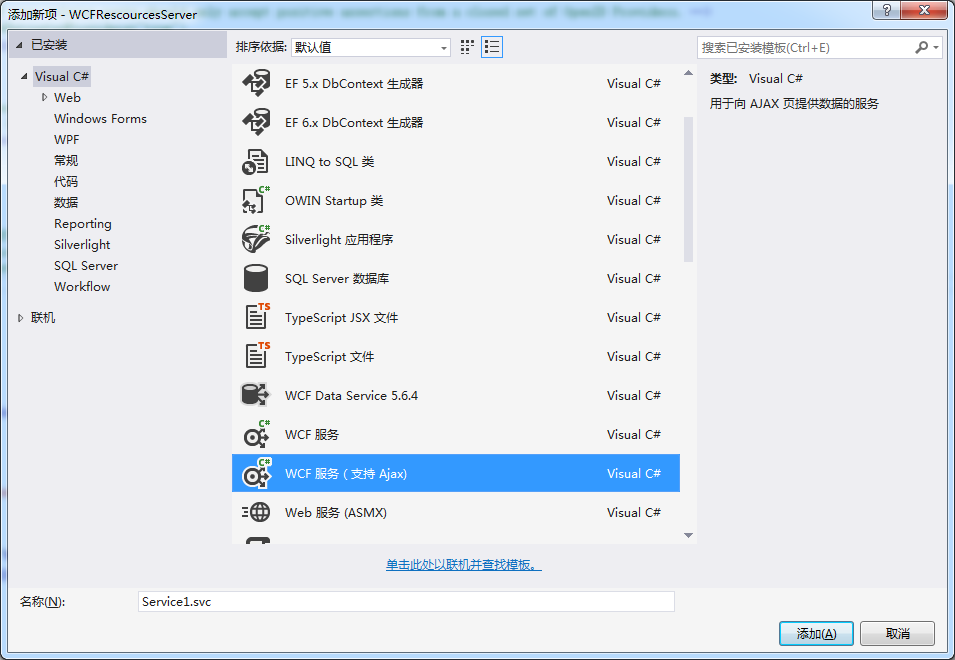
3、添加WCF服务,为了方便,我们添加支持ajax的wcf服务
4、重写ServiceAuthorizationManager
 using System;

 using System.Collections.Generic;

 using System.IdentityModel.Policy;

 using System.Linq;

 using System.Net.Http;

 using System.Security.Cryptography;

 using System.Security.Principal;

 using System.ServiceModel;

 using System.ServiceModel.Channels;

 using System.ServiceModel.Security;

 using System.ServiceModel.Web;

 using System.Threading;

 using System.Threading.Tasks;

 using System.Web;

 using DotNetOpenAuth.Messaging;

 using DotNetOpenAuth.OAuth2;

 using ProtocolException = System.ServiceModel.ProtocolException;

 namespace WCFRescourcesServer.Code

 {

     public class IdefavAuthorizationManager : ServiceAuthorizationManager

     {

         public IdefavAuthorizationManager()

         {

         }

         protected override bool CheckAccessCore(OperationContext operationContext)

         {

             if (!base.CheckAccessCore(operationContext))

             {

                 return false;

             }

             var httpDetails = operationContext.RequestContext.RequestMessage.Properties[HttpRequestMessageProperty.Name] as HttpRequestMessageProperty;

             var requestUri = operationContext.RequestContext.RequestMessage.Properties.Via;

             return Task.Run(async delegate

             {

                 ProtocolFaultResponseException exception = null;

                 try

                 {

                     var principal = await VerifyOAuth2Async(

                         httpDetails,

                         requestUri,

                         operationContext.IncomingMessageHeaders.Action ?? operationContext.IncomingMessageHeaders.To.AbsolutePath);

                     if (principal != null)

                     {

                         var policy = new OAuthPrincipalAuthorizationPolicy(principal);

                         var policies = new List<IAuthorizationPolicy> { policy };

                         var securityContext = new ServiceSecurityContext(policies.AsReadOnly());

                         if (operationContext.IncomingMessageProperties.Security != null)

                         {

                             operationContext.IncomingMessageProperties.Security.ServiceSecurityContext = securityContext;

                         }

                         else

                         {

                             operationContext.IncomingMessageProperties.Security = new SecurityMessageProperty

                             {

                                 ServiceSecurityContext = securityContext,

                             };

                         }

                         securityContext.AuthorizationContext.Properties["Identities"] = new List<IIdentity> { principal.Identity, };

                         return true;

                     }

                     else

                     {

                         return false;

                     }

                 }

                 catch (ProtocolFaultResponseException ex)

                 {

                     exception = ex;

                 }

                 catch (ProtocolException ex)

                 {

                 }

                 if (exception != null)

                 {

                     // Return the appropriate unauthorized response to the client.

                     var outgoingResponse = await exception.CreateErrorResponseAsync(CancellationToken.None);

                     if (WebOperationContext.Current != null)

                         this.Respond(WebOperationContext.Current.OutgoingResponse, outgoingResponse);

                 }

                 return false;

             }).GetAwaiter().GetResult();

         }

         private static async Task<IPrincipal> VerifyOAuth2Async(HttpRequestMessageProperty httpDetails, Uri requestUri, params string[] requiredScopes)

         {

             var resourceServer = new ResourceServer(new StandardAccessTokenAnalyzer((RSACryptoServiceProvider)Common.Configuration.SigningCertificate.PublicKey.Key, (RSACryptoServiceProvider)Common.Configuration.EncryptionCertificate.PrivateKey));

             return await resourceServer.GetPrincipalAsync(httpDetails, requestUri, requiredScopes: requiredScopes);

         }

         private void Respond(OutgoingWebResponseContext responseContext, HttpResponseMessage responseMessage)

         {

             responseContext.StatusCode = responseMessage.StatusCode;

             responseContext.SuppressEntityBody = true;

             foreach (var header in responseMessage.Headers)

             {

                 responseContext.Headers[header.Key] = header.Value.First();

             }

         }

     }

 }
5、实现OAuthPrincipalAuthorizationPolicy接口
 namespace OAuthResourceServer.Code {

     using System;

     using System.Collections.Generic;

     using System.IdentityModel.Claims;

     using System.IdentityModel.Policy;

     using System.Linq;

     using System.Security.Principal;

     using System.Web;

     public class OAuthPrincipalAuthorizationPolicy : IAuthorizationPolicy {

         private readonly Guid uniqueId = Guid.NewGuid();

         private readonly IPrincipal principal;

         /// <summary>

         /// Initializes a new instance of the <see cref="OAuthPrincipalAuthorizationPolicy"/> class.

         /// </summary>

         /// <param name="principal">The principal.</param>

         public OAuthPrincipalAuthorizationPolicy(IPrincipal principal) {

             this.principal = principal;

         }

         #region IAuthorizationComponent Members

         /// <summary>

         /// Gets a unique ID for this instance.

         /// </summary>

         public string Id {

             get { return this.uniqueId.ToString(); }

         }

         #endregion

         #region IAuthorizationPolicy Members

         public ClaimSet Issuer {

             get { return ClaimSet.System; }

         }

         public bool Evaluate(EvaluationContext evaluationContext, ref object state) {

             evaluationContext.AddClaimSet(this, new DefaultClaimSet(Claim.CreateNameClaim(this.principal.Identity.Name)));

             evaluationContext.Properties["Principal"] = this.principal;

             return true;

         }

         #endregion

     }

 }
6、配置WCF
<system.serviceModel>

    <bindings>

      <wsHttpBinding>

        <binding name="WSHttpBinding_OpenApi" closeTimeout="00:01:00" openTimeout="00:01:00" receiveTimeout="00:10:00" sendTimeout="00:01:00" bypassProxyOnLocal="false" transactionFlow="false" hostNameComparisonMode="StrongWildcard" maxBufferPoolSize="" maxReceivedMessageSize="" messageEncoding="Text" textEncoding="utf-8" useDefaultWebProxy="true" allowCookies="false">

          <readerQuotas maxDepth="" maxStringContentLength="" maxArrayLength="" maxBytesPerRead="" maxNameTableCharCount="" />

          <reliableSession ordered="true" inactivityTimeout="00:10:00" enabled="false" />

          <security mode="Message">

            <transport clientCredentialType="Windows" proxyCredentialType="None" realm="" />

            <message clientCredentialType="Windows" negotiateServiceCredential="true" algorithmSuite="Default" />

          </security>

        </binding>

      </wsHttpBinding>

    </bindings>

    <behaviors>

      <endpointBehaviors>

        <behavior name="WCFRescourcesServer.OpenApiAspNetAjaxBehavior">

          <enableWebScript />

        </behavior>

        <behavior name="WCFRescourcesServer.Services1Behavior">

        </behavior>

      </endpointBehaviors>

      <serviceBehaviors>

        <behavior name="myS">

          <serviceMetadata httpGetEnabled="true" httpsGetEnabled="true" />

          <serviceDebug includeExceptionDetailInFaults="false" />

          <serviceAuthorization serviceAuthorizationManagerType="WCFRescourcesServer.Code.IdefavAuthorizationManager, WCFRescourcesServer" principalPermissionMode="Custom" />

        </behavior>

      </serviceBehaviors>

    </behaviors>

    <serviceHostingEnvironment aspNetCompatibilityEnabled="true" multipleSiteBindingsEnabled="true" />

    <services>

      <service name="WCFRescourcesServer.Service1" behaviorConfiguration="myS">

        <endpoint address="" behaviorConfiguration="WCFRescourcesServer.Services1Behavior" binding="wsHttpBinding" contract="WCFRescourcesServer.IService1" />

      </service>

    </services>

  </system.serviceModel>
下面这段是关键的一句,配置WCF访问验证
<serviceAuthorization serviceAuthorizationManagerType="WCFRescourcesServer.Code.IdefavAuthorizationManager, WCFRescourcesServer" principalPermissionMode="Custom"/>
二、创建WCFClient访问WCF服务
创建一个IdefavOAuth2Client的Asp.net项目然后添加服务器引用
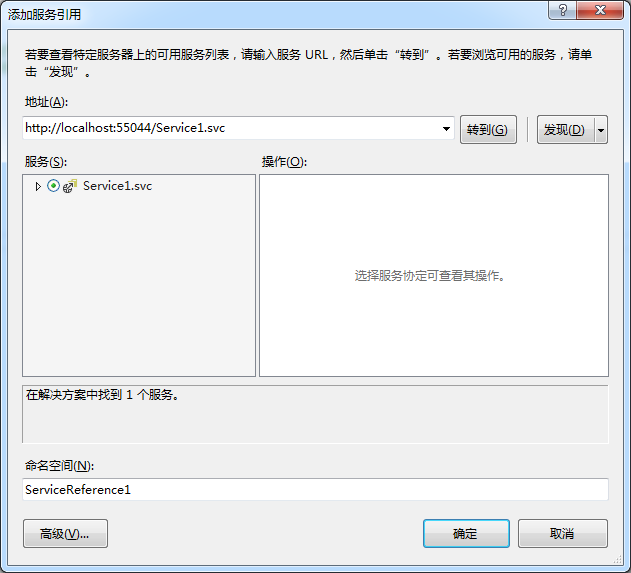
访问WCF代码如下:
 protected async void Button1_Click(object sender, EventArgs e)

         {

             var authServer = new AuthorizationServerDescription()

             {

                 TokenEndpoint = new Uri("http://localhost:53022/OAuth/token "),

                 ProtocolVersion = ProtocolVersion.V20

             };

             //var wcf= new UserAgentClient(authServer, "idefav", "1");

             WebServerClient Client= new WebServerClient(authServer, "idefav", "");

             var code =await Client.GetClientAccessTokenAsync(new string[] { "http://localhost:55044/IService1/DoWork" });

             string token = code.AccessToken;

             Service1Reference.Service1Client service1Client=new Service1Client();

             var httpRequest = (HttpWebRequest)WebRequest.Create(service1Client.Endpoint.Address.Uri);

             ClientBase.AuthorizeRequest(httpRequest,token);

             var httpDetails = new HttpRequestMessageProperty();

             httpDetails.Headers[HttpRequestHeader.Authorization] = httpRequest.Headers[HttpRequestHeader.Authorization];

             using (var scope = new OperationContextScope(service1Client.InnerChannel))

             {

                 if (OperationContext.Current.OutgoingMessageProperties.ContainsKey(HttpRequestMessageProperty.Name))

                 {

                     OperationContext.Current.OutgoingMessageProperties[HttpRequestMessageProperty.Name] = httpDetails;

                 }

                 else

                 {

                     OperationContext.Current.OutgoingMessageProperties.Add(HttpRequestMessageProperty.Name, httpDetails);

                 }

                 Button1.Text= service1Client.DoWork();

             }

         }
注意:
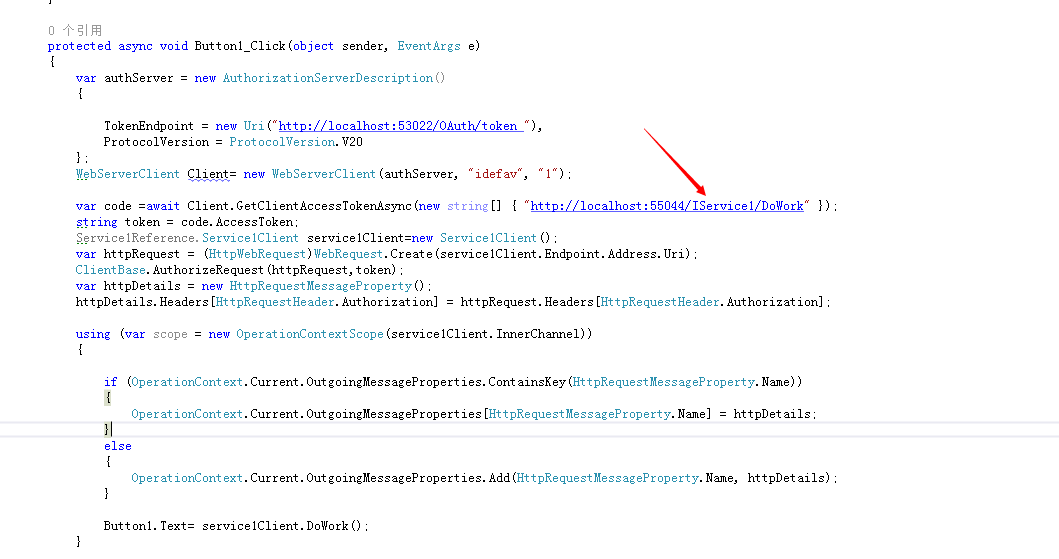
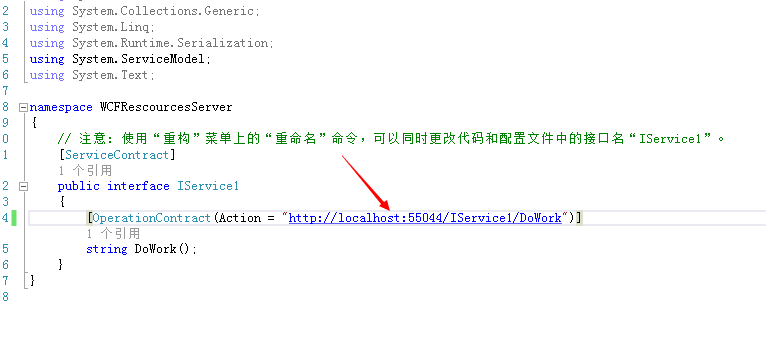
标示的地方是可以从服务引用生成的代码上面看的到

当然这个Scope可以在WCF中配置
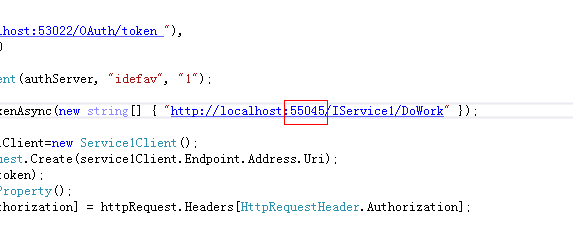
如果这里客户端和资源服务器不一致也会拒绝访问
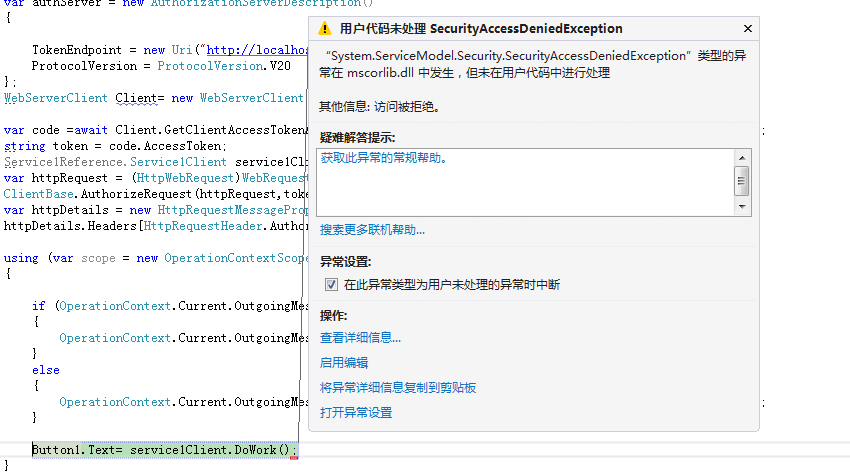
我们来测试一下,把端口改成55045然后运行项目
结果:
最后,还有个注意点
DotNetOpenAuth v5.0.0-alpha3 从Nuget上面安装的有Bug,需要去github下载源代码然后编译成dll替换掉Nuget的dll

我已经编译好了一份,百度网盘:
链接:http://pan.baidu.com/s/1jGlMZye 密码:hw2o
这里的是WCF资源服务器以及客户端访问
下篇将会讲WebAPI形式的资源服务器
DotNetOpenAuth实践之WCF资源服务器配置的更多相关文章
- DotNetOpenAuth实践之Webform资源服务器配置
系列目录: DotNetOpenAuth实践系列(源码在这里) 上篇我们讲到WebApi资源服务器配置,这篇我们说一下Webform下的ashx,aspx做的接口如何使用OAuth2认证 一.环境搭建 ...
- DotNetOpenAuth实践之WebApi资源服务器
系列目录: DotNetOpenAuth实践系列(源码在这里) 上篇我们讲到WCF服务作为资源服务器接口提供数据服务,那么这篇我们介绍WebApi作为资源服务器,下面开始: 一.环境搭建 1.新建We ...
- DotNetOpenAuth实践系列
写在前面 本人在研究DotNetOpenAuth的过程中,遇到很多问题,很多坑,花费了很多时间才调通这玩意,现在毫无保留的分享出来,希望博友们可以轻松的上手DotNetOpenAuth,减少爬坑时间. ...
- DotNetOpenAuth实践
DotNetOpenAuth实践之搭建验证服务器 DotNetOpenAuth是OAuth2的.net版本,利用DotNetOpenAuth我们可以轻松的搭建OAuth2验证服务器,不废话,下面我们来 ...
- DotNetOpenAuth实践之搭建验证服务器
系列目录: DotNetOpenAuth实践系列(源码在这里) DotNetOpenAuth是OAuth2的.net版本,利用DotNetOpenAuth我们可以轻松的搭建OAuth2验证服务器,不废 ...
- DotNetOpenAuth实践之Windows签名制作
系列目录: DotNetOpenAuth实践系列(源码在这里) 在上篇中我们搭建了一个简单的认证服务器,里面使用到了Windows签名证书,这一篇则是教大家如何制作Windows签名证书,下面进入正题 ...
- [WCF实践]1.WCF使用net.tcp寄宿到IIS中
一.IIS部分 环境:Windows Server 2008 R2 1.安装WAS,如下图所示: 2.网站net.tcp协议绑定,如下图所示: 3.网站启用net.tcp,如下图所示: 二 ...
- 学习nginx从入门到实践(五) 场景实践之静态资源web服务
一.静态资源web服务 1.1 静态资源 静态资源定义:非服务器动态生成的文件. 1.2 静态资源服务场景-CDN 1.3 文件读取配置 1.3.1 sendfile 配置语法: syntax: se ...
- Kubernetes实践技巧:资源预留
ubernetes 的节点可以按照节点的资源容量进行调度,默认情况下 Pod 能够使用节点全部可用容量.这样就会造成一个问题,因为节点自己通常运行了不少驱动 OS 和 Kubernetes 的系统守护 ...
随机推荐
- Codeforces 543.B Destroying Roads
B. Destroying Roads time limit per test 2 seconds memory limit per test 256 megabytes input standard ...
- bzoj3938 Robot
3938: Robot Time Limit: 10 Sec Memory Limit: 256 MBSubmit: 336 Solved: 112[Submit][Status][Discuss ...
- C++内存分配与释放
C++内存分配与释放 1. new 运算符 与 operator new一条 new 表达式语句( new Type; )中的 new 是指 new 运算符.operator new 是定义在 #in ...
- python requests https 访问出错
错误提示: /usr/local/lib/python2.7/site-packages/requests/packages/urllib3/util/ssl_.py:100: InsecurePla ...
- Asp.Net MVC +EF CodeFirst+多层程序设计
1.概述 这是一个基于个人博客的一个项目,虽然博客根本没必要做这么复杂的设计.但是公司有需求,所以先自己弄个项目练练手.项目需要满足下列需求 1.层与层之间需要解耦,在后期上线更新维护时不需要覆盖,只 ...
- codevs 1029 遍历问题
1029 遍历问题 http://codevs.cn/problem/1029/ 时间限制: 1 s 空间限制: 128000 KB 题目描述 Description 我们都很熟悉二叉树的 ...
- 最常用的8款 PHP 调试工具,你用过吗?
Web 开发并不是一项轻松的任务,有超级多服务端脚本语言提供给开发者,但是当前 PHP 因为具有额外的一些强大的功能而越来越流行.PHP 是最强大的服务端脚本语言之一,同时也是 Web 开发者和设计者 ...
- Spring websocket浏览器连接时出现404错误
1.场景 在用websocket做一个简单的数据导入页面同步显示后台进度功能的时候,浏览器出现连接不上的错误: WebSocket connection to 'ws://localhost:8080 ...
- 使用Sass预定义一些常用的样式,非常方便
CSS预处理技术现在已经非常成熟,比较流行的有Less,Sass,Stylus,在开发过程中提升我们的工作效率,缩短开发时间,方便管理和维护代码,可以根据自己的喜好选择一款自己喜欢的工具开发,使用很接 ...
- struts的标签
<%@ taglib uri="/struts-tags" prefix="s"%> <%@ taglib uri="/WEB-IN ...