
DotNetOpenAuth实践
DotNetOpenAuth实践之搭建验证服务器
DotNetOpenAuth是OAuth2的.net版本,利用DotNetOpenAuth我们可以轻松的搭建OAuth2验证服务器,不废话,下面我们来一步步搭建验证服务器
本次搭建环境:
.net4.5.1 ,DotNetOpenAuth v5.0.0-alpha3,MVC5
一、环境搭建
1、新建一个空的VS解决方案

2、添加验证服务器项目,项目选择MVC,不要自带的身份验证
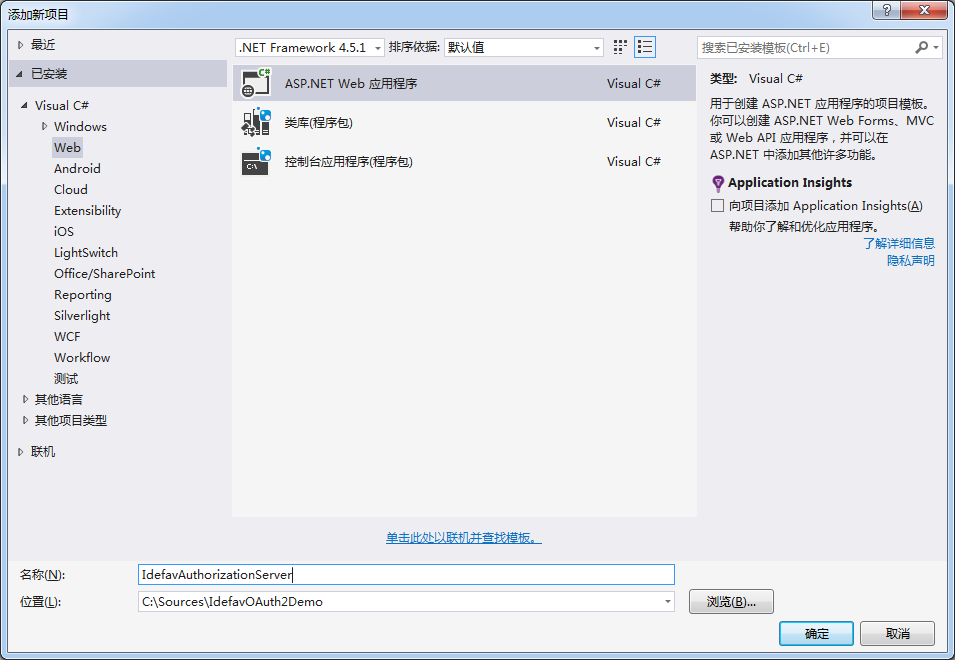

3、使用Nuget添加DotNetOpenAuth v5.0.0-alpha3
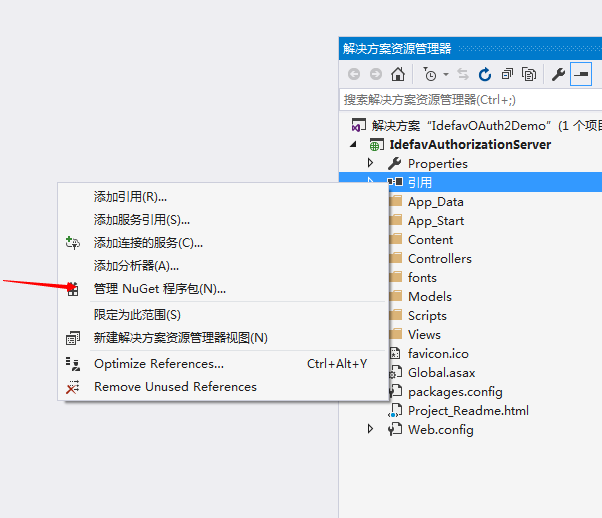
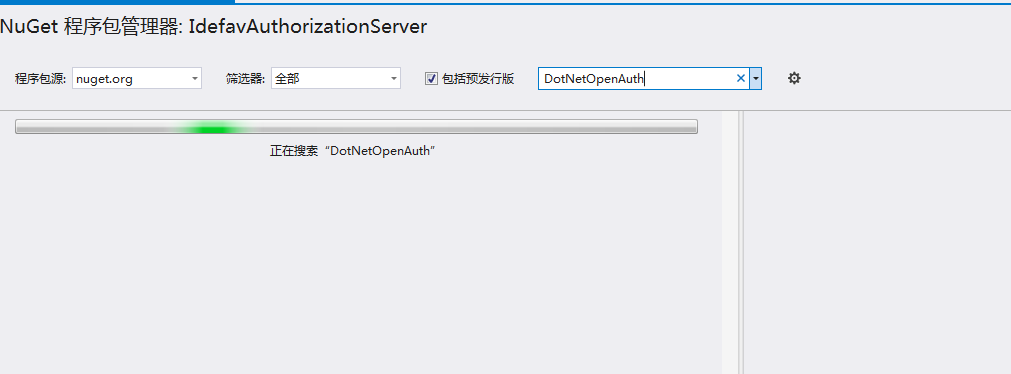
输入DotNetOpenAuth 安装DotNetOpenAuth v5.0.0-alpha3
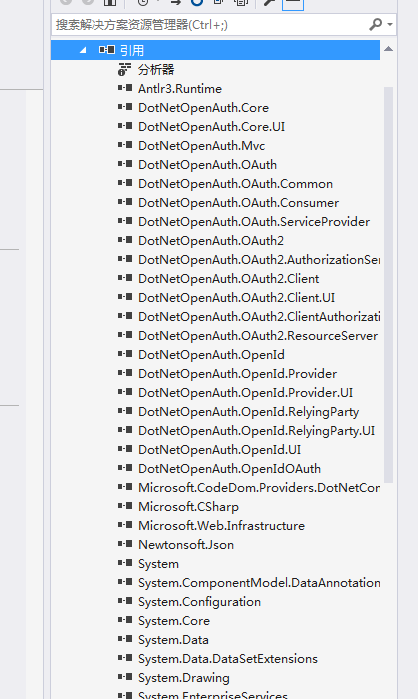
添加完成后
二、编写DotNetOpenAuth 验证服务器关键代码,实现功能
1、添加AuthorizationServerConfiguration.cs
这里的配置是为了添加方便管理,其实可以不用这个类

 1 using System;

 2 using System.Collections.Generic;

 3 using System.Linq;

 4 using System.Security.Cryptography.X509Certificates;

 5 using System.Web;

 6

 7 namespace IdefavAuthorizationServer.Code

 8 {

 9     /// <summary>

10     /// 验证服务器配置

11     /// </summary>

12     public class AuthorizationServerConfiguration

13     {

14         /// <summary>

15         /// 构造函数

16         /// </summary>

17         public AuthorizationServerConfiguration()

18         {

19             TokenLifetime = TimeSpan.FromMinutes(5);

20         }

21

22         /// <summary>

23         /// 签名证书

24         /// </summary>

25         public X509Certificate2 SigningCertificate { get; set; }

26

27         /// <summary>

28         /// 加密证书

29         /// </summary>

30         public X509Certificate2 EncryptionCertificate { get; set; }

31

32         /// <summary>

33         /// Token有效时间

34         /// </summary>

35         public TimeSpan TokenLifetime { get; set; }

36     }

37 }
2、实现IClientDescription接口
 1 using System;

 2 using System.Collections.Generic;

 3 using System.Linq;

 4 using System.Web;

 5 using DotNetOpenAuth.Messaging;

 6 using DotNetOpenAuth.OAuth2;

 7

 8 namespace IdefavAuthorizationServer.Code

 9 {

10     public class Client : IClientDescription

11     {

12         /// <summary>

13         /// 客户端名称client_id

14         /// </summary>

15         public string Name { get; set; }

16

17         /// <summary>

18         /// 客户端类型

19         /// </summary>

20         public int ClientType { get; set; }

21

22         /// <summary>

23         /// 回调URL

24         /// </summary>

25         public string Callback { get; set; }

26

27         public string ClientSecret { get; set; }

28

29

30         Uri IClientDescription.DefaultCallback

31         {

32             get { return string.IsNullOrEmpty(this.Callback) ? null : new Uri(this.Callback); }

33         }

34

35

36         ClientType IClientDescription.ClientType

37         {

38             get { return (ClientType)this.ClientType; }

39         }

40

41

42         bool IClientDescription.HasNonEmptySecret

43         {

44             get { return !string.IsNullOrEmpty(this.ClientSecret); }

45         }

46

47

48         bool IClientDescription.IsCallbackAllowed(Uri callback)

49         {

50             if (string.IsNullOrEmpty(this.Callback))

51             {

52                 // No callback rules have been set up for this client.

53                 return true;

54             }

55

56             // In this sample, it's enough of a callback URL match if the scheme and host match.

57             // In a production app, it is advisable to require a match on the path as well.

58             Uri acceptableCallbackPattern = new Uri(this.Callback);

59             if (string.Equals(acceptableCallbackPattern.GetLeftPart(UriPartial.Authority), callback.GetLeftPart(UriPartial.Authority), StringComparison.Ordinal))

60             {

61                 return true;

62             }

63

64             return false;

65         }

66

67

68         bool IClientDescription.IsValidClientSecret(string secret)

69         {

70             return MessagingUtilities.EqualsConstantTime(secret, this.ClientSecret);

71         }

72

73

74     }

75 }
3、实现IAuthorizationServerHost接口
 1 using System;

 2 using System.Collections.Generic;

 3 using System.Linq;

 4 using System.Security.Cryptography;

 5 using System.Web;

 6 using DotNetOpenAuth.Messaging.Bindings;

 7 using DotNetOpenAuth.OAuth2;

 8 using DotNetOpenAuth.OAuth2.ChannelElements;

 9 using DotNetOpenAuth.OAuth2.Messages;

10

11 namespace IdefavAuthorizationServer.Code

12 {

13     public class IdefavAuthorizationServerHost : IAuthorizationServerHost

14     {

15         /// <summary>

16         /// 配置

17         /// </summary>

18         private readonly AuthorizationServerConfiguration _configuration;

19

20         /// <summary>

21         /// 构造函数

22         /// </summary>

23         /// <param name="config"></param>

24         public IdefavAuthorizationServerHost(AuthorizationServerConfiguration config)

25         {

26             if (config != null)

27                 _configuration = config;

28         }

29

30         /// <summary>

31         /// Token创建

32         /// </summary>

33         /// <param name="accessTokenRequestMessage"></param>

34         /// <returns></returns>

35         public AccessTokenResult CreateAccessToken(IAccessTokenRequest accessTokenRequestMessage)

36         {

37             var accessToken = new AuthorizationServerAccessToken();

38             accessToken.Lifetime = _configuration.TokenLifetime;//设置Token的有效时间

39

40             // 设置加密公钥

41             accessToken.ResourceServerEncryptionKey =

42                 (RSACryptoServiceProvider)_configuration.EncryptionCertificate.PublicKey.Key;

43             // 设置签名私钥

44             accessToken.AccessTokenSigningKey = (RSACryptoServiceProvider)_configuration.SigningCertificate.PrivateKey;

45

46             var result = new AccessTokenResult(accessToken);

47             return result;

48         }

49

50         public IClientDescription GetClient(string clientIdentifier)

51         {

52             // 这里需要去验证客户端发送过来的client_id

53             if (string.Equals(clientIdentifier, "idefav", StringComparison.CurrentCulture))// 这里为了简明起见没有使用数据库

54             {

55                 var client=new Client

56                 {

57                     Name = "idefav",

58                     ClientSecret = "1",

59                     ClientType = 1

60                 };

61                 return client;

62             }

63             throw new ArgumentOutOfRangeException("clientIdentifier");

64         }

65

66         public bool IsAuthorizationValid(IAuthorizationDescription authorization)

67         {

68             return true;

69         }

70

71         public AutomatedUserAuthorizationCheckResponse CheckAuthorizeResourceOwnerCredentialGrant(string userName, string password,

72             IAccessTokenRequest accessRequest)

73         {

74             throw new NotImplementedException();

75         }

76

77         public AutomatedAuthorizationCheckResponse CheckAuthorizeClientCredentialsGrant(IAccessTokenRequest accessRequest)

78         {

79             AutomatedUserAuthorizationCheckResponse response = new AutomatedUserAuthorizationCheckResponse(accessRequest, true, "test");

80             return response;

81         }

82

83         public ICryptoKeyStore CryptoKeyStore { get; }

84         public INonceStore NonceStore { get; }

85

86

87     }

88 }
4、实现OAuthController
 1 using System;

 2 using System.Collections.Generic;

 3 using System.Linq;

 4 using System.Threading.Tasks;

 5 using System.Web;

 6 using System.Web.Mvc;

 7 using DotNetOpenAuth.Messaging;

 8 using DotNetOpenAuth.OAuth2;

 9 using IdefavAuthorizationServer.Code;

10

11 namespace IdefavAuthorizationServer.Controllers

12 {

13     public class OAuthController : Controller

14     {

15         private readonly AuthorizationServer authorizationServer =

16            new AuthorizationServer(new IdefavAuthorizationServerHost(Common.Configuration));

17

18         public async Task<ActionResult> Token()

19         {

20             var response = await authorizationServer.HandleTokenRequestAsync(Request);

21             return response.AsActionResult();

22         }

23     }

24 }
5、初始化AuthorizationServerConfiguration
这里采用Windows签名证书
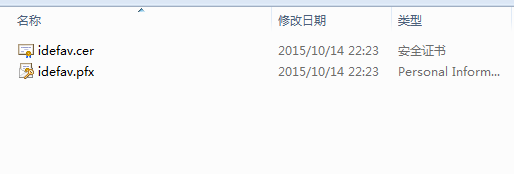
放到项目中
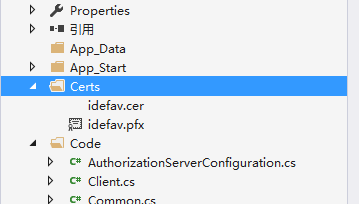
制作证书事注意:要加上-a sha1 -sky exchange
到此,基本代码就写完了,现在说说要注意的地方,OAuth2默认设置的请求是要求SSL的也就是必须是https//localhost:1111/OAuth/Token,然后我们现在不需要使用SSL加密请求,更改一下WebConfig文件
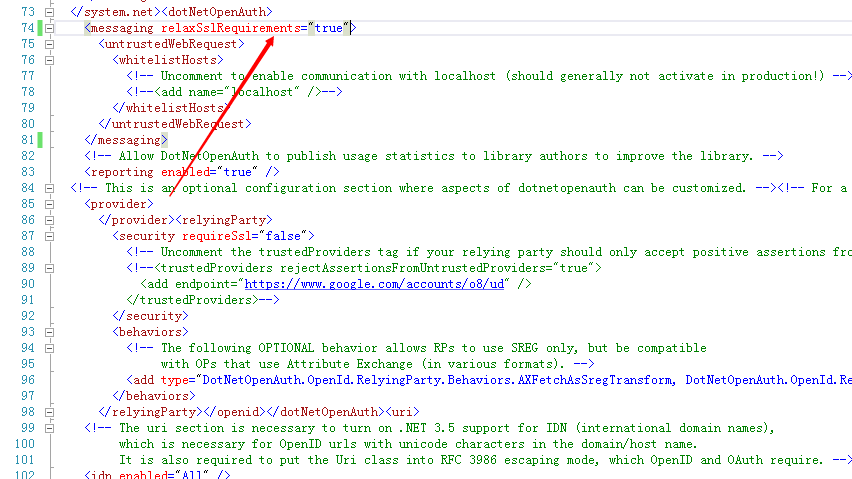
在WebConfig里面设置成如图中那样,就可以不用https访问了
6、我们F5运行项目
使用Post工具发送Post请求访问 http://localhost:53022/OAuth/token
Body参数:
1 client_id:idefav

2 client_secret:1

3 grant_type:client_credentials
请求结果:
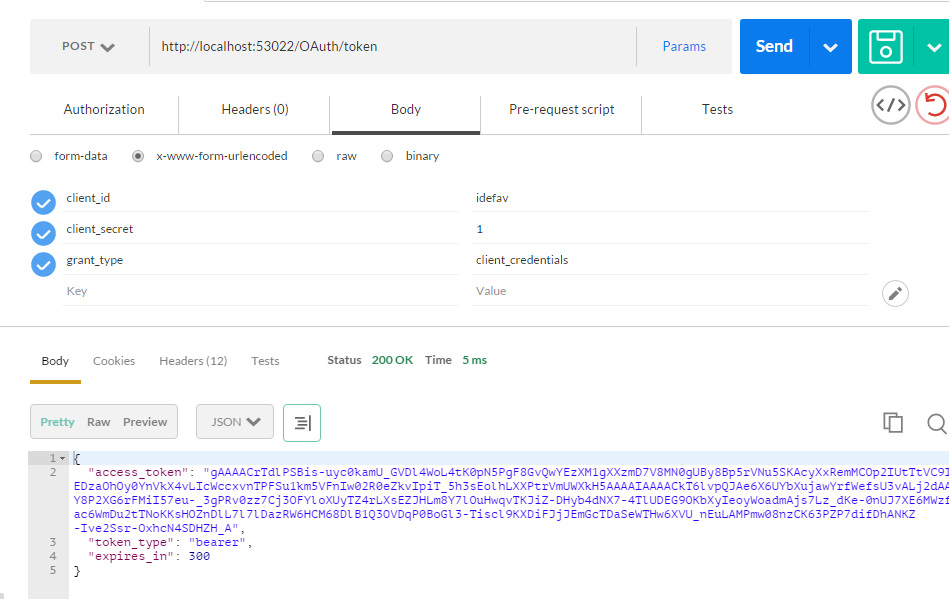
这样我们就拿到了access_token,通过这个access_token我们就可以访问资源服务器了
DotNetOpenAuth实践的更多相关文章
- DotNetOpenAuth实践之搭建验证服务器
系列目录: DotNetOpenAuth实践系列(源码在这里) DotNetOpenAuth是OAuth2的.net版本,利用DotNetOpenAuth我们可以轻松的搭建OAuth2验证服务器,不废 ...
- DotNetOpenAuth实践系列
写在前面 本人在研究DotNetOpenAuth的过程中,遇到很多问题,很多坑,花费了很多时间才调通这玩意,现在毫无保留的分享出来,希望博友们可以轻松的上手DotNetOpenAuth,减少爬坑时间. ...
- DotNetOpenAuth实践之Webform资源服务器配置
系列目录: DotNetOpenAuth实践系列(源码在这里) 上篇我们讲到WebApi资源服务器配置,这篇我们说一下Webform下的ashx,aspx做的接口如何使用OAuth2认证 一.环境搭建 ...
- DotNetOpenAuth实践之WebApi资源服务器
系列目录: DotNetOpenAuth实践系列(源码在这里) 上篇我们讲到WCF服务作为资源服务器接口提供数据服务,那么这篇我们介绍WebApi作为资源服务器,下面开始: 一.环境搭建 1.新建We ...
- DotNetOpenAuth实践之WCF资源服务器配置
系列目录: DotNetOpenAuth实践系列(源码在这里) 上一篇我们写了一个OAuth2的认证服务器,我们也获取到access_token,那么这个token怎么使用呢,我们现在就来揭开 一般获 ...
- DotNetOpenAuth实践之Windows签名制作
系列目录: DotNetOpenAuth实践系列(源码在这里) 在上篇中我们搭建了一个简单的认证服务器,里面使用到了Windows签名证书,这一篇则是教大家如何制作Windows签名证书,下面进入正题 ...
- DotNetOpenAuth Part 1 : Authorization 验证服务实现及关键源码解析
DotNetOpenAuth 是 .Net 环境下OAuth 开源实现框架.基于此,可以方便的实现 OAuth 验证(Authorization)服务.资源(Resource)服务.针对 DotNet ...
- DotNetOpenAuth搭建OAuth2.0
使用DotNetOpenAuth搭建OAuth2.0授权框架 标题还是一如既往的难取. 我认为对于一个普遍问题,必有对应的一个简洁优美的解决方案.当然这也许只是我的一厢情愿,因为根据宇宙法则,所有事物 ...
- webp图片实践之路
最近,我们在项目中实践了webp图片,并且抽离出了工具模块,整合到了项目的基础模板中.传闻IOS10也将要支持webp,那么使用webp带来的性能提升将更加明显.估计在不久的将来,webp会成为标配. ...
随机推荐
- Qt4.8在Windows下的三种编程环境搭建
Qt4.8在Windows下的三种编程环境搭建 Qt的版本是按照不同的图形系统来划分的,目前分为四个版本:Win32版,适用于Windows平台:X11版,适合于使用了X系统的各种Linux和Unix ...
- 队列优化和斜率优化的dp
可以用队列优化或斜率优化的dp这一类的问题为 1D/1D一类问题 即状态数是O(n),决策数也是O(n) 单调队列优化 我们来看这样一个问题:一个含有n项的数列(n<=2000000),求出每一 ...
- 实现Android ListView 自动加载更多内容
研究了几个小时终于实现了Android ListView 自动加载的效果. 说说我是怎样实现的.分享给大家. 1.给ListView增加一个FooterView,调用addFooterView(foo ...
- OpenCms创建网站的过程示意图——专用OpenCms人们刚开始学习
很多人听说过OpenCms,我知道它的强大,只需下载并安装,最后,我们看到了久违OpenCms,我们看到了它的简单的界面,喜悦之后,但难免困惑.如何用这个东西,我如何用它来网站,从哪里开始,无从下手. ...
- Java EE (6) -- Java EE 5 Enterprise Architect Certified Master
Section 1: Application Design Concepts and Principles Explain the main advantages of an object-orien ...
- Android学习笔记(四十):Preference使用
Preference从字面上看偏好,译为首选项. 一些配置数据,一些我们上次点击选择的内容.我们希望在下次应用调起的时候依旧有效,无须用户再一次进行配置或选择.Android提供preference这 ...
- 十步完全理解SQL(转)
本文由 伯乐在线 - 水果泡腾片 翻译.未经许可,禁止转载!英文出处:Lukas Eder.欢迎加入翻译组. 很多程序员视 SQL 为洪水猛兽.SQL 是一种为数不多的声明性语言,它的运行方式完全不同 ...
- java socket编程 初级 服务器端和客户端 通信
package server; import java.io.DataOutputStream; import java.io.IOException; import java.net.ServerS ...
- NET 项目结构搭建
NET 项目结构搭建 我们头开始,从简单的单项目解决方案,逐步添加业务逻辑的约束,从应用逻辑和领域逻辑两方面考虑,从简单的单个项目逐步搭建一个多项目的解决方案.主要内容:(1)搭建应用逻辑和领域逻辑都 ...
- 【原创】ZOJ_1649 Rescue 解题报告
Rescue Time Limit: 2 Seconds Memory Limit: 65536 KB Angel was caught by the MOLIGPY! He was put ...