
spring boot 尚桂谷学习笔记10 数据访问02 mybatis
数据访问 mybatis
创建一个 springboot 工程,模块选择 sql 中 mysql(数据驱动), jdbc(自动配置数据源), mybatis Web模块中选择 web
pom 引入:
        <dependency>

            <groupId>org.mybatis.spring.boot</groupId>

            <artifactId>mybatis-spring-boot-starter</artifactId>

            <version>1.3.2</version>

        </dependency>
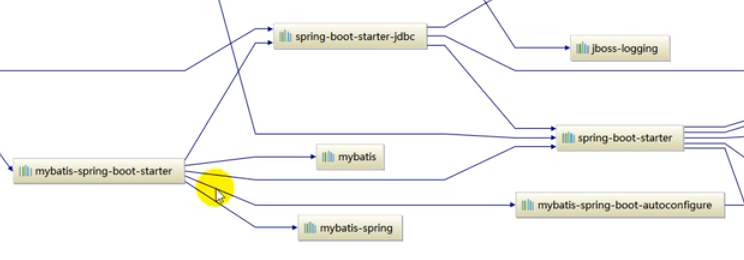
pom依赖关系图:也可以不引入jdbc 模块 mybatis依赖该模块
创建基本的环境:参照上一章节 (数据源druid 等配置)
新加入表 employee 并且设置 department 一起开机启动执行
DROP TABLE IF EXISTS `employee`;

CREATE TABLE `employee` (

  `id` int(10) NOT NULL,

  `lastName` char(20) DEFAULT NULL,

  `email` char(50) DEFAULT NULL,

  `gender` smallint(1) DEFAULT NULL,

  `d_id` int(10) DEFAULT NULL,

  PRIMARY KEY (`id`)

) ENGINE=InnoDB DEFAULT CHARSET=utf8;
yum 配置文件如下:
spring:

  datasource:

    password: 101022li

    username: root

    url: jdbc:mysql://192.168.10.129:3306/mybatis

    driver-class-name: com.mysql.jdbc.Driver

    type: com.alibaba.druid.pool.DruidDataSource

    initialSize: 5

    minIdle: 5

    maxActive: 5

    maxWait: 60000

    timeBetweenEvictionRunsMillis: 60000

    minEvictableIdletimeMillis: 300000

    validationQuery: SELECT 1 FROM DUAL

    testWhileIDle: true

    testOnBorrow: false

    testOnReturn: false

    poolPreparedStatements: true

# 配置监控系统拦截的filters 去掉后监控界面sql无法统计 wall 用于防火墙

    filters: stat,wall,log4j

#    maxPoolPreparedStatmentPerConnectionSize: 20

#   useGlobalB

    # 配置执行sql目录下的sql

    schema:

      - classpath:sql/department.sql

      - classpath:sql/employee.sql
设置 employee bean 以及 department bean 设置好 get set 方法
employee

    private Integer id;

    private String lastName;

    private Integer gender;

    private String email;

    private Integer did;

department

    private Integer id;

    private String departmentName;
注解版:
创建一个mapper文件
package com.lixuchun.springboot.mapper;

import com.lixuchun.springboot.bean.Department;

import org.apache.ibatis.annotations.*;

// 这是一个操作数据库的mapper

@Mapper

public interface DepartmentMapper {

    @Select("select * from department where id=#{id}")

    public Department getDepartmentById(Integer id);

    @Delete("delete from department where id=#{id}")

    public Integer deleteDeptById(Integer id);

    @Options(useGeneratedKeys = true, keyProperty = "id")

    @Insert("insert into department(departmentName) values(#{departmentName})")

    public Integer insertDept(Department department);

    @Update("update department set departmentName=#{departmentName} where id=#{id}")

    public Integer updateDept(Department department);

}
创建一个 controller 文件:
package com.lixuchun.springboot.Controller;

import com.lixuchun.springboot.bean.Department;

import com.lixuchun.springboot.mapper.DepartmentMapper;

import org.springframework.beans.factory.annotation.Autowired;

import org.springframework.stereotype.Controller;

import org.springframework.web.bind.annotation.GetMapping;

import org.springframework.web.bind.annotation.PathVariable;

import org.springframework.web.bind.annotation.RestController;

@RestController

public class DeptController {

    @Autowired

    DepartmentMapper departmentMapper;

    @GetMapping("/dept/{id}")

    public Department getDeptment(@PathVariable("id") Integer id) {

        return departmentMapper.getDepartmentById(id);

    }

    @GetMapping("/dept")

    public Department insertDept(Department department) {

        departmentMapper.insertDept(department);

        return department;

    }

}
浏览器访问:
localhost:8080/dept/2 查询deptId=2 的 部门信息
localhost:8080/dept?departmentName=coding1 插入部门信息 研发部 正常查询插入
问题:当前 数据库cloum 字段名称和类中字段名称相同 如果不同情况下处理流程如下:
将 数据库中 departmentName 列名 修改成 department_name
对应 mapper 文件中 @Select @Insert 两个sql 注释方法中 修改列名称
查询发现 localhost:8080/dept/2 只能查询出 id 名称查询不出来 不能映射
新建一个 MybatisConfig 类 进行mybatis配置:configurationCustomizer
package com.lixuchun.springboot.config;

import org.apache.ibatis.session.Configuration;

import org.mybatis.spring.boot.autoconfigure.ConfigurationCustomizer;

import org.springframework.context.annotation.Bean;

@org.springframework.context.annotation.Configuration

public class MybatisConfig {

    @Bean

    public ConfigurationCustomizer configurationCustomizer() {

        return new ConfigurationCustomizer() {

            @Override

            public void customize(Configuration configuration) {

                // 开启驼峰命名规则

                configuration.setMapUnderscoreToCamelCase(true);

            }

        };

    }

}
每一个mapper 类中 都有 @mapper 注解 如果有多个 mapper类非常麻烦
可以在启动类 使用 @MapperScan注释进行批量扫描配置,代替@mapper 注释-》 Springboot06DataMybatisApplication:
@MapperScan(value = "com.lixuchun.springboot.mapper")

@SpringBootApplication

public class Springboot06DataMybatisApplication {

    public static void main(String[] args) {

        SpringApplication.run(Springboot06DataMybatisApplication.class, args);

    }

}
配置文件版:
http://www.mybatis.org/mybatis-3/zh/index.html mybatis 参考文档
配置yum 配置文件 新增 mybatis 配置内容
# mybatis 配置

mybatis:

  config-location: classPath:mybatis/mybatis-config.xml

  mapper-locations: classPath:mybatis/mapper/EmployeeMapper.xml
在resource 文件夹下创建 mybatis/mapper 文件夹 并且创建 EmployeeMapper.xml 以及 Mybatis-config.xml 配置文件
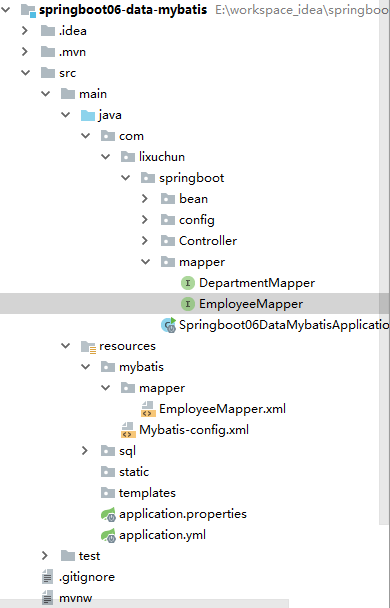
EmployeeMapper.xml 模板参照 上面 给出 mybatis 参考文档
<?xml version="1.0" encoding="UTF-8" ?>

<!DOCTYPE mapper

        PUBLIC "-//mybatis.org//DTD Mapper 3.0//EN"

        "http://mybatis.org/dtd/mybatis-3-mapper.dtd">

<mapper namespace="com.lixuchun.springboot.mapper.EmployeeMapper">

    <!--

        public Employee getEmployeeById(Integer id);

        public void insertEmployee(Employee employee);

    -->

    <select id="getEmployeeById" resultType="com.lixuchun.springboot.bean.Employee">

        SELECT * FROM employee WHERE id=#{id}

    </select>

    <insert id="insertEmployee">

        INSERT INTO employee(lastName, email, gender, d_id) VALUES (#{lastName}, #{email}, #{gender}, #{dId})

    </insert>

</mapper>
Mybatis-config.xml 文件内容
<?xml version="1.0" encoding="UTF-8" ?>

<!DOCTYPE configuration

        PUBLIC "-//mybatis.org//DTD Config 3.0//EN"

        "http://mybatis.org/dtd/mybatis-3-config.dtd">

<configuration>

    <settings>

        <setting name="mapUnderscoreToCamelCase" value="true"/>

    </settings>

</configuration>
EmployeeMapper.java 文件内容
package com.lixuchun.springboot.mapper;

import com.lixuchun.springboot.bean.Employee;

import org.apache.ibatis.annotations.Mapper;

@Mapper

public interface EmployeeMapper {

    public Employee getEmployeeById(Integer id);

    public void insertEmployee(Employee employee);

}
DeptController 内容增加 employee 访问
@Autowired

EmployeeMapper employeeMapper;

@GetMapping("/emp/{id}")

public Employee getEmployeeById(@PathVariable("id") Integer id) {

    Employee employee = employeeMapper.getEmployeeById(id);

    System.out.println(employee.getLastName());

     return employee;

}
访问 localhost:8080/emp/1 正常返回json结果

spring boot 尚桂谷学习笔记10 数据访问02 mybatis的更多相关文章
- spring boot 尚桂谷学习笔记11 数据访问03 JPA
整合JPA SpringData 程序数据交互结构图 (springdata jpa 默认使用 hibernate 进行封装) 使用之后就关注于 SpringData 不用再花多经历关注具体各个交互框 ...
- spring boot 尚桂谷学习笔记09 数据访问
springboot 与数据库访问 jdbc, mybatis, spring data jpa, 1.jdbc原生访问 新建项目 使用 springboot 快速构建工具 选中 web 组件 sq ...
- spring boot 尚桂谷学习笔记07 嵌入式容器 ---Web
------配置嵌入式servlet容器------ springboot 默认使用的是嵌入的Servlet(tomcat)容器 问题? 1)如何定制修改Servlet容器的相关配置: 1.修改和se ...
- spring boot 尚桂谷学习笔记04 ---Web开始
------web开发------ 1.创建spring boot 应用 选中我们需要的模块 2.spring boot 已经默认将这些场景配置好了 @EnableAutoConfiguration ...
- spring boot 尚桂谷学习笔记08 Docker ---Web
------Docker------ 简介:Docker是一个开元的应用容器引擎,性能非常高 已经安装好的软件打包成一个镜像放到服务器中运行镜像 MySQL容器,Redis容器...... Docke ...
- spring boot 尚桂谷学习笔记05 ---Web
------web 开发登录功能------ 修改login.html文件:注意加粗部分为 msg 字符串不为空时候 才进行显示 <!DOCTYPE html> <!-- saved ...
- spring boot 尚桂谷学习笔记06 异常处理 ---Web
------错误处理机制------ 默认效果 1 返回一个默认的错误页面 浏览器发送请求的请求头:优先接收 text/html 数据 客户端则默认响应json数据 : accept 没有说明返回什么 ...
- springboot 尚桂谷学习笔记03
------spring boot 与日志------ 日志框架: 市面上的日志框架: jul jcl jboss-logging logback log4j log4j2 ...... 左边一个门面 ...
- Spring Boot 揭秘与实战(二) 数据存储篇 - MyBatis整合
文章目录 1. 环境依赖 2. 数据源3. 脚本初始化 2.1. 方案一 使用 Spring Boot 默认配置 2.2. 方案二 手动创建 4. MyBatis整合5. 总结 4.1. 方案一 通过 ...
随机推荐
- Dp状态设计与方程总结
1.不完全状态记录<1>青蛙过河问题<2>利用区间dp 2.背包类问题<1> 0-1背包,经典问题<2>无限背包,经典问题<3>判定性背包问 ...
- "源文件名长度大于文件系统支持的长度无法删除"的解决方案
import java.io.File; import java.io.IOException; import org.apache.commons.io.FileUtils; /** * @auth ...
- luogu P3657 (NOIP2017) 跳房子(二分+DP+单调队列)
题面 传送门 分析 显然答案有单调性,可以二分答案,设当前二分值为g,根据题意我们可以求出跳跃长度的范围[l,r] 考虑DP 子状态: dp[i]表示跳到第i个点时的最大和 状态转移方程 \(dp[i ...
- Spark链接hive时 “HikariCP” 问题
IDE本地调试和spark-shell调试报错: Caused by: org.datanucleus.exceptions.NucleusUserException: The connection ...
- 汇编语言之寄存器使用bx si di bp
转载自:https://www.cnblogs.com/youxin/archive/2012/05/29/2524780.html 如果你看到这篇博客时正在做第七章问题,强烈建议先去把8.1~8.4 ...
- NVIDIA Jetson™ TX1 Module
NVIDIA® Jetson TX1 是一台模块式计算机,代表了视觉计算领域近20年的研发成就,其尺寸仅有信用卡大小.Jetson TX1 基于NVIDIA Maxwell™ 架构,配有256个 NV ...
- 微信小程序(13)--页面滚动到某个位置添加类效果
微信小程序页面滚动到某个位置添加类,盒子置顶效果. <!-- vh,是指CSS中相对长度单位,表示相对视口高度(Viewport Height),1vh = % * 视口高度 --> &l ...
- Spark- Spark从SFTP中读取zip压缩文件数据做计算
我们遇到个特别的需求,一个数据接入的流程跑的太慢,需要升级为用大数据方式去处理,提高效率. 数据: 数据csv文件用Zip 压缩后放置在SFTP中 数据来源: SFTP 数据操作: 文件和它的压缩包一 ...
- Codeforces Round #420 (Div. 2) - E
题目链接:http://codeforces.com/contest/821/problem/E 题意:起初在(0,0),现在要求走到(k,0),问你存在多少种走法. 其中有n条线段,每条线段为(a, ...
- Sass--传一个不带值的参数
Sass 的混合宏有一个强大的功能,可以传参,那么在 Sass 中传参主要有以下几种情形: A) 传一个不带值的参数 在混合宏中,可以传一个不带任何值的参数,比如: @mixin border-rad ...