
spring boot 尚桂谷学习笔记06 异常处理 ---Web
------错误处理机制------
默认效果
1 返回一个默认的错误页面

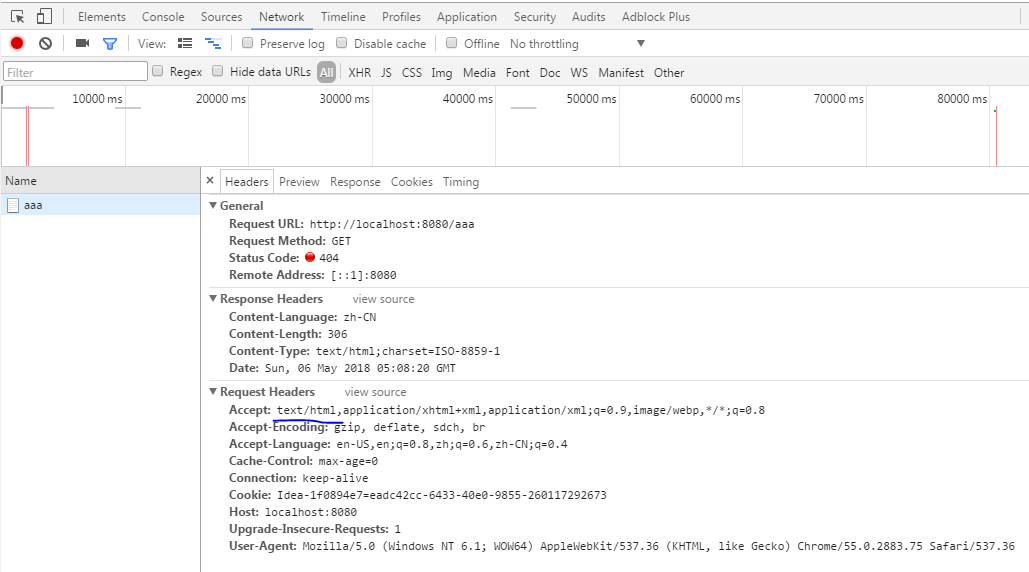
浏览器发送请求的请求头:优先接收 text/html 数据
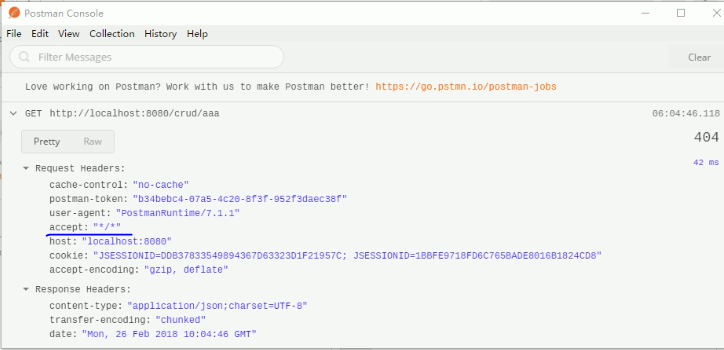
客户端则默认响应json数据 : accept 没有说明返回什么数据 默认返回json
原理:参照 ErrorMvcAutoConfiguration 错误的自动配置
1 DefaultErrorAttributes
  // 帮助我们共享页面信息
  public Map<String, Object> getErrorAttributes(WebRequest webRequest, boolean includeStackTrace) {

        Map<String, Object> errorAttributes = new LinkedHashMap();

        errorAttributes.put("timestamp", new Date());

        this.addStatus(errorAttributes, webRequest);

        this.addErrorDetails(errorAttributes, webRequest, includeStackTrace);

        this.addPath(errorAttributes, webRequest);

        return errorAttributes;

    }
2 BasicErrorController
@Controller

@RequestMapping({"${server.error.path:${error.path:/error}}"}) // 都是响应 /error请求

public class BasicErrorController extends AbstractErrorController {
  @RequestMapping(
      produces = {"text/html"} // 产生html类型的数据
  )
  public ModelAndView errorHtml(HttpServletRequest request, HttpServletResponse response) {
      HttpStatus status = this.getStatus(request);
      Map<String, Object> model = Collections.unmodifiableMap(this.getErrorAttributes(request, this.isIncludeStackTrace(request, MediaType.TEXT_HTML)));
      response.setStatus(status.value());
    // 去哪个页面作为错误页面 包含页面地址和内容
      ModelAndView modelAndView = this.resolveErrorView(request, response, status, model);
      return modelAndView == null ? new ModelAndView("error", model) : modelAndView;
  }

  @RequestMapping
  @ResponseBody // 产生json数据
  public ResponseEntity<Map<String, Object>> error(HttpServletRequest request) {
      Map<String, Object> body = this.getErrorAttributes(request, this.isIncludeStackTrace(request, MediaType.ALL));
      HttpStatus status = this.getStatus(request);
      return new ResponseEntity(body, status);
  }
3 ErrorPageCustomizer
@Value("${error.path:/error}")

private String path = "/error"; 系统出现错误 到 error请求 (web.xml 注册的错误规则)
4 DefaultErrorViewResolver
  public ModelAndView resolveErrorView(HttpServletRequest request, HttpStatus status, Map<String, Object> model) {

        ModelAndView modelAndView = this.resolve(String.valueOf(status), model);

        if (modelAndView == null && SERIES_VIEWS.containsKey(status.series())) {

            modelAndView = this.resolve((String)SERIES_VIEWS.get(status.series()), model);

        }

        return modelAndView;

    }

    private ModelAndView resolve(String viewName, Map<String, Object> model) {
     // 默认可以找到一个页面 error/404

        String errorViewName = "error/" + viewName;
     // 模板引擎可以解析这个页面地址就用模板引擎解析

        // 模板引擎可以用的情况下返回得到errorViewName指定视图地址
     // 模板引擎不可用 就在静态资源文件夹下找 errorViewName 对应的页面
     TemplateAvailabilityProvider provider = this.templateAvailabilityProviders.getProvider(errorViewName, this.applicationContext);

        return provider != null ? new ModelAndView(errorViewName, model) : this.resolveResource(errorViewName, model);

    }
步骤:
一旦系统出现4xx或者5xx错误:ErrorPageCustomizer 生效(定制错误的响应规则) 就会来到/error 请求
就会被 BasicErrorController 处理:
1) 响应页面: 去哪个页面由 DefaultErrorViewResolver 决定
protected ModelAndView resolveErrorView(HttpServletRequest request, HttpServletResponse response, HttpStatus status, Map<String, Object> model) {

        Iterator var5 = this.errorViewResolvers.iterator();

     // 所有的ErrorViewResolver 得到 ModelAndView

        ModelAndView modelAndView;

        do {

            if (!var5.hasNext()) {

                return null;

            }

            ErrorViewResolver resolver = (ErrorViewResolver)var5.next();

            modelAndView = resolver.resolveErrorView(request, status, model);

        } while(modelAndView == null);

        return modelAndView;

    }
2 如何定制错误响应
1) 定制错误页面
1) 有模板引擎的情况下:error/ 状态码 ( error/404.html) 将错误页面命名为错误状态码.html 发生此状态码到此错误页面
也可以使用 4xx.html或者5xx.html 来匹配 4开头的或者5开头的错误 如果有精确的会优先到精确的错误提示页面
页面能获取的信息:
timestamp:时间戳
status:状态码
error:错误提示
exception:异常对象
message:异常消息
errors:JSR303 数据校验的错误信息


2) 没有模板引擎,在静态资源文件夹下寻找 static文件夹下寻找
3) 模板引擎静态资源都没有 就是默认来到springboot 默认的错误提示页面
2) 定制json 错误数据
1) 自定义异常处理&返回json数据
//异常处理器

@ControllerAdvice

public class MyExceptionHandler {


   // 浏览器客户端返回都是json数据

    @ResponseBody

    @ExceptionHandler(UserNotExistException.class)

    public Map<String , Object> handleException(Exception e) {

        Map<String , Object> map = new HashMap<String, Object>();

        map.put("code", "user.notexist");

        map.put("message", e.getMessage());

        return map;

    }

}
// 没有自适应效果...
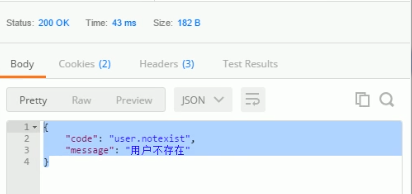

2) 转发到/error 进行自适应响应 实现功能但是 map.put 信息无法接受
    @ResponseBody

    @ExceptionHandler(UserNotExistException.class)

    public String handleException(Exception e, HttpServletRequest request) {

        Map<String , Object> map = new HashMap<String, Object>();

        // 传入我们自己设置的状态码 4xx 5xx 否则不会进入到错误页面的解析流程

        request.setAttribute("javax.servlet.error.status_code", 400);

        map.put("code", "user.notexist");

        map.put("message", e.getMessage());

        // 转发到 /error页面

        return "forward:/error";

    }
3) 将我们的定制数据携带出去
出现错误以后 会来到 /error 请求 会被 ErrorBaseController 处理,响应出去的数据可以
获取的数据时由 getErrorAttributes 得到的(是 AbstractErrorController规定的方法)
---1完全来编写一个 ErrorController【或者编写AbstractErrorController类子类】 的实现类放在容器中
---2页面上能用的数据 或者json 能用的返回数据 通过 errorAttributes.getErrorAttributes得到
容器中DefaultErrorAttributes.getErrorAttributes 此方法定义返回数据可以自己写一个
// 给容器加入自己定义的ErrorAttributes

@Component

public class MyErrorAttributes extends DefaultErrorAttributes{

    @Override

    public Map<String, Object> getErrorAttributes(WebRequest webRequest, boolean includeStackTrace) {

        Map<String, Object> map = super.getErrorAttributes(webRequest, includeStackTrace);

        map.put("company", "lixuchun");

        // scope

        // request 0

        // session 1

        Map<String , Object> ext = (Map<String , Object>)webRequest.getAttribute("ext", 0);

        map.put("ext", ext);

        return map;

    }

}
在MyExceptionHandler 中加入
    @ResponseBody

    @ExceptionHandler(UserNotExistException.class)

    public String handleException(Exception e, HttpServletRequest request) {

        Map<String , Object> map = new HashMap<String, Object>();

        // 传入我们自己设置的状态码 4xx 5xx 否则不会进入到错误页面的解析流程

        request.setAttribute("javax.servlet.error.status_code", 400);

        map.put("code", "user.notexist");

        map.put("message", e.getMessage());

        request.setAttribute("ext", map);

        // 转发到 /error页面

        return "forward:/error";

    }
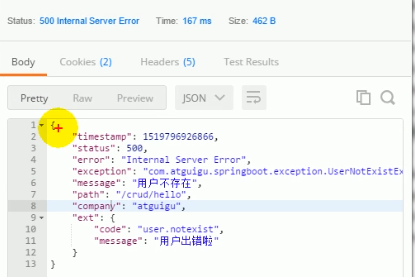
访问结果:
spring boot 尚桂谷学习笔记06 异常处理 ---Web的更多相关文章
- spring boot 尚桂谷学习笔记08 Docker ---Web
------Docker------ 简介:Docker是一个开元的应用容器引擎,性能非常高 已经安装好的软件打包成一个镜像放到服务器中运行镜像 MySQL容器,Redis容器...... Docke ...
- spring boot 尚桂谷学习笔记10 数据访问02 mybatis
数据访问 mybatis 创建一个 springboot 工程,模块选择 sql 中 mysql(数据驱动), jdbc(自动配置数据源), mybatis Web模块中选择 web pom 引入: ...
- spring boot 尚桂谷学习笔记04 ---Web开始
------web开发------ 1.创建spring boot 应用 选中我们需要的模块 2.spring boot 已经默认将这些场景配置好了 @EnableAutoConfiguration ...
- spring boot 尚桂谷学习笔记11 数据访问03 JPA
整合JPA SpringData 程序数据交互结构图 (springdata jpa 默认使用 hibernate 进行封装) 使用之后就关注于 SpringData 不用再花多经历关注具体各个交互框 ...
- spring boot 尚桂谷学习笔记09 数据访问
springboot 与数据库访问 jdbc, mybatis, spring data jpa, 1.jdbc原生访问 新建项目 使用 springboot 快速构建工具 选中 web 组件 sq ...
- spring boot 尚桂谷学习笔记07 嵌入式容器 ---Web
------配置嵌入式servlet容器------ springboot 默认使用的是嵌入的Servlet(tomcat)容器 问题? 1)如何定制修改Servlet容器的相关配置: 1.修改和se ...
- spring boot 尚桂谷学习笔记05 ---Web
------web 开发登录功能------ 修改login.html文件:注意加粗部分为 msg 字符串不为空时候 才进行显示 <!DOCTYPE html> <!-- saved ...
- springboot 尚桂谷学习笔记03
------spring boot 与日志------ 日志框架: 市面上的日志框架: jul jcl jboss-logging logback log4j log4j2 ...... 左边一个门面 ...
- 初次搭建spring boot 项目(实验楼-学习笔记)
首先说一下springboot 的优点: 使用Spring Initializr可以在几秒钟就配置好一个Spring Boot应用. 对大量的框架都可以无缝集成,基本不需要配置或者很少的配置就可以运行 ...
随机推荐
- Windows禅道环境部署
1. 禅道下载地址,下载解压 http://www.zentao.net/download/80081.html 一键安装包根据本机系统做相应版本下载 2. 解压完打开文件夹xampp ...
- JavaScript 各种遍历方式详解及总结
JavaScript 各种遍历方式详解 在$.each中想要终止循环,但是它没有continue或者break这样的终止方式,所以尝试使用return来进行终止,但是发现并没有跳出循环.为了搞清楚js ...
- how to use epoll with python
1 import socket, select 2 3 EOL1 = b'\n\n' 4 EOL2 = b'\n\r\n' 5 response = b'HTTP/1.0 200 OK\r\nDate ...
- webpack中的图片打包之路
最近在Github上弄项目,需要搭建一个webpack开发环境.Emmm,是的,从0开始搭建一个项目确实不容易,光Webpack的坑就够我踩一路的了.这不,刚搭建到“图片打包”这里,就遇到了麻烦.最后 ...
- Ajax异步请求返回文件流(eg:导出文件时,直接将导出数据用文件流的形式返回客户端供客户下载)
在异步请求中要返回文件流,不能使用JQuery,因为$.ajax,$.post 不支持返回二进制文件流的类型,可以看到下图,dataType只支持xml,json,script,html这几种格式,没 ...
- Linux学习笔记4-CentOS7中redis3.2.9安装教程
redis下载地址:http://www.redis.cn/download.html 1.将下载过来的redis-3.2.9.tar.gz文件复制到/usr/local文件夹下 2.tar xzf ...
- Java-java.lang.NoClassDefFoundError:brave.Span.Kind
今天在升级某个框架时,遇到如标题描述的问题.这个问题应该说还是比较明显的,首先去搜了一下NoClassDefFoundError的问题,参考这篇博客:https://www.cnblogs.com/x ...
- linux篇—Nginx反向代理负载均衡
一.环境准备 反向代理功能架构 3台web服务器,组建出web服务器集群 web01 10.0.0.7 172.16.1.7 web02 10.0.0.8 172.16.1.8 web03 10.0. ...
- Machine Learning:机器学习算法
原文链接:https://riboseyim.github.io/2018/02/10/Machine-Learning-Algorithms/ 摘要 机器学习算法分类:监督学习.半监督学习.无监督学 ...
- Elastic Search快速入门
https://blog.csdn.net/weixin_42633131/article/details/82902812 通过这个篇文章可以快速入门,快速搭建一个elastic search de ...