
spring boot 尚桂谷学习笔记07 嵌入式容器 ---Web
------配置嵌入式servlet容器------
springboot 默认使用的是嵌入的Servlet(tomcat)容器
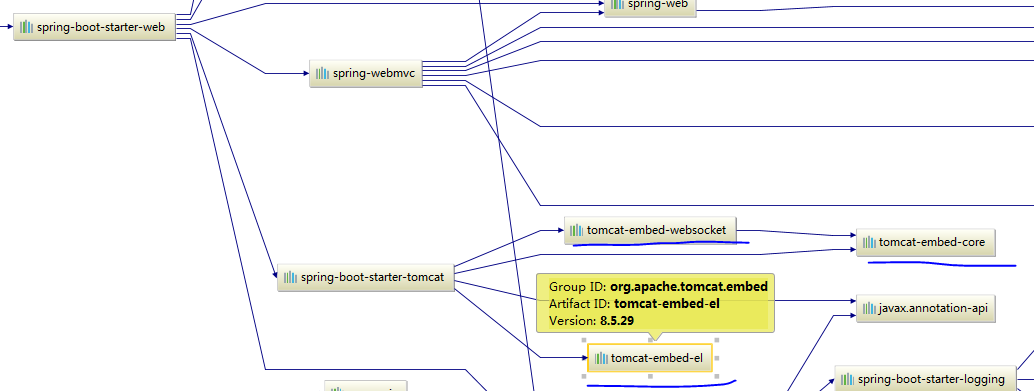
问题?
1)如何定制修改Servlet容器的相关配置:
1.修改和server有关的配置(ServerProperties配置文件设置)
// 通用的servlet 容器设置
server.xxxx
server.port=8080

server.servlet.context-path=/crud

// tomcat 相关的设置
server.tomcat.xxx
server.tomcat.uri-encoding=UTF-8
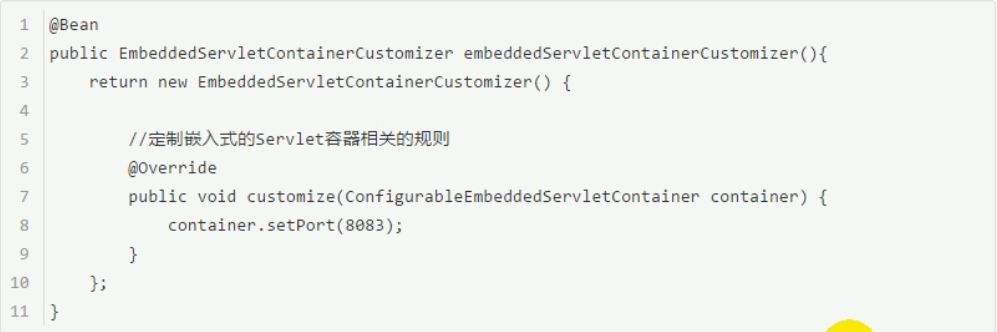
2. 编写一个EnbeddedServletContainerCustomizer:嵌入式servlet 容器的定制器来修改servlet容器默认配置
在springboot中 会有很多的xxxCustomlzer 帮助我们进行定制配置
2) 注册Servlet三大组件 【Servlet Filter Lisener】
由于springboot 默认是 以jar包的形式嵌入式的servlet容器启动web应用 没有web.xml 所以注册三大组件用一下方式

1) 注册Servlet ServletRegistrationBean
public class MyServlet extends HttpServlet{

    @Override

    protected void doGet(HttpServletRequest req, HttpServletResponse resp) throws ServletException, IOException {

        doPost(req, resp);

    }

    @Override

    protected void doPost(HttpServletRequest req, HttpServletResponse resp) throws ServletException, IOException {

        resp.getWriter().write("hello myservlet");

    }

}
// 注册Servlet

@Bean

public ServletRegistrationBean myServlet() {

    ServletRegistrationBean registrationBean = new ServletRegistrationBean(new MyServlet(), "/MyServlet");

    return registrationBean;

}
2) 注册filter FilterRegistrationBean
public class MyFilter implements Filter{

    @Override

    public void init(FilterConfig filterConfig) throws ServletException {

    }

    @Override

    public void doFilter(ServletRequest servletRequest, ServletResponse servletResponse, FilterChain filterChain) throws IOException, ServletException {

        System.out.println("MyFilter process");

        filterChain.doFilter(servletRequest, servletResponse);

    }

    @Override

    public void destroy() {

    }

}
// 注册filter

@Bean

public FilterRegistrationBean myFilter() {

    FilterRegistrationBean filterRegistrationBean = new FilterRegistrationBean();

    filterRegistrationBean.setFilter(new MyFilter());
   // 过滤什么请求

    filterRegistrationBean.setUrlPatterns(Arrays.asList("/hello", "/"));

    return filterRegistrationBean;

}
注册lisener ServletListenerRegistrationBean
public class MyLisener implements ServletContextListener {

    @Override

    public void contextInitialized(ServletContextEvent servletContextEvent) {

        System.out.println("contextInitialized   web 应用启动");

    }

    @Override

    public void contextDestroyed(ServletContextEvent servletContextEvent) {

        System.out.println("web 应用习销毁");

    }

}
// 注册lisener

@Bean

public ServletListenerRegistrationBean myLisener() {

    ServletListenerRegistrationBean<MyLisener> listenerRegistrationBean = new ServletListenerRegistrationBean<MyLisener>(new MyLisener());

    return listenerRegistrationBean;

}
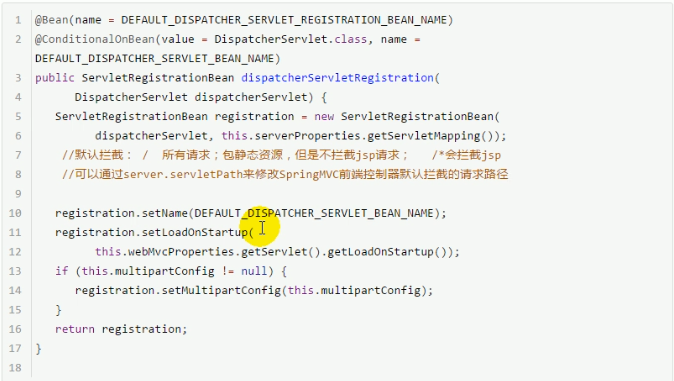
例子:springboot帮助我们配置springmvc时候 自动注册spirngmvc 的前端控制器
3) springboot 支持其他servlet容器
tomcat
jetty (长连接 聊天点对点长时间连接)
Undertow (不支持JSP 并发性能好)
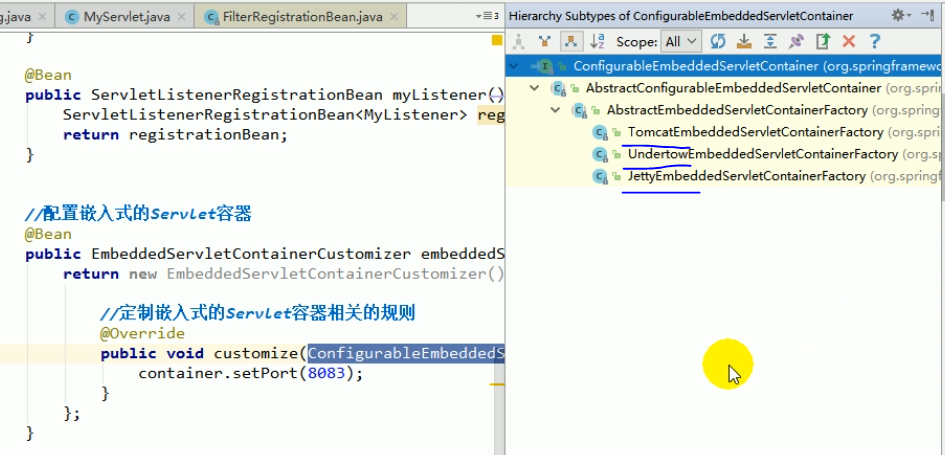
默认使用tomcat 可以切换成其他容器 修改pom依赖 移除tomcat 模块
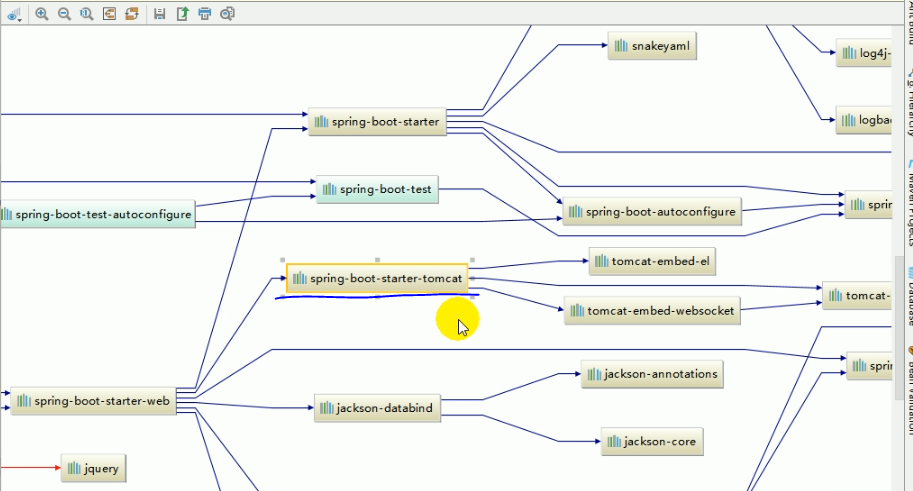
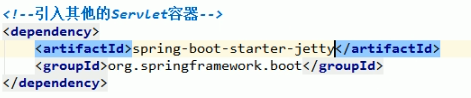
之后启动就为Jetty 启动了
嵌入式Servlet 容器优缺点:
优点:简单 便携
缺点:不支持jsp 优化定制比较复杂 (使用低定制器【ServerProperties, EnveddedServketCibtauberCystinuzer , 自己编写嵌入式Servlet 嵌入式工厂 EmbeddedServletContainerFactory 】)
使用外置的servlet容器 :外面安装Tomcat- 应用使用War包方式打包
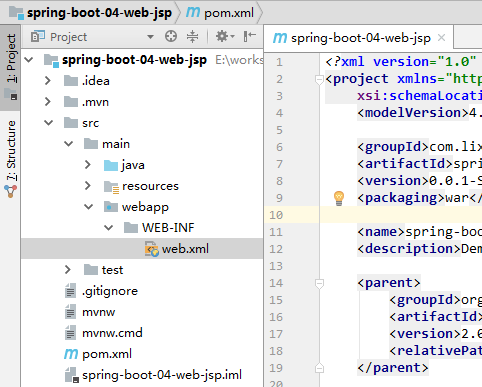
新建项目 打包方式 选择War包 之前选择是jar包, 并且配置生成Webapp目录
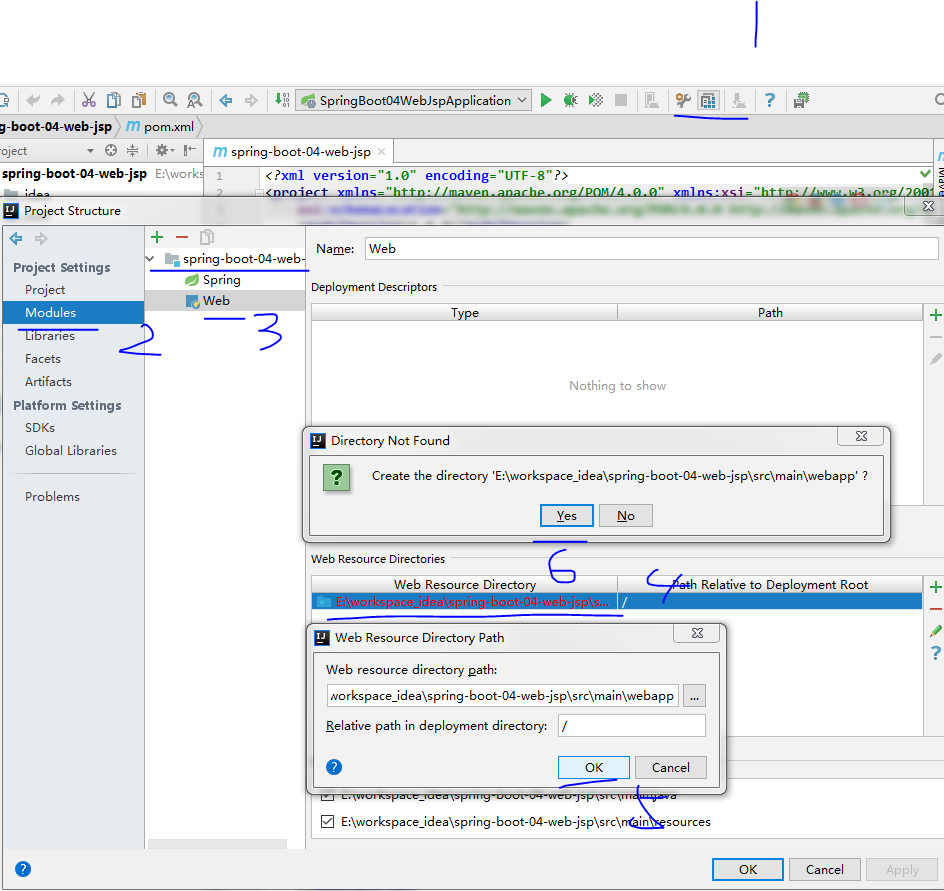
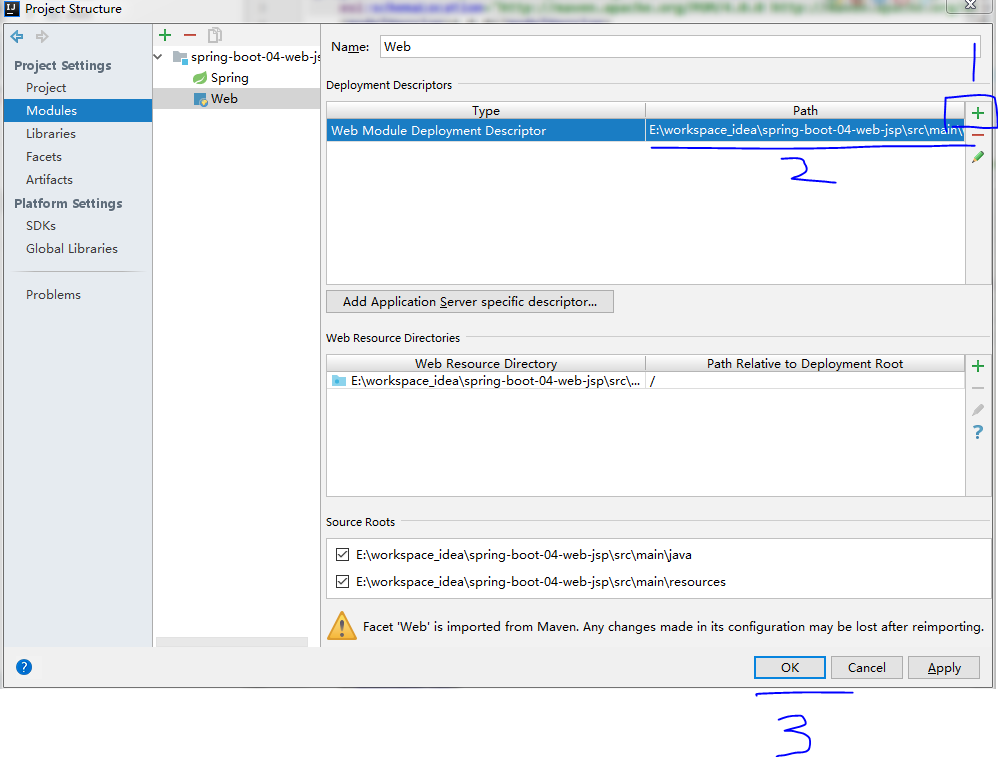
生成项目结构最后如下:
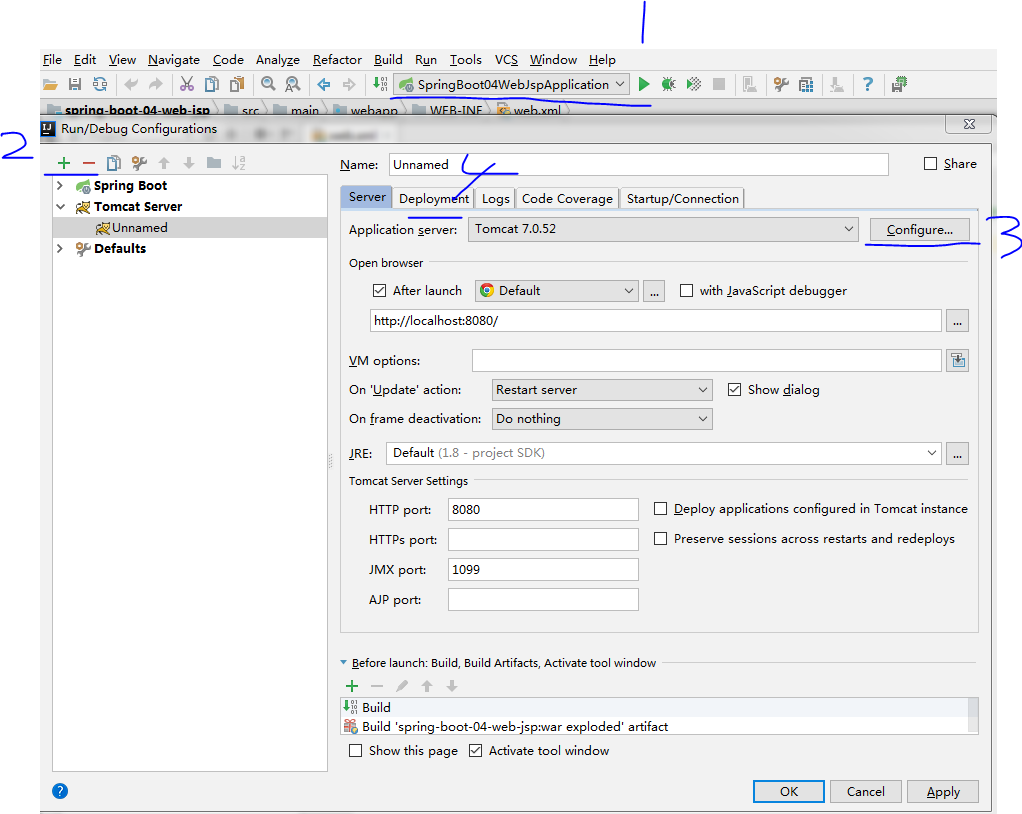
配置外置tomcat 服务器
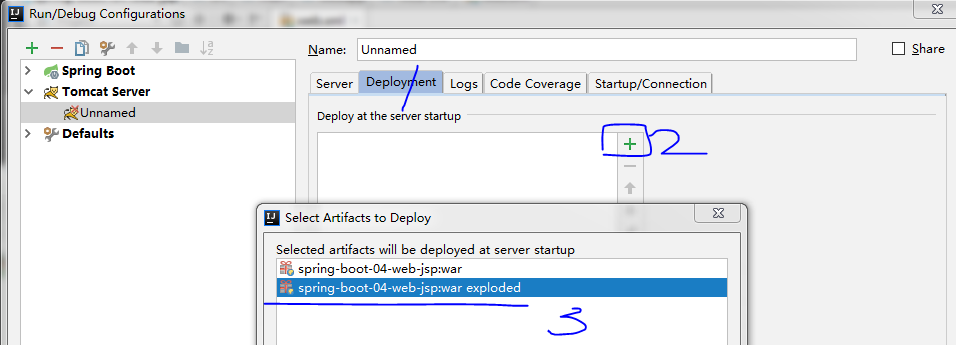
启动服务器:

创建 hello.jsp 以及success.jsp, helloController等
hello.jsp
<%--

  Created by IntelliJ IDEA.

  User: UPC

  Date: 2018/5/6

  Time: 19:26

  To change this template use File | Settings | File Templates.

--%>

<%@ page contentType="text/html;charset=UTF-8" language="java" %>

<html>

<head>

    <title>Title</title>

    <a href="abc"></a>

</head>

<body>

</body>

</html>
HelloController
package com.lixuchun.springboot.controller;

import org.springframework.stereotype.Controller;

import org.springframework.ui.Model;

import org.springframework.web.bind.annotation.GetMapping;

@Controller

public class HelloController {

    @GetMapping("/abc")

    public String hello(Model model) {

        model.addAttribute("message", "你好");

        return "success";

    }

}
success.jsp
<%--

  Created by IntelliJ IDEA.

  User: UPC

  Date: 2018/5/6

  Time: 19:26

  To change this template use File | Settings | File Templates.

--%>

<%@ page contentType="text/html;charset=UTF-8" language="java" %>

<html>

<head>

    <title>success</title>

    <h3>${message}</h3>

</head>

<body>

</body>

</html>
application.properties
spring.mvc.view.prefix=/WEB-INF

spring.mvc.view.suffix=.jsp
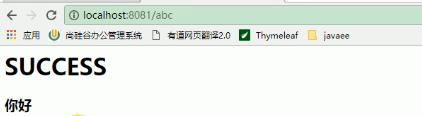
访问效果:

总结 如何使用外部容器:
1) 创建一个war项目
2)将嵌入式的Tomcat指定为 provided
<dependency>

    <groupId>org.springframework.boot</groupId>

    <artifactId>spring-boot-starter-tomcat</artifactId>

    <scope>provided</scope>

</dependency>
3)必须编写一个 springbootServletInitiallzer的子类,并且调用 configure方法
public class ServletInitializer extends SpringBootServletInitializer {

    @Override

    protected SpringApplicationBuilder configure(SpringApplicationBuilder application) {
     // 传入springboot应用的主程序

        return application.sources(SpringBoot04WebJspApplication.class);

    }

}
4). 启动服务就可以使用了
spring boot 尚桂谷学习笔记07 嵌入式容器 ---Web的更多相关文章
- spring boot 尚桂谷学习笔记04 ---Web开始
------web开发------ 1.创建spring boot 应用 选中我们需要的模块 2.spring boot 已经默认将这些场景配置好了 @EnableAutoConfiguration ...
- spring boot 尚桂谷学习笔记10 数据访问02 mybatis
数据访问 mybatis 创建一个 springboot 工程,模块选择 sql 中 mysql(数据驱动), jdbc(自动配置数据源), mybatis Web模块中选择 web pom 引入: ...
- spring boot 尚桂谷学习笔记11 数据访问03 JPA
整合JPA SpringData 程序数据交互结构图 (springdata jpa 默认使用 hibernate 进行封装) 使用之后就关注于 SpringData 不用再花多经历关注具体各个交互框 ...
- spring boot 尚桂谷学习笔记09 数据访问
springboot 与数据库访问 jdbc, mybatis, spring data jpa, 1.jdbc原生访问 新建项目 使用 springboot 快速构建工具 选中 web 组件 sq ...
- spring boot 尚桂谷学习笔记05 ---Web
------web 开发登录功能------ 修改login.html文件:注意加粗部分为 msg 字符串不为空时候 才进行显示 <!DOCTYPE html> <!-- saved ...
- spring boot 尚桂谷学习笔记08 Docker ---Web
------Docker------ 简介:Docker是一个开元的应用容器引擎,性能非常高 已经安装好的软件打包成一个镜像放到服务器中运行镜像 MySQL容器,Redis容器...... Docke ...
- spring boot 尚桂谷学习笔记06 异常处理 ---Web
------错误处理机制------ 默认效果 1 返回一个默认的错误页面 浏览器发送请求的请求头:优先接收 text/html 数据 客户端则默认响应json数据 : accept 没有说明返回什么 ...
- springboot 尚桂谷学习笔记03
------spring boot 与日志------ 日志框架: 市面上的日志框架: jul jcl jboss-logging logback log4j log4j2 ...... 左边一个门面 ...
- 初次搭建spring boot 项目(实验楼-学习笔记)
首先说一下springboot 的优点: 使用Spring Initializr可以在几秒钟就配置好一个Spring Boot应用. 对大量的框架都可以无缝集成,基本不需要配置或者很少的配置就可以运行 ...
随机推荐
- CentOS vim的使用
安装vim工具 [root@bogon ~]# yum install -y vim-enhanced 卸载vim工具 [root@bogon ~]# yum remove -y vim* vim常用 ...
- Webpack的使用指南-Webpack的常用解决方案
说是解决方案实际上更像是webpack的插件索引. 写这一篇的目的是为了形成一个所以,将来要用时直接来查找即可. 1.自动构建HTML,可压缩空格,可给引用的js加版本号或随机数:html-webpa ...
- android项目的目录结构讲解
参考书籍:<第一行代码Android> 一:android项目的目录结构讲解 1..gradle和.idea 这两个目录下放置的都是Android Studio自动生成的一 ...
- 如何写一个简单的基于 Qt 框架的 HttpServer ?
httpserver.h #ifndef HTTPSERVER_H #define HTTPSERVER_H #include <QObject> #include <QtCore& ...
- 3. ZooKeeper客户端(一)
ZooKeeper常用客户端有三种:原生客户端.zkClient.curator 项目中使用前,需要导入相关依赖 <dependencies> <dependency> < ...
- 【JAVA】java编译错误:编码UTF8/GBK的不可映射字符
环境: win7 cmd窗口编译 javac xx.java时报错 错误显示:错误:编码GBK的不可映射字符 背景: 分析发现是中文字符所在行报错了 查阅相关资料发现,是因为编译器设置为了utf-8, ...
- js中的对象类型的基本操作
示例 /** * 对象属于一种复合数据类型,在对象中可以保存多个不同数据类型的属性 * 对象的分类: * 1.内建对象 * - 由ES标准定义的对象,在任何ES的实现中都可以使用,比如:Math, * ...
- 纯css实现星级评分效果
效果 效果图如下,纯css实现超酷炫的星级评分动画效果 实现思路 5个类型为radio的input,label标签修改样式背景图为星星 label标签给每个星星鼠标停留时加注名字 点击星星有放大旋 ...
- Java 时间类 Date 和 Calendar
在项目中获取一个yyyy-MM-dd HH:mm:ss格式的时间字符串 package org.htsg.kits; import java.text.SimpleDateFormat; import ...
- springboot2.0+websocket集成【群发消息+单对单】(二)
https://blog.csdn.net/qq_21019419/article/details/82804921 版权声明:本文为博主原创文章,遵循 CC 4.0 by-sa 版权协议,转载请附上 ...