
AppBar中自定义顶部导航
在上一篇里总结AppBar的一些简单用法,但是AppBar除了有前面那些样式属性外,还能实现类似底部的Tab切换。
首先下载并运行前面的项目:
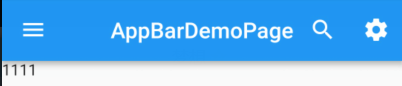
然后在此基础上实现Tab切换。
常见属性
TabBar有一下常见的属性:
- tabs :显示的标签内容,一般使用 Tab 对象,也可以是其他的 Widget
- controller :TabController 对象
- isScrollable :是否可滚动
- indicatorColor :指示器颜色
- indicatorWeight :指示器高度
- indicatorPadding :底部指示器的 Padding
- indicator :指示器 decoration,例如边框等
- indicatorSize :指示器大小计算方式,TabBarIndicatorSize.label 跟文字等宽,TabBarIndicatorSize.tab 跟每个 tab 等宽
- labelColor :选中 label 颜色
- labelStyle :选中 label 的 Style
- labelPadding :每个 label 的 padding 值
- unselectedLabelColor :未选中 label 颜色
- unselectedLabelStyle :未选中 label 的 Style
基本实现
为了实现顶部的Tabs切换,首先需要在Scaffold的外层定义一个DefaultTabController组件,然后组件里面定义tab的个数,最后将TabBar定义在AppBar里面的bottom属性中。根据这些,我们来修改前面的
import 'package:flutter/material.dart';

class AppBarDemoPage extends StatelessWidget {

  const AppBarDemoPage({Key key}) : super(key: key);

  @override

  Widget build(BuildContext context) {

    return DefaultTabController(

      length:2 ,

      child: Scaffold(

        appBar: AppBar(

          title:Text("AppBarDemoPage"),

          // backgroundColor: Colors.red,

          centerTitle:true,

          leading: IconButton(

            icon: Icon(Icons.menu),

            onPressed: (){

              print('menu');

            },

          ),

          actions: <Widget>[

            IconButton(

              icon: Icon(Icons.search),

              onPressed: (){

                print('search');

              },

            ),

            IconButton(

              icon: Icon(Icons.settings),

              onPressed: (){

                print('settings');

              },

            )

          ],

          bottom: TabBar(

            tabs: <Widget>[

              Tab(text: "热门"),

              Tab(text: "推荐")

            ],

          ),

        ),

        body: Text('1111'),

      ),

    );

  }

}

为了简化代码,删掉前面关于AppBar的属性设置:
AppBarDemo.dart
import 'package:flutter/material.dart';

class AppBarDemoPage extends StatelessWidget {

  const AppBarDemoPage({Key key}) : super(key: key);

  @override

  Widget build(BuildContext context) {

    return DefaultTabController(

      length:2 ,

      child: Scaffold(

        appBar: AppBar(

          title:Text("AppBarDemoPage"),

          centerTitle:true,

          bottom: TabBar(

            tabs: <Widget>[

              Tab(text: "热门"),

              Tab(text: "推荐")

            ],

          ),

        ),

        body: Text('1111'),

      ),

    );

  }

}
现在,只有跳转的按钮,却没有对应的页面组件,所以,还需要在body里面添加tabs切换的页面。
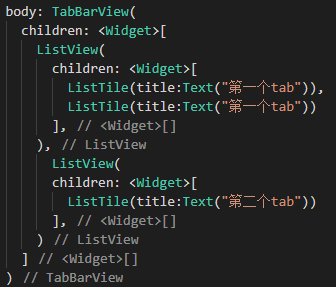
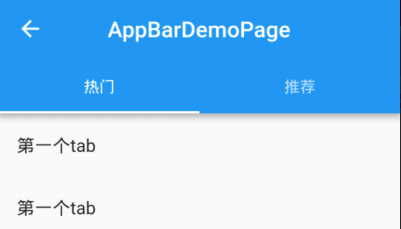

目前,是在一个新的页面添加了顶部Tabs切换,那么,如果需要在底部TabBar页面基础上添加Tabs切换,又该如何操作呢?
TabBar中添加顶部Tab切换
按照前面说的,在Scaffold的外层定义一个DefaultTabController组件,先这样修改Category.dart页面:
import 'package:flutter/material.dart';

class CategoryPage extends StatefulWidget {

  CategoryPage({Key key}) : super(key: key);

  _CategoryPageState createState() => _CategoryPageState();

}

class _CategoryPageState extends State<CategoryPage> {

  @override

  Widget build(BuildContext context) {

    return DefaultTabController(

      length: 4,

      child: Scaffold(

        appBar: AppBar(

          bottom:TabBar(

            tabs: <Widget>[

              Tab(text: "热销"),

              Tab(text: "推荐"),

              Tab(text: "推荐"),

              Tab(text: "推荐")

            ],

          ) ,

        ),

        body:TabBarView(

          children: <Widget>[

            ListView(

                children: <Widget>[

                  ListTile(title:Text("第一个tab")),

                ],

              ),

            ListView(

                children: <Widget>[

                  ListTile(title:Text("第二个tab")),

                ],

              ),

              ListView(

                children: <Widget>[

                  ListTile(title:Text("第三个tab")),

                ],

              ),

            ListView(

                children: <Widget>[

                  ListTile(title:Text("第四个tab")),

                ],

              )

          ],

        )

      ),

    );

  }

}
因为Category.dart是挂载到Tabs.dart中的,而在Tabs.dart中,已经有一个Scaffold组件和AppBar组件了,所以,继续添加顶部Tabs以后,就会有两个Scaffold组件和AppBar组件。

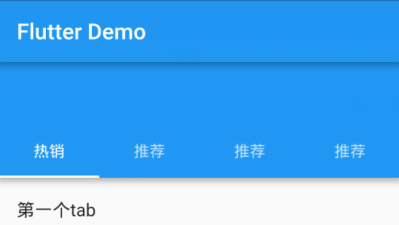
为了解决上面的问题,只需要将Tabs切换换个位置,移动到title所在的位置就可以了:
import 'package:flutter/material.dart';

class CategoryPage extends StatefulWidget {

  CategoryPage({Key key}) : super(key: key);

  _CategoryPageState createState() => _CategoryPageState();

}

class _CategoryPageState extends State<CategoryPage> {

  @override

  Widget build(BuildContext context) {

    return DefaultTabController(

      length: 4,

      child: Scaffold(

        appBar: AppBar(

          backgroundColor: Colors.black26,

          title: Row(

            mainAxisAlignment: MainAxisAlignment.center,

            children: <Widget>[

              Expanded(

                child:TabBar(
                  indicatorColor:Colors.blue,

                  labelColor:Colors.blue,

                  unselectedLabelColor: Colors.white,

                  indicatorSize:TabBarIndicatorSize.label ,

                  tabs: <Widget>[

                    Tab(text: "热销"),

                    Tab(text: "推荐"),

                    Tab(text: "推荐"),

                    Tab(text: "推荐")

                  ],

                ) ,

              )

            ],

          ),

        ),

        body:TabBarView(

          children: <Widget>[

            ListView(

                children: <Widget>[

                  ListTile(title:Text("第一个tab")),

                ],

              ),

            ListView(

                children: <Widget>[

                  ListTile(title:Text("第二个tab")),

                ],

              ),

              ListView(

                children: <Widget>[

                  ListTile(title:Text("第三个tab")),

                ],

              ),

            ListView(

                children: <Widget>[

                  ListTile(title:Text("第四个tab")),

                ],

              )

          ],

        )

      ),

    );

  }

}

AppBar中自定义顶部导航的更多相关文章
- Flutter AppBar 自定义顶部导航按钮 图标、颜色 以及 TabBar 定义顶部 Tab 切换
Flutter AppBar 自定义顶部按钮图 标.颜色 属性 描述 leading 在标题前面显示的一个控件,在首页通常显示应用 的 logo;在其他界面通常显示为返回按钮 title 标题,通常显 ...
- AppBar 自定义顶部导航按钮 图标、颜色 以及 TabBar 定义顶部 Tab 切换
一.Flutter AppBar 自定义顶部按钮图标.颜色 leading 在标题前面显示的一个控件,在首页通常显示应用的 logo:在其他界面通常显示为返回按钮 title 标题,通常显示为当 ...
- 微信小程序自定义顶部导航
注释:自定义导航需要自备相应图片 一.设置自定义顶部导航 Navigation是小程序的顶部导航组件,当页面配置navigationStyle设置为custom的时候可以使用此组件替代原生导航栏. 1 ...
- Flutter——AppBar组件(顶部导航组件)
AppBar组件的常用属性如下: 属性 描述 leading 在标题前面显示的一个控件,在首页通常显示应用的 logo:在其他界面通常显示为返回按钮 title 标题,通常显示为当前界面的标题文字,可 ...
- ionic3.0 中带顶部导航的下拉刷新列表的实现
1.最终实现效果 2.html代码布局: 3.css样式控制(注:下面这两个css类名需在浏览器解析后才可看到)
- [置顶]
xamarin Tablayout+Viewpager+Fragment顶部导航栏
最近几天不忙,所以把项目中的顶部导航栏的实现归集一下.android中使用TabLayout+ViewPager+Fragment制作顶部导航非常常见,代码实现也比较简单.当然我这个导航栏是基于xam ...
- yii2顶部导航使用
yii2中使用顶部导航的具体方法: 1.视图中调用两个类: use yii\bootstrap\Nav;use yii\bootstrap\NavBar; 2. <?php ...
- uni-app自定义导航栏按钮|uniapp仿微信顶部导航条
最近一直在学习uni-app开发,由于uniapp是基于vue.js技术开发的,只要你熟悉vue,基本上很快就能上手了. 在开发中发现uni-app原生导航栏也能实现一些顶部自定义按钮+搜索框,只需在 ...
- TabTopLayout【自定义顶部选项卡区域(固定宽度且居中)】
版权声明:本文为HaiyuKing原创文章,转载请注明出处! 前言 自定义顶部选项卡并居中显示.结合显示/隐藏view的方式实现切换功能(正常情况下可能是切换fragment). 效果图 代码分析 T ...
随机推荐
- 阶段1 语言基础+高级_1-3-Java语言高级_05-异常与多线程_第4节 等待唤醒机制_1_线程状态概述
Thread中有个嵌套类 它描述了线程的状态 线程状态的图 Object类中的Wait方法和notify方法
- seaborn
Seaborn是基于matplotlib的Python数据可视化库. 它提供了一个高级界面,用于绘制引人入胜且内容丰富的统计图形. 一 风格及调色盘 风格 1 sns.set() 模式格式 2 s ...
- webservice引用
class VidyoPortalUserServiceWithAuthentication : VidyoPortalUserService { String _username; String _ ...
- 关于Tomcat的浅谈
(今天看到tomcat已经更新到了9.0.24,这是一篇很早之前的文章,由于账号不想用了,所以搬到这里来,另外的账号要注销了) 1.Tomcat的下载 tomcat官网:http://tomcat.a ...
- c# Thread——1.为什么Abort中断线程是不可靠的
Thread.Abort 方法在c#中用作强制中断线程的执行,大多用于线程内部满足某个特定条件而自己调用关闭自身,比如下面的代码在i自增到3的时候就会停止打印. class Program { sta ...
- 查询SQL Server数据库所有表字段备注
SELECT 表名 = case when a.colorder=1 then d.name else '' end, 表说明 = case when a.colorder=1 then isnull ...
- mysql修改库、表、字段 字符集,中文排序
查看字段编码: show full columns from t2;show variables like '%character%';show variables like 'collation_% ...
- [BZOJ 2820] YY的gcd(莫比乌斯反演+数论分块)
[BZOJ 2820] YY的gcd(莫比乌斯反演+数论分块) 题面 给定N, M,求\(1\leq x\leq N, 1\leq y\leq M\)且gcd(x, y)为质数的(x, y)有多少对. ...
- 用命令行远程导出MySQL数据
mysqldump -h10.10.9.197 -uroot -proot --default-character-set=utf8 0610_eshop >C:/Users/Adm inist ...
- HDU 2783 You’ll be Working on the Railroad(最短路)
You’ll be Working on the Railroad Time Limit: 2000/1000 MS (Java/Others) Memory Limit: 32768/3276 ...