
web全栈应用【爬取(scrapy)数据 -> 通过restful接口存入数据库 -> websocket推送展示到前台】
作为
https://github.com/fanqingsong/web_full_stack_application
子项目的一功能的核心部分,使用scrapy抓取数据,解析完的数据,使用 python requets库,将数据推送到 webservice接口上, webservice接口负责保存数据到mongoDB数据库。
实现步骤:
1、 使用requests库,与webservice接口对接。
2、 使用scrapy抓取数据。
3、 结合1 2 实现完整功能。
Requests库 (Save to DB through restful api)
库的安装和快速入门见:
http://docs.python-requests.org/en/master/user/quickstart/#response-content
给出测试通过示例代码:
insert_to_db.py
import requests
resp = requests.get('http://localhost:3000/api/v1/summary')
# ------------- GET --------------
if resp.status_code != 200:
# This means something went wrong.
raise ApiError('GET /tasks/ {}'.format(resp.status_code))for todo_item in resp.json():
print('{} {}'.format(todo_item['Technology'], todo_item['Count']))# ------------- POST --------------
Technology = {"Technology": "Django", "Count": "50" }resp = requests.post('http://localhost:3000/api/v1/summary', json=Technology)
if resp.status_code != 201:
raise ApiError('POST /Technologys/ {}'.format(resp.status_code))print("-------------------")
print(resp.text)print('Created Technology. ID: {}'.format(resp.json()["_id"])
Python VirutalEnv运行环境
https://realpython.com/python-virtual-environments-a-primer/
Create a new virtual environment inside the directory:
# Python 2:

$ virtualenv env

# Python 3

$ python3 -m venv env
Note: By default, this will not include any of your existing site packages.
windows 激活:
env\Scripts\activate
Scrapy(Scratch data)
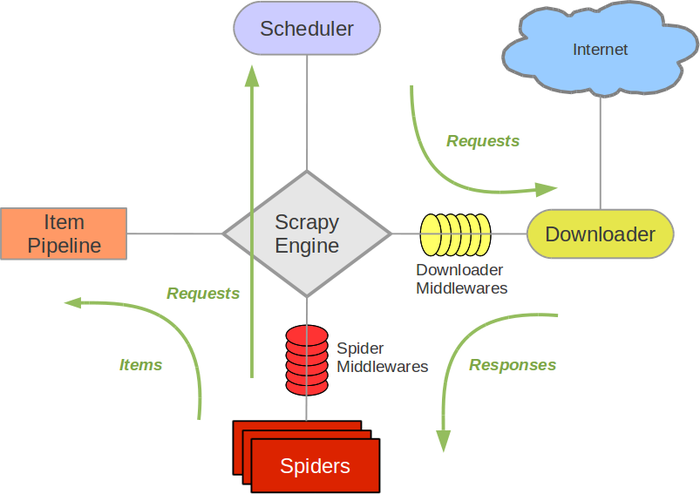
An open source and collaborative framework for extracting the data you need from websites.
In a fast, simple, yet extensible way.
https://scrapy-chs.readthedocs.io/zh_CN/0.24/topics/architecture.html
安装和使用参考:
https://www.cnblogs.com/lightsong/p/8732537.html
安装和运行过程报错解决办法:
1、 Scrapy运行ImportError: No module named win32api错误
https://blog.csdn.net/u013687632/article/details/57075514
pip install pypiwin32
https://www.cnblogs.com/baxianhua/p/8996715.html
1. http://www.lfd.uci.edu/~gohlke/pythonlibs/#twisted 下载twisted对应版本的whl文件(我的Twisted‑17.5.0‑cp36‑cp36m‑win_amd64.whl),cp后面是python版本,amd64代表64位,
2. 运行命令:
pip install C:\Users\CR\Downloads\Twisted-17.5.0-cp36-cp36m-win_amd64.whl
给出示例代码:
quotes_spider.py
import scrapy
class QuotesSpider(scrapy.Spider):
name = "quotes"
start_urls = [
'http://quotes.toscrape.com/tag/humor/',
]def parse(self, response):
for quote in response.css('div.quote'):
yield {
'text': quote.css('span.text::text').extract_first(),
'author': quote.xpath('span/small/text()').extract_first(),
}next_page = response.css('li.next a::attr("href")').extract_first()
if next_page is not None:
yield response.follow(next_page, self.parse)
在此目录下,运行
scrapy runspider quotes_spider.py -o quotes.json
输出结果
[
{"text": "\u201cThe person, be it gentleman or lady, who has not pleasure in a good novel, must be intolerably stupid.\u201d", "author": "Jane Austen"},
{"text": "\u201cA day without sunshine is like, you know, night.\u201d", "author": "Steve Martin"},
{"text": "\u201cAnyone who thinks sitting in church can make you a Christian must also think that sitting in a garage can make you a car.\u201d", "author": "Garrison Keillor"},
{"text": "\u201cBeauty is in the eye of the beholder and it may be necessary from time to time to give a stupid or misinformed beholder a black eye.\u201d", "author": "Jim Henson"},
{"text": "\u201cAll you need is love. But a little chocolate now and then doesn't hurt.\u201d", "author": "Charles M. Schulz"},
{"text": "\u201cRemember, we're madly in love, so it's all right to kiss me anytime you feel like it.\u201d", "author": "Suzanne Collins"},
{"text": "\u201cSome people never go crazy. What truly horrible lives they must lead.\u201d", "author": "Charles Bukowski"},
{"text": "\u201cThe trouble with having an open mind, of course, is that people will insist on coming along and trying to put things in it.\u201d", "author": "Terry Pratchett"},
{"text": "\u201cThink left and think right and think low and think high. Oh, the thinks you can think up if only you try!\u201d", "author": "Dr. Seuss"},
{"text": "\u201cThe reason I talk to myself is because I\u2019m the only one whose answers I accept.\u201d", "author": "George Carlin"},
{"text": "\u201cI am free of all prejudice. I hate everyone equally. \u201d", "author": "W.C. Fields"},
{"text": "\u201cA lady's imagination is very rapid; it jumps from admiration to love, from love to matrimony in a moment.\u201d", "author": "Jane Austen"}
]
业务全流程实例
https://github.com/fanqingsong/web_data_visualization
由于zhipin网站对爬虫有反制策略, 本例子采用scrapy的官方爬取实例quotes为研究对象。
流程为:
1、 爬取数据, scrapy 的两个组件 spider & item pipeline
2、 存数据库, requests库的post方法推送数据到 webservice_quotes服务器的api
3、 webservice_quotes将数据保存到mongoDB
4、 浏览器访问vue页面, 与websocket_quotes服务器建立连接
5、 websocket_quotes定期(每隔1s)从mongoDB中读取数据,推送给浏览器端,缓存为Vue应用的data,data绑定到模板视图
scrapy item pipeline 推送数据到webservice接口
# -*- coding: utf-8 -*-
# Define your item pipelines here
#
# Don't forget to add your pipeline to the ITEM_PIPELINES setting
# See: https://doc.scrapy.org/en/latest/topics/item-pipeline.htmlimport requests
class ScratchZhipinPipeline(object):
def process_item(self, item, spider):print("--------------------")
print(item['text'])
print(item['author'])
print("--------------------")# save to db through web service
resp = requests.post('http://localhost:3001/api/v1/quote', json=item)
if resp.status_code != 201:
raise ApiError('POST /item/ {}'.format(resp.status_code))
print(resp.text)
print('Created Technology. ID: {}'.format(resp.json()["_id"]))return item
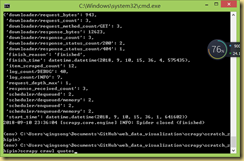
爬虫运行: scrapy crawl quotes
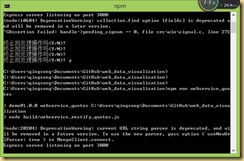
webservice运行: npm run webservice_quotes
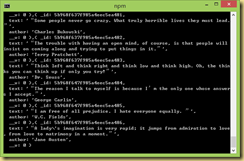
websocket运行: npm run websocket_quotes
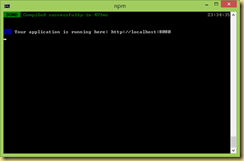
vue调试环境运行: npm run dev
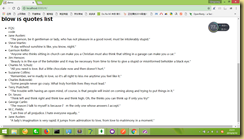
chrome:
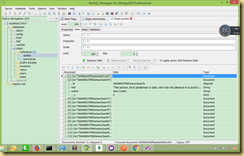
db:
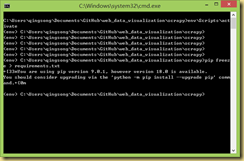
Python生成requirement.text文件
http://www.cnblogs.com/zhaoyingjie/p/6645811.html
快速生成requirement.txt的安装文件

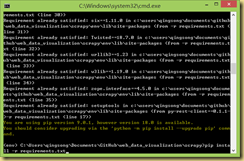
(CenterDesigner) xinghe@xinghe:~/PycharmProjects/CenterDesigner$ pip freeze > requirements.txt
安装所需要的文件 pip install -r requirement.txt
web全栈应用【爬取(scrapy)数据 -> 通过restful接口存入数据库 -> websocket推送展示到前台】的更多相关文章
- 从0开始学爬虫8使用requests/pymysql和beautifulsoup4爬取维基百科词条链接并存入数据库
从0开始学爬虫8使用requests和beautifulsoup4爬取维基百科词条链接并存入数据库 Python使用requests和beautifulsoup4爬取维基百科词条链接并存入数据库 参考 ...
- python3爬取百度知道的问答并存入数据库(MySQL)
一.链接分析: 以"Linux"为搜索的关键字为例: 首页的链接为:https://zhidao.baidu.com/search?lm=0&rn=10&pn=0& ...
- web全栈架构师[笔记] — 02 数据交互
数据交互 一.http协议 基本特点 1.无状态的协议 2.连接过程:发送连接请求.响应接受.发送请求 3.消息分两块:头.体 http和https 二.form 基本属性 action——提交到哪儿 ...
- python爬取网页数据并存储到mysql数据库
#python 3.5 from urllib.request import urlopen from urllib.request import urlretrieve from bs4 impor ...
- NodeJs简单七行爬虫--爬取自己Qzone的说说并存入数据库
没有那么难的,嘿嘿,说起来呢其实挺简单的,或者不能叫爬虫,只需要将自己的数据加载到程序里再进行解析就可以了,如果说你的Qzone是向所有人开放的,那么就有一个JSONP的接口,这么说来就简单了,也就不 ...
- python爬虫爬取ip记录网站信息并存入数据库
import requests import re import pymysql #10页 仔细观察路由 db = pymysql.connect("localhost",&quo ...
- python爬取拉勾网数据并进行数据可视化
爬取拉勾网关于python职位相关的数据信息,并将爬取的数据已csv各式存入文件,然后对csv文件相关字段的数据进行清洗,并对数据可视化展示,包括柱状图展示.直方图展示.词云展示等并根据可视化的数据做 ...
- Web 全栈大会:万维网之父的数据主权革命
大家好,今天我和大家分享一下由万维网之父发起的一场数据主权革命.什么叫数据主权?很容易理解,现在我们的数据是把持在巨头手里的,你的微信通讯录和聊天记录都无法导出,不管是从人权角度还是从法理角度,这些数 ...
- web scraper——简单的爬取数据【二】
web scraper——安装[一] 在上文中我们已经安装好了web scraper现在我们来进行简单的爬取,就来爬取百度的实时热点吧. http://top.baidu.com/buzz?b=1&a ...
随机推荐
- 自定义JDBC链接池
上篇简单介绍了jdbc链接数据库: 本篇就说一下自定义连接池以及增删改查的测试: 自定义连接池 自定义链接池的原因 JDBC连接中用到Connection 在每次对数据进行增删查改 都要 开启 ...
- shell 脚本中执行sql
#!/bin/bashsql='show databases' result=`mysql -uroot -pengine2user -h127.0.0.1 -e "${sql}" ...
- 06 Django REST Framework 版本控制
01-版本控制 对接口进行版本控制只是一种杀死已部署客户端的“礼貌”方式. - 罗伊菲尔丁. 1. API版本控制允许您更改不同客户端之间的行为.REST框架提供了许多不同的版本控制方案. 2. 版本 ...
- Mariadb第一章:介绍及安装--小白博客
mariadb(第一章) 数据库介绍 1.什么是数据库? 简单的说,数据库就是一个存放数据的仓库,这个仓库是按照一定的数据结构(数据结构是指数据的组织形式或数据之间的联系)来组织,存储的,我们可以 ...
- JS 设计模式一 -- 原型模式
原型模式 概念: 原型模式 是指原型实例指向创建对象的种类,并通过拷贝这些原型创建新的对象,是一种用来创建对象的模式,也就是创建一个对象作为另一个对象的prototype属性. 实现原型模式: 方法一 ...
- openstack搭建之-基础服务配置(7)
基础环境准备,所需服务器及说明 172.16.2.51 base.test.com 基础服务节点 172.16.2.52 ctrl.test.com 控制节点 172.16.2.53 ...
- opentack-openstack组件及功能(1)
一. OpenStack各组件间的关系 图22.1 OpenStack各组件间的关系 1.基础管理服务包含Keystone,Glance,Nova,Neutron,Horizon五个服务 (1)Key ...
- es6 模本字符串拼接方法 ``
1.字符串拼接 可以使用 es6 ` ` 配合 ${xxx} 具体操作上代码 <!DOCTYPE html> <html lang="en"> < ...
- Shell命令-文件及目录操作之file、md5sum
文件及目录操作 - file.md5sum 1. file:显示文件的类型 file命令的功能说明 用于辨识文件类型.通过 file 指令,我们得以辨识该文件的类型. file命令的语法格式 file ...
- Python 正则表达式使用问题集锦
在正则表达式中,如果直接给出字符,就是精确匹配.用\d可以匹配一个数字,\w可以匹配一个字母或数字,所以: '00\d'可以匹配'007',但无法匹配'00A':而且也无法匹配'1001',效果类似于 ...