
CentOS7下使用ELK搭建日志集中分析平台
应用场景:
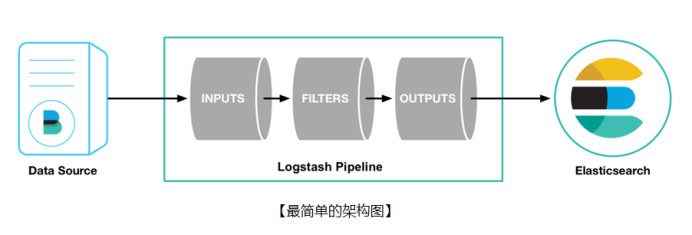
ELK实际上是三个工具的集合,ElasticSearch + Logstash + Kibana,这三个工具组合形成了一套实用、易用的监控架构,很多公司利用它来搭建可视化的海量日志分析平台。
官网下载地址:https://www.elastic.co/downloads
Elasticsearch:
是一个基于Lucene的搜索服务器。它提供了一个分布式多用户能力的全文搜索引擎,基于RESTful web接口。Elasticsearch是用Java开发的,并作为Apache许可条款下的开放源码发布,是当前流行的企业级搜索引擎。设计用于云计算中,能够达到实时搜索,稳定,可靠,快速,安装使用方便。
Logstash:
用于管理日志和事件的工具,你可以用它去收集日志、转换日志、解析日志并将他们作为数据提供给其它模块调用,例如搜索、存储等。
Kibana:
是一个优秀的前端日志展示框架,它可以非常详细的将日志转化为各种图表,为用户提供强大的数据可视化支持。
Filebeat:
类似于“agent”装在被监控端上(数据源),用来实时收集日志文件数据。
安装环境:
|
software |
ip |
system |
|
Filebeat 5.6 |
192.168.1.101 |
CentOS 7.4 |
|
Filebeat 5.6 |
192.168.1.102 |
CentOS 7.4 |
|
Filebeat 5.6 |
192.168.1.103 |
CentOS 7.4 |
|
Logstash 5.6 |
192.168.1.101 |
CentOS 7.4 |
|
ElasticSearch 5.6 |
192.168.1.101 |
CentOS 7.4 |
|
ElasticSearch 5.6 |
192.168.1.102 |
CentOS 7.4 |
|
ElasticSearch 5.6 |
192.168.1.103 |
CentOS 7.4 |
|
Kibana 5.6 |
192.168.1.101 |
CentOS 7.4 |
软件包:
jdk-8u65-linux-x64.tar.gz
epel-release-7-11.noarch.rpm
elasticsearch-5.6.12.rpm
logstash-5.6.12.rpm
kibana-5.6.12-x86_64.rpm
filebeat-5.6.12-x86_64.rpm
安装步骤:
安装java
[root@mydb1 ~]# mkdir -p /usr/java
[root@mydb1 ~]# cp /soft/jdk-8u65-linux-x64.tar.gz /usr/java
[root@mydb1 ~]# cd /usr/java
[root@mydb1 java]# tar -xvf jdk-8u65-linux-x64.tar.gz
[root@mydb1 java]# rm -rf jdk-8u65-linux-x64.tar.gz
[root@mydb1 ~]# vim .bash_profile
JAVA_HOME=/usr/java/jdk1.8.0_65
CLASSPATH=$JAVA_HOME/lib/
PATH=$JAVA_HOME/bin:$PATH
export PATH JAVA_HOME CLASSPATH
[root@mydb1 ~]# . .bash_profile
[root@mydb1 ~]# java -version
java version "1.8.0_65"
Java(TM) SE Runtime Environment (build 1.8.0_65-b17)
Java HotSpot(TM) 64-Bit Server VM (build 25.65-b01, mixed mode)
mydb2,mydb3执行同样的步骤
安装elasticsearch
[root@mydb1 soft]# rpm -ivh elasticsearch-5.6.12.rpm
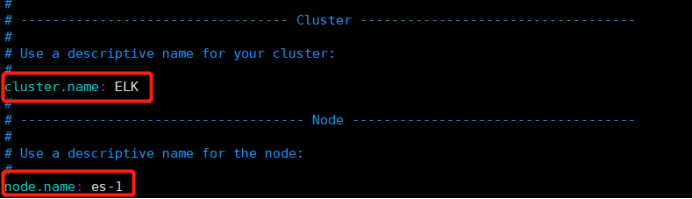
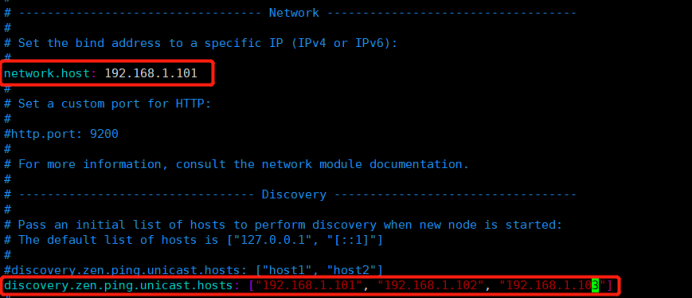
编辑配置文件
[root@mydb1 ~]# vim /etc/elasticsearch/elasticsearch.yml
启动服务
[root@mydb1 ~]# systemctl daemon-reload
[root@mydb1 ~]# systemctl start elasticsearch
[root@mydb1 ~]# systemctl status elasticsearch
● elasticsearch.service - Elasticsearch
Loaded: loaded (/usr/lib/systemd/system/elasticsearch.service; disabled; vendor preset: disabled)
Active: active (running) since 二 2018-10-30 04:19:05 CST; 8s ago
Docs: http://www.elastic.co
Process: 41715 ExecStartPre=/usr/share/elasticsearch/bin/elasticsearch-systemd-pre-exec (code=exited, status=0/SUCCESS)
Main PID: 41717 (java)
CGroup: /system.slice/elasticsearch.service
└─41717 /bin/java -Xms2g -Xmx2g -XX:+UseConcMarkSweepGC -XX:CMSInitiatingOccupancyFraction=75 -XX:+UseCMSInitiatingOccupancyOnly -XX:+AlwaysPreTouch ...
10月 30 04:19:05 mydb1 systemd[1]: Starting Elasticsearch...
10月 30 04:19:05 mydb1 systemd[1]: Started Elasticsearch.
10月 30 04:19:05 mydb1 elasticsearch[41717]: OpenJDK 64-Bit Server VM warning: If the number of processors is expected to increase from one, then you ...Threads=N
Hint: Some lines were ellipsized, use -l to show in full.
[root@mydb1 ~]# systemctl enable elasticsearch
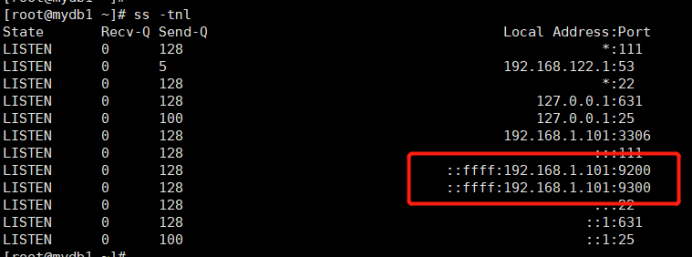
查看端口状态
配置集群中的另外两个节点es-2和es-3
es集群的相关查询
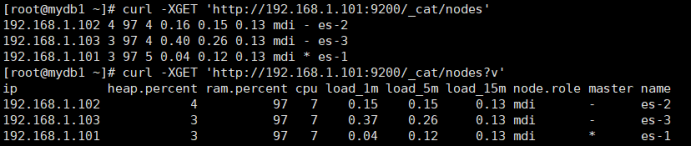
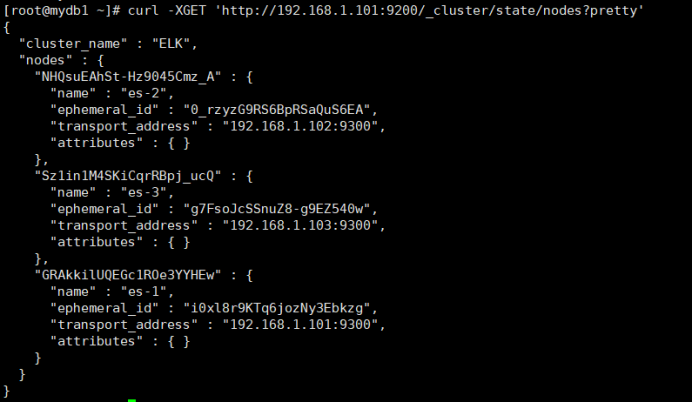
查询集群的健康状态

ES集群安装结束
安装Kibana
[root@mydb1 soft]# rpm -ivh kibana-5.6.12-x86_64.rpm
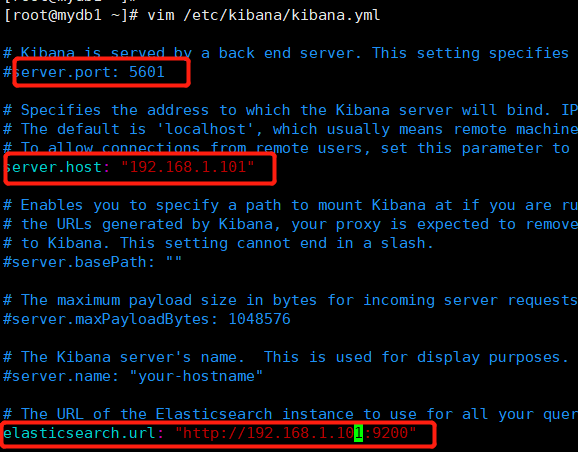
编辑配置文件
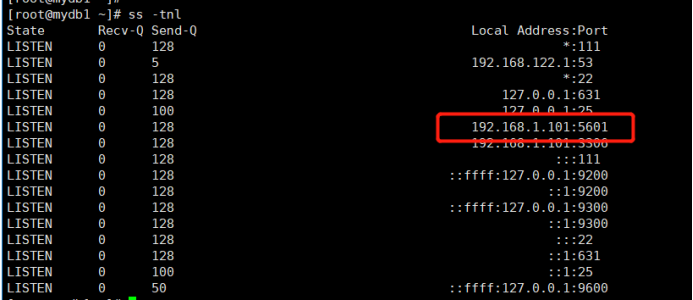
启动kibana
[root@mydb1 ~]# systemctl start kibana
[root@mydb1 ~]# systemctl status kibana
[root@mydb1 ~]# systemctl enable kibana
添加Nginx反向代理
[root@mydb1 soft]# rpm -ivh epel-release-7-11.noarch.rpm
[root@mydb1 soft]# yum install -y nginx httpd-tools
更改配置文件
删除或注释掉文件/etc/nginx/nginx.conf中的一段server{}

新增kibana.conf文件
[root@mydb1 ~]# cd /etc/nginx/conf.d/
[root@mydb1 conf.d]# cat kibana.conf
server {
listen 80;
server_name kibana;
auth_basic "Restricted Access";
auth_basic_user_file /etc/nginx/kibana-user;
location / {
proxy_pass http://192.168.1.101:5601;
proxy_http_version 1.1;
proxy_set_header Upgrade $http_upgrade;
proxy_set_header Connection 'upgrade';
proxy_set_header Host $host;
proxy_cache_bypass $http_upgrade;
}
}
生成页面登陆用户认证文件
[root@mydb1 ~]# htpasswd -cm /etc/nginx/kibana-user adrian
New password:
Re-type new password:
Adding password for user adrian
启动Nginx
[root@mydb1 ~]# nginx -t
nginx: the configuration file /etc/nginx/nginx.conf syntax is ok
nginx: configuration file /etc/nginx/nginx.conf test is successful
[root@mydb1 ~]# systemctl start nginx
[root@mydb1 ~]# systemctl status nginx
[root@mydb1 ~]# systemctl enable nginx
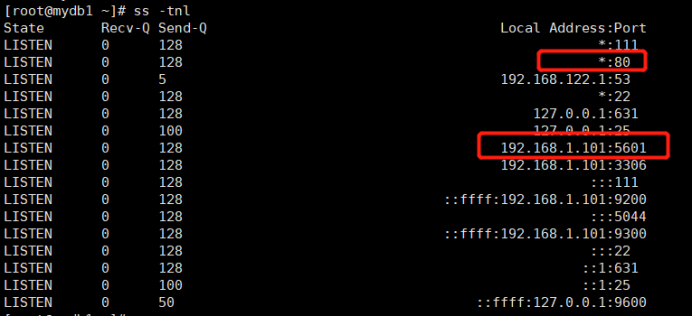
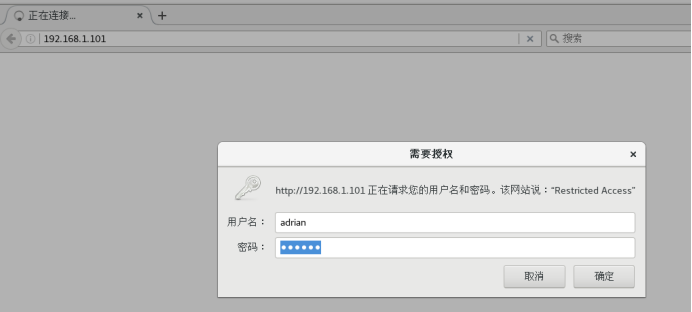
浏览器登陆kibana
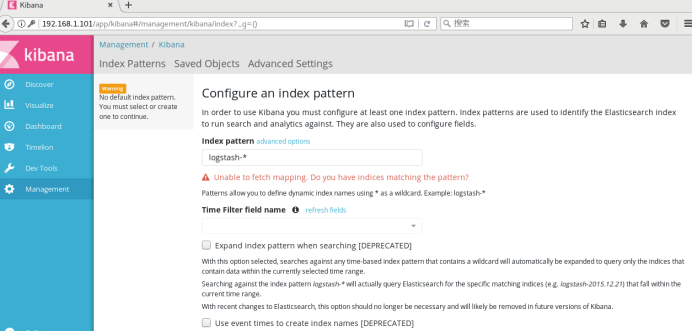
Kibana安装配置完成
安装Logstash
[root@mydb1 soft]# rpm -ivh logstash-5.6.12.rpm
添加配置文件
[root@mydb1 ~]# vim /etc/logstash/conf.d/logstash.conf
input {
beats {
port => "5044"
}
}
filter {
grok {
# 有ID有use
match => [ "message", "(?m)^# User@Host: %{USER:user}\[[^\]]+\] @ (?:(?<clienthost>\S*) )?\[(?:%{IP:clientip})?\]\s+Id:\s%{NUMBER:id:int}\n# Query_time: %{NUMBER:query_time:float}\s+Lock_time: %{NUMBER:lock_time:float}\s+Rows_sent: %{NUMBER:rows_sent:int}\s+Rows_examined: %{NUMBER:rows_examined:int}\nuse\s(?<dbname>\w+);\nSET\s+timestamp=%{NUMBER:timestamp_mysql:int};\n(?<query>.*)" ]
# 有ID无use
match => [ "message", "(?m)^# User@Host: %{USER:user}\[[^\]]+\] @ (?:(?<clienthost>\S*) )?\[(?:%{IP:clientip})?\]\s+Id:\s%{NUMBER:id:int}\n# Query_time: %{NUMBER:query_time:float}\s+Lock_time: %{NUMBER:lock_time:float}\s+Rows_sent: %{NUMBER:rows_sent:int}\s+Rows_examined: %{NUMBER:rows_examined:int}\nSET\s+timestamp=%{NUMBER:timestamp_mysql:int};\n(?<query>.*)" ]
# 无ID有use
match => [ "message", "(?m)^# User@Host: %{USER:user}\[[^\]]+\] @ (?:(?<clienthost>\S*) )?\[(?:%{IP:clientip})?\]\n# Query_time: %{NUMBER:query_time:float}\s+Lock_time: %{NUMBER:lock_time:float}\s+Rows_sent: %{NUMBER:rows_sent:int}\s+Rows_examined: %{NUMBER:rows_examined:int}\nuse\s(?<dbname>\w+);\nSET\s+timestamp=%{NUMBER:timestamp_mysql:int};\n(?<query>.*)" ]
# 无ID无use
match => [ "message", "(?m)^# User@Host: %{USER:user}\[[^\]]+\] @ (?:(?<clienthost>\S*) )?\[(?:%{IP:clientip})?\]\n# Query_time: %{NUMBER:query_time:float}\s+Lock_time: %{NUMBER:lock_time:float}\s+Rows_sent: %{NUMBER:rows_sent:int}\s+Rows_examined: %{NUMBER:rows_examined:int}\nSET\s+timestamp=%{NUMBER:timestamp_mysql:int};\n(?<query>.*)" ]
}
date {
match => ["timestamp_mysql","UNIX"]
target => "@timestamp"
}
}
output {
elasticsearch {
hosts => ["192.168.1.101:9200"]
index=>"mysql-slow-log-%{+YYYY.MM.dd}"
}
stdout { codec => rubydebug }
}
启动logstash服务
[root@mydb1 ~]# systemctl start logstash
[root@mydb1 ~]# systemctl status logstash
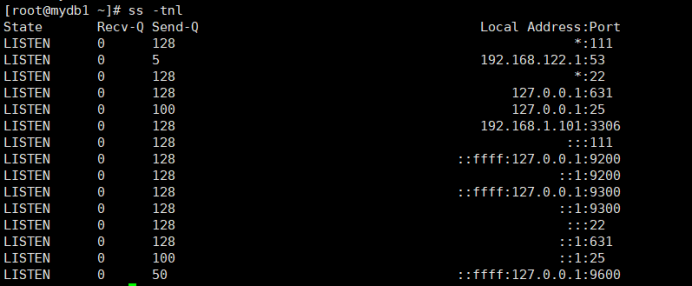
Logstash安装配置完成
安装filebeat
[root@mydb1 soft]# rpm -ivh filebeat-5.6.12-x86_64.rpm
修改配置文件
[root@mydb1 ~]# vim /etc/filebeat/filebeat.yml
filebeat.prospectors:
- input_type: log
paths:
- /app/mysqldata/3306/slow.log
exclude_lines: ['^\# Time']
multiline.pattern: '^\# Time|^\# User'
multiline.negate: true
multiline.match: after
output.logstash:
hosts: ["192.168.1.101:5044"]
[root@mydb1 ~]# systemctl start filebeat
[root@mydb1 ~]# systemctl status filebeat
mydb2,mydb3执行同样的步骤
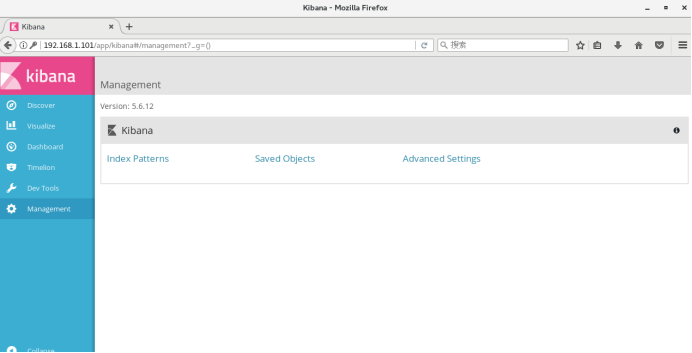
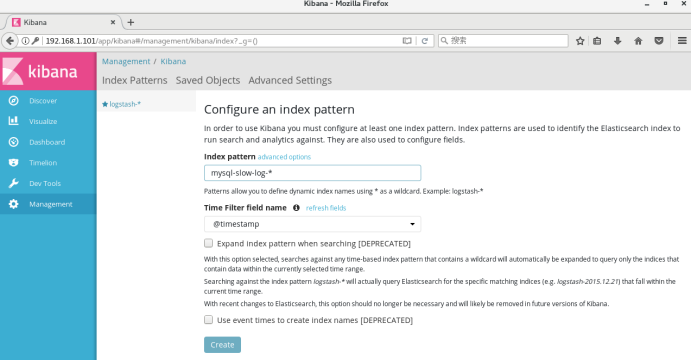
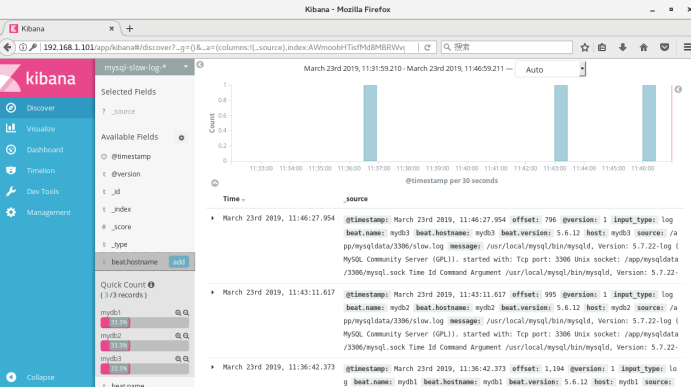
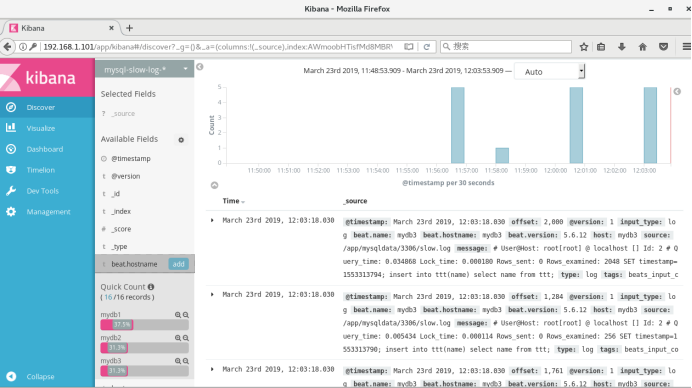
调整long_query_time值为0,清空/app/mysqldata/3306/slow.log,重启数据库
测试是否正常:
[root@mydb1 ~]# vim /etc/logstash/conf.d/logstash.conf
input {
beats {
port => "5044"
}
}
filter {
}
output {
elasticsearch {
hosts => ["192.168.1.101:9200"]
}
stdout { codec => rubydebug }
}
[root@mydb1 ~]# systemctl start logstash
[root@mydb1 ~]# systemctl status logstash
[root@mydb1 ~]# vim test.sh
while [ 1==1 ];do
sleep 1
send=`date '+%Y-%m-%d %H:%M:%S'`
echo $send ">>hello" >> test.log
done
[root@mydb1 ~]# sh test.sh &
[root@mydb1 ~]# vim /etc/filebeat/filebeat.yml
filebeat.prospectors:
- input_type: log
paths:
- /root/test.log
output.logstash:
hosts: ["l92.168.1.101:5044"]
[root@mydb1 ~]# systemctl start filebeat
[root@mydb1 ~]# systemctl status filebeat
CentOS7下使用ELK搭建日志集中分析平台的更多相关文章
- 2018年ElasticSearch6.2.2教程ELK搭建日志采集分析系统(教程详情)
章节一 2018年 ELK课程计划和效果演示1.课程安排和效果演示 简介:课程介绍和主要知识点说明,ES搜索接口演示,部署的ELK项目演示 es: localhost:9200 k ...
- ELK/EFK——日志收集分析平台
ELK——日志收集分析平台 ELK简介:在开源的日志管理方案之中,最出名的莫过于ELK了,ELK由ElasticSearch.Logstash和Kiabana三个开源工具组成.1)ElasticSea ...
- Centos6.5使用ELK(Elasticsearch + Logstash + Kibana) 搭建日志集中分析平台实践
Centos6.5安装Logstash ELK stack 日志管理系统 概述: 日志主要包括系统日志.应用程序日志和安全日志.系统运维和开发人员可以通过日志了解服务器软硬件信息.检查配置过程中的 ...
- 2018年ElasticSearch6.2.2教程ELK搭建日志采集分析系统(目录)
章节一 2018年 ELK课程计划和效果演示 1.课程安排和效果演示 简介:课程介绍和主要知识点说明,ES搜索接口演示,部署的ELK项目演示 章节二 elasticSearch 6.2版本基础讲解到 ...
- ELK:日志收集分析平台
简介 ELK是一个日志收集分析的平台,它能收集海量的日志,并将其根据字段切割.一来方便供开发查看日志,定位问题:二来可以根据日志进行统计分析,通过其强大的呈现能力,挖掘数据的潜在价值,分析重要指标的趋 ...
- Centos7下使用ELK(Elasticsearch + Logstash + Kibana)搭建日志集中分析平台
日志监控和分析在保障业务稳定运行时,起到了很重要的作用,不过一般情况下日志都分散在各个生产服务器,且开发人员无法登陆生产服务器,这时候就需要一个集中式的日志收集装置,对日志中的关键字进行监控,触发异常 ...
- 使用ELK(Elasticsearch + Logstash + Kibana) 搭建日志集中分析平台实践--转载
原文地址:https://wsgzao.github.io/post/elk/ 另外可以参考:https://www.digitalocean.com/community/tutorials/how- ...
- centos7下git服务器端搭建
git的安装: yum 源仓库里的 Git 版本更新不及时,最新版本的 Git 是 1.8.3.1,但是官方最新版本已经到了 2.9.2.想要安装最新版本的的 Git,只能下载源码进行安装. 1. 查 ...
- centos7下git服务器端搭建(转)
git的安装: yum 源仓库里的 Git 版本更新不及时,最新版本的 Git 是 1.8.3.1,但是官方最新版本已经到了 2.9.2.想要安装最新版本的的 Git,只能下载源码进行安装. 1. 查 ...
随机推荐
- Dubbo系列(一)dubbo的产生背景与原理概述
一.Dubbo框架的产生背景 大规模服务化之前,应用只是通过RMI或Hessian等工具,简单的暴露和引用远程服务,通过配置服务的URL地址进行调用,通过F5等硬件进行负载均衡. (1) ...
- Leetcode题目279.完全平方数(动态规划-中等)
题目描述: 给定正整数 n,找到若干个完全平方数(比如 1, 4, 9, 16, ...)使得它们的和等于 n.你需要让组成和的完全平方数的个数最少. 示例 1: 输入: n = 12 输出: 3 解 ...
- Linux设备驱动程序 之 内核符号表
insmod使用公共内核符号表来解析模块中未定义的符号.功能内核符号表中包含了所有全局内核项(函数和变量)的地址,这是实现模块化驱动程序所必须的.当模块装载到内核后,它所导出的任何符号都会变成内核符号 ...
- LeetCode 229. 求众数 II(Majority Element II )
题目描述 给定一个大小为 n 的数组,找出其中所有出现超过 ⌊ n/3 ⌋ 次的元素. 说明: 要求算法的时间复杂度为 O(n),空间复杂度为 O(1). 示例 1: 输入: [3,2,3] 输出: ...
- Flume-Failover Sink Processor 故障转移与 Load balancing Sink 负载均衡
接上一篇:https://www.cnblogs.com/jhxxb/p/11579518.html 使用 Flume1 监控一个端口,其 sink 组中的 sink 分别对接 Flume2 和 Fl ...
- linux向文件中添加数据,数据被追加到了上一行的行尾
当我们在windows上新建了文件,并且要上传到linux上时,一定要在文件后加上空格,否则就会出现标题上讲的,数据被追加到了上一行的行尾,而不是新起一行,但是如果是在linux上新建的文件,则没有这 ...
- 订阅发布模式eventEmiter
// 订阅发布模式 class EventEmitter { constructor() { this._events = {}; } on(name, callback) { if (this._e ...
- Mac下mysql服务端密码重置及环境配置
一 停止mysql服务 关闭MySQL服务的操作: 苹果->系统偏好设置->最下边点MySQL 在弹出页面中 关闭mysql服务(点击stop mysql server) 二 进入终端,命 ...
- mybatis之动态SQL操作之插入
1) 根据条件,插入一个学生 /** * 持久层*/ public class StudentDao { /** * 动态SQL--插入 */ public void dynaSQLwithInse ...
- PhoneUtils
import java.util.regex.Matcher; import java.util.regex.Pattern; public class PhoneUtils { /** * @par ...