
吴裕雄 PYTHON 神经网络——TENSORFLOW 学习率的设置
import tensorflow as tf

TRAINING_STEPS = 10

LEARNING_RATE = 1

x = tf.Variable(tf.constant(5, dtype=tf.float32), name="x")

y = tf.square(x)

train_op = tf.train.GradientDescentOptimizer(LEARNING_RATE).minimize(y)

with tf.Session() as sess:

    sess.run(tf.global_variables_initializer())

    for i in range(TRAINING_STEPS):

        sess.run(train_op)

        x_value = sess.run(x)

        print( "After %s iteration(s): x%s is %f."% (i+1, i+1, x_value) )

TRAINING_STEPS = 1000

LEARNING_RATE = 0.001

x = tf.Variable(tf.constant(5, dtype=tf.float32), name="x")

y = tf.square(x)

train_op = tf.train.GradientDescentOptimizer(LEARNING_RATE).minimize(y)

with tf.Session() as sess:

    sess.run(tf.global_variables_initializer())

    for i in range(TRAINING_STEPS):

        sess.run(train_op)

        if i % 100 == 0:

            x_value = sess.run(x)

            print("After %s iteration(s): x%s is %f."% (i+1, i+1, x_value))

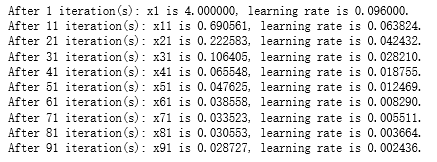
TRAINING_STEPS = 100

global_step = tf.Variable(0)

LEARNING_RATE = tf.train.exponential_decay(0.1, global_step, 1, 0.96, staircase=True)

x = tf.Variable(tf.constant(5, dtype=tf.float32), name="x")

y = tf.square(x)

train_op = tf.train.GradientDescentOptimizer(LEARNING_RATE).minimize(y, global_step=global_step)

with tf.Session() as sess:

    sess.run(tf.global_variables_initializer())

    for i in range(TRAINING_STEPS):

        sess.run(train_op)

        if i % 10 == 0:

            LEARNING_RATE_value = sess.run(LEARNING_RATE)

            x_value = sess.run(x)

            print ("After %s iteration(s): x%s is %f, learning rate is %f."% (i+1, i+1, x_value, LEARNING_RATE_value))
吴裕雄 PYTHON 神经网络——TENSORFLOW 学习率的设置的更多相关文章
- 吴裕雄 python 神经网络——TensorFlow训练神经网络:不使用指数衰减的学习率
import tensorflow as tf from tensorflow.examples.tutorials.mnist import input_data INPUT_NODE = 784 ...
- 吴裕雄 python 神经网络——TensorFlow 循环神经网络处理MNIST手写数字数据集
#加载TF并导入数据集 import tensorflow as tf from tensorflow.contrib import rnn from tensorflow.examples.tuto ...
- 吴裕雄 python 神经网络——TensorFlow训练神经网络:不使用滑动平均
import tensorflow as tf from tensorflow.examples.tutorials.mnist import input_data INPUT_NODE = 784 ...
- 吴裕雄 python 神经网络——TensorFlow训练神经网络:不使用隐藏层
import tensorflow as tf from tensorflow.examples.tutorials.mnist import input_data INPUT_NODE = 784 ...
- 吴裕雄 python 神经网络——TensorFlow训练神经网络:不使用激活函数
import tensorflow as tf from tensorflow.examples.tutorials.mnist import input_data INPUT_NODE = 784 ...
- 吴裕雄 python 神经网络——TensorFlow训练神经网络:不使用正则化
import tensorflow as tf from tensorflow.examples.tutorials.mnist import input_data INPUT_NODE = 784 ...
- 吴裕雄 python 神经网络——TensorFlow训练神经网络:全模型
import tensorflow as tf from tensorflow.examples.tutorials.mnist import input_data INPUT_NODE = 784 ...
- 吴裕雄 PYTHON 神经网络——TENSORFLOW 无监督学习处理MNIST手写数字数据集
# 导入模块 import numpy as np import tensorflow as tf import matplotlib.pyplot as plt # 加载数据 from tensor ...
- 吴裕雄 python 神经网络——TensorFlow 使用卷积神经网络训练和预测MNIST手写数据集
import tensorflow as tf import numpy as np from tensorflow.examples.tutorials.mnist import input_dat ...
随机推荐
- Apache Kafka(七)- Kafka ElasticSearch Comsumer
Kafka ElasticSearch Consumer 对于Kafka Consumer,我们会写一个例子用于消费Kafka 数据传输到ElasticSearch. 1. 构造ElasticSear ...
- EAC3 channel & program extension
EAC3 bit stream syntax允许在single bitstream中存在time-multiplexed substreams. 在EAC3的signle bitstream中,允许s ...
- FPGA-HPS
最近在做DE1的图像方面实验,用到了HPS,所以简要谈一谈什么是HPS. 由图可知,DE1的板子就是有fpga+hps组成的: 参考自:http://bbs.eeworld.com.cn/thread ...
- 密码学笔记——playfair密码
Playfair密码(Playfair cipher 或 Playfair square)一种替换密码,1854年由查尔斯·惠斯通(Charles Wheatstone)的英国人发明. 例题: 某种 ...
- axios 请求中的Form Data 与 Request Payload的区别
在vue项目中使用axios发post请求时候,后台返回500. 发现是form Data 和 Request payload的问题. 后台对两者的处理方式不同,导致我们接收不到数据. 解决方案:使用 ...
- 一段代码实现Aplayer+网易云音乐接口
玩cnblogs的小伙伴可以将以下代码复制到页脚html当中哦 <!-- require APlayer --> <link rel="stylesheet" h ...
- 【游戏体验】Buttonhunt(鼠标寻找按钮)
虽然画风千奇百变 但这款益智游戏的趣味性相当高 推荐试玩 个人测评 游戏性 9/10 音乐 4/10 剧情 6/10 总评 19/30
- 【PAT甲级】1112 Stucked Keyboard (20分)(字符串)
题意: 输入一个正整数K(1<K<=100),接着输入一行字符串由小写字母,数字和下划线组成.如果一个字符它每次出现必定连续出现K个,它可能是坏键,找到坏键按照它们出现的顺序输出(相同坏键 ...
- jmeter 进行websocket数据帧过大导致code 1009
Response message: Received: Close frame with status code 1009 and close reason 'No async message sup ...
- 粪发涂墙-tomcat
tomcat 的 JAVA_OPTS 分析设置 快乐生活你我 2019-08-12 06:07:00 JAVA_OPTS ,顾名思义,是用来设置JVM相关运行参数的变量. 1.JVM:JAVA_OPT ...