
微信小程序 自定义单选复选按钮组的实现(用于实现购物车产品列表功能)
(一)单选按钮组
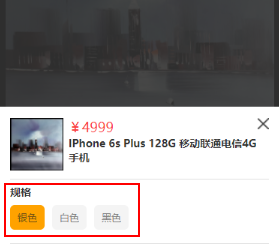
模型图如下:
index.js
Page({

  data: {

    parameter: [{ id: 1, name: '银色' }, { id: 2, name: '白色' },{ id: 3, name: '黑色' }],//模拟商品参数数据,如果是线上版本需要自行发起request请求

  },

  onLoad: function (options) {

     this.data.parameter[0].checked = true;

    this.setData({

      parameter: this.data.parameter,

    })//默认parameter数组的第一个对象是选中的

  },

   // 参数点击响应事件

  parameterTap:function(e){//e是获取e.currentTarget.dataset.id所以是必备的,跟前端的data-id获取的方式差不多

    var that=this

    var this_checked = e.currentTarget.dataset.id

    var parameterList = this.data.parameter//获取Json数组

    for (var i = 0; i < parameterList.length;i++){

      if (parameterList[i].id == this_checked){

        parameterList[i].checked = true;//当前点击的位置为true即选中

      }

      else{

        parameterList[i].checked = false;//其他的位置为false

      }

    }

    that.setData({

      parameter: parameterList

    })

  }

})
index.wxml
<view class='fwb fz-28 mgt-16 mgb-10'>规格</view>

  <view class='parameter-wrap'>

    <block wx:for="{{parameter}}" wx:key="parameter">

    <text class='parameter-info text-over {{item.checked?"checked_parameter":""}}' data-id='{{item.id}}' bindtap='parameterTap'>{{item.name}}</text>

    </block>

  </view>
index.wxss
.checked_parameter{

  background: rebeccapurple;

  padding: 3px;

  border-radius: 5px;

  color: #fff;

}
Tips:此处的{{item.checked?”checked_parameter”:”“}}为三元选择器,即通过checked判断当前是否为选中样式,而后进行样式的添加checked_parameter。
(二)多选按钮组
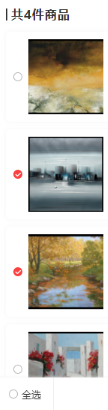
模型图如下:
cartList.js
Page({

    data:{

    CartList:[],//做空处理,如果购物车为空后端的值没有改变,容易产生报错
  //测试数据:CartList: [{id: 1, name: '银色', checked: false},{id: 2, name: '白色', checked: false},{id: 3, name: '黑色', checked: true}]
    },

      onLoad: function () {

    // 获取购物车请求

    var that = this;

    wx.request({

      url: request_getCartList,//向后端发起请求,此处的是get的方式,如需要ajax请参照本站内的相关文章

      data: {

        "session3rd": userid,

      },

      success: function (res) {

        if (res.data.code == -2) {

          that.setData({

            CartList: []

          })

        }

        if(res.data.code==1){

          that.setData({

            CartList: list

          })

         }

       }

    })

  },

    // 多选

  chooseOs: function (event) {

    for (var i = 0; i < this.data.CartList.length; i++) {

      if (event.currentTarget.id == this.data.CartList[i].id) {

        if (this.data.CartList[i].checked == true) {

          this.data.CartList[i].checked = false;

          var CartList = this.data.CartList;

          this.setData({

            CartList//重定义CartList,使购物车的样式实现局部刷新

          })

        } else {

          this.data.CartList[i].checked = true;

          var CartList = this.data.CartList;

          this.setData({

            CartListt//重定义CartList,使购物车的样式实现局部刷新

          })

        }

      }

    }

  },

})
cartList.wxml
  <block wx:for="{{CartList}}" wx:key="">

    <view class="order-out user-shadow mgb-20 nowrap">

      <view class="check-btn" catchtap='chooseOs' id="{{item.id}}">

        <image class="absoult-v" src="{{imgSrc}}{{item.checked?'type_1':'type_0'}}.png" mode="widthFix"></image>

      </view>

    </view>

  </block>
Tips:前端页面通过catchtap的事件捕捉的方式,调用chooseOs的方法,获取当前点击对象的id即id=”{{item.id}}”,然后对选中的事件添加样式this.data.CartList[i].checked = true;,对未选中的事件删除样式this.data.CartList[i].checked = false;
(三)复选拓展-全选全不选
cart.xml
 <view class="all-btn" bindtap='allCheckTap' wx:if="{{!checked}}">

    <image src="{{imgSrc}}{{checked?'type_1':'type_0'}}.png" mode="widthFix"></image>

    <text>全选</text>

  </view>

  <view class="all-btn" bindtap='allCheckTap' wx:if="{{checked}}">

    <image src="{{imgSrc}}{{checked?'type_1':'type_0'}}.png" mode="widthFix"></image>

    <text>全不选</text>

  </view>
Tips:此处的‘全选’和‘全不选’没有合并,需要小码农们自行整合。
cartList.js
// 全选按钮

  allCheckTap: function () {

    this.setData({

      checked: !this.data.checked,

    })

    if (this.data.checked) {

      for (var i = 0; i < this.data.CartList.length; i++) {

        if (this.data.CartList[i].checked !== true) {

          this.data.CartList[i].checked = true;

          var CartList = this.data.CartList;

          this.setData({

            CartList

          })

        }

      }

    }

    else {

      for (var i = 0; i < this.data.CartList.length; i++) {

        if (this.data.CartList[i].checked == true) {

          this.data.CartList[i].checked = false;

          var CartList = this.data.CartList;

          this.setData({

            CartList

          })

        }

      }

    }

  },
tips:全选跟全部不选的逻辑比较简单就是,将所有所有的checked循环遍历this.data.CartList[i].checked == true或false,然后通过this.setData({CartList})重新定义一下,实现局部刷新。
转 : https://blog.csdn.net/qq_38209578/article/details/78810981
微信小程序 自定义单选复选按钮组的实现(用于实现购物车产品列表功能)的更多相关文章
- 微信小程序 修改(自定义) 单选/复选按钮样式 checkbox/radio样式自定义
参考文章: 微信小程序 修改(自定义) 单选/复选按钮样式 checkbox/radio样式自定义
- 微信小程序自定义Tabber,附详细源码
目录 1,前言 2,说明 3,核心代码 1,前言 分享一个完整的微信小程序自定义Tabber,tabber按钮可以设置为跳转页面,也可以设置为功能按钮.懒得看文字的可以直接去底部,博主分享了小程序代码 ...
- 微信小程序——自定义导航栏
微信头部导航栏可能通过json配置: 但是有时候我们项目需求可能需要自定义头部导航栏,如下图所示: 现在具体说一下实现步骤及方法: 步骤: 1.在 app.json 里面把 "navigat ...
- 微信小程序自定义弹窗wcPop插件|仿微信弹窗样式
微信小程序自定义组件弹窗wcPop|小程序消息提示框|toast自定义模板弹窗 平时在开发小程序的时候,弹窗应用场景还是蛮广泛的,但是微信官方提供的弹窗比较有局限性,不能自定义修改.这个时候首先想到的 ...
- 微信小程序自定义 tabbar
一定的需求情况下,无法使用小程序原生的 tabbar 的时候,需要自行实现一个和 tabbar 功能一模一样的自制组件. 查阅了海量的博客和文档之后,亲自踩坑.总结了三种在不使用微信小程序原生 tab ...
- 微信小程序-自定义底部导航
代码地址如下:http://www.demodashi.com/demo/14258.html 一.前期准备工作 软件环境:微信开发者工具 官方下载地址:https://mp.weixin.qq.co ...
- 微信小程序自定义tabbar的实现
微信小程序自定义tabbar的实现 目的:当采用微信的自定义tabbar组件的时候,切换的时候会出现闪屏的效果:当使用微信默认的tabbar的时候,限制了tabbar的数量以及灵活配置. 方案:自己动 ...
- 微信小程序 自定义导航组件 nav头部 全面屏设计
nav-dynamic 微信小程序自定义nav头部组件:适配全面屏设计: 实现功能 初始进入页面时,展示初始状态下的nav样式: 页面滚动时,监听页面滚动事件,展示滚动状态下的nav样式: 根据配置字 ...
- 微信小程序自定义组件,提示组件
微信小程序自定义组件,这里列举了一个常用的提示自定义组件,调用自定义组件中的方法和字段.仅供参考和学习. 编写组件: 在根目录下添加“components”目录,然后像添加Page页面一样添加自定义组 ...
随机推荐
- mybatis+spring配置
可参考:http://www.javacodegeeks.com/2014/02/building-java-web-application-using-mybatis-with-spring.htm ...
- poj - 1191 - 棋盘切割(dp)
题意:将一个8*8的棋盘(每一个单元正方形有个分值)沿直线(竖或横)割掉一块,留下一块,对留下的这块继续这样操作,总共进行n - 1次,得到n块(1 < n < 15)矩形,每一个矩形的分 ...
- sell 项目 订单详情表 设计 及 创建
1.数据库设计 2.订单详情表 创建 /** * 订单详情表 */ create table `order_detail` ( `detail_id` varchar(32) not null, `o ...
- 移动端自适应布局 rem方案
1.viewport.js (function(window, document) { // 给hotcss开辟个命名空间,别问我为什么,我要给你准备你会用到的方法,免得用到的时候还要自己写. con ...
- 【PMP】十五至尊图
以上是PMP的10大知识领域与5个过程组,在PMP考试中属于必须记忆的知识,该知识来源于PMBOK 第6版 附件为每日练习记忆模板,可以更好的记忆上图 点击下载附件
- V-rep学习笔记:机器人路径规划1
Motion Planning Library V-REP 从3.3.0开始,使用运动规划库OMPL作为插件,通过调用API的方式代替以前的方法进行运动规划(The old path/motion ...
- ubuntu普通账户获取root权限的方法以及su和su -的区别
打开命令窗口 输入命令:sudo passwd root 然后按照上图中的操作进行即可. su和su -的命令的不同: su命令和su -命令最大的本质区别就是:前者只是切换了root身份,但Shel ...
- python之模块pprint之常见用法
# -*- coding: cp936 -*- #python 27 #xiaodeng #python之模块pprint之常见用法 import pprint data = [(1,{'a':'A' ...
- input文本框在div中居中
{display:block;margin-left:auto;margin-right:auto;}
- SITEMAP放到独立的文件上面
<siteMap configSource="Config\siteMap.config"/> </system.web> <siteMap> ...