
数学之路-python计算实战(9)-机器视觉-图像插值仿射
- 插值
- Python: cv2.resize(src, dsize[, dst[, fx[, fy[, interpolation]]]]) → dst
- interpolation –
interpolation method:
- INTER_NEAREST - a nearest-neighbor interpolation
- INTER_LINEAR - a bilinear interpolation (used by default)
- INTER_AREA - resampling using pixel area relation. It may be a preferred method for image decimation, as it gives moire’-free results. But when the image is zoomed, it is similar to theINTER_NEAREST method.
- INTER_CUBIC - a bicubic interpolation over 4x4 pixel neighborhood
- INTER_LANCZOS4 - a Lanczos interpolation over 8x8 pixel neighborhood
# -*- coding: utf-8 -*-

import cv2

fn="test2.jpg"

img=cv2.imread(fn)

w=img.shape[1]

h=img.shape[0]

#放大,双立方插值

newimg1=cv2.resize(img,(w*2,h*2),interpolation=cv2.INTER_CUBIC)

#放大, 近期邻插值

newimg2=cv2.resize(img,(w*2,h*2),interpolation=cv2.INTER_NEAREST)

#放大, 象素关系重採样

newimg3=cv2.resize(img,(w*2,h*2),interpolation=cv2.INTER_AREA)

#缩小, 象素关系重採样

newimg4=cv2.resize(img,(300,200),interpolation=cv2.INTER_AREA)

cv2.imshow('preview1',newimg1)

cv2.imshow('preview2',newimg2)

cv2.imshow('preview3',newimg3)

cv2.imshow('preview4',newimg4)

cv2.waitKey()

cv2.destroyAllWindows()
仿射可进行缩放、旋转、平衡操作
- Python: cv2.warpAffine(src, M, dsize[, dst[, flags[, borderMode[, borderValue]]]]) → dst
- C: void cvWarpAffine(const CvArr* src, CvArr* dst, const CvMat* map_matrix, intflags=CV_INTER_LINEAR+CV_WARP_FILL_OUTLIERS, CvScalar fillval=cvScalarAll(0) )
- Python: cv.WarpAffine(src, dst, mapMatrix, flags=CV_INTER_LINEAR+CV_WARP_FILL_OUTLIERS, fillval=(0, 0, 0, 0)) → None
highlight=warpaffine#cv.WarpAffine" title="Permalink to this definition" style="color: rgb(101, 161, 54); text-decoration: none; visibility: hidden; font-size: 0.8em; padding: 0px 4px;">
- C: void cvGetQuadrangleSubPix(const CvArr* src, CvArr* dst, const CvMat*map_matrix)
highlight=warpaffine#void cvGetQuadrangleSubPix(const CvArr* src, CvArr* dst, const CvMat* map_matrix)" title="Permalink to this definition" style="color: rgb(101, 161, 54); text-decoration: none; visibility: hidden; font-size: 0.8em; padding: 0px 4px;">
- Python: cv.GetQuadrangleSubPix(src, dst, mapMatrix) → None
-
Parameters: - src – input image.
- dst – output image that has the size dsize and the same type assrc .
- M –
 transformation matrix.
 - dsize – size of the output image.
- flags – combination of interpolation methods (see resize() ) and the optional flag WARP_INVERSE_MAP that means that M is the inverse transformation (
 ).
). - borderMode – pixel extrapolation method (seeborderInterpolate()); when borderMode=BORDER_TRANSPARENT , it means that the pixels in the destination image corresponding to the “outliers” in the source image are not modified by the function.
- borderValue – value used in case of a constant border; by default, it is 0.
The function warpAffine transforms the source image using the specified matrix:

getRotationMatrix2D
Calculates an affine matrix of 2D rotation.
- C++: Mat getRotationMatrix2D(Point2f center, double angle, double scale)
- Python: cv2.getRotationMatrix2D(center, angle, scale) → retval
highlight=warpaffine#cv2.getRotationMatrix2D" title="Permalink to this definition" style="color: rgb(101, 161, 54); text-decoration: none; visibility: hidden; font-size: 0.8em; padding: 0px 4px;">
- C: CvMat* cv2DRotationMatrix(CvPoint2D32f center, double angle, double scale, CvMat* map_matrix)
- Python: cv.GetRotationMatrix2D(center, angle, scale, mapMatrix) → None
-
Parameters: - center – Center of the rotation in the source image.
- angle – Rotation angle in degrees. Positive values mean counter-clockwise rotation (the coordinate origin is assumed to be the top-left corner).
- scale – Isotropic scale factor.
- map_matrix – The output affine transformation, 2x3 floating-point matrix.
The function calculates the following matrix:

where

The transformation maps the rotation center to itself. If this is not the target, adjust the shift.
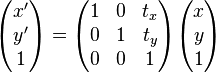
仿射变换。又称仿射映射。是指在几何中。一个向量空间进行一次线性变换并接上一个平移。变换为还有一个向量空间。
一个对向量 平移
平移 ,与旋转放大缩小
 的仿射映射为

上式在 齐次坐标上,等价于以下的式子

-
为了表示仿射变换。须要使用齐次坐标,即用三维向量 (x, y, 1) 表示二维向量,对于高维来说也是如此。依照这样的方法。就能够用矩阵乘法表示变换。
 ;
;  变为
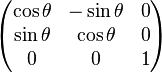
变为在矩阵中添加一列与一行,除右下角的元素为 1 外其他部分填充为 0,通过这样的方法,全部的线性变换都能够转换为仿射变换。比如,上面的旋转矩阵变为
通过这样的方法,使用与前面一样的矩阵乘积能够将各种变换无缝地集成到一起
# -*- coding: utf-8 -*-

import cv2

fn="test3.jpg"

img=cv2.imread(fn)

w=img.shape[1]

h=img.shape[0]

#得到仿射变换矩阵,完毕旋转

#中心

mycenter=(h/2,w/2)

#旋转角度

myangle=90

#缩放尺度

myscale=0.5

#仿射变换完毕缩小并旋转

transform_matrix=cv2.getRotationMatrix2D(mycenter,myangle,myscale)

newimg=cv2.warpAffine(img,transform_matrix,(h,w))

cv2.imshow('preview',newimg)

cv2.waitKey()

cv2.destroyAllWindows()
本博客全部内容是原创,假设转载请注明来源
http://blog.csdn.net/myhaspl/

本博客全部内容是原创。假设转载请注明来源
http://blog.csdn.net/myhaspl/
数学之路-python计算实战(9)-机器视觉-图像插值仿射的更多相关文章
- 数学之路-python计算实战(21)-机器视觉-拉普拉斯线性滤波
拉普拉斯线性滤波,.边缘检測 . When ksize == 1 , the Laplacian is computed by filtering the image with the follow ...
- 数学之路-python计算实战(17)-机器视觉-滤波去噪(中值滤波)
Blurs an image using the median filter. C++: void medianBlur(InputArray src, OutputArray dst, int ks ...
- 数学之路-python计算实战(20)-机器视觉-拉普拉斯算子卷积滤波
拉普拉斯算子进行二维卷积计算,线性锐化滤波 # -*- coding: utf-8 -*- #线性锐化滤波-拉普拉斯算子进行二维卷积计算 #code:myhaspl@myhaspl.com impor ...
- 数学之路-python计算实战(15)-机器视觉-滤波去噪(归一化块滤波)
# -*- coding: utf-8 -*- #code:myhaspl@myhaspl.com #归一化块滤波 import cv2 import numpy as np fn="tes ...
- 数学之路-python计算实战(14)-机器视觉-图像增强(直方图均衡化)
我们来看一个灰度图像,让表示灰度出现的次数,这样图像中灰度为 的像素的出现概率是 是图像中全部的灰度数, 是图像中全部的像素数, 实际上是图像的直方图,归一化到 . 把 作为相应于 的累计概率 ...
- 数学之路-python计算实战(19)-机器视觉-卷积滤波
filter2D Convolves an image with the kernel. C++: void filter2D(InputArray src, OutputArray dst, int ...
- 数学之路-python计算实战(13)-机器视觉-图像增强
指数变换的基本表达式为:y=bc(x-a)-1 当中參数b.c控制曲线的变换形状,參数a控制曲线的位置. 指数变换的作用是扩展图像的高灰度级.压缩低灰度级.能够用于亮度过高的图像 本博客全部内容是原创 ...
- 数学之路-python计算实战(16)-机器视觉-滤波去噪(邻域平均法滤波)
# -*- coding: utf-8 -*- #code:myhaspl@myhaspl.com #邻域平均法滤波,半径为2 import cv2 import numpy as np fn=&qu ...
- 数学之路-python计算实战(18)-机器视觉-滤波去噪(双边滤波与高斯滤波 )
高斯滤波就是对整幅图像进行加权平均的过程.每个像素点的值,都由其本身和邻域内的其它像素值经过加权平均后得到.高斯滤波的详细操作是:用一个模板(或称卷积.掩模)扫描图像中的每个像素.用模板确定的邻域内像 ...
随机推荐
- 用SLF4j/Logback打印日志-3
在 用SLF4j/Logback打印日志-1 和 用SLF4j/Logback打印日志-2 中分别介绍了Logback记录日志的基本原理并重点介绍了输出源配置.本篇介绍一些性能和技巧性的东西. 性能 ...
- @Dubbo概述
Dubbo是什么 Dubbo是一个开源分布式服务框架,致力于提供高性能和透明化的RPC远程服务调用方案,以及SOA服务治理方案. 有三个核心部分包括: 远程通讯:提供对多种基于长连接的NIO框架抽象封 ...
- 5.2 dubbo-compiler源码解析
ExtensionLoader<Protocol> loader = ExtensionLoader.getExtensionLoader(Protocol.class); final P ...
- asp.net 获得域名,端口,虚拟目录[转]
asp.net 获得域名,端口,虚拟目录 记性不好,好多次都被路径问题给拦住了.我现在想得到一个资源的全URL路径,因此首先想得到网站当前的域名,端口和虚拟目录.看下表 底下這張表就是各種跟 Brow ...
- C# xml 常规 保护 方法总结
一 使用xsd模式文件验证xml文件: xml文件: <?xml version="1.0" encoding="utf-8" ?> <Boo ...
- IOS中的网络编程详解
在移动互联网时代,几乎所有应用都需要用到网络,比如QQ.微博.网易新闻.优酷.百度地图,只有通过网络跟外界进行数据交互.数据更新,应用才能保持新鲜.活力,如果没有了网络,也就缺少了数据变化,无论外观多 ...
- Delphi获取默认打印机名称及端口
Delphi获取默认打印机名称及端口 在前段时间写的收银系统中由于目前市场上很多电脑主板上已经没有并口,而POS机却又需要并口,所以目前需要用PCI转接卡,这个就导致不同门店使用的端口就有可能不同,这 ...
- 【转载】JAVA-dynamic web module与tomcat
大致因为java的web系统有多种类型,比如静态的和动态的,然后动态的java web project要设置dynamic web module,也就是动态网页模型,他必须要喝对应的服务器搭配好了才能 ...
- c语言统计程序执行时间
c语言程序执行时间 #include <iostream> #include <cstdio> #include <ctime> int main() { std: ...
- 如何把本地代码提交到git(码云)、github代码管理项目上
前提必须安装了git工具 以下命令操作都是通过git bash操作. 将本地代码提交到码云空项目操作: D:\>mkdir inek_winprop D:\>cd inek_winprop ...