
miRNA分析--比对(二)
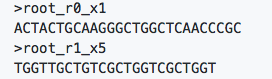
在比对之前为了减少比对时间,将每一个样本中的reads进行合并,得到fasta格式,其命名规则如下:
样本_r数子_x数字
r 中的数字表示reads序号;
x 中的数字表示该条reads重复次数
比对分为两条策略
1、根据本物种已有的miRNA序列进行比对,
已知当miRNA序列从 miRBase或者 sRNAanno得到
(应该将clean reads比对到所研究物种到tRNA, rRNA, snoRNA,mRNA等数据,允许一个错配,将比对上等reads过滤,也可以比对到参考基因组,将为未比对到到reads过滤掉,但是本次我没有这么做)
对于第一种情况,我采用bowtie将reads比对到成熟miRNA
1 ##建立索引

2 bowtie-build ref.fa

3 ##比对

4 bowtie -v 0 -m 30 -p 10 -f  ref.fa sample.fa sample.bwt

5 参数解释

6 -v: 允许0个错配

7 -p: 10个线程

8 -m: 当比对超过这个数时,认为时未比对

9 -f: 输入序列fasta
根据.bwt 文件可以计算出每个已知当miRNA中比对上当reads数量,别忘记乘以 x后面的数
2、直接比对到参考基因组并进行新miRNA鉴定
采用miR-PREFeR进行Novel miRNA鉴定
其githup主页:https://github.com/hangelwen/miR-PREFeR
需安装ViennaRNA ( 最好是1.8.5或2.1.2, 2.1.5版本)
1 #我装的是最新版

2 wget https://www.tbi.univie.ac.at/RNA/download/sourcecode/2_4_x/ViennaRNA-2.4.10.tar.gz

3 tar zvxf ViennaRNA-2.4.10.tar.gz

4 cd ViennaRNA-2.4.10

5 ./configure --prefix="/user/tools/ViennaRNA/" --without-perl

6 make

7 make install
安装
1 git clone https://github.com/hangelwen/miR-PREFeR.git
数据准备
️ref.fa
️miRNA 比对到ref.fa的sam文件 (sam 文件中的reads 必须是collapse reads )
️gff 文件(可选,记录需要屏蔽掉的信息,比如重复序列等)
bowtie 比对
1 bowtie -a -v 0 -m 30 -p 10 -f ref.fa sample.fa -S sample.sam
准备configure 文件
 1 #example configuration file for the miR-PREFeR pipeline.

 2 #lines start with '#' are comments

 3

 4 #miR-PREFeR path, please change to your path to the script folder.

 5 #Absolute path perfered.

 6 PIPELINE_PATH = /miR

 7

 8 #Genomic sequence file in fasta format.  Absolute path perfered. If a path

 9 #relative if used, it's relatvie to the working directory where you execute

10 #the pipeline.

11 FASTA_FILE =  genome_v1.fa

12

13 #Small RNA read alignment file in SAM format. The SAM file should contain

14 #the SAM header. If N samples are used, then N file names are listed here,

15 #separated by comma. please note that before doing alignment, process the

16 #reads fasta files using the provided script 'process-reads-fasta.py' to

17 #collapse and rename the reads. Absolute path perfered. If a path

18 #relative if used, it's relatvie to the working directory where you execute

19 #the pipeline.

20 ALIGNMENT_FILE = ./trm_XX-1_L1_I309.R1.fastq_trm_fa.fa.sam, ./trm_XX-2_L1_I310.R1.fastq_trm_fa.fa.sam, ./trm_XX-3_L1_I311.R1.fastq_trm_fa.fa.sam, ./trm_XY-1_L1_I312.R1.fastq_trm_fa.fa.sam, ./trm_XY-2_L1_I313.R1.fastq_trm_fa.fa.sam, ./trm_XY-3_L1_I314.R1.fastq_trm_fa.fa.sam, ./trm_YY-1_L1_I315.R1.fastq_trm_fa.fa.sam, ./trm_YY-2_L1_I316.R1.fastq_trm_fa.fa.sam, ./trm_YY-3_L1_I332.R1.fastq_trm_fa.fa.sam

21

22 #GFF file which list all existing annotations on genomic sequences FASTA_FILE.

23 #If no GFF file is availble, comment this line out or leave the value blank.

24 #Absolute path perfered. If a path relative if used, it's relatvie to the

25 #working directory where you execute the pipeline.

26 #CAUTION: please only list the CDS regions, not the entire miRNA region, because

27 #miRNAs could be in introns. This option is mutual exclusive with 'GFF_FILE_INCLUDE'

28 #option.

29 # If you have a GFF file that contains regions in which you want to predict whehter

30 # they include miRNAs, please use the 'GFF_FILE_INCLUDE' option instead.

31 GFF_FILE_EXCLUDE = CDS.gff

32

33 # Only predict miRNAs from the regions given in the GFF file. This option is mutual

34 # exclusive with 'GFF_FILE_EXCLUDE'. Thus, only one of them can be used.

35 #GFF_FILE_INCLUDE = ./TAIR10.chr1.candidate.gff

36

37 #The max length of a miRNA precursor. The range is from 60 to 3000. The default

38 #is 300.

39 PRECURSOR_LEN = 300

40

41 #The first step of the pipeline is to identify candidate regions of the miRNA

42 #loci. If READS_DEPTH_CUTOFF = N, then bases that the mapped depth is smaller

43 #than N is not considered. The value should >=2.

44 READS_DEPTH_CUTOFF = 20

45

46 #Number of processes for this computation. Using more processes speeds up the computation,

47 #especially if you have a multi-core processor. If you have N cores avalible for the

48 #computation, it's better to set this value in the range of N to 2*N.

49 #If comment out or leave blank, 1 is used.

50 NUM_OF_CORE = 4

51

52 #Outputfolder. If not specified, use the current working directory. Please make sure that

53 #you have enough disk space for the folder, otherwise the pipeline may fail.

54 OUTFOLDER = spinach-result

55

56 #Absolute path of the folder that contains intermidate/temperary files during the

57 # run of the pipeline. If not specified, miR-PREFeR uses a folder with suffix "_tmp"

58 #under OUTFOLDER by default. Please make sure that you have enough disk space for the

59 # folder, otherwise the pipeline may fail.

60 #TMPFOLDER = /tmp/exmaple

61 TMPFOLDER =

62

63 #prefix for naming the output files. For portability, please DO NOT contain any

64 #spaces and special characters. The prefered includes 'A-Z', 'a-z', '0-9', and

65 #underscore '_'.

66 NAME_PREFIX = spinach-example

67

68 #Maximum gap length between two contigs to form a candidate region.

69 MAX_GAP = 100

70

71 # Minimum and maximum length of the mature sequence. Default values are 18 and 24.

72 MIN_MATURE_LEN = 18

73 MAX_MATURE_LEN = 24

74

75 # If this is 'Y', then the criteria that requries the star sequence must be expressed

76 # is loosed if the expression pattern is good enough (.e.g. the majority of the reads

77 # mapped to the region are mapped to the mature position.). There are lots of miRNAs

78 # which do not have star sequence expression. The default value is Y.

79 ALLOW_NO_STAR_EXPRESSION = Y

80

81 # In most cases, the mature star duplex has 2nt 3' overhangs. If this is set to 'Y', then

82 # 3nt overhangs are allowed. Default is 'N'.

83 ALLOW_3NT_OVERHANG = N

84

85 #The pipeline makes a checkpoint after each major step. In addition, because the

86 #folding stage is the most time consuming stage, it makes a checkpiont for each

87 #folding process after folding every CHECKPOINT_SIZE sequences. If the pipeline

88 #is killed for some reason in the middle of folding, it can be restarted using

89 #'recover' command from where it was stopped. The default value is 3000. On my

90 #system this means making a checkpoint about every 5 minutes.

91 CHECKPOINT_SIZE = 3000
运行
1 python miR_PREFeR.py -L -k pipeline configfile
pipeline里包含prepare, candidate, fold, predict四步。如果某步中断了,还可以续跑
1 python miR_PREFeR.py -L recover configfile
输出结果
根据example_miRNA.detail.csv 文件 写一个脚本 提取每个miRNA的reads 数量,进而做差异分析
差异分析
差异分析采用DESeq2, 可看我之前写的miRAN 分析以及mRNA分析
关注下方公众号可获得更多精彩

ref
2、省心省事的植物miRNA分析软件miR-PREFeR,值得拥有
miRNA分析--比对(二)的更多相关文章
- miRNA分析--靶基因预测(三)
miRNA分析--数据过滤(一) miRNA分析--比对(二) 根据miRNA Target Prediction in Plants, miRNA并非所有区域都要求严格匹配,其中第1位碱基和第14位 ...
- iOS----- Crash 分析(文二)-崩溃日志组成
iOS Crash 分析(文二)-崩溃日志组成 现在我们看一个淘宝iOS主客崩溃的例子: ### 1.进程信息 ### Incident Identifier: E4201F10-6F5F-40F9- ...
- 手机自动化测试:appium源码分析之bootstrap二
手机自动化测试:appium源码分析之bootstrap二 在bootstrap项目中的io.appium.android.bootstrap.handler包中的类都是对应的指令类, priva ...
- 【RxJava Demo分析】(二)Schedulers线程调度器 · Hans Zone
用Schedulers(调度器)实现多任务(并发,Concurrency)的例子 废话不多说我们看一下有关于RxJava的代码: 1 2 3 4 5 6 7 8 9 10 11 12 13 14 15 ...
- 分析轮子(二)- << ,>>,>> (左移、右移、无符号右移)
前言:写 分析轮子(一)-ArrayList.java 的时候看到源码中有 int newCapacity = oldCapacity + (oldCapacity >> 1); 这样的代 ...
- Netty源码分析之NioEventLoop(二)—NioEventLoop的启动
上篇文章中我们对Netty中NioEventLoop创建流程与源码进行了跟踪分析.本篇文章中我们接着分析NioEventLoop的启动流程: Netty中会在服务端启动和新连接接入时通过chooser ...
- Python 爬虫知识点 - 淘宝商品检索结果抓包分析(续二)
一.URL分析 通过对“Python机器学习”结果抓包分析,有两个无规律的参数:_ksTS和callback.通过构建如下URL可以获得目标关键词的检索结果,如下所示: https://s.taoba ...
- yolov3源码分析keras(二)损失函数计算
一.前言 损失函数计算主要分析两部分一部分是yolo_head函数的分析另一部分为ignore_mask的生成的分析. 二.重要细节分析 2.1损失函数计算具体代码及部分分析 def yolo_los ...
- spark 源码分析之十二 -- Spark内置RPC机制剖析之八Spark RPC总结
在spark 源码分析之五 -- Spark内置RPC机制剖析之一创建NettyRpcEnv中,剖析了NettyRpcEnv的创建过程. Dispatcher.NettyStreamManager.T ...
随机推荐
- LeetCode:“剑指 Offer”
LeetCode:"剑指 Offer" 刷题小菜鸡,花了几天时间做了一遍 LeetCode 上给出的 "剑指 Offer" 在此做一下记录 LeetCode主页 ...
- Flutter的环境配置以及一些常见问题
flutter & AndroidStudio flutter的下载与配置 flutter是Google推出的基于Dart语言开发的跨平台开源UI框架,能够支持安卓与iOS. flutter框 ...
- Noip模拟20 2021.7.19
T1 玩具 题目读错意思直接报零... 拼接方式没读懂以为是个数学题,用卡特兰数,可是的确想多了 数据范围表达出你怎么暴力都行,选择$n^3,dp$ 相当于一片森林,每次多加一条边就合并成一棵树 在$ ...
- 国产Linux服务器-Jexus的初步使用
题记:年末研究了一些关于Net跨平台的东西,没错,就是Jexus,就是Windows下面的IIS. 官网:https://www.jexus.org/ 先看看官网的解释再说其他的问题,Jexus就是L ...
- vim 让人爱不释手的编辑器之神
VIM 基本介绍 vim诞生已有20多年,它常被人称之为编辑器之神,vim的操作理念可以说是独具一格而又出类拔萃,使用vim能极大的提升文本处理效率,因此熟练掌握vim应该是每个程序员都应该做到的事情 ...
- 嵌入式开发板nfs挂载
板子要开始调试了,第一个头大的问题就是调试过程中更新的文件怎么更新到板子上,以前用sd卡拷贝来来回回太浪费时间了,adb也需要接线各种连接操作. 现在板子有wifi可用,是时候把nfs共享搭起来了. ...
- cf17A Noldbach problem(额,,,素数,,,)
题意: 判断从[2,N]中是否有超过[包括]K个数满足:等于一加两个相邻的素数. 思路: 枚举. 也可以:筛完素数,枚举素数,直到相邻素数和超过N.统计个数 代码: int n,k; int prim ...
- hdu 5092 Seam Carving (简单数塔DP,题没读懂,,不过可以分析样例)
题意: 给一个m*n的矩阵,每格上有一个数. 找从第1行到第m行的一条路径,使得这条路径上的数之和最小. 路径必须满足相邻两行所选的两个数的纵坐标相邻(即一个格子必须是另一个格子的周围八个格子中的一个 ...
- Oracle ORA 12541 报错解决过程
Oracle 导入全库之后使用plsql登陆时报错 版本12C版本2 ORA-12541: TNS: No Listener 再oracle主机本地可以使用sqlplus 登陆,但是使用plsql无法 ...
- 痞子衡嵌入式:实测i.MXRT1010上的普通GPIO与高速GPIO极限翻转频率
大家好,我是痞子衡,是正经搞技术的痞子.今天痞子衡给大家介绍的是i.MXRT1010上的普通GPIO与高速GPIO极限翻转频率. 上一篇文章 <聊聊i.MXRT1xxx上的普通GPIO与高速GP ...