环境搭建
 

1、linux安装maven


tar zxvf apache-maven-3.0.5-bin.tar.gz
 
mv apache-maven-3.0.5 /usr/local/apache-maven-3.0.5
 
vi /etc/profile
增加:
export MAVEN_HOME=/usr/local/apache-maven-3.0.5
export PATH=$PATH:$MAVEN_HOME/bin
 
source /etc/profile 
 
mvn -v
 
2、linux安装nexus
 
需要的安装包:nexus-2.11.4-01-bundle.tar(csdn下载地址:http://download.csdn.net/detail/carboncomputer/9595216)
需要jdk版本1.7以上
 
tar zxvf nexus-2.11.4-01-bundle.tar
 
端口配置文件,可修改端口:/nexus-2.11.4-01/conf/nexus.properties
 
cd nexus-2.11.4-01/bin
 
./nexus  start
 
如果启动成功,就会显示如下:

 
如果在启动过程中说要求root权限的。可以百度解决,或者用sudo sh nexus  start启动。
 
用默认的账号密码登录:admin/admin123
 
环境就部署好了,现在是使用maven仓库。
 
注意:严重不提倡使用nexus3.0以上的版本,一开始用这个,安装时很多问题需要解决,此外,新的界面很难使用。官网上也是推荐使用maven时采用nexus2.X版本。
 
maven仓库使用及版本发布管理
 
 
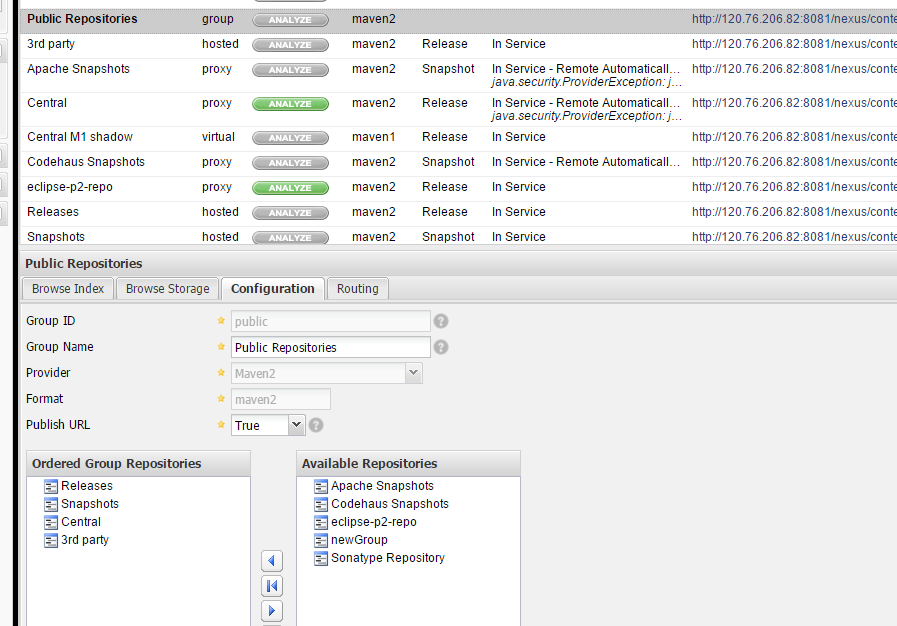
点击仓库列表

 
主要是两个类型:
snapshots:开发过程中的版本仓库
release:正式发布的版本仓库
public是maven主库
 
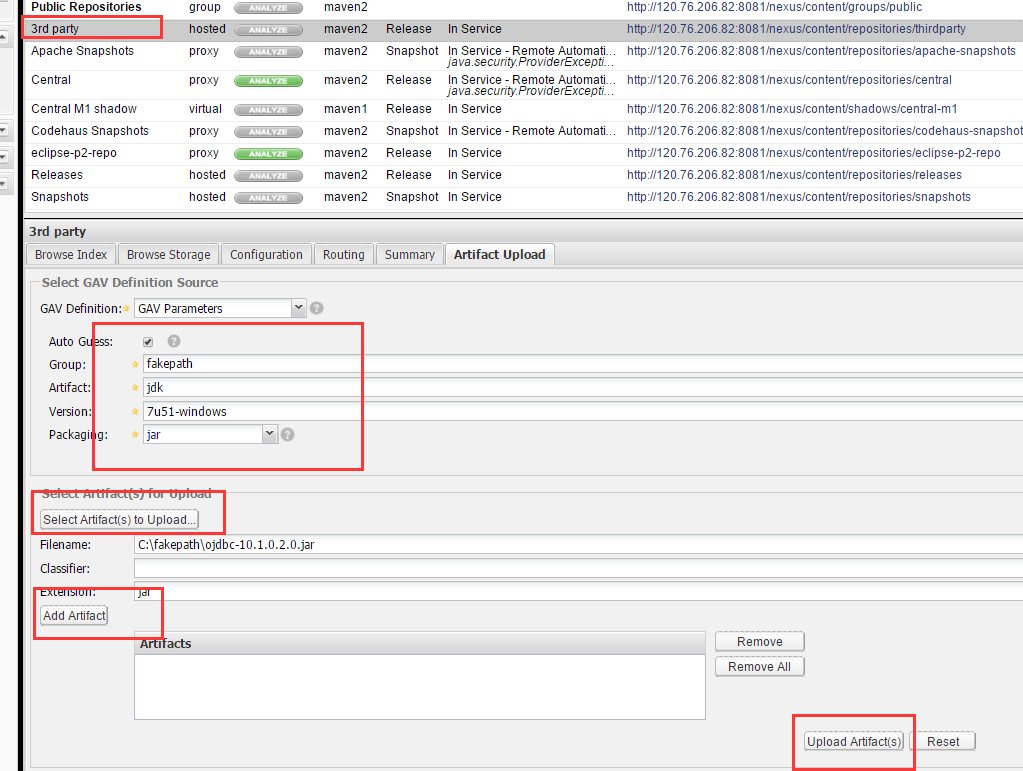
nexus默认新建了一个库:3rd party,专门存放第三方的jar,这个所搜搜几篇文章看看就有说明了。这里对于这个不一一说了,主要是介绍如何使用nexus来管理版本和本地开发过程。
 
上传第三方的jar如下:

 
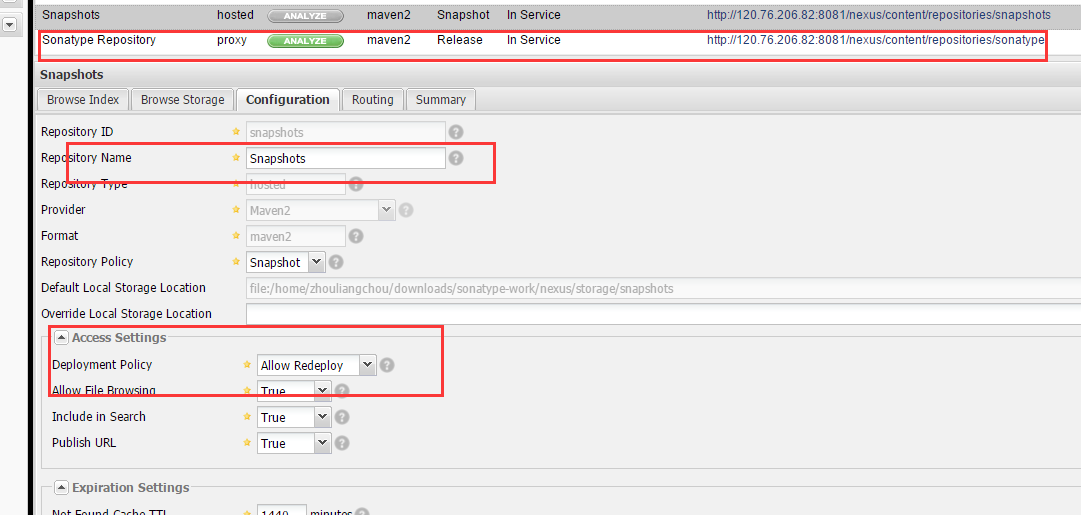
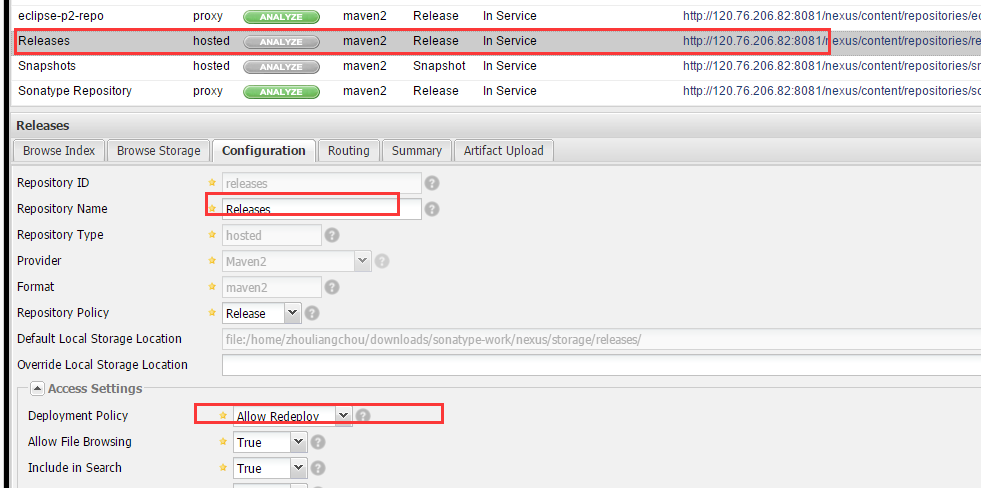
snapshots、release全部开发允许部署的权限,如下


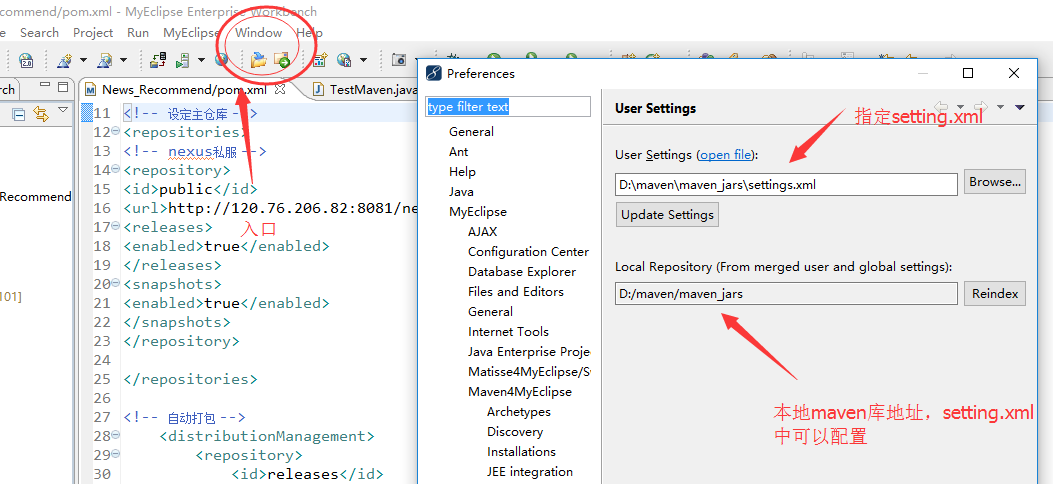
本地是windows下的myeclipse10进行开发的,myeclipse10自带maven插件,直接使用,不需要加载这个插件,其他的比如eclipse需要自行处理。
 
myeclipse配置setting.xml

 
现在来看看setting.xml文件

<settings xmlns="http://maven.apache.org/SETTINGS/1.0.0"
          xmlns:xsi="http://www.w3.org/2001/XMLSchema-instance"
          xsi:schemaLocation="http://maven.apache.org/SETTINGS/1.0.0 http://maven.apache.org/xsd/settings-1.0.0.xsd">
  <localRepository>D:/maven/maven_jars</localRepository>

<pluginGroups>
  </pluginGroups>

<proxies>
  </proxies>

<servers>

<server>
    <id>releases</id>
        <username>deployment</username>
    <password>admin123</password>
</server>
<server>
     <id>snapshots</id>
        <username>deployment</username>
     <password>admin123</password>    
</server>       
                       
<server>
        <id>public</id>
        <username>deployment</username>
        <password>admin123</password>
</server>
</servers>

<mirrors>

<mirror>
      <id>nexus</id>
      <mirrorOf>nexus</mirrorOf>
      <name>nexus Repositories</name>
      <url>http://xxx.xx.xx.xx:8081/nexus/content/repositories/thirdparty/</url>
    </mirror>
     
  </mirrors>

<profiles>
  
  <activeProfiles>  
        <activeProfile>dev</activeProfile>  
  
    </activeProfiles>

</settings>

 
建立maven工程


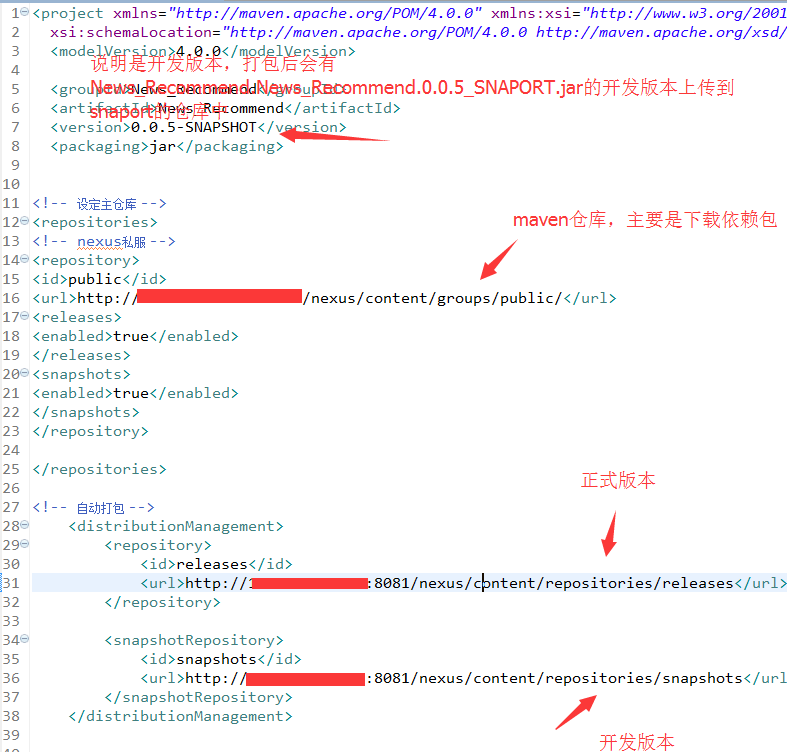
pom.xml的内容设置如下:

< project xmlns= "http://maven.apache.org/POM/4.0.0" xmlns:xsi= "http://www.w3.org/2001/XMLSchema-instance"
  xsi:schemaLocation= "http://maven.apache.org/POM/4.0.0 http://maven.apache.org/xsd/maven-4.0.0.xsd">
  < modelVersion >4.0.0 </modelVersion >
 
  < groupId> News_Recommend</ groupId>
  < artifactId> News_Recommend</ artifactId>
  < version> 0.0.5-SNAPSHOT</ version>
  < packaging> jar</ packaging>
 
 
<!-- 设定主仓库 -->
< repositories>
<!-- nexus私服 -->
< repository>
< id> public</ id>
< url> http://xxxx:8081/nexus/content/groups/public/ </url >
< releases>
< enabled> true</ enabled>
</ releases>
< snapshots>
< enabled> true</ enabled>
</ snapshots>
</ repository>
 
</ repositories>
 
<!-- 自动打包 -->
    <distributionManagement >
        <repository >
            <id >releases </id >
            < url> http://xxxx:8081/nexus/content/repositories/releases </url >
        </repository >
 
        <snapshotRepository >
            <id >snapshots </id >
            < url> http://xxxx:8081/nexus/content/repositories/snapshots </url >
        </snapshotRepository >
    </distributionManagement >


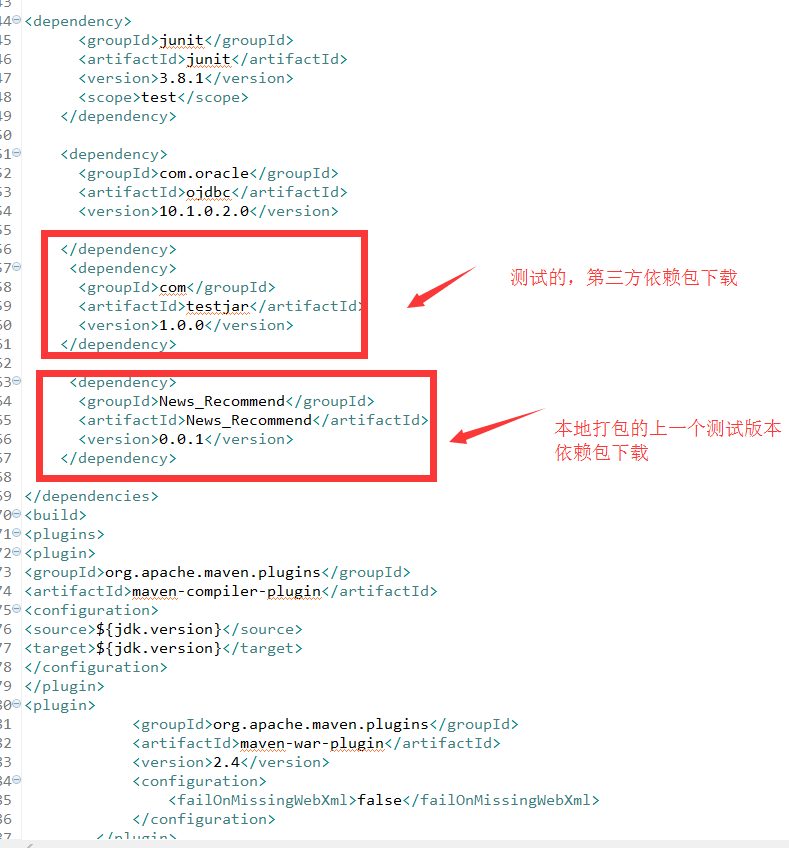
< dependencies>
 
< dependency>
      <groupId > junit</ groupId>
      <artifactId > junit</ artifactId>
      <version >3.8.1 </version >
      <scope >test </scope >
    </dependency >
   
    <dependency >
      <groupId >com.oracle </groupId >
      <artifactId > ojdbc</ artifactId>
      <version >10.1.0.2.0 </version >
    
    </dependency >
     <dependency >
      <groupId > com</ groupId>
      <artifactId > testjar</ artifactId>
      <version >1.0.0 </version >
    </dependency >
 
     <dependency >
      <groupId >News_Recommend </groupId >
      <artifactId >News_Recommend </artifactId >
      <version >0.0.1 </version >
    </dependency >
   
</ dependencies>
< build>
< plugins>
< plugin>
< groupId> org.apache.maven.plugins</ groupId>
< artifactId> maven-compiler- plugin</ artifactId>
< configuration>
< source> ${jdk.version}</ source>
< target> ${jdk.version}</ target>
</ configuration>
</ plugin>
< plugin>
            <groupId >org.apache.maven.plugins </groupId >
            <artifactId > maven-war-plugin </artifactId >
            <version >2.4 </version >
            <configuration >
                <failOnMissingWebXml >false </failOnMissingWebXml >
            </configuration >
        </plugin >
 
</ plugins>
< finalName> News_Recommend</ finalName>
</ build>
 
</ project>
 
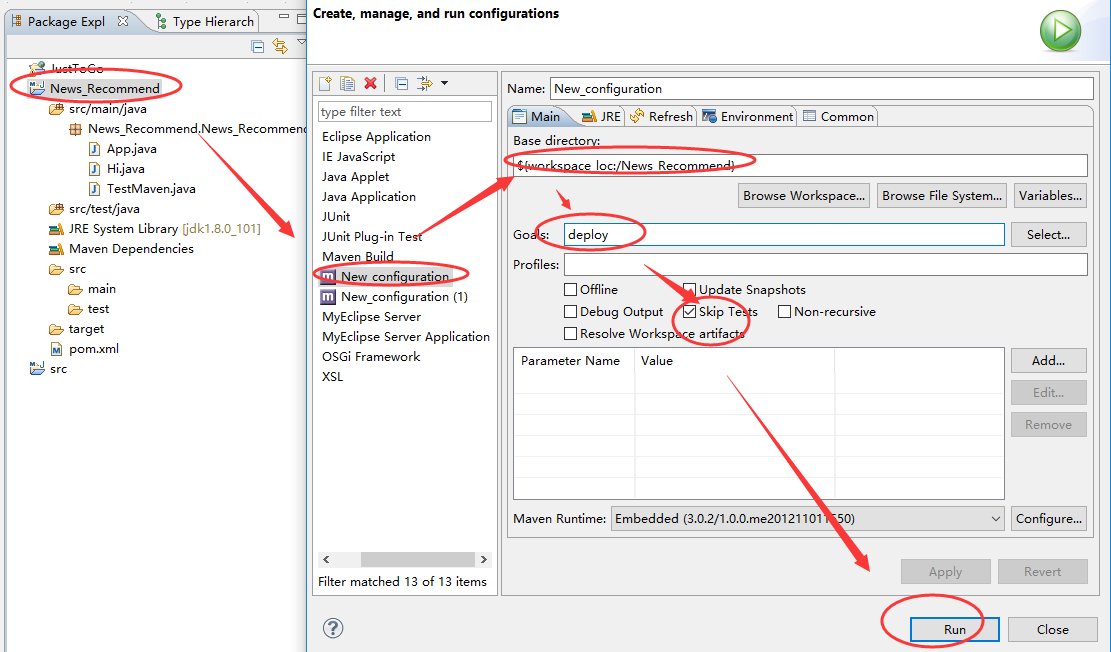
下面来生成开发版本的jar并自动上传到snaport仓库
 
工程右键-->run as-->run configuration


打开nexus后台可以看到打包成功并上传的jar:

 
接下来,如何生成release版本呢,只需要修改pom.xml
 
 < groupId> News_Recommend</ groupId>
  < artifactId> News_Recommend</ artifactId>
  < version> 0.0.5-SNAPSHOT</ version>
  < packaging> jar</ packaging>
改为
 < groupId> News_Recommend</ groupId>
  < artifactId> News_Recommend</ artifactId>
  < version> 0.0.5</ version>
  < packaging> jar</ packaging>
 
即可。
 
打开nexus后台查看正式版本:
 

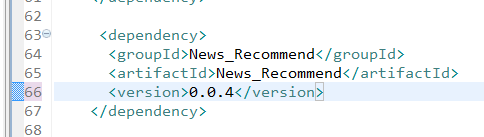
工程进行正式升级时只需要在pom.xml配置新增的jar依赖包即可,如下:
 

 原文地址:http://www.cnblogs.com/zhongshengzhen/p/nexus_maven.html
 
弄了两天才有了眉目,希望对大家有用,不吝赐教和点赞,谢谢。

nexus建立maven仓库私服及Snapshots、release的版本管理的更多相关文章

  1. nexus(Maven仓库私服)的安装、配置、使用和仓库迁移

    简介 Nexus下载:点击进入 Nexus 是Maven仓库管理器,如果你使用Maven,你可以从Maven中央仓库 下载所需要的构件(artifact),但这通常不是一个好的做法,你应该在本地架设一 ...

  2. 【Maven】Nexus(Maven仓库私服)下载与安装

    Nexus介绍 Nexus 是Maven仓库管理器,如果你使用Maven,你可以从Maven中央仓库 下载所需要的构件(artifact),但这通常不是一个好的做法,你应该在本地架设一个Maven仓库 ...

  3. 配置Nexus为maven的私服

    1.配置Nexus为maven的私服 第一种方式:在项目的POM中如下配置 <repositories> <repository> <id>nexus_public ...

  4. 使用nexus搭建maven仓库(本地私服)

    我们在使用maven的时候,对于项目所依赖的jar包,maven默认会在中央仓库下载jar包,到本地的磁盘目录(如果没有配置则是用户目录下/.m2/repository文件夹下).如果公司内部搭了一个 ...

  5. 使用nexus搭建maven仓库(maven 本地私服)

    我们在使用maven的时候,对于项目所依赖的jar包,maven默认会在中央仓库下载jar包,到本地的磁盘目录(如果没有配置则是用户目录下/.m2/repository文件夹下).如果公司内部搭了一个 ...

  6. Nexus(Maven仓库私服)安装

    一.Nexus介绍 Nexus 是Maven仓库管理器,如果你使用Maven,你可以从Maven中央仓库 下载所需要的构件(artifact),但这通常不是一个好的做法,你应该在本地架设一个Maven ...

  7. Nexus 3.X(Maven仓库私服)仓库迁移与备份

    Linux 仓库迁移 Nexus的构件仓库都保存在sonatype-work目录中,该目录的位置由nexus/conf/nexus.properties配置文件指定.仓库迁移需要两个过程:备份和还原 ...

  8. (转)Maven仓库——私服介绍

    背景:对Maven私服一直想做个深入的总结,因为不了解,所以感觉很陌生. 转载地址:http://blog.csdn.net/catoop/article/details/62312477 常用功能和 ...

  9. maven仓库私服配置

    私服访问地址:[[http://192.168.1.252:9080/nexus/content/groups/public/ 地址]] 1. 打开eclipse/myeclipse的maven插件: ...

随机推荐

  1. Qt 多线程学习

    最近的项目上用到了关于多线程的知识,自己也比较感兴趣,所以就拿了那本<C++ GUI Qt4 编程>来学习. 这本书的第14章是关于多线程的知识,使用的Qt版本是Qt4.x.在下用的是最新 ...

  2. JS全局变量VAR和THIS

    (注意)JS全局变量VAR和THIS 很多人都觉得在javascript声明一个变量,加var和不加var没有什么区别,实际上是一个错误的观点,如果在函数外面,也就是说在window区域加不加var确 ...

  3. ubuntu - chrome 标题栏, 书签乱码 解决

    只要修改/etc/fonts/conf.d/49-sansserif.conf这个文件就行了—— 打开/etc/fonts/conf.d/49-sansserif.conf这个文件: sudo ged ...

  4. Java [Leetcode 189]Rotate Array

    题目描述: Rotate an array of n elements to the right by k steps. For example, with n = 7 and k = 3, the ...

  5. 关于web中的自适应布局

    一.”自适应网页设计”的概念 2010年,Ethan Marcotte提出了“自适应网页设计”(Responsive Web Design)--这个名词,指可以自动识别屏幕宽度.并做出相应调整的网页设 ...

  6. button捕捉回车键

    为了给一个页面设置回车默认触发的按钮功能,我浏览了IE上的诸多方法,有的言不达意,有的读不懂,后来把高手的一段代码改造后,形成了一段代码,使这个问题的解决变得非常简章,有兴趣的朋友不妨一试.<s ...

  7. HDU 5768 Lucky7 容斥原理+中国剩余定理(互质)

    分析: 因为满足任意一组pi和ai,即可使一个“幸运数”被“污染”,我们可以想到通过容斥来处理这个问题.当我们选定了一系列pi和ai后,题意转化为求[x,y]中被7整除余0,且被这一系列pi除余ai的 ...

  8. IOS PUSH

    第一阶段:.net应用程序把要发送的消息.目的iPhone的标识打包,发给APNS. 第二阶段:APNS在自身的已注册Push服务的iPhone列表中,查找有相应标识的iPhone,并把消息发到iPh ...

  9. HDFS分布式文件系统设计思想

    HDFS设计目标 1)硬件错误是常态,数据保存需要冗余. 2)数据批量读取,Hadoop擅长数据分析而不是事务处理. 3)大规模数据集. 4)简单一致醒模型,降低系统复杂度,文件一次写入多次读取, 5 ...

  10. Getting Started(Google Cloud Storage Client Library)

    在运行下面的步骤之前,请确保: 1.你的项目已经激活了Google Cloud Storage和App Engine,包括已经创建了至少一个Cloud Storage bucket. 2.你已经下载了 ...