
scrapy-splash抓取动态数据例子二
一、介绍
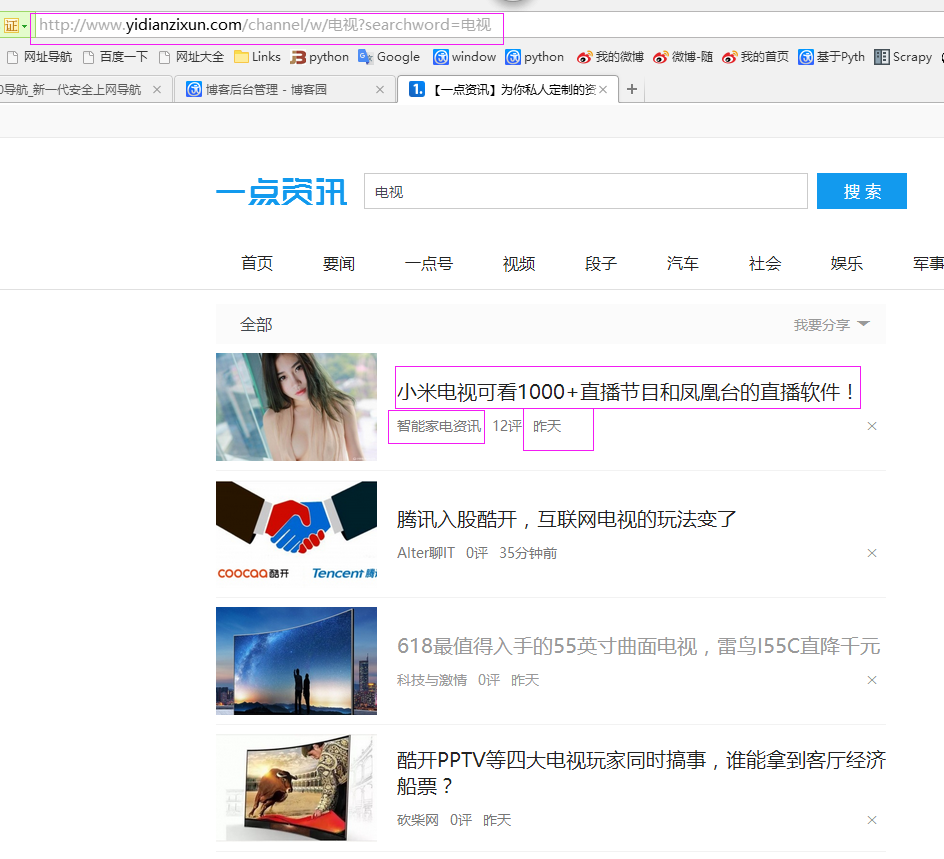
本例子用scrapy-splash抓取一点资讯网站给定关键字抓取咨询信息。
给定关键字:打通;融合;电视
抓取信息内如下:
1、资讯标题
2、资讯链接
3、资讯时间
4、资讯来源
二、网站信息
三、数据抓取
针对上面的网站信息,来进行抓取
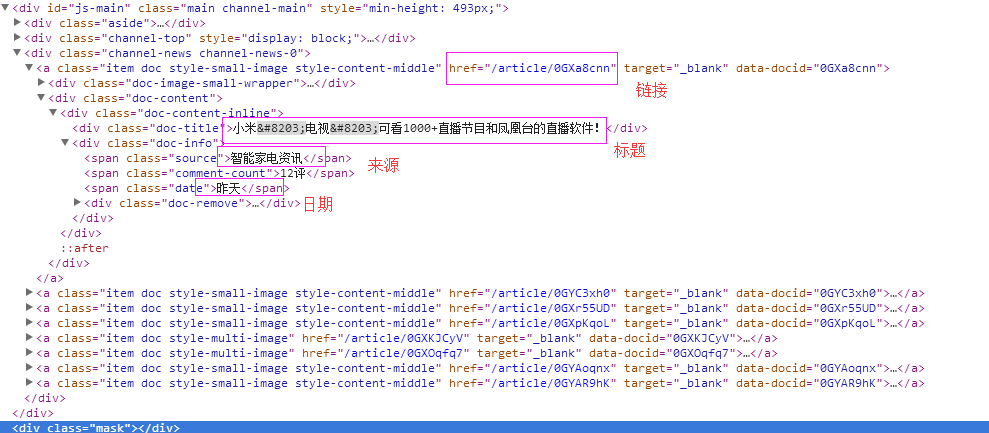
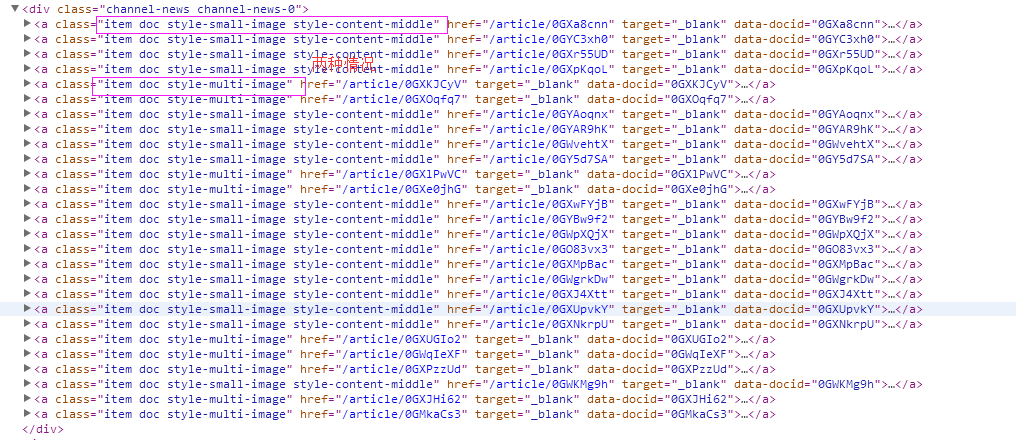
1、首先抓取信息列表,由于信息列表的class值有“item doc style-small-image style-content-middle” 和“item doc style-multi-image”两种情况,所以用contains包含item doc style-的语法来抓
抓取代码:sels = site.xpath('//a[contains(@class,"item doc style-")]')
2、抓取标题
抓取代码:titles = sel.xpath('.//div[@class="doc-title"]/text()')
3、抓取链接
抓取代码:it['url'] = 'http://www.yidianzixun.com' + sel.xpath('.//@href')[0].extract()
4、抓取日期
抓取代码:dates = sel.xpath('.//span[@class="date"]/text()')
5、抓取来源
抓取代码:it['source'] = sel.xpath('.//span[@class="source"]/text()')[0].extract()
四、完整代码
1、yidianzixunSpider
# -*- coding: utf-8 -*-

import scrapy

from scrapy import Request

from scrapy.spiders import Spider

from scrapy_splash import SplashRequest

from scrapy_splash import SplashMiddleware

from scrapy.http import Request, HtmlResponse

from scrapy.selector import Selector

from scrapy_splash import SplashRequest

from splash_test.items import SplashTestItem

import IniFile

import sys

import os

import re

import time

reload(sys)

sys.setdefaultencoding('utf-8')

# sys.stdout = open('output.txt', 'w')

class yidianzixunSpider(Spider):

    name = 'yidianzixun'

    start_urls = [

        'http://www.yidianzixun.com/channel/w/打通?searchword=打通',

        'http://www.yidianzixun.com/channel/w/融合?searchword=融合',

        'http://www.yidianzixun.com/channel/w/电视?searchword=电视'

    ]

    # request需要封装成SplashRequest

    def start_requests(self):

        for url in self.start_urls:

            print url

            index = url.rfind('=')

            yield SplashRequest(url

                                , self.parse

                                , args={'wait': ''},

                                meta={'keyword': url[index + 1:]}

                                )

    def date_isValid(self, strDateText):

        '''

        判断日期时间字符串是否合法:如果给定时间大于当前时间是合法,或者说当前时间给定的范围内

        :param strDateText: 四种格式 '2小时前'; '2天前' ; '昨天' ;'2017.2.12 '

        :return: True:合法;False:不合法

        '''

        currentDate = time.strftime('%Y-%m-%d')

        if strDateText.find('分钟前') > 0 or strDateText.find('刚刚') > -1:

            return True, currentDate

        elif strDateText.find('小时前') > 0:

            datePattern = re.compile(r'\d{1,2}')

            ch = int(time.strftime('%H'))  # 当前小时数

            strDate = re.findall(datePattern, strDateText)

            if len(strDate) == 1:

                if int(strDate[0]) <= ch:  # 只有小于当前小时数,才认为是今天

                    return True, currentDate

        return False, ''

    def parse(self, response):

        site = Selector(response)

        keyword = response.meta['keyword']

        it_list = []

        sels = site.xpath('//a[contains(@class,"item doc style-")]')

        for sel in sels:

            dates = sel.xpath('.//span[@class="date"]/text()')

            if len(dates) > 0:

                flag, date = self.date_isValid(dates[0].extract())

                if flag:

                    titles = sel.xpath('.//div[@class="doc-title"]/text()')

                    if len(titles) > 0:

                        title = str(titles[0].extract())

                        if title.find(keyword) > -1:

                            it = SplashTestItem()

                            it['title'] = title

                            it['url'] = 'http://www.yidianzixun.com' + sel.xpath('.//@href')[0].extract()

                            it['date'] = date

                            it['keyword'] = keyword

                            it['source'] = sel.xpath('.//span[@class="source"]/text()')[0].extract()

                            it_list.append(it)

        if len(it_list) > 0:

            return it_list
2、SplashTestItem
import scrapy

class SplashTestItem(scrapy.Item):

    #标题

    title = scrapy.Field()

    #日期

    date = scrapy.Field()

    #链接

    url = scrapy.Field()

    #关键字

    keyword  = scrapy.Field()

    #来源网站

    source =  scrapy.Field()
3、SplashTestPipeline
# -*- coding: utf-8 -*-

# Define your item pipelines here

#

# Don't forget to add your pipeline to the ITEM_PIPELINES setting

# See: http://doc.scrapy.org/en/latest/topics/item-pipeline.html

import codecs

import json

class SplashTestPipeline(object):

    def __init__(self):

        # self.file = open('data.json', 'wb')

        self.file = codecs.open(

            'spider.txt', 'w', encoding='utf-8')

        # self.file = codecs.open(

        #     'spider.json', 'w', encoding='utf-8')

    def process_item(self, item, spider):

        line = json.dumps(dict(item), ensure_ascii=False) + "\n"

        self.file.write(line)

        return item

    def spider_closed(self, spider):

        self.file.close()
4、settings.py
# -*- coding: utf-8 -*-

# Scrapy settings for splash_test project

#

# For simplicity, this file contains only settings considered important or

# commonly used. You can find more settings consulting the documentation:

#

#     http://doc.scrapy.org/en/latest/topics/settings.html

#     http://scrapy.readthedocs.org/en/latest/topics/downloader-middleware.html

#     http://scrapy.readthedocs.org/en/latest/topics/spider-middleware.html

ITEM_PIPELINES = {

        'splash_test.pipelines.SplashTestPipeline':300

        }

BOT_NAME = 'splash_test'

SPIDER_MODULES = ['splash_test.spiders']

NEWSPIDER_MODULE = 'splash_test.spiders'

SPLASH_URL = 'http://192.168.99.100:8050'

# Crawl responsibly by identifying yourself (and your website) on the user-agent

#USER_AGENT = 'splash_test (+http://www.yourdomain.com)'

# Obey robots.txt rules

ROBOTSTXT_OBEY = False

DOWNLOADER_MIDDLEWARES = {

    'scrapy_splash.SplashCookiesMiddleware': 723,

    'scrapy_splash.SplashMiddleware': 725,

    'scrapy.downloadermiddlewares.httpcompression.HttpCompressionMiddleware': 810,

}

SPIDER_MIDDLEWARES = {

    'scrapy_splash.SplashDeduplicateArgsMiddleware': 100,

}

DUPEFILTER_CLASS = 'scrapy_splash.SplashAwareDupeFilter'

HTTPCACHE_STORAGE = 'scrapy_splash.SplashAwareFSCacheStorage'

# Configure maximum concurrent requests performed by Scrapy (default: 16)

#CONCURRENT_REQUESTS = 32

# Configure a delay for requests for the same website (default: 0)

# See http://scrapy.readthedocs.org/en/latest/topics/settings.html#download-delay

# See also autothrottle settings and docs

#DOWNLOAD_DELAY = 3

# The download delay setting will honor only one of:

#CONCURRENT_REQUESTS_PER_DOMAIN = 16

#CONCURRENT_REQUESTS_PER_IP = 16

# Disable cookies (enabled by default)

#COOKIES_ENABLED = False

# Disable Telnet Console (enabled by default)

#TELNETCONSOLE_ENABLED = False

# Override the default request headers:

#DEFAULT_REQUEST_HEADERS = {

#   'Accept': 'text/html,application/xhtml+xml,application/xml;q=0.9,*/*;q=0.8',

#   'Accept-Language': 'en',

#}

# Enable or disable spider middlewares

# See http://scrapy.readthedocs.org/en/latest/topics/spider-middleware.html

#SPIDER_MIDDLEWARES = {

#    'splash_test.middlewares.SplashTestSpiderMiddleware': 543,

#}

# Enable or disable downloader middlewares

# See http://scrapy.readthedocs.org/en/latest/topics/downloader-middleware.html

#DOWNLOADER_MIDDLEWARES = {

#    'splash_test.middlewares.MyCustomDownloaderMiddleware': 543,

#}

# Enable or disable extensions

# See http://scrapy.readthedocs.org/en/latest/topics/extensions.html

#EXTENSIONS = {

#    'scrapy.extensions.telnet.TelnetConsole': None,

#}

# Configure item pipelines

# See http://scrapy.readthedocs.org/en/latest/topics/item-pipeline.html

#ITEM_PIPELINES = {

#    'splash_test.pipelines.SplashTestPipeline': 300,

#}

# Enable and configure the AutoThrottle extension (disabled by default)

# See http://doc.scrapy.org/en/latest/topics/autothrottle.html

#AUTOTHROTTLE_ENABLED = True

# The initial download delay

#AUTOTHROTTLE_START_DELAY = 5

# The maximum download delay to be set in case of high latencies

#AUTOTHROTTLE_MAX_DELAY = 60

# The average number of requests Scrapy should be sending in parallel to

# each remote server

#AUTOTHROTTLE_TARGET_CONCURRENCY = 1.0

# Enable showing throttling stats for every response received:

#AUTOTHROTTLE_DEBUG = False

# Enable and configure HTTP caching (disabled by default)

# See http://scrapy.readthedocs.org/en/latest/topics/downloader-middleware.html#httpcache-middleware-settings

#HTTPCACHE_ENABLED = True

#HTTPCACHE_EXPIRATION_SECS = 0

#HTTPCACHE_DIR = 'httpcache'

#HTTPCACHE_IGNORE_HTTP_CODES = []

#HTTPCACHE_STORAGE = 'scrapy.extensions.httpcache.FilesystemCacheStorage'
scrapy-splash抓取动态数据例子二的更多相关文章
- scrapy-splash抓取动态数据例子十二
一.介绍 本例子用scrapy-splash通过搜狗搜索引擎,输入给定关键字抓取资讯信息. 给定关键字:数字:融合:电视 抓取信息内如下: 1.资讯标题 2.资讯链接 3.资讯时间 4.资讯来源 二. ...
- scrapy-splash抓取动态数据例子一
目前,为了加速页面的加载速度,页面的很多部分都是用JS生成的,而对于用scrapy爬虫来说就是一个很大的问题,因为scrapy没有JS engine,所以爬取的都是静态页面,对于JS生成的动态页面都无 ...
- scrapy-splash抓取动态数据例子八
一.介绍 本例子用scrapy-splash抓取界面网站给定关键字抓取咨询信息. 给定关键字:个性化:融合:电视 抓取信息内如下: 1.资讯标题 2.资讯链接 3.资讯时间 4.资讯来源 二.网站信息 ...
- scrapy-splash抓取动态数据例子七
一.介绍 本例子用scrapy-splash抓取36氪网站给定关键字抓取咨询信息. 给定关键字:个性化:融合:电视 抓取信息内如下: 1.资讯标题 2.资讯链接 3.资讯时间 4.资讯来源 二.网站信 ...
- scrapy-splash抓取动态数据例子六
一.介绍 本例子用scrapy-splash抓取中广互联网站给定关键字抓取咨询信息. 给定关键字:打通:融合:电视 抓取信息内如下: 1.资讯标题 2.资讯链接 3.资讯时间 4.资讯来源 二.网站信 ...
- scrapy-splash抓取动态数据例子五
一.介绍 本例子用scrapy-splash抓取智能电视网网站给定关键字抓取咨询信息. 给定关键字:打通:融合:电视 抓取信息内如下: 1.资讯标题 2.资讯链接 3.资讯时间 4.资讯来源 二.网站 ...
- scrapy-splash抓取动态数据例子四
一.介绍 本例子用scrapy-splash抓取微众圈网站给定关键字抓取咨询信息. 给定关键字:打通:融合:电视 抓取信息内如下: 1.资讯标题 2.资讯链接 3.资讯时间 4.资讯来源 二.网站信息 ...
- scrapy-splash抓取动态数据例子三
一.介绍 本例子用scrapy-splash抓取今日头条网站给定关键字抓取咨询信息. 给定关键字:打通:融合:电视 抓取信息内如下: 1.资讯标题 2.资讯链接 3.资讯时间 4.资讯来源 二.网站信 ...
- scrapy-splash抓取动态数据例子十六
一.介绍 本例子用scrapy-splash爬取梅花网(http://www.meihua.info/a/list/today)的资讯信息,输入给定关键字抓取微信资讯信息. 给定关键字:数字:融合:电 ...
随机推荐
- hdu 3667(最小费用最大流+拆边)
Transportation Time Limit: 2000/1000 MS (Java/Others) Memory Limit: 32768/32768 K (Java/Others)To ...
- C++使用第三方静态库的方法
以jasoncpp为例 首先在github下载最新的的jasoncpp包并解压 找到类似makefiles的文件编译,一般是打开sln文件使用vs编译(生成解决方案),在build文件中可以找到对应的 ...
- 微软企业库5.0 学习之路——第八步、使用Configuration Setting模块等多种方式分类管理企业库配置信息
在介绍完企业库几个常用模块后,我今天要对企业库的配置文件进行处理,缘由是我打开web.config想进行一些配置的时候发现web.config已经变的异常的臃肿(大量的企业库配置信息充斥其中),所以决 ...
- ffmpeg测试程序
ffmpeg在编译安装后在源码目录运行make fate可以编译并运行测试程序.如果提示找不到ffmpeg的库用LD_LIBRARY_PATH指定一下库安装的目录.
- SCU - 4441 Necklace(树状数组求最长上升子数列)
Necklace frog has \(n\) gems arranged in a cycle, whose beautifulness are \(a_1, a_2, \dots, a_n\). ...
- Flask实战第43天:把图片验证码和短信验证码保存到memcached中
前面我们已经获取到图片验证码和短信验证码,但是我们还没有把它们保存起来.同样的,我们和之前的邮箱验证码一样,保存到memcached中 编辑commom.vews.py .. from utils i ...
- Outlook Font
- 【uva 10294】 Arif in Dhaka (First Love Part 2) (置换,burnside引理|polya定理)
题目来源:UVa 10294 Arif in Dhaka (First Love Part 2) 题意:n颗珠子t种颜色 求有多少种项链和手镯 项链不可以翻转 手镯可以翻转 [分析] 要开始学置换了. ...
- 北大青鸟代码---asp.net初学者宝典
一.上传图片:使用控件:file,button,image; 上传按钮的代码: string fullfilename=this.File1 .PostedFile .FileName ;取得本地文件 ...
- bzoj 2803 [Poi2012]Prefixuffix 兼字符串hash入门
打cf的时候遇到的问题,clairs告诉我这是POI2012 的原题..原谅我菜没写过..于是拐过来写这道题并且学了下string hash. 字符串hash基于Rabin-Karp算法,并且对于 ...