
Spring Boot中使用Swagger2构建RESTful APIs介绍
1、添加相关依赖
   <!-- https://mvnrepository.com/artifact/io.springfox/springfox-swagger2 -->

    <dependency>

        <groupId>io.springfox</groupId>

        <artifactId>springfox-swagger2</artifactId>

        <version>2.9.2</version>

    </dependency>

    <dependency>

        <groupId>io.springfox</groupId>

        <artifactId>springfox-swagger-ui</artifactId>

        <version>2.9.2</version>

    </dependency>
2、创建Swagger自动配置类
import org.springframework.context.annotation.Bean;

import org.springframework.context.annotation.Configuration;

import springfox.documentation.builders.ApiInfoBuilder;

import springfox.documentation.builders.PathSelectors;

import springfox.documentation.builders.RequestHandlerSelectors;

import springfox.documentation.service.ApiInfo;

import springfox.documentation.spi.DocumentationType;

import springfox.documentation.spring.web.plugins.Docket;

import springfox.documentation.swagger2.annotations.EnableSwagger2;

@Configuration

@EnableSwagger2

public class Swagger {

    @Bean

    public Docket createRestApi() {

        return new Docket(DocumentationType.SWAGGER_2)

                .apiInfo(apiInfo())

                .select()

                .apis(RequestHandlerSelectors.basePackage("com.ck.demo"))

                .paths(PathSelectors.any())

                .build();

    }

    private ApiInfo apiInfo() {

        return new ApiInfoBuilder()

                .title("Spring Boot中使用Swagger2构建RESTful APIs")

                .description("更多Spring Boot相关文章请关注:https://www.yuque.com/chaohen")

                .termsOfServiceUrl("https://www.yuque.com/chaohen")

                .contact("潮痕")

                .version("1.0.0")

                .build();

    }

}
- 首先通过
@Configuration注解,让Spring来加载该类配置。再通过@EnableSwagger2注解来启用Swagger2。 - 其次通过
createRestApi函数创建Docket的Bean之后,使用apiInfo()用来创建该Api的基本信息(这些基本信息会展现在文档页面中)。- - 再次通过
select()函数返回一个ApiSelectorBuilder实例用来控制哪些接口暴露给Swagger来展现,本例采用指定扫描的包路径来定义,Swagger会扫描该包下所有Controller定义的API,并产生文档内容,这里除了被@ApiIgnore指定的请求。
实际使用:
import com.ck.demo.bean.BlogsUserInfo;

import com.ck.demo.service.UserInfoService;

import io.swagger.annotations.ApiImplicitParam;

import io.swagger.annotations.ApiOperation;

import org.springframework.beans.factory.annotation.Autowired;

import org.springframework.jdbc.core.BeanPropertyRowMapper;

import org.springframework.jdbc.core.JdbcTemplate;

import org.springframework.jdbc.core.RowMapper;

import org.springframework.web.bind.annotation.PathVariable;

import org.springframework.web.bind.annotation.RequestMapping;

import org.springframework.web.bind.annotation.RequestMethod;

import org.springframework.web.bind.annotation.RestController;

import org.springframework.web.context.request.RequestContextHolder;

import org.springframework.web.context.request.ServletRequestAttributes;

import javax.annotation.Resource;

import javax.servlet.http.HttpServletRequest;

import java.util.List;

@RestController

@RequestMapping("user")

public class UsreInfoController {

    @Resource

    private JdbcTemplate jdbcTemplate;

    @Autowired

    private UserInfoService userInfoService;

    @ApiOperation(value = "获取用户列表",notes = "")

    @RequestMapping(value = "/getusers",method = RequestMethod.GET)

    public Object getDbType() {

        String sql = "select * from blogs_user_info";

        RowMapper<BlogsUserInfo> rowMapper = new BeanPropertyRowMapper<BlogsUserInfo>(BlogsUserInfo.class);

        List<BlogsUserInfo> list = jdbcTemplate.query(sql, rowMapper);

        ServletRequestAttributes servletRequestAttributes = (ServletRequestAttributes) RequestContextHolder.getRequestAttributes();

        HttpServletRequest request = servletRequestAttributes.getRequest();

        Integer times = (Integer) request.getSession().getAttribute("times");

        ;

        if (times == null) {

            times = new Integer(1);

        } else {

            times = new Integer(times.intValue() + 1);

        }

        request.getSession().setAttribute("times", times);

        System.out.println("***********************" + times);

        return list;

    }

    @ApiOperation(value = "根据用户ID获取用户信息",notes = "")

    @ApiImplicitParam(name = "id", value = "用户ID", required = true, dataType = "Long")

    @RequestMapping("/getId/{id}")

    public Object getUserInfoByParmityKey(@PathVariable String id) {

        BlogsUserInfo blogsUserInfo = userInfoService.getUserInfoByParmityKeyService(id);

        return blogsUserInfo;

    }

}
注解语法用例:
@Api:用在请求的类上,表示对类的说明

    tags="说明该类的作用,可以在UI界面上看到的注解"

    value="该参数没什么意义,在UI界面上也看到,所以不需要配置"

eg: @Api(tags = "用户信息Controller")

@ApiOperation:用在请求的方法上,说明方法的用途、作用

    value="说明方法的用途、作用"

    notes="方法的备注说明"

eg: @ApiOperation(value="用户登录",notes="手机号、密码都是必填!")

@ApiImplicitParams:用在请求的方法上,表示一组参数说明

    @ApiImplicitParam:用在@ApiImplicitParams注解中,指定一个请求参数的各个方面

        name:参数名

        value:参数的汉字说明、解释

        required:参数是否必须传

        paramType:参数放在哪个地方

            · header --> 请求参数的获取:@RequestHeader

            · query --> 请求参数的获取:@RequestParam

            · path(用于restful接口)--> 请求参数的获取:@PathVariable

            · body(不常用)

            · form(不常用)

        dataType:参数类型,默认String,其它值dataType="Integer"

        defaultValue:参数的默认值

 eg: @ApiImplicitParams({

        @ApiImplicitParam(name="username",value="用户名",required=true,paramType="String"),

        @ApiImplicitParam(name="password",value="密码",required=true,paramType="form"),

        @ApiImplicitParam(name="vcode",value="验证码",required=true,paramType="form",dataType="Integer")

		})

@ApiResponses:用在请求的方法上,表示一组响应

    @ApiResponse:用在@ApiResponses中,一般用于表达一个错误的响应信息

        code:数字,例如400

        message:信息,例如"请求参数没填好"

        response:抛出异常的类

 eg:@ApiOperation(value = "select1请求",notes = "多个参数,多种的查询参数类型")

     @ApiResponses({

        @ApiResponse(code=400,message="请求参数没填好"),

        @ApiResponse(code=404,message="请求路径没有或页面跳转路径不对")

         })

@ApiModel:用于响应类上,表示一个返回响应数据的信息

            (这种一般用在post创建的时候,使用@RequestBody这样的场景,

            请求参数无法使用@ApiImplicitParam注解进行描述的时候)

    @ApiModelProperty:用在属性上,描述响应类的属性

eg:

    import io.swagger.annotations.ApiModel;

    import io.swagger.annotations.ApiModelProperty;

    import java.io.Serializable;

    @ApiModel(description= "返回响应数据")

    public class RestMessage implements Serializable{

        @ApiModelProperty(value = "是否成功")

        private boolean success=true;

        @ApiModelProperty(value = "返回对象")

        private Object data;

        @ApiModelProperty(value = "错误编号")

        private Integer errCode;

        @ApiModelProperty(value = "错误信息")

        private String message;

        /* getter/setter */

    }
3、在Swagger可视化界面展示
输入 http://localhost:8080/user/getusers 结果如下:
{"uuid":"d882f714-c015-4c46-a92e-5d7e2a8b3380","name":"丫丫","age":12,"address":"浙江省","phone":"1898*****63","company":"alibaba"}
在浏览器打开:http://localhost:8080/swagger-ui.html
页面如下: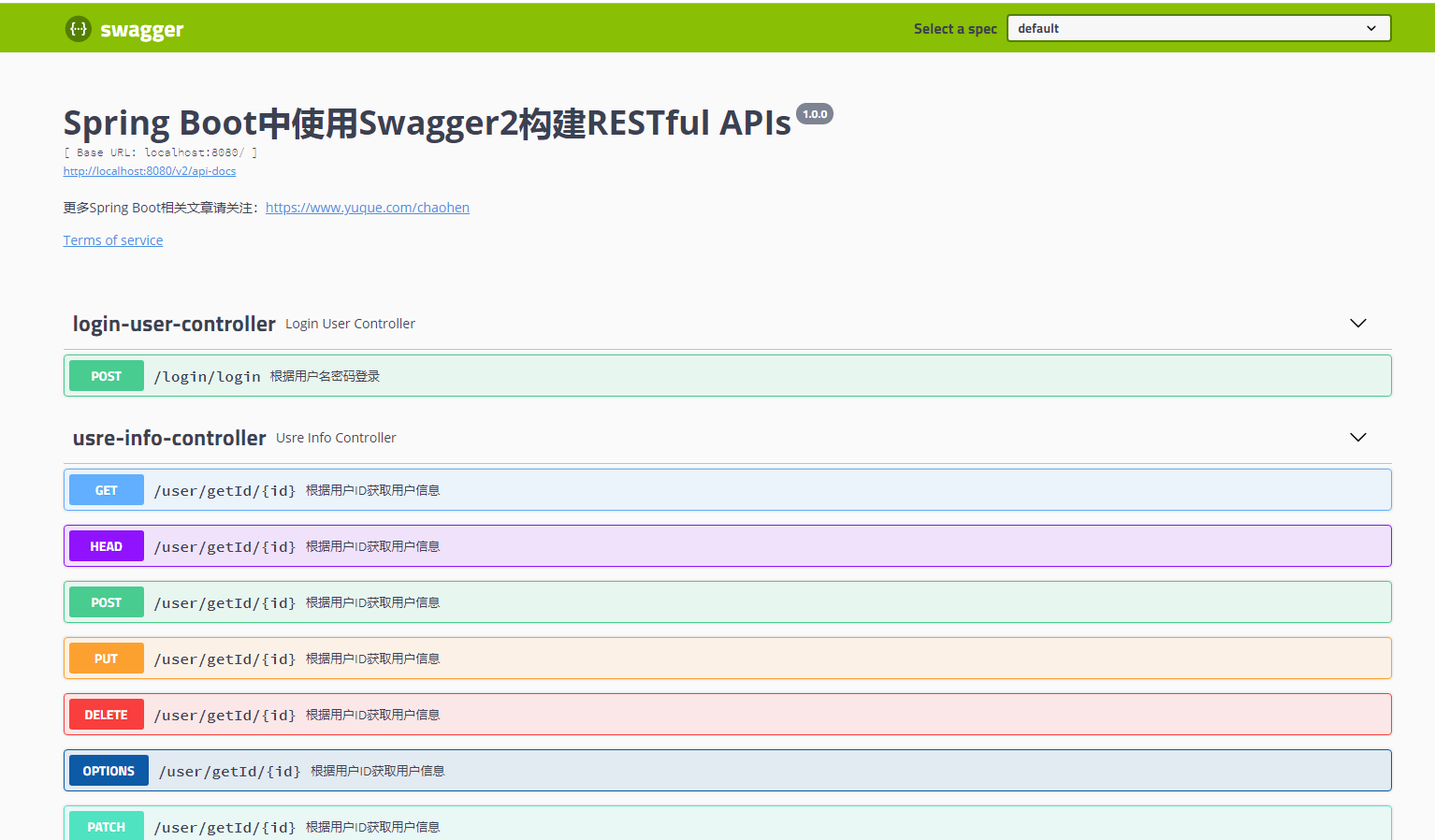
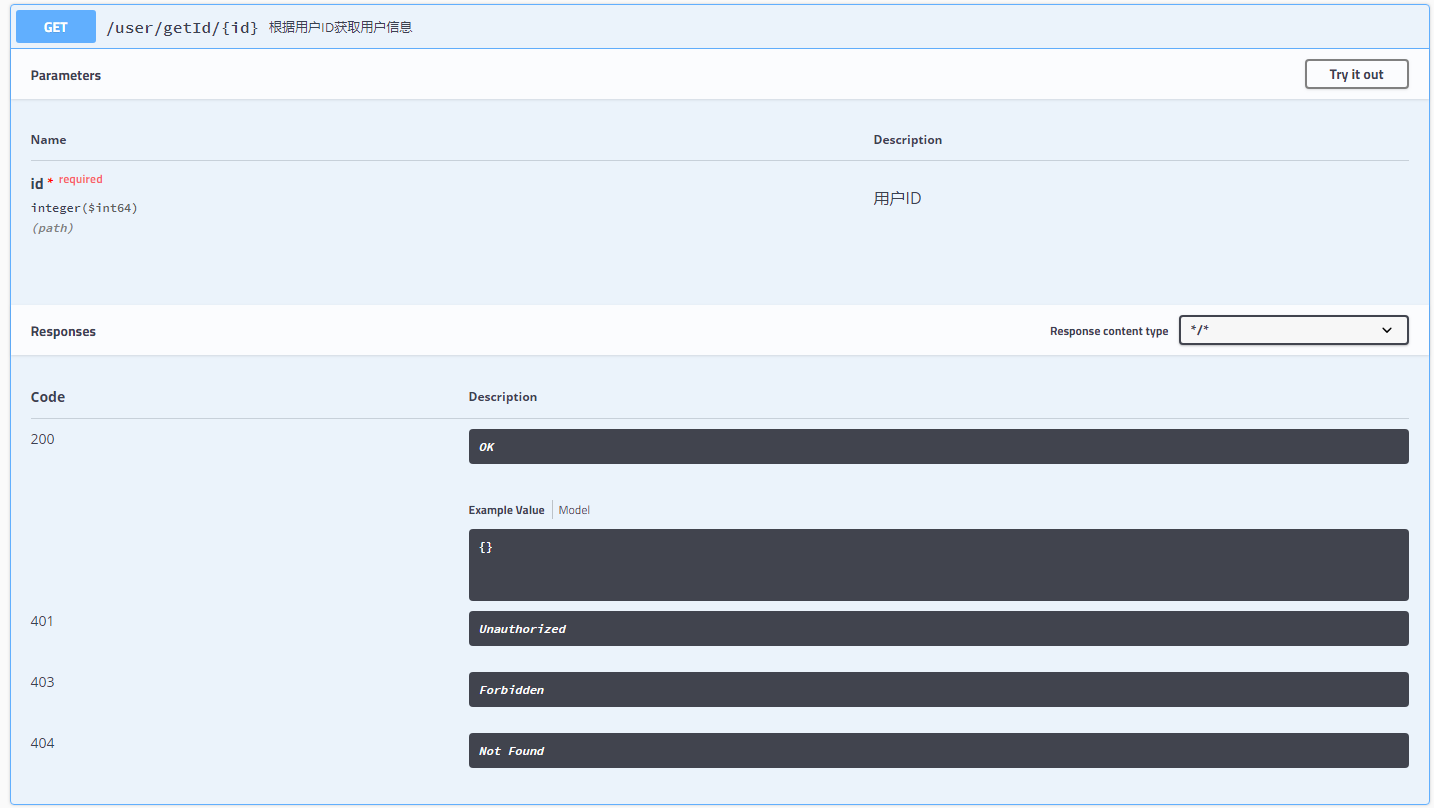
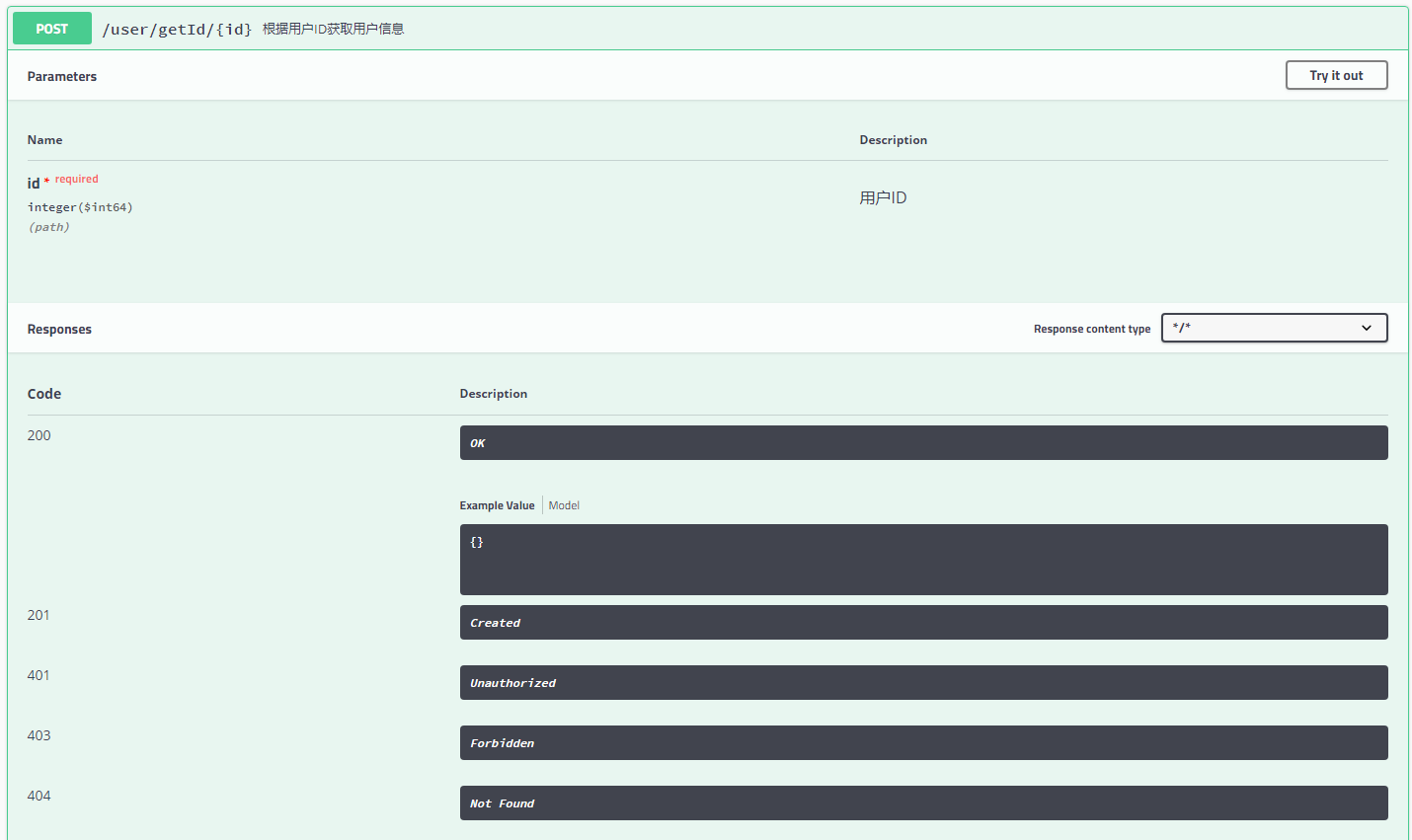
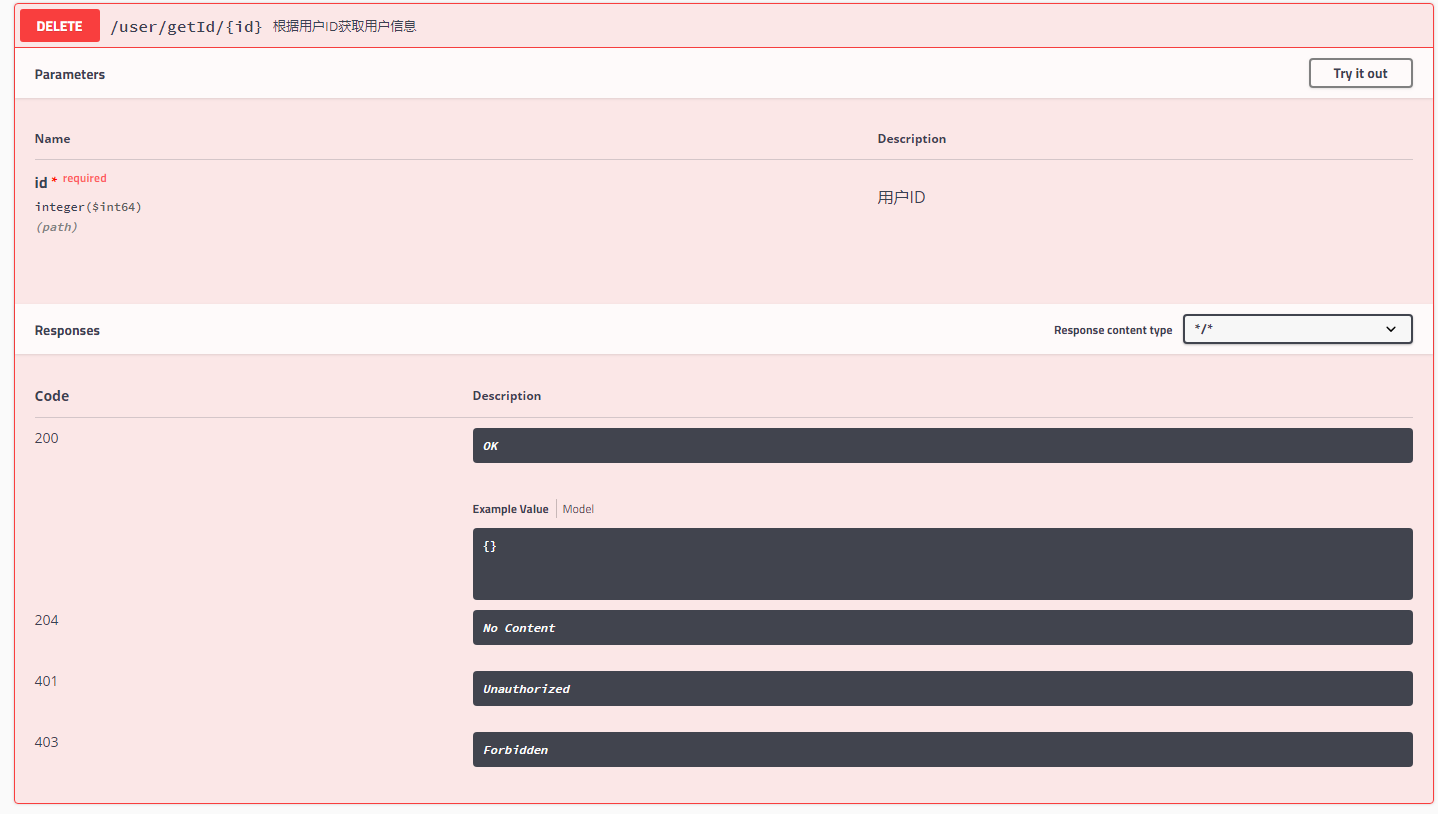
详细信息:
get请求
post请求
delete请求
4、详情测试
get请求测试:
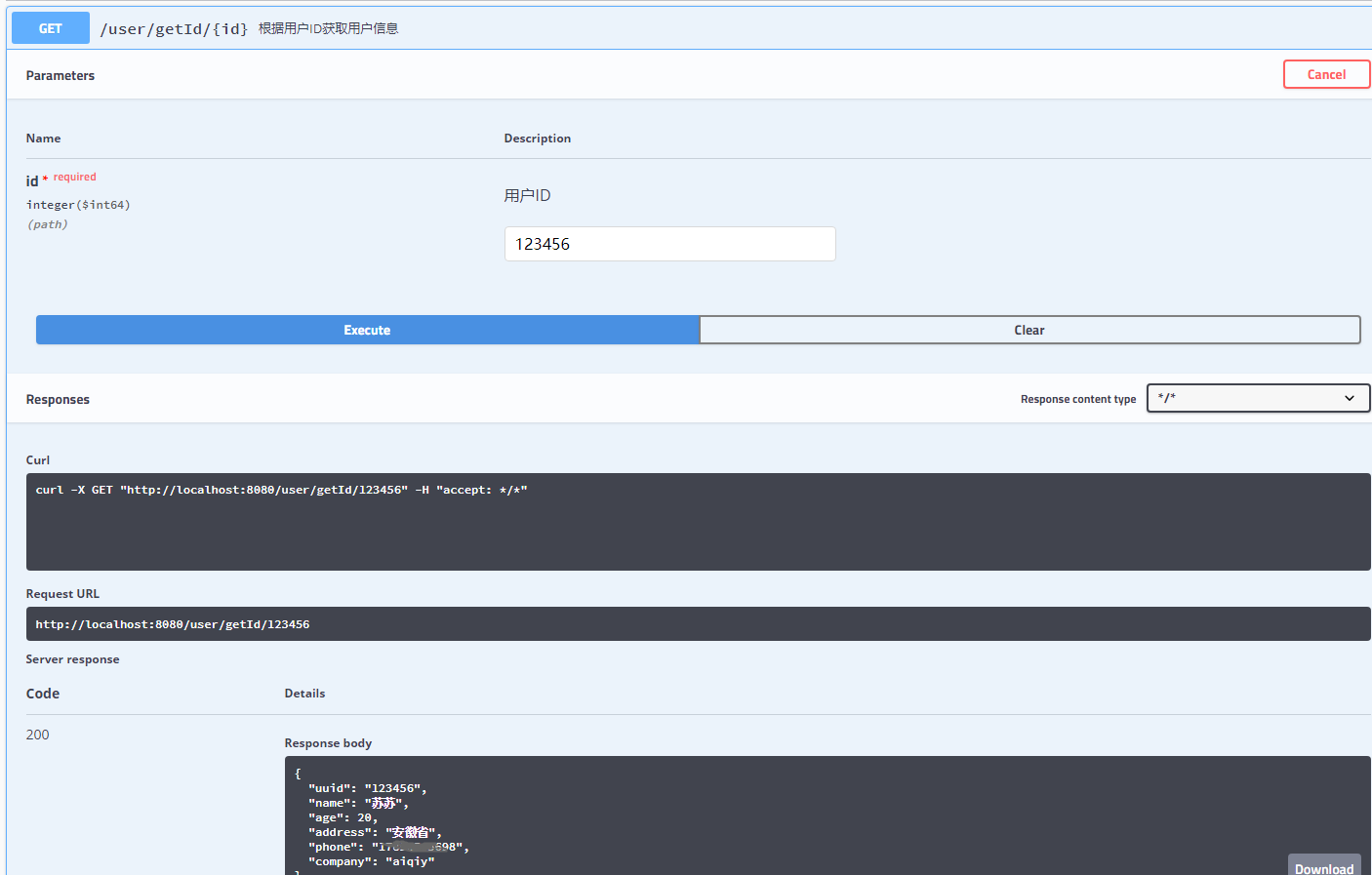
post请求测试
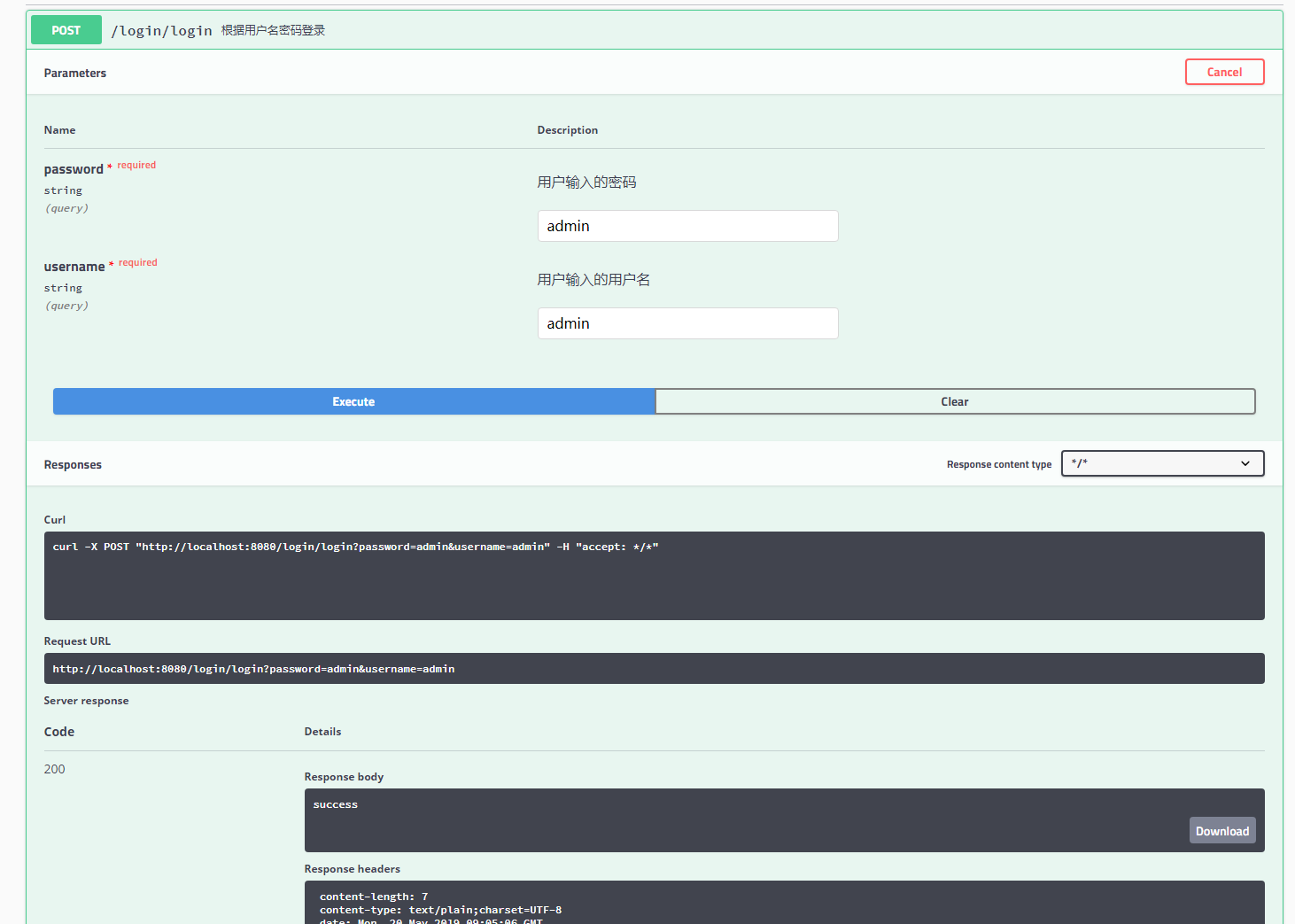
此时执行成功,已经达到所需的目标,End。
Spring Boot中使用Swagger2构建RESTful APIs介绍的更多相关文章
- Spring Boot中使用Swagger2构建RESTful APIs
关于 Swagger Swagger能成为最受欢迎的REST APIs文档生成工具之一,有以下几个原因: Swagger 可以生成一个具有互动性的API控制台,开发者可以用来快速学习和尝试API. S ...
- Spring Boot中使用Swagger2构建RESTful API文档
在开发rest api的时候,为了减少与其他团队平时开发期间的频繁沟通成本,传统做法我们会创建一份RESTful API文档来记录所有接口细节,然而这样的做法有以下几个问题: 1.由于接口众多,并且细 ...
- Spring Boot中使用Swagger2构建强大的RESTful API文档
由于Spring Boot能够快速开发.便捷部署等特性,相信有很大一部分Spring Boot的用户会用来构建RESTful API.而我们构建RESTful API的目的通常都是由于多终端的原因,这 ...
- Spring Boot 中使用 Swagger2 构建强大的 RESTful API 文档
项目现状:由于前后端分离,没有很好的前后端合作工具. 由于接口众多,并且细节复杂(需要考虑不同的HTTP请求类型.HTTP头部信息.HTTP请求内容等),高质量地创建这份文档本身就是件非常吃力的事,下 ...
- Spring Boot中使用Swagger2生成RESTful API文档(转)
效果如下图所示: 添加Swagger2依赖 在pom.xml中加入Swagger2的依赖 <!-- https://mvnrepository.com/artifact/io.springfox ...
- Spring MVC中使用 Swagger2 构建Restful API
1.Spring MVC配置文件中的配置 [java] view plain copy <!-- 设置使用注解的类所在的jar包,只加载controller类 --> <contex ...
- Spring Boot中使用Swagger2构建API文档
程序员都很希望别人能写技术文档,自己却很不愿意写文档.因为接口数量繁多,并且充满业务细节,写文档需要花大量的时间去处理格式排版,代码修改后还需要同步修改文档,经常因为项目时间紧等原因导致文档滞后于代码 ...
- Spring Boot中使用Swagger2构建强大的RESTful(最新全,无坑)
1:说明 网上这类文章 太多, 一搜一大把 ,但是要不是知识太过于老旧,就是配置没有说名清楚,你的项目按照他的配置却不能正常运行: 所以本文的目的: 配置swagger 2 那swagger 1 不 ...
- Spring Boot (21) 使用Swagger2构建restful API
使用swagger可以与spring mvc程序配合组织出强大的restful api文档.它既可以减少我们创建文档的工作量,同时说明内容又整合入现实代码中,让维护文档和修改代码整合为一体,可以让我们 ...
随机推荐
- 使用 Docker 在 Linux 上托管 ASP.NET Core 应用程序
说在前面 在阅读本文之前,您必须对 Docker 的中涉及的基本概念以及常见命令有一定了解,本文侧重实战,不会对相关概念详述. 同时请确保您本地开发机器已完成如下安装: Docker 18.06 或更 ...
- JavaScript随机数区间限制
在一段区间内的取某个数字 有一个通用的方法 主要使用了一下两个javascript函数 1.Math.floor() 方法可对一个数进行下舍入 2.Math.random() 方法可返回介于 0 ~ ...
- Spark学习笔记:(一)入门 glance
参考: http://spark.apache.org/docs/latest/quick-start.html 其它资料: http://mojijs.com/2015/04/190845/i ...
- (最新)各大公司Java后端开发面试题总结
ThreadLocal(线程变量副本) Synchronized实现内存共享,ThreadLocal为每个线程维护一个本地变量. 采用空间换时间,它用于线程间的数据隔离,为每一个使用该变量的线程提供一 ...
- Configuring Your EMS Server or EMS Console Server on Windows/Linux
EMS Configuration Files RAD Studio provides the scripts to render the web-browser console, the EMS s ...
- UVA10480 Sabotage —— 最小割最大流
题目链接:https://vjudge.net/problem/UVA-10480 题解: 实际就是求最小割集. 1.什么是网络流图的“割”?答:一个边的集合,使得网络流图删除这些边之后,点被分成两部 ...
- HDU1495 非常可乐 —— BFS + 模拟
题目链接:http://acm.hdu.edu.cn/showproblem.php?pid=1495 非常可乐 Time Limit: 2000/1000 MS (Java/Others) M ...
- java如何判断字符串是否为空(小知识)
方法一: 最多人使用的一个方法, 直观, 方便, 但效率很低: if(s == null ||"".equals(s));方法二: 比较字符串长度, 效率高, 是我知道的最好一个方 ...
- 接口_简单get接口_第一个接口
import flask,json # print(__name__) ##__name__代表当前这个python文件 server = flask.Flask(__name__) #把咱们当前的这 ...
- parquet文件格式——本质上是将多个rows作为一个chunk,同一个chunk里每一个单独的column使用列存储格式,这样获取某一row数据时候不需要跨机器获取
Parquet是Twitter贡献给开源社区的一个列数据存储格式,采用和Dremel相同的文件存储算法,支持树形结构存储和基于列的访问.Cloudera Impala也将使用Parquet作为底层的存 ...