
nes 红白机模拟器 第1篇
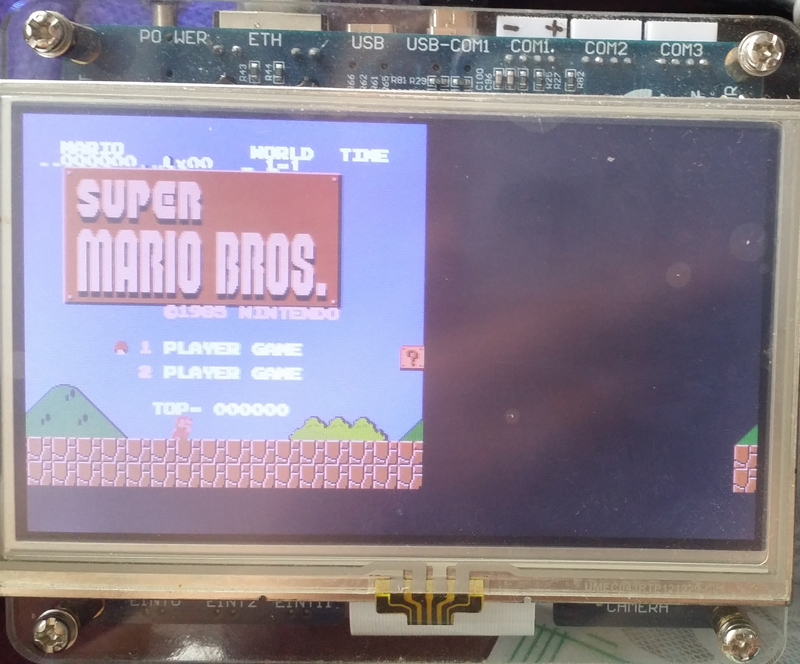
对比了很多种,开源的 NES 模拟器 VirtuaNES , nestopia , FakeNES , FCEUX , InfoNES , LiteNES
最后决定使用 LiteNES 进行移值,它是由 mynes 移值而来。LiteNES 对 mynes 代码进行整理兼容了 C99 标准,编译时无警告。
https://github.com/NJUOS/LiteNES
https://github.com/yaglo/mynes
LiteNES , mynes 基于 Allegro ,Allegro 是一种提供底层画图,输入,定时器等支持的库。
LiteNES 全部抽象提取代码到 一个 hal.c 文件里面,修改移值十分方便。下面是修改后的样子,替换这个文件。
在修改下 Makefile 中的 gcc 改为 arm-linux-gcc 编译 即可在板子上出现 Game 画面了(经过测试,发现支持的游戏不多,有的载加不出来)
NES 移值第1篇,仅能出现画面。以后会更新添加声音,多线程,输入等。现在只为能显示出画面。
hal.c :
 /*

 This file present all abstraction needed to port LiteNES.

   (The current working implementation uses allegro library.)

 To port this project, replace the following functions by your own:

 1) nes_hal_init()

     Do essential initialization work, including starting a FPS HZ timer.

 2) nes_set_bg_color(c)

     Set the back ground color to be the NES internal color code c.

 3) nes_flush_buf(*buf)

     Flush the entire pixel buf's data to frame buffer.

 4) nes_flip_display()

     Fill the screen with previously set background color, and

     display all contents in the frame buffer.

 5) wait_for_frame()

     Implement it to make the following code is executed FPS times a second:

         while (1) {

             wait_for_frame();

             do_something();

         }

 6) int nes_key_state(int b)

     Query button b's state (1 to be pressed, otherwise 0).

     The correspondence of b and the buttons:

       0 - Power

       1 - A

       2 - B

       3 - SELECT

       4 - START

       5 - UP

       6 - DOWN

       7 - LEFT

       8 - RIGHT

 */

 #include "hal.h"

 #include "fce.h"

 #include "common.h"

 /**

  * allegro API 不明白的看文档

  * https://www.allegro.cc/manual/5/index.html

  */

 /* lcd 操作相关 头文件 */

 #include <sys/types.h>

 #include <sys/stat.h>

 #include <fcntl.h>

 #include <linux/fb.h>

 #include <sys/ioctl.h>

 #include <unistd.h>

 #include <string.h>

 #include <sys/mman.h>

 static int fb_fd;

 static unsigned char *fb_mem;

 static int px_width;

 static int line_width;

 static int screen_width;

 static struct fb_var_screeninfo var;

 static int lcd_fb_display_px(int color, int x, int y)

 {

     unsigned char  *pen8;

     unsigned short *pen16;

     unsigned char r,g,b;

     pen8 = (unsigned char *)(fb_mem + y*line_width + x*px_width);

     pen16 = (unsigned short *)pen8;

     //合并为 565 格式 16bbp

     r = (color>>) & 0xff;

     g = (color>>) & 0xff;

     b = (color>>) & 0xff;

     *pen16 = (r>>)<< | (g>>)<< | (b>>);

     return ;

 }

 //调色板转16进行32位颜色

 static int pal2color(pal pal)

 {

     int color = ;

     color = pal.r <<  | pal.g << | pal.b;

     return color;

 }

 static int lcd_fb_init()

 {

     //如果使用 mmap 打开方式 必须是 读写方式

     fb_fd = open("/dev/fb0", O_RDWR);

     if(- == fb_fd)

     {

         printf("cat't open /dev/fb0 \n");

         return -;

     }

     //获取屏幕参数

     if(- == ioctl(fb_fd, FBIOGET_VSCREENINFO, &var))

     {

         close(fb_fd);

         printf("cat't ioctl /dev/fb0 \n");

         return -;

     }

     //计算参数

     px_width = var.bits_per_pixel / ;

     line_width = var.xres * px_width;

     screen_width = var.yres * line_width;

     fb_mem = (unsigned char *)mmap(NULL, screen_width, PROT_READ | PROT_WRITE, MAP_SHARED, fb_fd, );

     if(fb_mem == (void *)-)

     {

         close(fb_fd);

         printf("cat't mmap /dev/fb0 \n");

         return -;

     }

     //清屏

     memset(fb_mem,  , screen_width);

     return ;

 }

 /* Wait until next allegro timer event is fired. */

 void wait_for_frame()

 {

     //休眠 FPS = 60 * 1000 毫秒

     usleep(/FPS*);

 }

 /* Set background color. RGB value of c is defined in fce.h */

 void nes_set_bg_color(int c)

 {

     //画背景颜色

     int i,j;

     for(i=; i<SCREEN_WIDTH; i++)

     {

         for(j=; j<SCREEN_HEIGHT; j++)

         {

             lcd_fb_display_px(pal2color(palette[c]), i, j);

         }

     }

 }

 /* Flush the pixel buffer */

 void nes_flush_buf(PixelBuf *buf)

 {

     Pixel *p;

     int i,x,y,color;

     for (i = ; i < buf->size; i++)

     {

            p = &buf->buf[i];

            x = p->x;

         y = p->y;

         color = pal2color(palette[p->c]);

         lcd_fb_display_px(color, x, y);

         lcd_fb_display_px(color, x+, y);

         lcd_fb_display_px(color, x, y+);

         lcd_fb_display_px(color, x+, y+);

         }

 }

 /* Initialization:

    (1) start a 1/FPS Hz timer.

    (2) register fce_timer handle on each timer event */

 void nes_hal_init()

 {

     /**

      * 需要完成的事情

      * 1,初始化 lcd

      * 2,初始化 定时器 先做简单的直接用系统延时

      */

     if(- == lcd_fb_init())

     {

         printf("lcd fb init error \n");

         return ;

     }

 }

 /* Update screen at FPS rate by allegro's drawing function.

    Timer ensures this function is called FPS times a second. */

 void nes_flip_display()

 {

     //设置64种颜色值 不必设置

 }

 /* Query a button's state.

    Returns 1 if button #b is pressed. */

 int nes_key_state(int b)

 {

     switch (b)

     {

         case : // On / Off

             return ;

         case : // A

             return ;

         case : // B

             return ;

         case : // SELECT

             return ;

         case : // START

             return ;

         case : // UP

             return ;

         case : // DOWN

             return ;

         case : // LEFT

             return ;

         case : // RIGHT

             return ;

         default:

             return ;

     }

 }
nes 红白机模拟器 第1篇的更多相关文章
- nes 红白机模拟器 第7篇 编译使用方法
模拟器,基于 InfoNES ,作者添加修改以下功能: 1, joypad 真实手柄驱动程序(字符型设备驱动) 2,原始图像只有256*240 ,添加 图像放大算法,这里实现了2种,a, 最近邻插值 ...
- arm 2440 linux 应用程序 nes 红白机模拟器 第1篇
对比了很多种,开源的 NES 模拟器 VirtuaNES , nestopia , FakeNES , FCEUX , InfoNES , LiteNES 最后决定使用 LiteNES 进行移值,它是 ...
- arm 2440 linux 应用程序 nes 红白机模拟器 第4篇 linux 手柄驱动支持
小霸王学习机的真实手柄,实测CPU 占用 80% 接线图: 手柄读时序: joypad.c 驱动: 普通的字符设备驱动. #include <linux/module.h> #includ ...
- arm 2440 linux 应用程序 nes 红白机模拟器 第2篇 InfoNES
InfoNES 支持 map ,声音,代码比较少,方便 移值. 在上个 LiteNES 的基础上,其实不到半小时就移值好了这个,但问题是,一直是黑屏.InfoNES_LoadFrame () Wo ...
- nes 红白机模拟器 第6篇 声音支持
InfoNES 源码中并没有包含 linux 的声音支持. 但提供 wince 和 win 的工程,文件,通过分析,win 的 DirectSound 发声,在使用 linux ALSA 实现. 先使 ...
- nes 红白机模拟器 第5篇 全屏显示
先看一下效果图 放大的原理是使用最初级的算法,直接取对应像素法. /*================================================================= ...
- nes 红白机模拟器 第4篇 linux 手柄驱动支持
小霸王学习机的真实手柄,实测CPU 占用 80% 接线图: 手柄读时序: joypad.c 驱动: 普通的字符设备驱动. #include <linux/module.h> #includ ...
- nes 红白机模拟器 第2篇 InfoNES
InfoNES 支持 map ,声音,代码比较少,方便 移值. 在上个 LiteNES 的基础上,其实不到半小时就移值好了这个,但问题是,一直是黑屏.InfoNES_LoadFrame () Wo ...
- nes 红白机模拟器 第3篇 游戏手柄测试 51 STM32
手柄使用的是 CD4021 ,datasheet 上说支持 3V - 15V . 因为手柄是 5V 供电,2440 开发板上是GPIO 3.3V 电平,STM32 GPIO 也是 3.3V (也兼容5 ...
随机推荐
- OpenGL 保存bmp图像
今天我们先简单介绍Windows中常用的BMP文件格式,然后讲OpenGL的像素操作.虽然看起来内容可能有点多,但实际只有少量几个知识点,如果读者对诸如”显示BMP图象”等内容比较感兴趣的话,可能不知 ...
- 瑞星:以虚拟化安全“Hold住”企业用户
自从云计算的概念诞生的哪一天起,就吸引了无数人的目光.自从2006年开始,云计算经过了雾里看花的朦胧.众说纷纭的迷茫,到现在各类应用与服务呈现出了百花齐放的姿态,引领着信息科技迈入了新纪元,而服务器虚 ...
- springboot学习笔记:3.配置文件使用概要
Spring Boot允许外化(externalize)你的配置,这样你能够在不同的环境下使用相同的代码. 你可以使用properties文件,YAML文件,环境变量和命令行参数来外化配置.使用@Va ...
- HttpClient学习笔记
HttpClient相关的实体类官方文档地址:http://hc.apache.org/httpcomponents-client-ga/httpclient/apidocs/ 使用HttpClien ...
- mysql数据库常用命令入门
查询所有数据库 show databases; 创建数据库 create database mytest001 default character set utf8; 查看数据库的默认字符集 show ...
- Redis 总结精讲 看一篇成高手系统
转自:https://blog.csdn.net/hjm4702192/article/details/80518856 本文围绕以下几点进行阐述 1.为什么使用redis2.使用redis有什么缺点 ...
- Jquery中$(document).ready() 和 JavaScript中的window.onload方法 比较
Jquery中$(document).ready()的作用类似于传统JavaScript中的window.onload方法,不过与window.onload方法还是有区别的. 1.执行时间 win ...
- Handler机制中的消息队列
--> 学习自蘑菇街大佬 Handler机制可以看成是一个消息阻塞队列,当有消息时立即处理消息,没有消息时则阻塞.在Android系统中APP启动后很快进入死循环,不断读取MessageQueu ...
- 吴裕雄--python学习笔记:爬虫基础
一.什么是爬虫 爬虫:一段自动抓取互联网信息的程序,从互联网上抓取对于我们有价值的信息. 二.Python爬虫架构 Python 爬虫架构主要由五个部分组成,分别是调度器.URL管理器.网页下载器.网 ...
- 吴裕雄--天生自然 R语言开发学习:高级数据管理
#-----------------------------------# # R in Action (2nd ed): Chapter 5 # # Advanced data management ...