
Python Ethical Hacking - VULNERABILITY SCANNER(9)
Automatically Discovering Vulnerabilities Using the Vulnerability Scanner
1. Modify the run_scanner method in the scanner class.
#!/usr/bin/env python

import requests

import re

from bs4 import BeautifulSoup

from urllib.parse import urljoin

class Scanner:

    def __init__(self, url, ignore_links):

        self.session = requests.Session()

        self.target_url = url

        self.target_links = []

        self.links_to_ignore = ignore_links

    def extract_links_from(self, url):

        response = self.session.get(url)

        return re.findall('(?:href=")(.*?)"', response.content.decode(errors='ignore'))

    def crawl(self, url=None):

        if url == None:

            url = self.target_url

        href_links = self.extract_links_from(url)

        for link in href_links:

            link = urljoin(url, link)

            if "#" in link:

                link = link.split("#")[0]

            if self.target_url in link and link not in self.target_links and link not in self.links_to_ignore:

                self.target_links.append(link)

                print(link)

                self.crawl(link)

    def extract_forms(self, url):

        response = self.session.get(url)

        parsed_html = BeautifulSoup(response.content, features="lxml")

        return parsed_html.findAll("form")

    def submit_form(self, form, value, url):

        action = form.get("action")

        post_url = urljoin(url, action)

        method = form.get("method")

        inputs_list = form.findAll("input")

        post_data = {}

        for input in inputs_list:

            input_name = input.get("name")

            input_type = input.get("type")

            input_value = input.get("value")

            if input_type == "text":

                input_value = value

            post_data[input_name] = input_value

        if method == "post":

            return requests.post(post_url, data=post_data)

        return self.session.get(post_url, params=post_data)

    def run_scanner(self):

        for link in self.target_links:

            forms = self.extract_forms(link)

            for form in forms:

                print("[+] Testing form in " + link)

                is_vulnerable_to_xss = self.test_xss_in_form(form, link)

                if is_vulnerable_to_xss:

                    print("\n\n[***] XSS discovered in " + link + " in the following from")

                    print(form)

            if "=" in link:

                print("\n\n[+] Testing " + link)

                is_vulnerable_to_xss = self.test_xss_in_link(link)

                if is_vulnerable_to_xss:

                    print("[***] Discovered XSS in " + link)

    def test_xss_in_link(self, url):

        xss_test_script = "<sCript>alert('test')</scriPt>"

        url = url.replace("=", "=" + xss_test_script)

        response = self.session.get(url)

        return xss_test_script in response.content.decode()

    def test_xss_in_form(self, form, url):

        xss_test_script = "<sCript>alert('test')</scriPt>"

        response = self.submit_form(form, xss_test_script, url)

        return xss_test_script in response.content.decode()
2. Test this new automatically vulnerability scanner.
#!/usr/bin/env python

import scanner

target_url = "http://10.0.0.45/dvwa/"

links_to_ignore = "http://10.0.0.45/dvwa/logout.php"

data_dict = {"username": "admin", "password": "password", "Login": "submit"}

vuln_scanner = scanner.Scanner(target_url, links_to_ignore)

vuln_scanner.session.post("http://10.0.0.45/dvwa/login.php", data=data_dict)

vuln_scanner.crawl()

vuln_scanner.run_scanner()
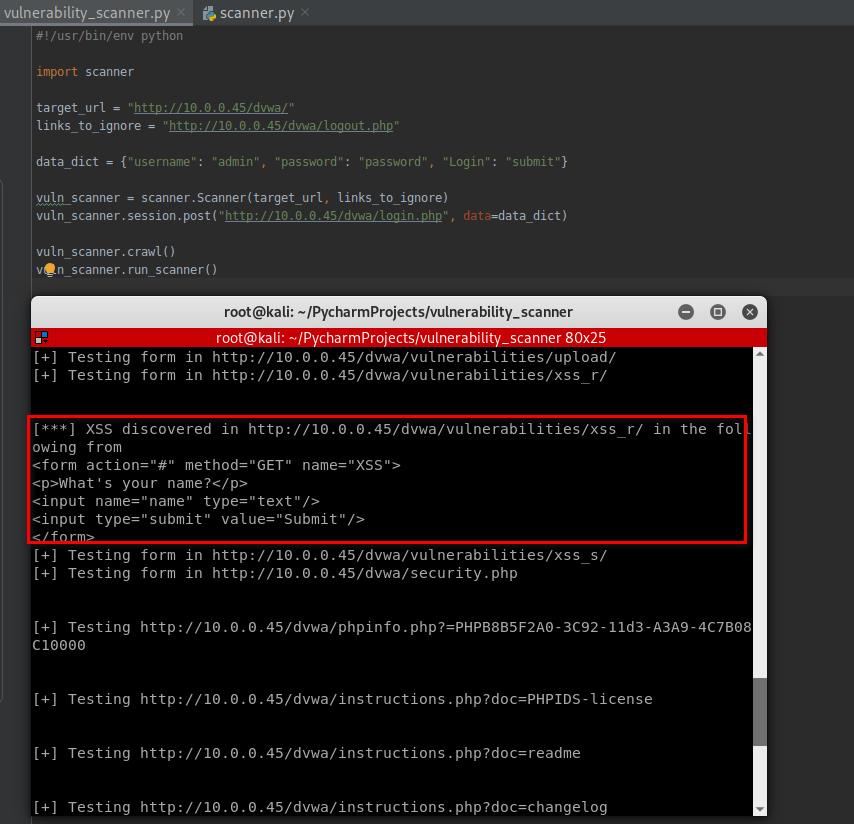
Following is the full test result.
root@kali:~/PycharmProjects/vulnerability_scanner# python3 vulnerability_scanner.py

http://10.0.0.45/dvwa/dvwa/css/main.css

http://10.0.0.45/dvwa/favicon.ico

http://10.0.0.45/dvwa/instructions.php

http://10.0.0.45/dvwa/setup.php

http://10.0.0.45/dvwa/vulnerabilities/brute/

http://10.0.0.45/dvwa/vulnerabilities/exec/

http://10.0.0.45/dvwa/vulnerabilities/csrf/

http://10.0.0.45/dvwa/vulnerabilities/fi/?page=include.php

http://10.0.0.45/dvwa/vulnerabilities/sqli/

http://10.0.0.45/dvwa/vulnerabilities/sqli_blind/

http://10.0.0.45/dvwa/vulnerabilities/upload/

http://10.0.0.45/dvwa/vulnerabilities/xss_r/

http://10.0.0.45/dvwa/vulnerabilities/xss_s/

http://10.0.0.45/dvwa/security.php

http://10.0.0.45/dvwa/phpinfo.php

http://10.0.0.45/dvwa/phpinfo.php?=PHPB8B5F2A0-3C92-11d3-A3A9-4C7B08C10000

http://10.0.0.45/dvwa/about.php

http://10.0.0.45/dvwa/instructions.php?doc=PHPIDS-license

http://10.0.0.45/dvwa/instructions.php?doc=readme

http://10.0.0.45/dvwa/instructions.php?doc=changelog

http://10.0.0.45/dvwa/instructions.php?doc=copying

http://10.0.0.45/dvwa/security.php?phpids=on

http://10.0.0.45/dvwa/security.php?phpids=off

http://10.0.0.45/dvwa/security.php?test=%22><script>eval(window.name)</script>

http://10.0.0.45/dvwa/ids_log.php

[+] Testing form in http://10.0.0.45/dvwa/setup.php

[+] Testing form in http://10.0.0.45/dvwa/vulnerabilities/brute/

[+] Testing form in http://10.0.0.45/dvwa/vulnerabilities/exec/

[+] Testing form in http://10.0.0.45/dvwa/vulnerabilities/csrf/

[+] Testing http://10.0.0.45/dvwa/vulnerabilities/fi/?page=include.php

[+] Testing form in http://10.0.0.45/dvwa/vulnerabilities/sqli/

[+] Testing form in http://10.0.0.45/dvwa/vulnerabilities/sqli_blind/

[+] Testing form in http://10.0.0.45/dvwa/vulnerabilities/upload/

[+] Testing form in http://10.0.0.45/dvwa/vulnerabilities/xss_r/

[***] XSS discovered in http://10.0.0.45/dvwa/vulnerabilities/xss_r/ in the following from

<form action="#" method="GET" name="XSS">

<p>What's your name?</p>

<input name="name" type="text"/>

<input type="submit" value="Submit"/>

</form>

[+] Testing form in http://10.0.0.45/dvwa/vulnerabilities/xss_s/

[+] Testing form in http://10.0.0.45/dvwa/security.php

[+] Testing http://10.0.0.45/dvwa/phpinfo.php?=PHPB8B5F2A0-3C92-11d3-A3A9-4C7B08C10000

[+] Testing http://10.0.0.45/dvwa/instructions.php?doc=PHPIDS-license

[+] Testing http://10.0.0.45/dvwa/instructions.php?doc=readme

[+] Testing http://10.0.0.45/dvwa/instructions.php?doc=changelog

[+] Testing http://10.0.0.45/dvwa/instructions.php?doc=copying

[+] Testing form in http://10.0.0.45/dvwa/security.php?phpids=on

[+] Testing http://10.0.0.45/dvwa/security.php?phpids=on

[+] Testing form in http://10.0.0.45/dvwa/security.php?phpids=off

[+] Testing http://10.0.0.45/dvwa/security.php?phpids=off

[+] Testing form in http://10.0.0.45/dvwa/security.php?test=%22><script>eval(window.name)</script>

[+] Testing http://10.0.0.45/dvwa/security.php?test=%22><script>eval(window.name)</script>

[+] Testing form in http://10.0.0.45/dvwa/ids_log.php
You can add new methods in the scanner class to find more vulnerabilities.
Python Ethical Hacking - VULNERABILITY SCANNER(9)的更多相关文章
- Python Ethical Hacking - VULNERABILITY SCANNER(7)
VULNERABILITY_SCANNER How to discover a vulnerability in a web application? 1. Go into every possibl ...
- Python Ethical Hacking - VULNERABILITY SCANNER(4)
Extracting & Submitting Forms Automatically Target website:http://10.0.0.45/dvwa/vulnerabilities ...
- Python Ethical Hacking - VULNERABILITY SCANNER(2)
VULNERABILITY_SCANNER How to discover a vulnerability in a web application? 1. Go into every possibl ...
- Python Ethical Hacking - VULNERABILITY SCANNER(8)
Implementing Code To Discover XSS in Parameters 1. Watch the URL of the XSS reflected page carefully ...
- Python Ethical Hacking - VULNERABILITY SCANNER(3)
Polish the Python code using sending requests in a session Class Scanner. #!/usr/bin/env python impo ...
- Python Ethical Hacking - VULNERABILITY SCANNER(1)
HTTP REQUESTS BASIC INFORMATION FLOW The user clicks on a link. HTML website generates a request(cli ...
- Python Ethical Hacking - VULNERABILITY SCANNER(6)
EXPLOITATION - XSS VULNS EXPLOITING XSS Run any javascript code. Beef framework can be used to hook ...
- Python Ethical Hacking - VULNERABILITY SCANNER(5)
EXPLOITATION - XSS VULNS XSS - CROSS SITE SCRIPTING VULNS Allow an attacker to inject javascript cod ...
- Python Ethical Hacking - BACKDOORS(8)
Cross-platform hacking All programs we wrote are pure python programs They do not rely on OS-specifi ...
随机推荐
- 04.开发REST 接口
使用Django开发REST 接口 我们以在Django框架中使用的图书英雄案例来写一套支持图书数据增删改查的REST API接口,来理解REST API的开发. 在此案例中,前后端均发送JSON格式 ...
- 玩Python小游戏猜数字,在游戏中掌握基础,你还能学不会?
学python怎么离得开案例呢? 今天再继续给大家分享一个Python教程里的猜数字游戏 我最近也是在学python,从事编程工作几年了,但是python还是今年才开始玩的,不得不说,这真是一 ...
- 一、Adobe Premiere Pro CC概述
一.Adobe Premiere Pro CC概述 使用建议 一.开始 二.在Adobe Premiere Pro CC执行非线性编辑 1.标准的视频剪辑工作流 2.使用Premiere增强工作流 p ...
- spring boot admin项目的集成和开发
Spring Boot Admin是一个Github上的一个开源项目,它在Spring Boot Actuator的基础上提供简洁的可视化WEB UI,是用来管理 Spring Boot 应用程序的一 ...
- Java工具类—包装类
Java工具类--包装类 我们都知道,JDK 其实给我们提供了很多很多 Java 开发者已经写好的现成的类,他们其实都可以理解成工具类,比如我们常见的集合类,日期相关的类,数学相关的类等等,有了这些工 ...
- 【博弈】HDU - 5963 朋友
题目 B君在围观一群男生和一群女生玩游戏,具体来说游戏是这样的: 给出一棵n个节点的树,这棵树的每条边有一个权值,这个权值只可能是0或1. 在一局游戏开始时,会确定一个节点作为根.接下来从女生开始,双 ...
- 解决移动端点击穿透问题_h5实现移动端点击事件穿透的多种解决方案
移动端点透点透现象出现的场景: 当A/B两个层上下z轴重叠,上层的A点击后消失或移开(这一点很重要),并且B元素本身有默认click事件(如a标签)或绑定了click事件.在这种情况下,点击A/B重叠 ...
- 通过原生js对DOM事件的绑定的几种方式总汇
在网页开发中经常会有交互操作,比如点击一个dom元素,需要让js对该操作做出相应的响应,这就需要对Dom元素进行事件绑定来进行处理,js通常有三种常用的方法进行事件绑定:在DOM元素中直接绑定:在Ja ...
- vue+elementUI 图片上传问题
图片上传问题,获取后台的图片,并点击可以更换图片,并把图片存储到数据库中: (1)在编辑页面上,action指的图片上传的地址,header指请求头: (2)因为element-ui有自己上传的接口, ...
- mongodb--创建用户权限
最近在部署MongoDB Replica Set,马上就到生产环境了,一想还没有给数据库设置用户权限,配置的这一路踩了好多坑,希望对大家有帮助 1. 配置好mongodb replica set 安装 ...