
学会WCF之试错法——客户端调用基础
1当客户端调用未返回结果时,服务不可用(网络连接中断,服务关闭,服务崩溃等)
客户端抛出异常
异常类型:CommunicationException
InnerException:
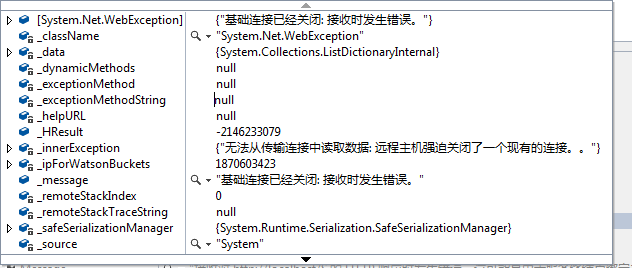
Message:
接收对 http://localhost/S 的 HTTP 响应时发生错误。这可能是由于服务终结点绑定未使用 HTTP 协议造成的。这还可能是由于服务器中止了 HTTP 请求上下文(可能由于服务关闭)所致。有关详细信息,请参见服务器日志。
Stacktrace:
Server stack trace:
在 System.ServiceModel.Channels.HttpChannelUtilities.ProcessGetResponseWebException(WebException webException, HttpWebRequest request, HttpAbortReason abortReason)
在 System.ServiceModel.Channels.HttpChannelFactory`1.HttpRequestChannel.HttpChannelRequest.WaitForReply(TimeSpan timeout)
在 System.ServiceModel.Channels.RequestChannel.Request(Message message, TimeSpan timeout)
在 System.ServiceModel.Dispatcher.RequestChannelBinder.Request(Message message, TimeSpan timeout)
在 System.ServiceModel.Channels.ServiceChannel.Call(String action, Boolean oneway, ProxyOperationRuntime operation, Object[] ins, Object[] outs, TimeSpan timeout)
在 System.ServiceModel.Channels.ServiceChannelProxy.InvokeService(IMethodCallMessage methodCall, ProxyOperationRuntime operation)
在 System.ServiceModel.Channels.ServiceChannelProxy.Invoke(IMessage message)
Exception rethrown at [0]:
在 System.Runtime.Remoting.Proxies.RealProxy.HandleReturnMessage(IMessage reqMsg, IMessage retMsg)
在 System.Runtime.Remoting.Proxies.RealProxy.PrivateInvoke(MessageData& msgData, Int32 type)
在 Client.IService.GetData(Int32 value)
在 Client.ServiceClient.GetData(Int32 value) 位置 e:\projgxz_myself\WCF_Find_Error\Client\ServiceProxy.cs:行号 52
在 Client.ServiceProxy.GetData(Int32 value) 位置 e:\projgxz_myself\WCF_Find_Error\Client\ServiceProxy.cs:行号 19
在 Client.Program.Main(String[] args) 位置 e:\projgxz_myself\WCF_Find_Error\Client\Program.cs:行号 17
2 服务地址与元数据访问地址
服务器A(192.168.107.13)上部署服务,服务端终结点配置为:http://localhost/S,元数据检索URI配置为http://localhost/S
在客户端(192.168.20.104)上访问A的服务,查看元数据。客户端浏览器输入网址:http://192.168.107.13/S
输出页面为:
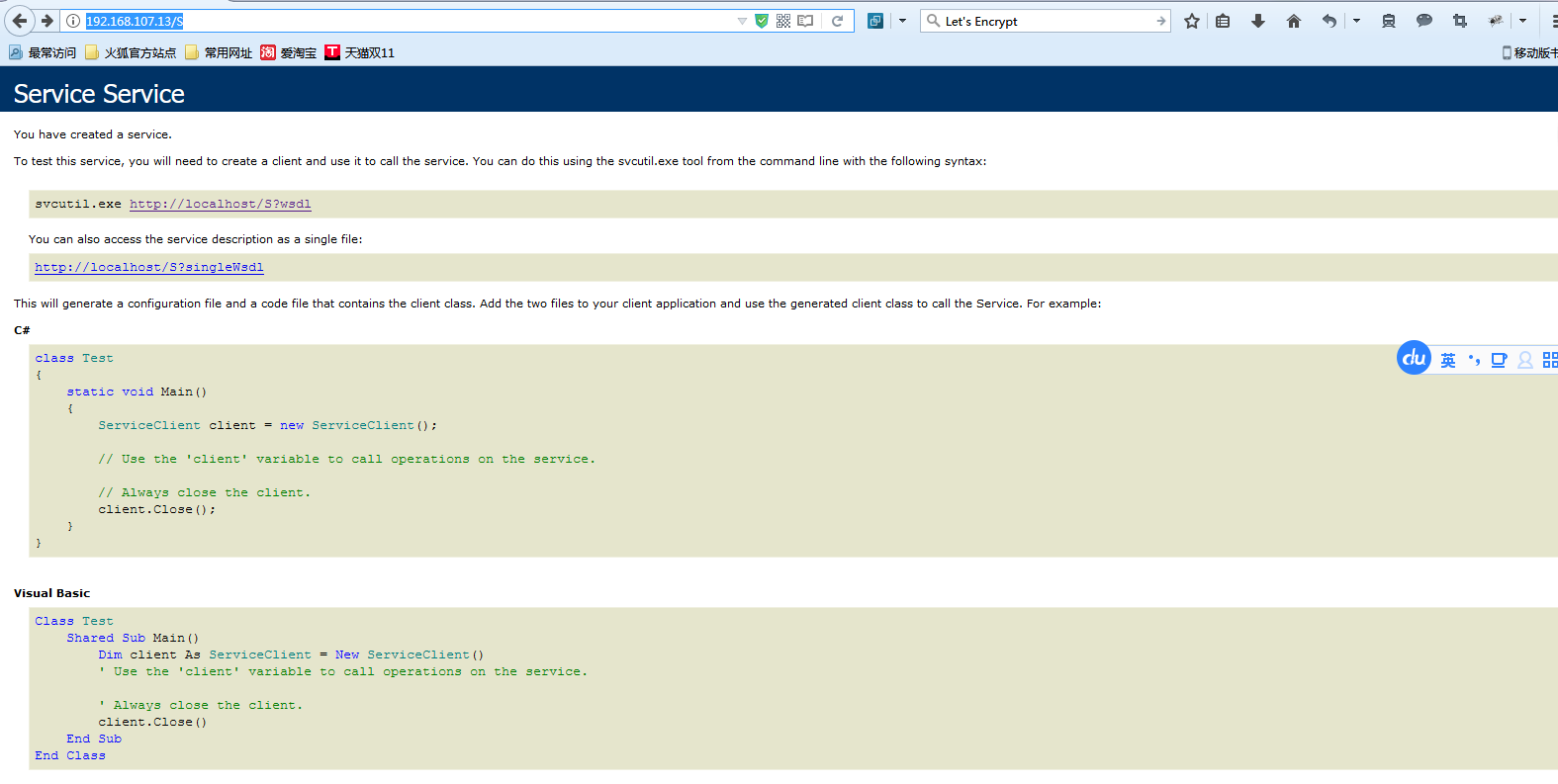
点击页面链接:无法访问到A机器服务的元素据,这是合理的因为localhost代表本机的ip,此刻操作是在客户端的机器上,而不在服务器上;客户端的机器上并没有这个服务,所以服务端终结点配置为:http://localhost/S,元数据检索URI配置为http://192.168.107.13/S

当服务端终结点和元数据访问地址不统一时,服务端通信对象无法打开。
3对比无法获得异常真实原因的两种用法
服务端方法:
[ServiceBehavior(InstanceContextMode = InstanceContextMode.PerSession, ConcurrencyMode = ConcurrencyMode.Reentrant)]

    public class Service : IService

    {

        public string GetData(int value)

        {

            return string.Format("You entered: {0}", value);

        }

}
客户端代理:
public class ServiceProxy

    {

        public string GetData(int value)

        {

            string ret = null;

            ServiceClient client = null;

            try

            {

                client = new ServiceClient();

                ret = client.GetData(value);

                client.Close();

            }

            catch

            {

                if (client != null)

                {

                    client.Abort();

                }

                throw;

            }

            return ret;

        }

}

[ServiceContractAttribute(ConfigurationName = "IService")]

    public interface IService

    {

        [System.ServiceModel.OperationContractAttribute(Action = "http://tempuri.org/IService/GetData", ReplyAction = "http://tempuri.org/IService/GetDataResponse")]

        string GetData(int value);

}

public class ServiceClient : System.ServiceModel.ClientBase<IService>, IService

    {

        public ServiceClient()

        {

        }

        public string GetData(int value)

        {

            return base.Channel.GetData(value);

        }

}
客户端调用:
方式一
直接调用ServiceClient,调用数据返回后关闭客户端。
static void Main(string[] args)

{

            try

            {

          ServiceClient clients = new ServiceClient();

                clients.GetData();

          clients.Close();

            }

            catch (Exception ex)

            {

                clients.Abort();

            }

}
方式二:
在Main方法中将下面的代码用try...catch包起来。
ServiceProxy proxy = new ServiceProxy();
proxy.GetData(1);
方式三:
在Main方法中将下面的代码用try...catch包起来。
using (ServiceClient client = new ServiceClient())
{
client.GetData(1);
}
方法一和方法二可以返回真实的原因,而方法三不能,他们的区别在于,方法三在客户端捕获异常之前关闭了客户端对象,而其他两种方式则是在获得异常信息后才关闭客户端对象的,所以由上面的测试又可得出WCF客户端程序中慎用using。
学会WCF之试错法——客户端调用基础的更多相关文章
- 学会WCF之试错法——安全配置报错分析
安全配置报错分析 服务端配置 <system.serviceModel> <bindings> <wsHttpBinding> <binding name = ...
- 学会WCF之试错法——数据传输
数据传输 服务契约 [ServiceContract] public interface IService { [OperationContract] string GetData(int value ...
- 学会WCF之试错法——超时
服务契约 [ServiceContract] public interface IService { [OperationContract] string GetData(int value); [O ...
- WCF初探-10:WCF客户端调用服务
创建WCF 服务客户端应用程序需要执行下列步骤: 获取服务终结点的服务协定.绑定以及地址信息 使用该信息创建 WCF 客户端 调用操作 关闭该 WCF 客户端对象 WCF客户端调用服务存在以下特点: ...
- Java与WCF交互(一):Java客户端调用WCF服务
最近开始了解WCF,写了个最简单的Helloworld,想通过java客户端实现通信.没想到以我的基础,居然花了整整两天(当然是工作以外的时间,呵呵),整个过程大费周折,特写下此文,以供有需要的朋友参 ...
- Java与WCF交互(一):Java客户端调用WCF服务 【转】
原文:http://www.cnblogs.com/downmoon/archive/2010/08/24/1807161.html 最近开始了解WCF,写了个最简单的Helloworld,想通过ja ...
- WCF系列教程之WCF客户端调用服务
1.创建WCF客户端应用程序需要执行下列步骤 (1).获取服务终结点的服务协定.绑定以及地址信息 (2).使用该信息创建WCF客户端 (3).调用操作 (4).关闭WCF客户端对象 二.操作实例 1. ...
- 转载——Java与WCF交互(一):Java客户端调用WCF服务
最近开始了解WCF,写了个最简单的Helloworld,想通过java客户端实现通信.没想到以我的基础,居然花了整整两天(当然是工作以外的时间,呵呵),整个过程大费周折,特写下此文,以供有需要的朋友参 ...
- Silverlight客户端调用WCF服务难题解疑
一:解决办法 Silverlight客户端调用WCF服务在实际使用中经常会出现的问题就是无法直接应用类文件和配置文件.微软针对这一情况已经给出了解决办法.WCF开发框架可以帮助我们实现可靠性较高的跨平 ...
随机推荐
- FTPS Firewall
989 for the FTPS data channel implicit FTPS was expected to listen on the IANA Well Known Port 990/T ...
- Spring boot Mybatis 整合(注解版)
之前写过一篇关于springboot 与 mybatis整合的博文,使用了一段时间spring-data-jpa,发现那种方式真的是太爽了,mybatis的xml的映射配置总觉得有点麻烦.接口定义和映 ...
- clean code 第一章笔记
我们都曾有过这样的经历:自己写的烂程序竟然可以运行,然后就认为能运行的烂代码总比什么都没有强.还会有这样的想法:总有一天我会修改它.但是,LeBlanc(勒布朗)法则表示:稍后等于永不(Later e ...
- C Primer Plus 读后感
<C Primer Plus>中文版 第六版 从网站上搜索到这本书适合初学者而且是自学者可以看的C语言书籍,于是上网买了一本. 真是物有所值,通过本书我很系统的学习了一遍C语言,书中代码很 ...
- JBPM学习第4篇:10分钟熟悉Eclipse
http://download.jboss.org/jbpm/videos/7.0.0.Final_eclipse_getting_started.swf 打开视频练习 1.导入 evaluation ...
- JBPM学习第1篇:入门与安装
1.相关关键词 BPM:全称Business Process Management,即业务流程管理 BPEL:全称为Business Process Execution Language,即业务流程执 ...
- 最新版PMBOK项目管理的五大过程组和十大知识领域
PMBOK五大过程组是:启动过程.规划过程.执行过程.监控过程.收尾过程. 各用一句话概括项目管理知识体系五大过程组: 1.启动过程组:作用是设定项目目标,让项目团队有事可做: 2.规划过程组:作用是 ...
- csharp:using Newtonsoft.Json.Net2.0 in .net 2.0 webform
/// <summary> /// http://www.weather.com.cn/data/sk/101280601.html /// {"weatherinfo" ...
- MySQL数据库学习笔记<一>
MySQL基本概念以及简单操作 一.MySQL MySQL是一个关系型数据库管理系统,由瑞典MySQL AB 公司开发,目前属于Oracle 旗下产品.MySQL 是最流行的关系型数据库管理系 ...
- Spring 框架(二)
1AOP 1.1 AOP介绍 1.1.1 什么是AOP l 在软件业,AOP为Aspect Oriented Programming的缩写,意为:面向切面编程,通过预编译方式和运行期动态代理实现程序功 ...