
学会WCF之试错法——超时
服务契约
[ServiceContract]

    public interface IService

    {

        [OperationContract]

        string GetData(int value);

        [OperationContract]

        string GetString(string value);

        [OperationContract]

        void Upload(Request request);

    }

    [MessageContract]

    public class Request

    {

        [MessageHeader(MustUnderstand = true)]

        public string FileName { get; set; }

        [MessageBodyMember(Order = )]

        public Stream Content {get;set;}

}
服务
[ServiceBehavior(InstanceContextMode = InstanceContextMode.PerCall, ConcurrencyMode = ConcurrencyMode.Reentrant)]

    public class Service : IService

    {

        public string GetData(int value)

        {

            //Thread.Sleep(120000);

            return string.Format("You entered: {0}", value);

        }

        public string GetString(string value)

        {

            //Thread.Sleep(120000);

            return string.Format("You entered: {0}", value);

        }

        public void Upload(Request request)

        {

            try

            {

                StreamReader sr = new StreamReader(request.Content, Encoding.GetEncoding("GB2312"));

                StreamWriter sw = new StreamWriter("E:\\" + request.FileName + ".txt", false, Encoding.GetEncoding("GB2312"));

                while (!sr.EndOfStream)

                {

                    sw.WriteLine(sr.ReadLine());

                    //Thread.Sleep(5000);

                }

                sr.Close();

                sw.Close();

            }

            catch (Exception ex)

            { }

        }

}
服务配置
<system.serviceModel>

    <services>

      <service name="WCF_Find_Error_Lib.Service">

        <endpoint address="" binding="basicHttpBinding" contract="WCF_Find_Error_Lib.IService">

          <identity>

            <dns value="localhost" />

          </identity>

        </endpoint>

        <host>

          <baseAddresses>

            <add baseAddress="http://localhost/S" />

          </baseAddresses>

        </host>

      </service>

    </services>

    <behaviors>

      <serviceBehaviors>

        <behavior>

          <serviceMetadata httpGetEnabled="True" httpsGetEnabled="True"/>

          <serviceDebug includeExceptionDetailInFaults="False" />

        </behavior>

      </serviceBehaviors>

    </behaviors>

  </system.serviceModel>
客户端代理
public class ServiceProxy

    {

        public string GetData(int value)

        {

            string ret = null;

            ServiceClient client = null;

            try

            {

                client = new ServiceClient();

                ret = client.GetData(value);

                client.Close();

            }

            catch

            {

                if (client != null)

                {

                    client.Abort();

                }

                throw;

            }

            return ret;

        }

        public string GetString(string value)

        {

            string ret = null;

            ServiceClient client = null;

            try

            {

                client = new ServiceClient();

                ret = client.GetString(value);

                client.Close();

            }

            catch

            {

                if (client != null)

                {

                    client.Abort();

                }

                throw;

            }

            return ret;

        }

        public void Upload(Request request)

        {

            ServiceClient client = null;

            try

            {

                client = new ServiceClient();

                client.Upload(request);

                client.Close();

            }

            catch

            {

                if (client != null)

                {

                    client.Abort();

                }

                throw;

            }

        }

    }

    [ServiceContractAttribute(ConfigurationName = "IService")]

    public interface IService

    {

        [System.ServiceModel.OperationContractAttribute(Action = "http://tempuri.org/IService/GetData", ReplyAction = "http://tempuri.org/IService/GetDataResponse")]

        string GetData(int value);

        [System.ServiceModel.OperationContractAttribute(Action = "http://tempuri.org/IService/GetString", ReplyAction = "http://tempuri.org/IService/GetStringResponse")]

        string GetString(string value);

        [System.ServiceModel.OperationContractAttribute(Action = "http://tempuri.org/IService/Upload", ReplyAction = "http://tempuri.org/IService/UploadResponse")]

        void Upload(Request request);

    }

    [MessageContract]

    public class Request

    {

        [MessageHeader(MustUnderstand = true)]

        public string FileName { get; set; }

        [MessageBodyMember(Order = 1)]

        public Stream Content { get; set; }

}

    [ServiceBehavior(InstanceContextMode = InstanceContextMode.PerCall, ConcurrencyMode = ConcurrencyMode.Reentrant)]

    public class ServiceClient : System.ServiceModel.ClientBase<IService>, IService

    {

        public ServiceClient()

        {

        }

        public string GetData(int value)

        {

            return base.Channel.GetData(value);

        }

        public string GetString(string value)

        {

            return base.Channel.GetString(value);

        }

        public void Upload(Request request)

        {

            base.Channel.Upload(request);

        }

}
客户端配置
<system.serviceModel>

    <bindings>

      <basicHttpBinding>

        <binding name="BasicHttpBinding_IService" />

      </basicHttpBinding>

    </bindings>

    <client>

      <endpoint address="http://localhost/S" binding="basicHttpBinding"

          bindingConfiguration="BasicHttpBinding_IService" contract="IService"

          name="BasicHttpBinding_IService" />

    </client>

  </system.serviceModel>
1 客户端调用超时
运行客户端,执行调用
ServiceProxy proxy = new ServiceProxy();
string s = proxy.GetData(1);
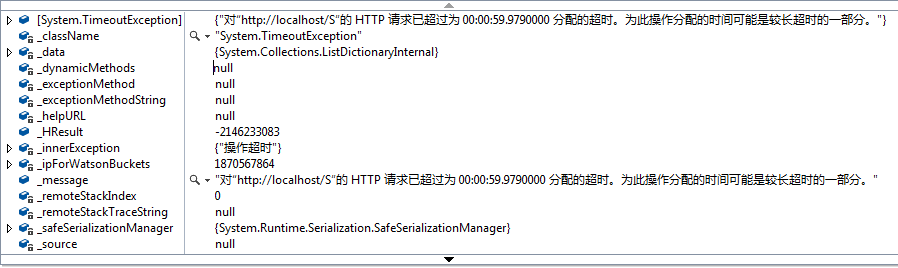
通过配置sendTimeout参数设定超时时间,超时时间默认为1分钟,上述配置中采用了默认超时时间。
Message
请求通道在等待 00:00:59.9469970 以后答复时超时。增加传递给请求调用的超时值,或者增加绑定上的 SendTimeout 值。分配给此操作的时间可能已经是更长超时的一部分。
Stacktrace:
Server stack trace:
在 System.ServiceModel.Channels.RequestChannel.Request(Message message, TimeSpan timeout)
在 System.ServiceModel.Dispatcher.RequestChannelBinder.Request(Message message, TimeSpan timeout)
在 System.ServiceModel.Channels.ServiceChannel.Call(String action, Boolean oneway, ProxyOperationRuntime operation, Object[] ins, Object[] outs, TimeSpan timeout)
在 System.ServiceModel.Channels.ServiceChannelProxy.InvokeService(IMethodCallMessage methodCall, ProxyOperationRuntime operation)
在 System.ServiceModel.Channels.ServiceChannelProxy.Invoke(IMessage message)
Exception rethrown at [0]:
在 System.Runtime.Remoting.Proxies.RealProxy.HandleReturnMessage(IMessage reqMsg, IMessage retMsg)
在 System.Runtime.Remoting.Proxies.RealProxy.PrivateInvoke(MessageData& msgData, Int32 type)
在 Client.IService.GetData(Int32 value)
在 Client.ServiceClient.GetData(Int32 value) 位置 e:\projgxz_myself\WCF_Find_Error\Client\ServiceProxy.cs:行号 52
在 Client.ServiceProxy.GetData(Int32 value) 位置 e:\projgxz_myself\WCF_Find_Error\Client\ServiceProxy.cs:行号 19
在 Client.Program.Main(String[] args) 位置 e:\projgxz_myself\WCF_Find_Error\Client\Program.cs:行号 17
增大客户端调用超时时间,可解决超时问题
例如,超时时间设置为10分钟,满足此次调用需求。
<system.serviceModel>

    <bindings>

      <basicHttpBinding>

        <binding name="BasicHttpBinding_IService" sendTimeout="00:10:00"/>

      </basicHttpBinding>

    </bindings>

    <client>

      <endpoint address="http://localhost/S" binding="basicHttpBinding"

          bindingConfiguration="BasicHttpBinding_IService" contract="IService"

          name="BasicHttpBinding_IService" />

    </client>

  </system.serviceModel>
2 非活动状态的最大时间间隔
通过配置receiveTimeout设定时间间隔,默认值为 10 分钟。
服务实例化模式改为为会话模式:
[ServiceBehavior(InstanceContextMode = InstanceContextMode.PerSession, ConcurrencyMode = ConcurrencyMode.Reentrant)]
服务端配置
<netTcpBinding>

     <binding name="NetTcpBinding_IService" maxBufferSize="270000" maxReceivedMessageSize="270000" transferMode="Buffered" receiveTimeout="00:00:10">

       <readerQuotas maxStringContentLength="240000"/>

       <reliableSession enabled="true" inactivityTimeout="00:00:10"/>

     </binding>

</netTcpBinding>
客户端配置
<netTcpBinding>

     <binding name="NetTcpBinding_IService" sendTimeout="00:00:10" maxBufferSize="2700000" maxReceivedMessageSize="2700000" transferMode="Buffered" >

       <readerQuotas maxStringContentLength="240000"/>

     </binding>

</netTcpBinding>
客户端调用
using (ServiceClient client = new ServiceClient())

                {

                    StreamReader sr = new StreamReader("D:\\CSBMTEMP.txt", Encoding.Default);

                    string str = sr.ReadToEnd();

                    sr.Close();

                    client.GetString(str);

                    Thread.Sleep();

                    client.GetString(str);

                }
运行客户端程序,成功捕获异常

上述异常中给出的错误信息并未指出具体的异常原因,所以从中很难推测是由于超时时间设置问题。遇到此类问题只能根据经验逐项排查,当然这是很浪费时间的,尤其是对于复杂的程序,更是如此。
-----------------------------------------------------------------------------------------
转载与引用请注明出处。
时间仓促,水平有限,如有不当之处,欢迎指正。
学会WCF之试错法——超时的更多相关文章
- 学会WCF之试错法——客户端调用基础
1当客户端调用未返回结果时,服务不可用(网络连接中断,服务关闭,服务崩溃等) 客户端抛出异常 异常类型:CommunicationException InnerException: Message: ...
- 学会WCF之试错法——安全配置报错分析
安全配置报错分析 服务端配置 <system.serviceModel> <bindings> <wsHttpBinding> <binding name = ...
- 学会WCF之试错法——数据传输
数据传输 服务契约 [ServiceContract] public interface IService { [OperationContract] string GetData(int value ...
- WCF服务调用超时错误:套接字连接已中止。这可能是由于处理消息时出错或远程主机超过接收超时或者潜在的网络资源问题导致的。本地套接字超时是“00:05:30”(已解决)
问题: 线上正式环境调用WCF服务正常,但是每次使用本地测试环境调用WCF服务时长就是出现:套接字连接已中止.这可能是由于处理消息时出错或远程主机超过接收超时或者潜在的网络资源问题导致的.本地套接字超 ...
- WCF返回null超时
Message.CreateMessage(msg.Version, msg.Headers.Action + "Response", DealObject("错误信息& ...
- 从Web Service和Remoting Service引出WCF服务
本篇先通过Web Service和Remoting Service创建服务,抛砖引玉,再体验WCF服务.首先一些基本面: 什么是WCF? Windows Communication Foundatio ...
- 关于webapi调用wcf并发假死的分析
原来IDFA(IOS推广获取到用户IOS手机的唯一标识,如果不刷机的话跟安卓的IMEI一样)在公司正常的页面是公用用一个网站和数据库的. 起初怀疑并发数太多,把数据库连接池的数量从一百设置到三百,确实 ...
- 中小研发团队架构实践之生产环境诊断工具WinDbg 三分钟学会.NET微服务之Polly 使用.Net Core+IView+Vue集成上传图片功能 Fiddler原理~知多少? ABP框架(asp.net core 2.X+Vue)模板项目学习之路(一) C#程序中设置全局代理(Global Proxy) WCF 4.0 使用说明 如何在IIS上发布,并能正常访问
中小研发团队架构实践之生产环境诊断工具WinDbg 生产环境偶尔会出现一些异常问题,WinDbg或GDB是解决此类问题的利器.调试工具WinDbg如同医生的听诊器,是系统生病时做问题诊断的逆向分析工具 ...
- WCF 超时情形
在做WCF开发时,会经常碰到超时的情况,总结了一下,主要是由一下原因引起: 1.客户端没有正确地Close. 确保每次客户端调用完毕之后,就要调用Close,保证连接数. 另外,服务端配置最大连接数: ...
随机推荐
- PHP学习6——常用函数
主要内容: 字符串处理函数 时间和日期处理函数 字符串处理函数 echo输出字符串 print输出字符串,带返回值1 print.php <?php var_dump(print("有 ...
- CentOS7部署.Net Core2.0站点(上)
其实类似的教程网上已经有很多了,之所以要写,是应为发现在使用最新的centos7和.netcore2.1版本时还是遇到了不少坑,所以记录下,以后希望大家能少走弯路. 一.安装CentOS7 我是用虚拟 ...
- ASP.NET MVC4 新手入门教程之七 ---7.向电影模式和表中添加新字段
在这一节中,您将使用实体框架代码第一次迁移,迁移到模型类的一些变化,所以该更改应用于数据库. 默认情况下,当您使用实体框架代码优先将自动创建一个数据库,像你那样早些时候在本教程中,代码第一次添加一个表 ...
- Java - Latch和Barrier的区别
之所以把Latch与Barrier放在一起比较是因为他们给人一种相似的感觉. 他们都是阻塞一些行为直至某个事件发生,但Latch是等待某个事件发生,而Barrier是等待线程. 先比较一下JCIP中对 ...
- easyui+nodejs+sqlserver增删改查实现
用到的模块或者技术: Express: http://www.expressjs.com.cn/4x/api.html#express Easyui: http://www.jeasyui.com/d ...
- HTTP中的响应协议及302、304的含义
响应协议 HTTP/1.1 200 OK:响应协议为HTTP1.1,状态码为200,表示请求成功,OK是对状态码的解释: Server: Apache-Coyote/1.1:服务器的版本信息: Con ...
- java web 开发入门
Java web,是java技术用来解决web互联网领域的技术总和.Java web技术主要包括客户端和服务端,java在客户端的服务有java applet,不过用的非常少,大部分应用在服务端,比如 ...
- unity3d之技能栏冷却
绑定在按钮上的脚本 using UnityEngine; using System.Collections; using UnityEngine.UI; public class CdCover : ...
- Maven+Spring+MySql 登陆实例
近来无事,复习复习Spring相关知识,从<Spring企业应用开发实战>这本书开始. 本文为学习<Spring企业应用开发实战>总结,著作权归原作者. 一.用Maven建立w ...
- java 中国网建实现发送短信验证码
现在中国网建上注册一个自己的账户, 然后里面有代码案例,也有相应的下载jar包的地址 package com.direct.note; import java.io.IOException; impo ...