
scrapy-splash抓取动态数据例子一
目前,为了加速页面的加载速度,页面的很多部分都是用JS生成的,而对于用scrapy爬虫来说就是一个很大的问题,因为scrapy没有JS engine,所以爬取的都是静态页面,对于JS生成的动态页面都无法获得
解决方案:
1、利用第三方中间件来提供JS渲染服务: scrapy-splash 等。
2、利用webkit或者基于webkit库
Splash是一个Javascript渲染服务。它是一个实现了HTTP API的轻量级浏览器,Splash是用Python实现的,同时使用Twisted和QT。Twisted(QT)用来让服务具有异步处理能力,以发挥webkit的并发能力。
下面就来讲一下如何使用scrapy-splash:
1、利用pip安装scrapy-splash库:
2、pip install scrapy-splash
3、安装docker
scrapy-splash使用的是Splash HTTP API, 所以需要一个splash instance,一般采用docker运行splash,所以需要安装docker,具体参见:http://www.cnblogs.com/shaosks/p/6932319.html
4、启动docker
安装好后运行docker。docker成功安装后,有“Docker Quickstart Terminal”图标,双击他启动

5、拉取镜像(pull the image):
$ docker pull scrapinghub/splash

这样就正式启动了。
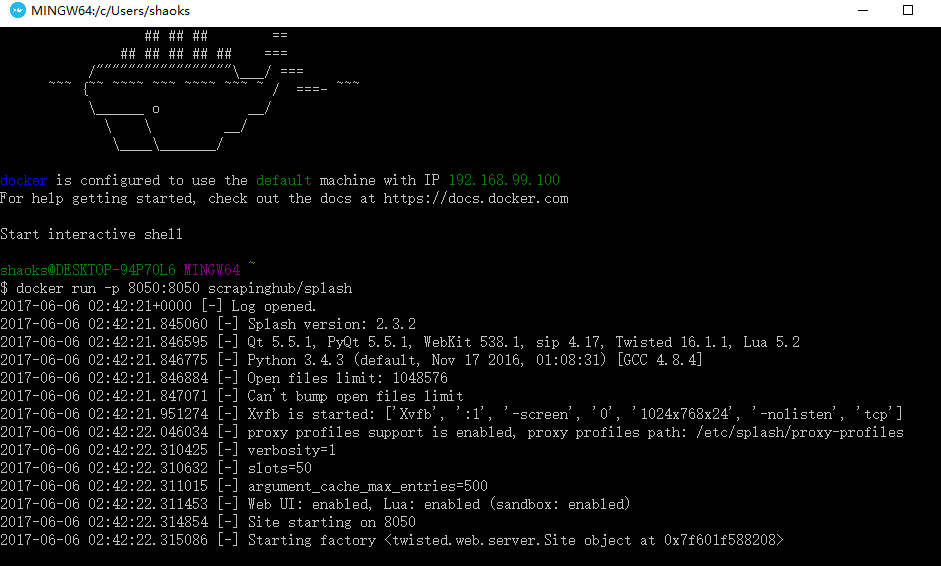
6、用docker运行scrapinghub/splash服务:
$ docker run -p 8050:8050 scrapinghub/splash
首次启动会比较慢,加载一些东西,多次启动会出现以下信息

这时要关闭当前窗口,然后在进程管理器里面关闭一些进程重新打开

重新打开Docker Quickstart Terminal,然后输入:docker run -p 8050:8050 scrapinghub/splash
7、配置splash服务(以下操作全部在settings.py):
1)添加splash服务器地址:

2)将splash middleware添加到DOWNLOADER_MIDDLEWARE中:

3)Enable SplashDeduplicateArgsMiddleware:

4)Set a custom DUPEFILTER_CLASS:

5)a custom cache storage backend:

8、正式抓取
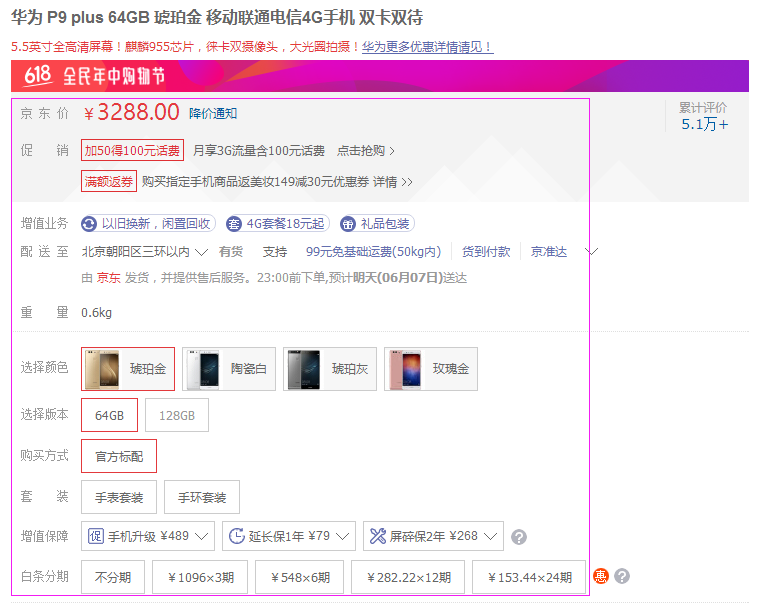
该例子是抓取京东某个手机产品的详细信息,地址:https://item.jd.com/2600240.html
如下图:框住的信息是要榨取的内容
对应的html
1、京东价:

抓取代码:prices = site.xpath('//span[@class="p-price"]/span/text()')
2、促销

抓取代码:cxs = site.xpath('//div[@class="J-prom-phone-jjg"]/em/text()')
3、增值业务

抓取代码:value_addeds =site.xpath('//ul[@class="choose-support lh"]/li/a/span/text()')
4、重量

抓取代码:quality = site.xpath('//div[@id="summary-weight"]/div[2]/text()')
5、选择颜色

抓取代码:colors = site.xpath('//div[@id="choose-attr-1"]/div[2]/div/@title')
6、选择版本

抓取代码:versions = site.xpath('//div[@id="choose-attr-2"]/div[2]/div/@data-value')
7、购买方式
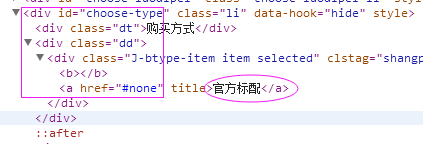
抓取代码:buy_style = site.xpath('//div[@id="choose-type"]/div[2]/div/a/text()')
8、套 装

抓取代码:suits = site.xpath('//div[@id="choose-suits"]/div[2]/div/a/text()')
9、增值保障

抓取代码:vaps = site.xpath('//div[@class="yb-item-cat"]/div[1]/span[1]/text()')
10、白条分期

抓取代码:stagings = site.xpath('//div[@class="baitiao-list J-baitiao-list"]/div[@class="item"]/a/strong/text()')
9、运行splash服务
在抓取之前首先要启动splash服务,命令:docker run -p 8050:8050 scrapinghub/splash,
点击“Docker Quickstart Terminal” 图标

10、运行scrapy crawl scrapy_splash

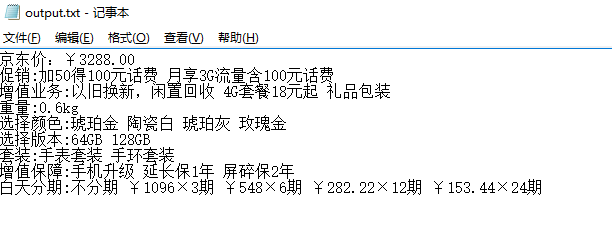
11、抓取数据

12、完整源代码
1、SplashSpider
# -*- coding: utf-8 -*-

import scrapy

from scrapy import Request

from scrapy.spiders import Spider

from scrapy_splash import SplashRequest

from scrapy_splash import SplashMiddleware

from scrapy.http import Request, HtmlResponse

from scrapy.selector import Selector

from scrapy_splash import SplashRequest

from splash_test.items import SplashTestItem

import sys

reload(sys)

sys.setdefaultencoding('utf-8')

sys.stdout = open('output.txt', 'w')

class SplashSpider(Spider):

    name = 'scrapy_splash'

    start_urls = [

        'https://item.jd.com/2600240.html'

    ]

    # request需要封装成SplashRequest

    def start_requests(self):

        for url in self.start_urls:

            yield SplashRequest(url

                                , self.parse

                                , args={'wait': '0.5'}

                                # ,endpoint='render.json'

                                )

    def parse(self, response):

        # 本文只抓取一个京东链接,此链接为京东商品页面,价格参数是ajax生成的。会把页面渲染后的html存在html.txt

        # 如果想一直抓取可以使用CrawlSpider,或者把下面的注释去掉

        site = Selector(response)

        it_list = []

        it = SplashTestItem()

        #京东价

        # prices = site.xpath('//span[@class="price J-p-2600240"]/text()')

        # it['price']= prices[0].extract()

        # print '京东价:'+ it['price']

        prices = site.xpath('//span[@class="p-price"]/span/text()')

        it['price'] = prices[0].extract()+ prices[1].extract()

        print '京东价:' + it['price']

        # 促  销

        cxs = site.xpath('//div[@class="J-prom-phone-jjg"]/em/text()')

        strcx = ''

        for cx in cxs:

            strcx += str(cx.extract())+' '

        it['promotion'] = strcx

        print '促销:%s '% strcx

        # 增值业务

        value_addeds =site.xpath('//ul[@class="choose-support lh"]/li/a/span/text()')

        strValueAdd =''

        for va in value_addeds:

            strValueAdd += str(va.extract())+' '

        print '增值业务:%s ' % strValueAdd

        it['value_add'] = strValueAdd

        # 重量

        quality = site.xpath('//div[@id="summary-weight"]/div[2]/text()')

        print '重量:%s ' % str(quality[0].extract())

        it['quality']=quality[0].extract()

        #选择颜色

        colors = site.xpath('//div[@id="choose-attr-1"]/div[2]/div/@title')

        strcolor = ''

        for color in colors:

            strcolor += str(color.extract()) + ' '

        print '选择颜色:%s ' % strcolor

        it['color'] = strcolor

        # 选择版本

        versions = site.xpath('//div[@id="choose-attr-2"]/div[2]/div/@data-value')

        strversion = ''

        for ver in versions:

            strversion += str(ver.extract()) + ' '

        print '选择版本:%s ' % strversion

        it['version'] = strversion

        # 购买方式

        buy_style = site.xpath('//div[@id="choose-type"]/div[2]/div/a/text()')

        print '购买方式:%s ' % str(buy_style[0].extract())

        it['buy_style'] = buy_style[0].extract()

        # 套装

        suits = site.xpath('//div[@id="choose-suits"]/div[2]/div/a/text()')

        strsuit = ''

        for tz in suits:

            strsuit += str(tz.extract()) + ' '

        print '套装:%s ' % strsuit

        it['suit'] = strsuit

        # 增值保障

        vaps = site.xpath('//div[@class="yb-item-cat"]/div[1]/span[1]/text()')

        strvaps = ''

        for vap in vaps:

            strvaps += str(vap.extract()) + ' '

        print '增值保障:%s ' % strvaps

        it['value_add_protection'] = strvaps

        # 白条分期

        stagings = site.xpath('//div[@class="baitiao-list J-baitiao-list"]/div[@class="item"]/a/strong/text()')

        strstaging = ''

        for st in stagings:

            ststr =str(st.extract())

            strstaging += ststr.strip() + ' '

        print '白天分期:%s ' % strstaging

        it['staging'] = strstaging

        it_list.append(it)

        return it_list
2、SplashTestItem
# -*- coding: utf-8 -*-

# Define here the models for your scraped items

#

# See documentation in:

# http://doc.scrapy.org/en/latest/topics/items.html

import scrapy

class SplashTestItem(scrapy.Item):

    #单价

    price = scrapy.Field()

    # description = Field()

    #促销

    promotion = scrapy.Field()

    #增值业务

    value_add = scrapy.Field()

    #重量

    quality = scrapy.Field()

    #选择颜色

    color = scrapy.Field()

    #选择版本

    version = scrapy.Field()

    #购买方式

    buy_style=scrapy.Field()

    #套装

    suit =scrapy.Field()

    #增值保障

    value_add_protection = scrapy.Field()

    #白天分期

    staging = scrapy.Field()

    # post_view_count = scrapy.Field()

    # post_comment_count = scrapy.Field()

    # url = scrapy.Field()
3、SplashTestPipeline
# -*- coding: utf-8 -*-

# Define your item pipelines here

#

# Don't forget to add your pipeline to the ITEM_PIPELINES setting

# See: http://doc.scrapy.org/en/latest/topics/item-pipeline.html

import codecs

import json

class SplashTestPipeline(object):

    def __init__(self):

        # self.file = open('data.json', 'wb')

        self.file = codecs.open(

            'spider.txt', 'w', encoding='utf-8')

        # self.file = codecs.open(

        #     'spider.json', 'w', encoding='utf-8')

    def process_item(self, item, spider):

        line = json.dumps(dict(item), ensure_ascii=False) + "\n"

        self.file.write(line)

        return item

    def spider_closed(self, spider):

        self.file.close()
4、settings.py
# -*- coding: utf-8 -*-

# Scrapy settings for splash_test project

#

# For simplicity, this file contains only settings considered important or

# commonly used. You can find more settings consulting the documentation:

#

#     http://doc.scrapy.org/en/latest/topics/settings.html

#     http://scrapy.readthedocs.org/en/latest/topics/downloader-middleware.html

#     http://scrapy.readthedocs.org/en/latest/topics/spider-middleware.html

ITEM_PIPELINES = {

        'splash_test.pipelines.SplashTestPipeline':300

        }

BOT_NAME = 'splash_test'

SPIDER_MODULES = ['splash_test.spiders']

NEWSPIDER_MODULE = 'splash_test.spiders'

SPLASH_URL = 'http://192.168.99.100:8050'

# Crawl responsibly by identifying yourself (and your website) on the user-agent

#USER_AGENT = 'splash_test (+http://www.yourdomain.com)'

# Obey robots.txt rules

ROBOTSTXT_OBEY = True

DOWNLOADER_MIDDLEWARES = {

    'scrapy_splash.SplashCookiesMiddleware': 723,

    'scrapy_splash.SplashMiddleware': 725,

    'scrapy.downloadermiddlewares.httpcompression.HttpCompressionMiddleware': 810,

}

SPIDER_MIDDLEWARES = {

    'scrapy_splash.SplashDeduplicateArgsMiddleware': 100,

}

DUPEFILTER_CLASS = 'scrapy_splash.SplashAwareDupeFilter'

HTTPCACHE_STORAGE = 'scrapy_splash.SplashAwareFSCacheStorage'

# Configure maximum concurrent requests performed by Scrapy (default: 16)

#CONCURRENT_REQUESTS = 32

# Configure a delay for requests for the same website (default: 0)

# See http://scrapy.readthedocs.org/en/latest/topics/settings.html#download-delay

# See also autothrottle settings and docs

#DOWNLOAD_DELAY = 3

# The download delay setting will honor only one of:

#CONCURRENT_REQUESTS_PER_DOMAIN = 16

#CONCURRENT_REQUESTS_PER_IP = 16

# Disable cookies (enabled by default)

#COOKIES_ENABLED = False

# Disable Telnet Console (enabled by default)

#TELNETCONSOLE_ENABLED = False

# Override the default request headers:

#DEFAULT_REQUEST_HEADERS = {

#   'Accept': 'text/html,application/xhtml+xml,application/xml;q=0.9,*/*;q=0.8',

#   'Accept-Language': 'en',

#}

# Enable or disable spider middlewares

# See http://scrapy.readthedocs.org/en/latest/topics/spider-middleware.html

#SPIDER_MIDDLEWARES = {

#    'splash_test.middlewares.SplashTestSpiderMiddleware': 543,

#}

# Enable or disable downloader middlewares

# See http://scrapy.readthedocs.org/en/latest/topics/downloader-middleware.html

#DOWNLOADER_MIDDLEWARES = {

#    'splash_test.middlewares.MyCustomDownloaderMiddleware': 543,

#}

# Enable or disable extensions

# See http://scrapy.readthedocs.org/en/latest/topics/extensions.html

#EXTENSIONS = {

#    'scrapy.extensions.telnet.TelnetConsole': None,

#}

# Configure item pipelines

# See http://scrapy.readthedocs.org/en/latest/topics/item-pipeline.html

#ITEM_PIPELINES = {

#    'splash_test.pipelines.SplashTestPipeline': 300,

#}

# Enable and configure the AutoThrottle extension (disabled by default)

# See http://doc.scrapy.org/en/latest/topics/autothrottle.html

#AUTOTHROTTLE_ENABLED = True

# The initial download delay

#AUTOTHROTTLE_START_DELAY = 5

# The maximum download delay to be set in case of high latencies

#AUTOTHROTTLE_MAX_DELAY = 60

# The average number of requests Scrapy should be sending in parallel to

# each remote server

#AUTOTHROTTLE_TARGET_CONCURRENCY = 1.0

# Enable showing throttling stats for every response received:

#AUTOTHROTTLE_DEBUG = False

# Enable and configure HTTP caching (disabled by default)

# See http://scrapy.readthedocs.org/en/latest/topics/downloader-middleware.html#httpcache-middleware-settings

#HTTPCACHE_ENABLED = True

#HTTPCACHE_EXPIRATION_SECS = 0

#HTTPCACHE_DIR = 'httpcache'

#HTTPCACHE_IGNORE_HTTP_CODES = []

#HTTPCACHE_STORAGE = 'scrapy.extensions.httpcache.FilesystemCacheStorage'
scrapy-splash抓取动态数据例子一的更多相关文章
- scrapy-splash抓取动态数据例子八
一.介绍 本例子用scrapy-splash抓取界面网站给定关键字抓取咨询信息. 给定关键字:个性化:融合:电视 抓取信息内如下: 1.资讯标题 2.资讯链接 3.资讯时间 4.资讯来源 二.网站信息 ...
- scrapy-splash抓取动态数据例子七
一.介绍 本例子用scrapy-splash抓取36氪网站给定关键字抓取咨询信息. 给定关键字:个性化:融合:电视 抓取信息内如下: 1.资讯标题 2.资讯链接 3.资讯时间 4.资讯来源 二.网站信 ...
- scrapy-splash抓取动态数据例子六
一.介绍 本例子用scrapy-splash抓取中广互联网站给定关键字抓取咨询信息. 给定关键字:打通:融合:电视 抓取信息内如下: 1.资讯标题 2.资讯链接 3.资讯时间 4.资讯来源 二.网站信 ...
- scrapy-splash抓取动态数据例子五
一.介绍 本例子用scrapy-splash抓取智能电视网网站给定关键字抓取咨询信息. 给定关键字:打通:融合:电视 抓取信息内如下: 1.资讯标题 2.资讯链接 3.资讯时间 4.资讯来源 二.网站 ...
- scrapy-splash抓取动态数据例子四
一.介绍 本例子用scrapy-splash抓取微众圈网站给定关键字抓取咨询信息. 给定关键字:打通:融合:电视 抓取信息内如下: 1.资讯标题 2.资讯链接 3.资讯时间 4.资讯来源 二.网站信息 ...
- scrapy-splash抓取动态数据例子三
一.介绍 本例子用scrapy-splash抓取今日头条网站给定关键字抓取咨询信息. 给定关键字:打通:融合:电视 抓取信息内如下: 1.资讯标题 2.资讯链接 3.资讯时间 4.资讯来源 二.网站信 ...
- scrapy-splash抓取动态数据例子二
一.介绍 本例子用scrapy-splash抓取一点资讯网站给定关键字抓取咨询信息. 给定关键字:打通:融合:电视 抓取信息内如下: 1.资讯标题 2.资讯链接 3.资讯时间 4.资讯来源 二.网站信 ...
- scrapy-splash抓取动态数据例子十六
一.介绍 本例子用scrapy-splash爬取梅花网(http://www.meihua.info/a/list/today)的资讯信息,输入给定关键字抓取微信资讯信息. 给定关键字:数字:融合:电 ...
- scrapy-splash抓取动态数据例子十五
一.介绍 本例子用scrapy-splash爬取电视之家(http://www.tvhome.com/news/)网站的资讯信息,输入给定关键字抓取微信资讯信息. 给定关键字:数字:融合:电视 抓取信 ...
随机推荐
- 使用PuTTY连接树莓派
这是 meelo 原创的 玩转树莓派 系列文章 PuTTY是一个支持Telnet.SSH协议,实现远程登录的软件.树莓派的官方操作系统Raspbian默认开启了SSH协议进行登录,这样即使没有专门的显 ...
- section
@RenderSection("Header") @section Header { <div class="view"> @foreach ( ...
- IllegalStateException: Unable to find a @SpringBootConfiguration
此处需要改掉包名和类名
- 四十四 常用内建模块 struct
准确地讲,Python没有专门处理字节的数据类型.但由于str既是字符串,又可以表示字节,所以,字节数组=str.而在C语言中,我们可以很方便地用struct.union来处理字节,以及字节和int, ...
- ubuntu16.04安装最新版本的wine
1.安装源 sudo add-apt-repository ppa:wine/wine-builds sudo apt-get update 2.安装wine sudo apt-get install ...
- Python Unicode与中文处理(转)
Python Unicode与中文处理 python中的unicode是让人很困惑.比较难以理解的问题,本文力求彻底解决这些问题: 1.unicode.gbk.gb2312.utf-8的关系: htt ...
- Python 实现腾讯新闻抓取
原文地址:http://www.cnblogs.com/rails3/archive/2012/08/14/2636780.htm 思路: 1.抓取腾讯新闻列表页面: http://news.qq.c ...
- 【数据结构】 最小生成树(三)——prim算法
上一期介绍到了kruskal算法,这个算法诞生于1956年,重难点就是如何判断是否形成回路,此处要用到并查集,不会用当然会觉得难,今天介绍的prim算法在kruskal算法之后一年(即1957年)诞生 ...
- 【转】【python】装饰器的原理
写在前面: 在开发OpenStack过程中,经常可以看到代码中的各种注解,自己也去查阅了资料,了解了这是python中的装饰器,因为弱类型的语言可以将函数当成返回值返回,这就是装饰器的原理. 虽然说知 ...
- Outlook Font