
使用XIB实现一个简单view
技术处女贴 欢迎来探讨
转帖请注明出处 http://www.cnblogs.com/andy-zhou/p/4962135.html
微信: @Andy
1. AppDelegate
AppDelegate.h 文件
#import <UIKit/UIKit.h>

@interface AppDelegate : UIResponder <UIApplicationDelegate>

@property (strong, nonatomic) UIWindow *window;

@property (strong, nonatomic) UITabBarController *tabBarController;

@end
AppDelegate.m 文件
#import "AppDelegate.h"

#import "ViewController.h"

#import "AZImageViewController.h"

@interface AppDelegate ()

@end

@implementation AppDelegate

- (BOOL)application:(UIApplication *)application didFinishLaunchingWithOptions:(NSDictionary *)launchOptions {

    self.window = [[[UIWindow alloc] initWithFrame:[[UIScreen mainScreen] bounds]] autorelease];

//    ViewController *viewController = [[[ViewController alloc] initWithNibName:@"ViewController" bundle:nil] autorelease];

//    self.window.rootViewController = viewController;

    ViewController *viewController = [[[ViewController alloc] initWithNibName:@"ViewController" bundle:nil] autorelease];

    AZImageViewController *imageViewController = [[[AZImageViewController alloc] initWithNibName:@"AZImageViewController" bundle:nil] autorelease];

    self.tabBarController = [[UITabBarController new] autorelease];

    self.tabBarController.viewControllers = @[viewController, imageViewController];

    self.window.rootViewController = self.tabBarController;

    [self.window makeKeyAndVisible];

    return YES;

}

- (void)dealloc

{

    [_window release];

    [super dealloc];

}

@end
2. ViewController
ViewController.h 文件
#import <UIKit/UIKit.h>

@interface ViewController : UIViewController

@property (retain, nonatomic) IBOutlet UILabel *status;

- (IBAction)leftButtonPress:(id)sender;

- (IBAction)rightButtonPress:(id)sender;

- (IBAction)setStatusText:(id)sender;

@end
ViewController.m 文件
#import "ViewController.h"

@interface ViewController ()

@end

@implementation ViewController

@synthesize status;

- (id)initWithNibName:(NSString *)nibNameOrNil bundle:(NSBundle *)nibBundleOrNil {

    self = [super initWithNibName:nibNameOrNil bundle:nibBundleOrNil];

    if (self) {

        self.title = NSLocalizedString(@"First", @"First");

        self.tabBarItem.image = [UIImage imageNamed:@"first"];

    }

    return self;

}

- (void)viewDidLoad {

    [super viewDidLoad];

    // Do any additional setup after loading the view, typically from a nib.

}

- (void)didReceiveMemoryWarning {

    [super didReceiveMemoryWarning];

    // Dispose of any resources that can be recreated.

}

- (void)dealloc {

    [status release];

    [super dealloc];

}

- (IBAction)leftButtonPress:(id)sender {

     status.text = @"this is left btn";

}

- (IBAction)rightButtonPress:(id)sender {

    status.text = @"this is right btn";

}

- (IBAction)setStatusText:(id)sender {

    NSString *title = [sender titleForState:UIControlStateNormal];

//    status.text = title;

    NSString *newLableText = [NSString stringWithFormat:@"Hello, %@ btn", title];

    status.text = newLableText;

}

@end
ViewController.xib 文件
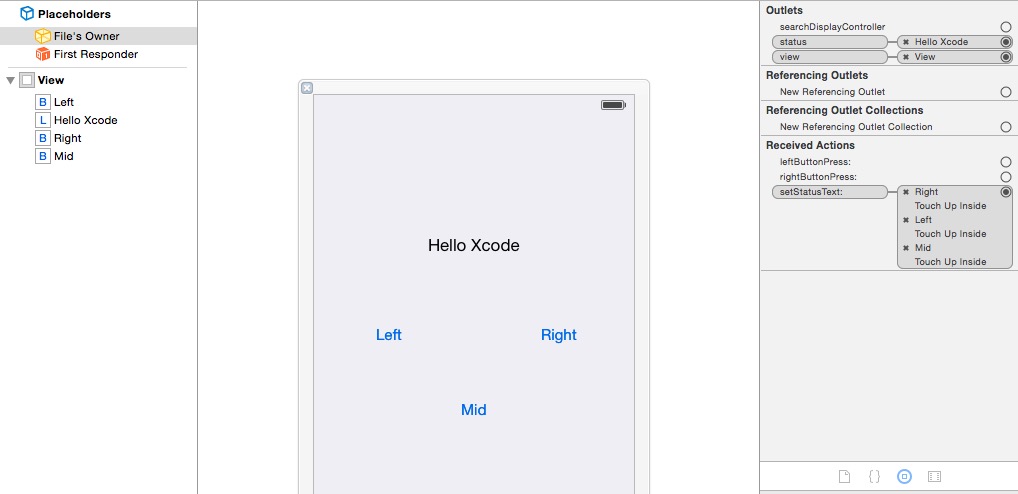
3. AZImageViewController
AZImageViewController.h 文件
#import "ViewController.h"

@interface AZImageViewController : ViewController

@property (retain, nonatomic) IBOutlet UITextField *nameField;

@property (retain, nonatomic) IBOutlet UITextField *numberField;

@property (retain, nonatomic) IBOutlet UILabel *rateLabel;

- (IBAction)textFieldDoneEditing:(id)sender;

- (IBAction)backgroudTap:(id)sender;

- (IBAction)sliderMove:(id)sender;

@end
AZImageViewController.m 文件
#import "AZImageViewController.h"

@interface AZImageViewController ()

@end

@implementation AZImageViewController

@synthesize nameField;

@synthesize numberField;

@synthesize rateLabel;

- (id)initWithNibName:(NSString *)nibNameOrNil bundle:(NSBundle *)nibBundleOrNil {

    self = [super initWithNibName:nibNameOrNil bundle:nibBundleOrNil];

    if (self) {

        self.title = NSLocalizedString(@"Second", @"Second");

        self.tabBarItem.image = [UIImage imageNamed:@"second"];

    }

    return self;

}

#pragma mark - Custom Method

- (IBAction)textFieldDoneEditing:(id)sender {

    [sender resignFirstResponder];

}

- (IBAction)backgroudTap:(id)sender {

    [nameField resignFirstResponder];

    [numberField resignFirstResponder];

}

- (IBAction)sliderMove:(id)sender {

    UISlider *slider = (UISlider *)sender;

    NSInteger _rate = (NSInteger)roundf(slider.value);

    rateLabel.text = [NSString stringWithFormat:@"%ld", _rate];

}

- (void)dealloc {

    [nameField release];

    [numberField release];

    [rateLabel release];

    [super dealloc];

}

@end
AZImageViewController.xib 文件
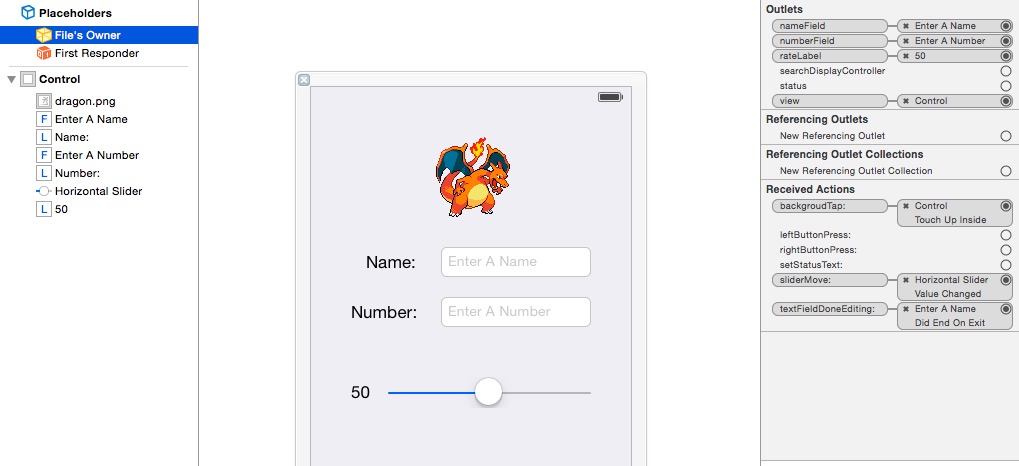
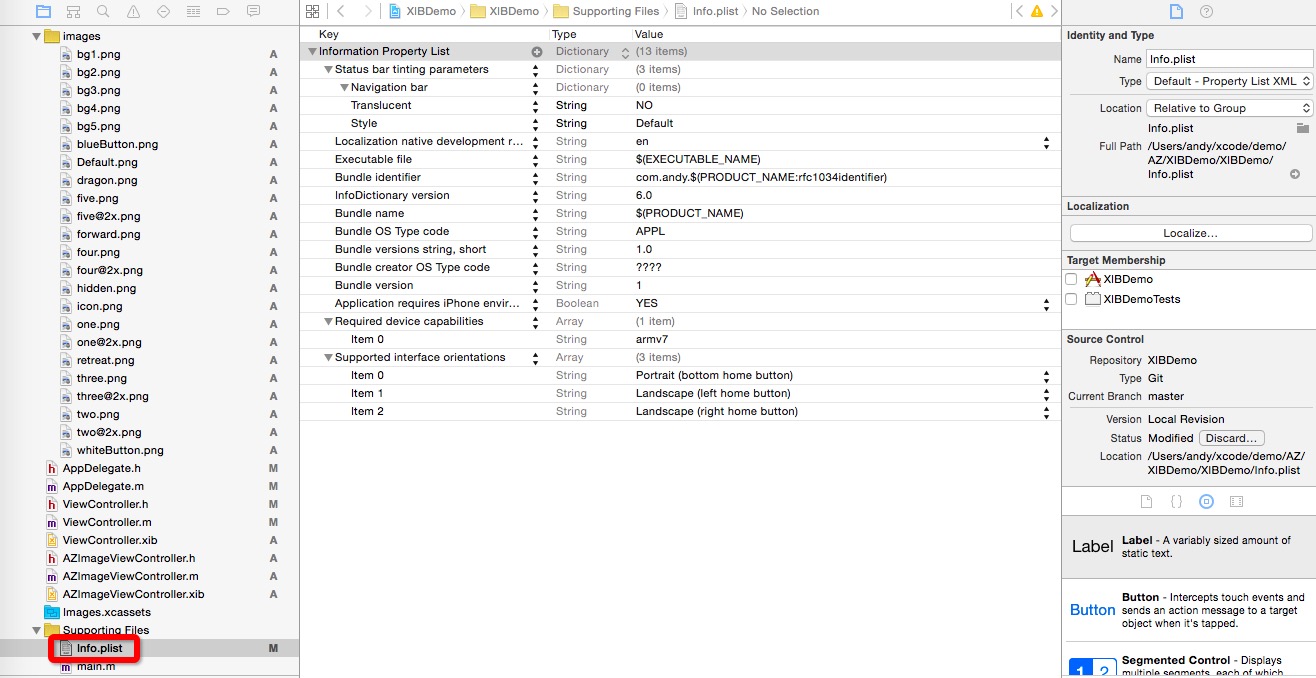
4. info_plist
使用XIB实现一个简单view的更多相关文章
- 使用xib封装一个自定义view的步骤
使用xib封装一个自定义view的步骤 1> 新建一个继承UIView的自定义view,假设类名叫做(MJAppView) 2> 新建一个MJAppView.xib文件来描述MJAppVi ...
- iOS开发UI篇—使用xib自定义UItableviewcell实现一个简单的团购应用界面布局
iOS开发UI篇—使用xib自定义UItableviewcell实现一个简单的团购应用界面布局 一.项目文件结构和plist文件 二.实现效果 三.代码示例 1.没有使用配套的类,而是直接使用xib文 ...
- iOS开发UI篇—使用picker View控件完成一个简单的选餐应用
iOS开发UI篇—使用picker View控件完成一个简单的选餐应用 一.实现效果 说明:点击随机按钮,能够自动选取,下方数据自动刷新. 二.实现思路 1.picker view的有默认高度为162 ...
- 相比xib 使用代码编排view 的一个明显的好处就是可以更好地重复使用已有代码,减少代码冗余。
相比xib 使用代码编排view 的一个明显的好处就是可以更好地重复使用已有代码,减少代码冗余.
- 在iOS中实现一个简单的画板App
在这个随笔中,我们要为iPhone实现一个简单的画板App. 首先需要指出的是,这个demo中使用QuarzCore进行绘画,而不是OpenGL.这两个都可以实现类似的功能,区别是OpenGL更快,但 ...
- 创建一个Table View
在本课程中,您将创建应用程序FoodTracker的主屏幕.您将创建第二个,表视图为主场景,列出了用户的菜谱.你会设计定制表格单元格显示每一个菜谱,它是这样的: 学习目标 在课程结束时,你将能够: 创 ...
- Objective-C ,ios,iphone开发基础:快速实现一个简单的图片查看器
新建一个single view 工程: 关闭ARC , 在.xib视图文件上拖放一个UIImageView 两个UIButton ,一个UISlider ,布局如图. 并为他们连线, UIImage ...
- IOS中一个简单的粒子效果实现
1.效果图展示 2.实现思路 1> 首先要实现上面的效果,第一步要处理的就是一个简单的画板,在View上面用鼠标滑动的时候画出线条,这个功能可使用UIBezierPath实现 2> 关于粒 ...
- CSharpGL(23)用ComputeShader实现一个简单的ParticleSimulator
CSharpGL(23)用ComputeShader实现一个简单的ParticleSimulator 我还没有用过Compute Shader,所以现在把红宝书里的例子拿来了,加入CSharpGL中. ...
随机推荐
- Path文件操作实例
<%@ Page Language="C#" AutoEventWireup="true" CodeBehind="AddProduct.asp ...
- ubuntu12.04安装mysql
首先下载ubuntu 12.04 64位对应的myqsl版本 http://dev.mysql.com/downloads/file/?id=464508 然后按照如下 ...
- HQL语句大全(转载)
Hibernate配备了一种非常强大的查询语言,这种语言看上去很像SQL.但是不要被语法结构 上的相似所迷惑,HQL是非常有意识的被设计为完全面向对象的查询,它可以理解如继承.多态 和关联之类的概念. ...
- CG基础教程-陈惟老师十二讲笔记
转自 麽洋TinyOcean:http://www.douban.com/people/Tinyocean/notes?start=50&type=note 因为看了陈惟十二讲视频没有课件,边 ...
- Servlet与Tomcat
Web应用不仅局限于展示在服务器上的静态页面,更多的是根据用的请求动态的生成页面信息,还可以从数据库中提取数据,生成页面返回给用户. 第一种方法:遵循HTTP协议实现一个服务器端软件 第二种方法:利用 ...
- VS2008中开发智能设备程序的一些总结
原文链接:http://blog.csdn.net/citybug_nj/article/details/2598705 程序中包括四个部分: 系统配置 这个部分用来配置系统中的相关参数,参数包括数据 ...
- HUD5423 Rikka with Tree(DFS)
题目链接:http://acm.hdu.edu.cn/showproblem.php?pid=5423 Rikka with Tree Time Limit: 2000/1000 MS (Java/O ...
- RFC总结-SD模块
1.客户主数据1.1 创建.修改客户主数据*该函数更新所有字段,X表用来新增和修改,Y表为删除 CALL FUNCTION 'SD_CUSTOMER_MAINTAIN_ALL' EXPORTIN ...
- bootstrap学习笔记<六>(表单二之按钮)
按钮(补充) (ps:居中元素可以使用<center></center>标签) 块级按钮(ps:按钮占一整行) <button class="btn btn-p ...
- mysql 特殊字符
1.倒引号,比如表中有一个字段为desc,在mysql中desc是关键字,如何表明desc是字段呢? 有两种办法:desc使用倒引号引起来,或者在desc前面加上表名,如下:mysql> sel ...