
gitlab的安装和基本维护
基本介绍
GitLab是一个自托管的Git项目仓库,可以自己搭建个人代码管理的仓库,功能与github类似。
安装
操作系统:CentOS6.5
gitlab官网下载安装地址:https://about.gitlab.com/downloads/#centos6
1.安装依赖的包
yum install curl openssh-server openssh-clients postfix cronie

service postfix start

chkconfig postfix on

lokkit -s http -s ssh
2.使用gitlab官网的脚本安装
curl -sS https://packages.gitlab.com/install/repositories/gitlab/gitlab-ce/script.rpm.sh | sudo bash

yum install gitlab-ce
或者使用gitlab的rpm安装gitlab
curl -LJO https://packages.gitlab.com/gitlab/gitlab-ce/packages/el/6/gitlab-ce-XXX.rpm/download

rpm -i gitlab-ce-XXX.rpm
如果一切顺利,gitlab将安装完成!
3.这里我先修改下配置文件(将访问地址改为主机的ip地址),默认为主机名访问(http://hostname 默认的访问地址)
修改结果如下:
[root@locahost~]# grep -n "^[a-Z]" /etc/gitlab/gitlab.rb

:external_url 'http://10.10.100.38'
4.配置并启动gitlab
gitlab-ctl reconfigure
5.安装完毕后,使用Web登录
打开浏览器输入http://10.10.100.38 #10.10.100.38为我的gitlab主机ip地址.
第一次登录要求设置root密码
登录成功之后,是这样的
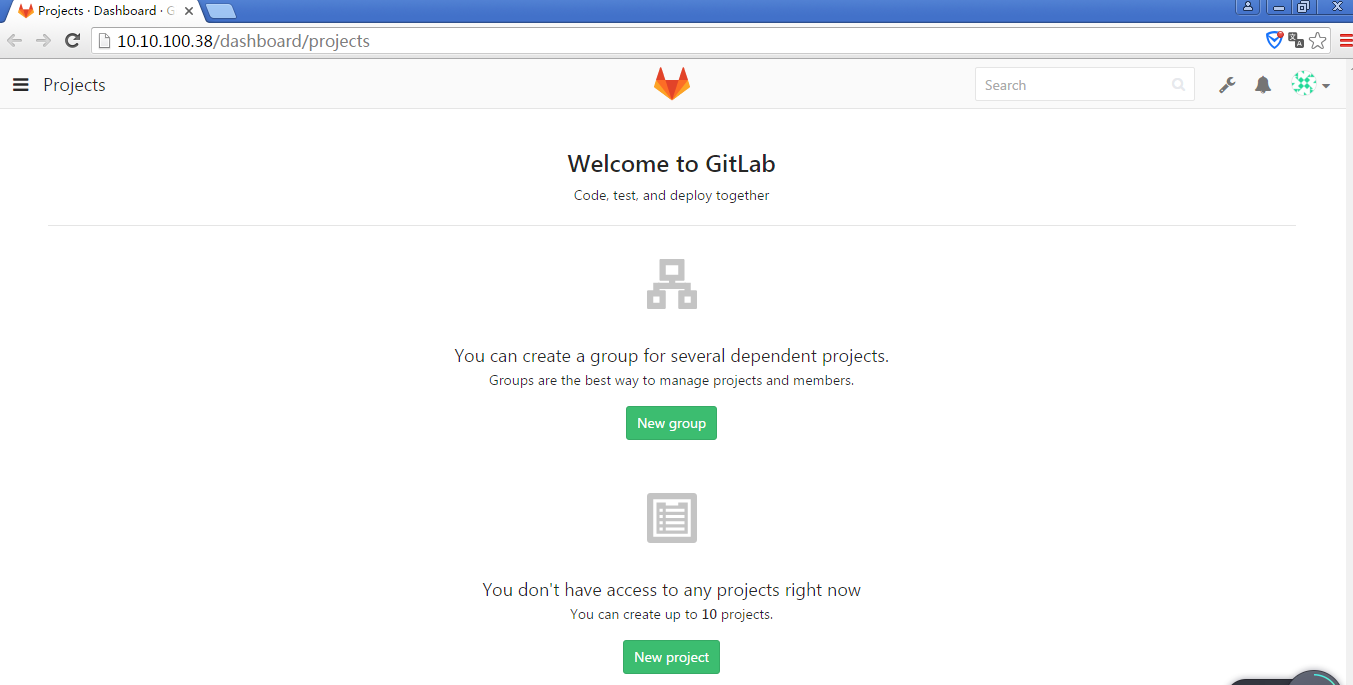
至此,gitlab的安装访问正常...
安装完gitlab后的运维操作:
初次配置服务
sudo gitlab-ctl reconfigure
启动服务
sudo gitlab-ctl start
停止服务
sudo gitlab-ctl stop
重启服务
sudo gitlab-ctl restart
检查服务状态
sudo gitlab-ctl status
一般服务状态显示信息
显示格式:
状态 : 进程名称:(进程ID)运行时间(秒);进程的日志服务进程和运行时间
[root@localhost~]# gitlab-ctl status

run: gitlab-workhorse: (pid 14584) 3325s; down: log: 0s, normally up, want up

run: logrotate: (pid 14593) 3324s; run: log: (pid 31243) 612s

run: nginx: (pid 14602) 3323s; down: log: 0s, normally up, want up

run: postgresql: (pid 11749) 3741s, want down; down: log: 3721s, normally up, want up

run: redis: (pid 14613) 3322s; down: log: 0s, normally up, want up

run: sidekiq: (pid 8677) 4118s, got TERM; down: log: 0s, normally up, want up

run: unicorn: (pid 14619) 3322s; run: log: (pid 7844) 4153s
| 状态 | 说明 |
| run | 运行状态 |
| down | 服务停止 |
检查服务的日志信息
# 检查redis的日志

sudo gitlab-ctl tail redis

# 检查postgresql的日志

sudo gitlab-ctl tail postgresql

# 检查gitlab-workhorse的日志

sudo gitlab-ctl tail gitlab-workhorse

# 检查logrotate的日志

sudo gitlab-ctl tail logrotate

# 检查nginx的日志

sudo gitlab-ctl tail nginx

# 检查sidekiq的日志

sudo gitlab-ctl tail sidekiq

# 检查unicorn的日志

sudo gitlab-ctl tail unicorn
gitlab管理员密码忘记,怎么重置密码
Gitlab 修改root用户密码
使用rails工具打开终端
sudo gitlab-rails console production
查询用户的email,用户名,密码等信息,id:1 表示root账号
user = User.where(id: 1).first
重新设置密码
user.password = '新密码'

user.password_confirmation = '新密码'
保存密码
user.save!
完整的操作ruby脚本
user = User.where(id: 1).first

user.password = '新密码'

user.password_confirmation = '新密码'

user.save!
然后使用重置过的密码重新登录。
Git 图形界面操作工具
- SourceTree https://www.sourcetreeapp.com/
- TortoiseGit https://code.google.com/p/tortoisegit/wiki/Download?tm=2
参考文档:
http://www.cnblogs.com/stevendes/p/6218928.html
http://www.cnblogs.com/yangliheng/p/5760185.html
https://about.gitlab.com/downloads/#centos6
http://www.tuicool.com/articles/mEbAZbE
gitlab的安装和基本维护的更多相关文章
- Centos下的GitLab的安装汉化和数据备份以及管理员密码重置
前言: 安装版本:gitlab-ce-8.8.5-ce.1.el7.x86_64.rpm 下载地址: https://mirrors.tuna.tsinghua.edu.cn/gitlab-ce/yu ...
- Gitlab 快速部署及日常维护 (二)
一.概述 上一篇我们将Gitlab的安装部署和初始化设置部分全部讲解完成了,接下来我们介绍Gitlab在日常工作中常遇见的问题进行梳理说明. 二.Gitlab的安装和维护过程中常见问题 1.Gitla ...
- gitlab一键安装 (转)
原文地址:http://www.2cto.com/os/201411/353292.html 0 简介bitnami和gitlab bitnami BitNami是一个开源项目,该项目产生的开源软件包 ...
- gitlab的安装以及汉化
gitlab的安装 首先在网上下载好任意版本gitlab的rpm包 推荐下面的地址: https://mirrors.tuna.tsinghua.edu.cn/gitlab-ce/yum/el7/gi ...
- gitlab一键安装+配置(备份+LADP认证)
gitlab一键安装+配置(备份+LADP认证) #gitlab一键安装 #centos6 mini, GitLab社区版 #参考官方最新文档 https://www.gitlab.com.cn/in ...
- Gitlab的安装与实践
tucao 先让我来吐槽一下下,使用GitHub以及Bitbucket比较不太稳定,尤其是后者,可以说是极其不稳定,甚至无法克隆仓库到本地.因此,决定安装一款开源且免费的Git服务到自己的服务器主机上 ...
- Gitlab的安装及项目新建
1. Gitlab的安装及仓库创建 1.1下载gitlab安装包 1).官网下载速度较慢 建议先行下载 国内的源里面可以找到最新的版本https://mirrors.tuna.tsinghua.edu ...
- DevOps之一 Gitlab的安装与配置
gitlab的安装 参考治疗:https://www.gitlab.com.cn/installation/#centos-7 http://www.21yunwei.com/archives/435 ...
- gitlab的安装和基本使用
一.gitlab的安装 1)安装依赖包 sudo yum install git vim gcc glibc-statc telnet -y sudo yum install -y curl poli ...
随机推荐
- SpringBoot整合SpringKafka实现生产者史上最简代码实现
该项目是使用的技术:SpringBoot + SpringKafka + Maven 先看pom.xml文件中引入的依赖: <?xml version="1.0" enco ...
- FFmpeg Basic学习笔记(4)
图像处理 常见的图片格式包括YUV.BMP.JPG.GIF.PNG. 图像的创建 可以使用下面命令从输入源中截取图像 ffmpeg -i input -ss t image.type 从videocl ...
- GBDT 迭代决策树
GBDT(Gradient Boosting Decision Tree) 又叫 MART(Multiple Additive Regression Tree),是一种迭代的决策树算法,该算法由多棵决 ...
- Linux服务器集群系统(一)
Reference: http://www.linuxvirtualserver.org/zh/lvs1.html LVS项目介绍 章文嵩 (wensong@linux-vs.org)2002 年 3 ...
- wamp升级php5.3.10到php5.6.13版本
1. 停止WAMP服务器. 2. 去网站windows.php.net 下载php-5.6.13-nts-Win32-VC9-x86.zip. 不要下载THE INSTALLER. 3. 在wa ...
- 【C#】使用user32.dll的MessageBox弹窗消息
要使用user32.dll的MessageBox弹窗消息,自然需要引入user32.dll到项目中. 一个最简单的实例如下: using System; using System.Runtime.In ...
- MySQL Master_Slave主从配置
一.配置主数据库master 1.在主库Master创建用户. mysql>create user repl; //创建新用户 //repl用户必须具有REPLICATION SLAVE权限,除 ...
- PHP——大话PHP设计模式——链式操作
- [开发笔记]-ASP.NET项目在IIS上使用虚拟目录
说一下我想要实现的效果: 假如我做一个图片展示类的网站,或者其他需要用户上传文件的网站,需要将用户上传的文件保存到一个Uploadfiles文件夹下,一般我们在做项目时用户上传的文件都是保存在网站项目 ...
- js中表单数据序列化方式
一共有以下三种: var obj1 = $('#queryForm').serialize(); var obj2 = $('#queryForm').serializeArray(); var ob ...