
.Net 开发Windows Service
1、首先创建一个Windows Service
2、创建完成后切换到代码视图,代码中默认有OnStart和OnStop方法执行服务开启和服务停止执行的操作,下面代码是详细解释:
using System;
using System.IO;
usingSystem.ServiceProcess;
using System.Text;
usingSystem.Timers;
namespaceTestService
{
public partial class Service1 : ServiceBase
{
public Service1()
{
InitializeComponent();
}
protected override voidOnStart(string[] args)
{
//服务开启执行代码
StartDoSomething();
}
protected override void OnStop()
{
//服务结束执行代码
}
protected override void OnPause()
{
//服务暂停执行代码
base.OnPause();
}
protected override void OnContinue()
{
//服务恢复执行代码
base.OnContinue();
}
protected override void OnShutdown()
{
//系统即将关闭执行代码
base.OnShutdown();
}
private void StartDoSomething()
{
System.Timers.Timer timer = newSystem.Timers.Timer(10000); //间隔10秒
timer.AutoReset = true;
timer.Enabled = false; //执行一次
timer.Elapsed += newElapsedEventHandler(WriteSomething);
timer.Start();
}
private void WriteSomething(objectsource, System.Timers.ElapsedEventArgs e)
{
FileStream fs = null;
try
{
fs = newFileStream("d:/1.txt", FileMode.OpenOrCreate);
string strText = @"//实例化一个文件流--->与写入文件相关联
FileStream fs = newFileStream(sf.FileName, FileMode.Create);
//实例化一个StreamWriter-->与fs相关联
StreamWriter sw = newStreamWriter(fs);
//开始写入
sw.Write(this.textBox1.Text);
//清空缓冲区
sw.Flush();
//关闭流
sw.Close();
fs.Close();";
//获得字节数组
byte[] data = newUTF8Encoding().GetBytes(strText);
//开始写入
fs.Write(data, 0, data.Length);
//清空缓冲区、关闭流
fs.Flush();
fs.Close();
fs.Dispose();
}
catch
{
}
finally
{
if (fs != null)
{
fs.Close();
fs.Dispose();
}
}
}
}
}
3、然后切换到设计视图,右键点击下图中圈选的“添加安装程序”

4、选中下图第一个控件,点击F4,右边切换到属性视图;更改属性视图中的Account属性为LocalService(本地服务)
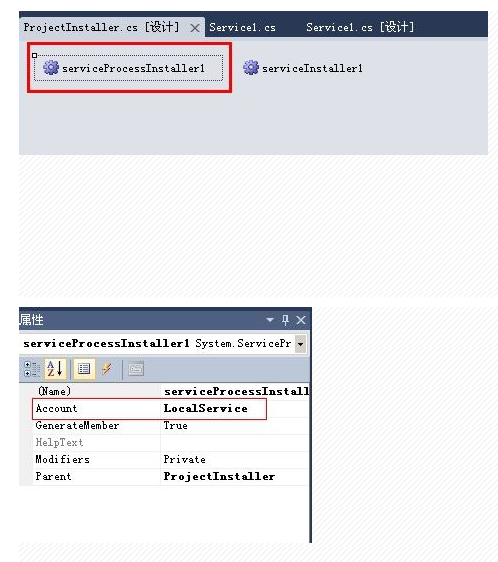
5、
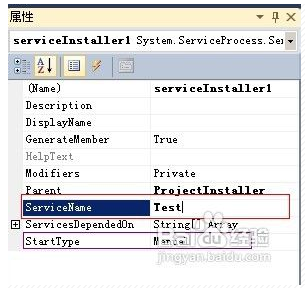
选中上面第二个控件,点击F4,右边切换到属性视图。更改ServiceName为你自己喜欢的服务名称,记住不要和系统的冲突了哦~,亲!StartType默认为手动,你可以更改为自动
(Automatic)或禁用(Disabled)
6、编译项目,然后win+R输入cmd进入命令窗口。去对应.net版本下的目录中找到InstallUtil.exe,我项目采用的是 .net 2.0,故路径为C:\WINDOWS\Microsoft.NET\Framework\v2.0.50727
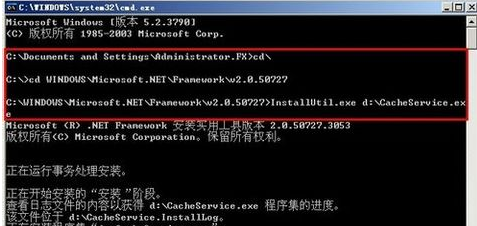
Cmd命令
installutil WindowsService_test.exe (安装Windows服务)
installutil /u WindowsService_test.exe (卸载Windows服务)
.Net 开发Windows Service的更多相关文章
- .NET开发Windows Service程序 - Topshelf
在实际项目开发过程中,会经常写一些类似定时检查,应用监控的应用.这类应用在windows平台通常都会写成window service程序. 在百度上搜索一下'c#开发windows service', ...
- 使用C#编程语言开发Windows Service服务
转载-https://www.cnblogs.com/yubao/p/8443455.html Create Windows Service project using Visual Studio C ...
- C# Windows service 开发笔录
本文将详细图解,开发Windows service的过程. 功能:数据库查询数据后,经过处理,每天定时发送邮件. 一.WinForm调试 1.新建Windows service项目 2.新建WinFo ...
- Python3 写Windows Service服务程序
用Python开发Windows Service,用Python来做这个事情必须要借助第三方模块pywin32,下载路径:https://pypi.org/project/pywin32/#files ...
- Windows Service的转换与部署
开发Windows Service,可能会碰到以下两种情况. 1. 直接开发一个Windows Service 网上有很多教程,可以参考这个: http://www.cnblogs.com/sorex ...
- Windows Service 开发,安装与调试
Visual Studio.net 2010 Windows Service 开发,安装与调试 本示例完成一个每隔一分钟向C:\log.txt文件写入一条记录为例,讲述一个Windows Servic ...
- 如何托管ASP.NET Core应用到Windows Service中
(此文章同时发表在本人微信公众号"dotNET开发经验谈",欢迎右边二维码来关注.) 题记:正在构思一个中间件的设计,考虑是否既可以使用最新的技术,也可以兼顾传统的部署模式.所以有 ...
- 使用Visual Studio 2015 Community 开发windows服务
昨天研究在.NET下开发Windows服务程序,期间遇到一些小问题,这里仅将自己的开发过程和需要注意的地方写下和广大网友分享…… 1.基础 Windows服务是指系统启动时能够自己运行的程序.W ...
- 使用Python写Windows Service服务程序
1.背景 如果你想用Python开发Windows程序,并让其开机启动等,就必须写成windows的服务程序Windows Service,用Python来做这个事情必须要借助第三方模块pywin32 ...
随机推荐
- u-boot-2015.01在tq2440上的初步移植
作者: 彭东林 邮箱: pengdonglin137@163.com QQ: 405728433 开发板: tq2440 工具: Win7 + VMware + Debian6 ...
- Linux下安装Eclipse的PHP插件(PHPEclipse)
下载: Eclipse: http://www.eclipse.org/downloads/ (本人用的Ubuntu,直接在SoftWare Center中下载的) (选择适合你系统的相应 ...
- UVA 1665 Islands
题意:输入一个n*m矩阵,每一个格子都有一个正整数,再输入T个整数ti,对于每一个ti,输出大于ti的正整数组成多少个四连快 思路:正着做的话事实上相当于删除连通块,而假设反着做的话就相当于变成添加连 ...
- Makefile中的“-I”(大写i),“-L”(大写l),“-l”(小写l)
用gcc编译程序时,可能会用到“-I”(大写i),“-L”(大写l),“-l”(小写l)等参数, “-I”(大写i):表示包含头文件: “-L”(大写l):表示库文件目录: “-l”(小写l):表示链 ...
- 机器学习入门之四:机器学习的方法--SVM(支持向量机)(转载)
转自 飞鸟各投林 SVM(支持向量机) 支持向量机算法是诞生于统计学习界,同时在机器学习界大放光彩的经典算法. 支持向量机算法从某种意义上来说是逻辑回归算法的强化:通过给予逻辑回归算法更严格的优化条件 ...
- 2017.4.7 e.toString() 与 e.getMessage()的区别
我使用的时候,抛出了空指针异常,本来是想将异常信息显示在errorInfo里,却发现没有拿到错误信息. 原因:我用的是getMessage(). 用e.getMessage() 时,返回的是null. ...
- EffectiveJava(5)避免创建不必要的对象
避免创建不必要的对象 1.通过延迟初始化对象提高性能 调用功能方法时调用静态工厂方法,而不是调用类时使用 2.适配器:把功能委托给一个后备对象,从而为后备对象提供一个接口的对象 3.自动装箱:优先使用 ...
- JAVA Eclipse如何重新设置工作空间workspace
窗口-首选项-常规-启动和关闭,勾选启动时提示工作空间,然后移除现有的工作空间,最好也勾选启动时刷新工作空间 重启之后就可以设置工作空间了
- Windows / Linux 一件编译zlib库
一. 下载zlib库 : http://www.zlib.net 本文以 zlib-.tar.xz 为例 二. 解压文件得到 zlib- 文件夹,修改 zlib-/CMakeLists.txt 文 ...
- javascript - 活动倒计时(天、时、分、秒)
计数时: 结束时: 示例: <!DOCTYPE html> <html lang="en"> <head> <meta charset=& ...